89 min read
Overview
In lesson 5 of Quicknode's DeFi DEX course, we will dive into the world of frontend development for your decentralized exchange. The frontend is the user-facing aspect of your DEX, where traders interact with the platform, such as swapping and providing liquidity. By the end of this section, you will have a solid understanding of creating an engaging and functional frontend for the DEX you've built over the last several lessons.
Building the Frontend
The frontend of a DEX is crucial for providing a seamless and intuitive user experience. This is where you will implement various user interfaces and components that allow users to interact with the underlying smart contracts you deployed on the blockchain. Here are the key steps involved in building the frontend:
- User Interface Design: Design the user interface elements, keeping in mind your platform's ease of use, visual aesthetics, and overall branding.
- Component Development: Develop individual components for utilities and features such as the wallet connection, navigation bar, swap and liquidity tabs.
- Responsive Design: Ensure your frontend is responsive and accessible across different devices and screen sizes.
- Integration with Smart Contracts: Connect the frontend with the smart contracts that handle the user to smart contract interaction.
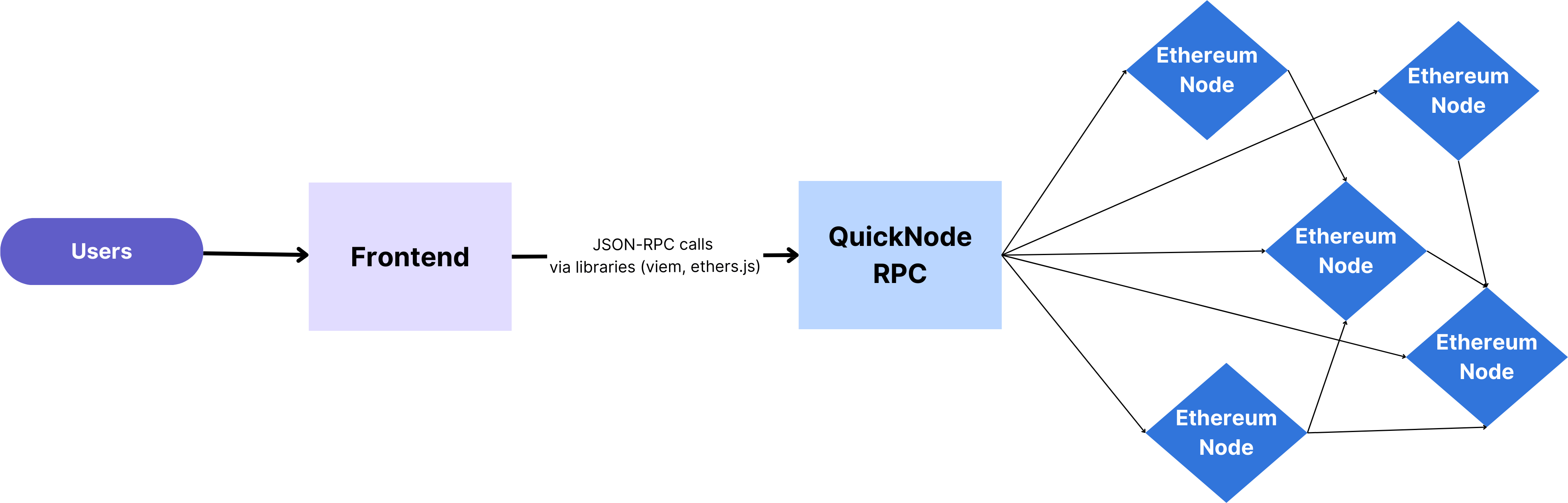
You generally follow the steps below in order to interact with a smart contract on a frontend application:
- You connect your wallet and use the frontend to tell the application what you want to do, like doing a swap.
- The frontend takes the information you provided and prepares the transaction to be sent to the blockchain.
- When the wallet interface pops up, you confirm the transaction details.
- Transaction details is sent to the blockchain with JSON-RPC calls using an endpoint (RPC URL) and libraries like Viem.
- The smart contract executes the function call and updates the contract state accordingly.
- The frontend updates its values to align with the new state in the smart contract.
Tech Stack
We will use the following frameworks and libraries to create the frontend and interact with our DEX smart contracts:
-
TypeScript is a typed superset of JavaScript that adds type safety to the language. This makes it easier to write more robust and maintainable code. TypeScript is also becoming increasingly popular in the web development community, as it can be used to build large and complex applications.
-
React is a JavaScript library for building user interfaces. It is one of the most popular JavaScript libraries in the world. React is known for its declarative nature, which makes it easy to write code that is both efficient and maintainable.
-
Vite is a modern JavaScript build tool that is designed to be fast and efficient. Vite can be used to build both static and dynamic websites, and it supports a wide range of JavaScript frameworks, including React, Vue, and Angular.
-
Tailwind CSS is a utility-first CSS framework. This means that it provides a set of small, reusable CSS classes that can be combined to create custom styles. Tailwind CSS is becoming increasingly popular in the web development community, as it can be used to quickly and easily create beautiful and responsive websites.
-
Viem is a TypeScript library for interacting with EVM blockchains like Ethereum. It is a modern, lightweight, and easy-to-use library that is designed to make building Web3 dApps easy and blazing fast.
Components of dApps
In this section, we'll take a closer look at the key components that constitute our frontend. Each component plays a crucial role in helping facilitate a user's interactions on the DEX. Let's dive in!
-
The
Headercomponent serves as the navigation bar for our dApp. It provides users with easy access to different sections and actions within the platform, enhancing the overall user experience. By implementing the header, users can connect their wallets and seamlessly navigate between different tabs like Swap, Liquidity and Create Exchange. -
The
AddLiquiditycomponent allows users to provide liquidity to various trading pairs by depositing their tokens into liquidity pools. This is a fundamental feature of a DEX, enabling users to earn fees while contributing to the platform's liquidity. Users can specify the amount of tokens they want to contribute and receive proportional shares in the pool. -
On the other hand, the
RemoveLiquiditycomponent empowers users to withdraw their tokens from liquidity pools. By interacting with this component, users can manage their liquidity positions, retrieve their tokens, and potentially realize gains earned from trading fees. -
The
Liquiditycomponent serves as a container that dynamically displays either the AddLiquidity or RemoveLiquidity component. -
The
Swapcomponent is at the heart of our dApp, enabling users to trade one token for ETH or vice versa. Users can input the tokens they wish to exchange, and the component will handle the execution of the trade through the underlying smart contracts. This critical component contributes to the core functionality of our DEX. -
The
CreateExchangecomponent is a fundamental part of our dApp, responsible for enabling users to create new exchange contracts within the platform. It integrates essential modules and components to facilitate this process, including checking the validity of provided token addresses and handling the creation of new exchanges.
By breaking down our dApp into these individual components, we're setting the stage for a seamless and engaging user experience. In the upcoming sections, we'll delve into the implementation of each component, exploring how they interact with smart contracts, the blockchain, and user inputs.
Helper Functions
In the process of building a decentralized application (dApp), the efficient management of various operations is key to a seamless user experience. That's where helper functions come into play. These functions are designed to streamline complex calculations, interactions with smart contracts, and data retrieval. Let's explore some of the crucial helper functions present in our dApp's utility files.
Although we will dive into the code in the following section, here is the list of the helper functions that are used in the development of the dApp in order to get a clear picture of the structure.
- addLiquidity.tsx
addLiquidity: This function facilitates the process of adding liquidity to trading pairs by interacting with the respective smart contracts. It ensures a secure and reliable way for users to participate in liquidity pools.calculateToken: A function that calculates the amount of tokens to be added based on the provided share of the liquidity pool.
- client.tsx
publicClient: Create a public blockchain client that can be used to interact with the Sepolia chain using the Quicknode endpoint.walletClient: Create a wallet blockchain client that can be used to interact with the Sepolia chain using a web-based browser wallet (e.g. MetaMask, Phantom).
- createExchange.tsx
createNewExchange: This function is pivotal in the creation of a new Exchange smart contract within the platform. By calling this function, users can initiate the establishment of a new trading environment, enabling the trading of a selected token and ETH.
- getData.tsx
getExchangeAddress: Retrieve the address of a specific exchange within the dApp.getEtherBalance: Retrieve the balance of Ether (ETH) for a specific account.getTokenBalance: Fetch the balance of a particular token in the account.getLpTokenBalance: Retrieve the balance of LP (Liquidity Provider) tokens held by the user.getReserveOfToken: Obtain the reserve amount of a token in a liquidity pool.getTokenData: Retrieve essential data about a token, such as its symbol.
- removeLiquidity.tsx
removeLiquidity: This function facilitates the removal of liquidity from a trading pair's pool. It interacts with smart contracts to handle the withdrawal of tokens.getTokensAfterRemove: A helper that calculates the remaining token amounts after liquidity removal.
- swap.tsx
getAmountOfTokensReceivedFromSwap: Calculate the amount of tokens a user would receive after performing a swap between two tokens.swapTokens: Execute the token swap operation by interacting with the necessary smart contracts.
Add the Token and NFT API v2 bundle
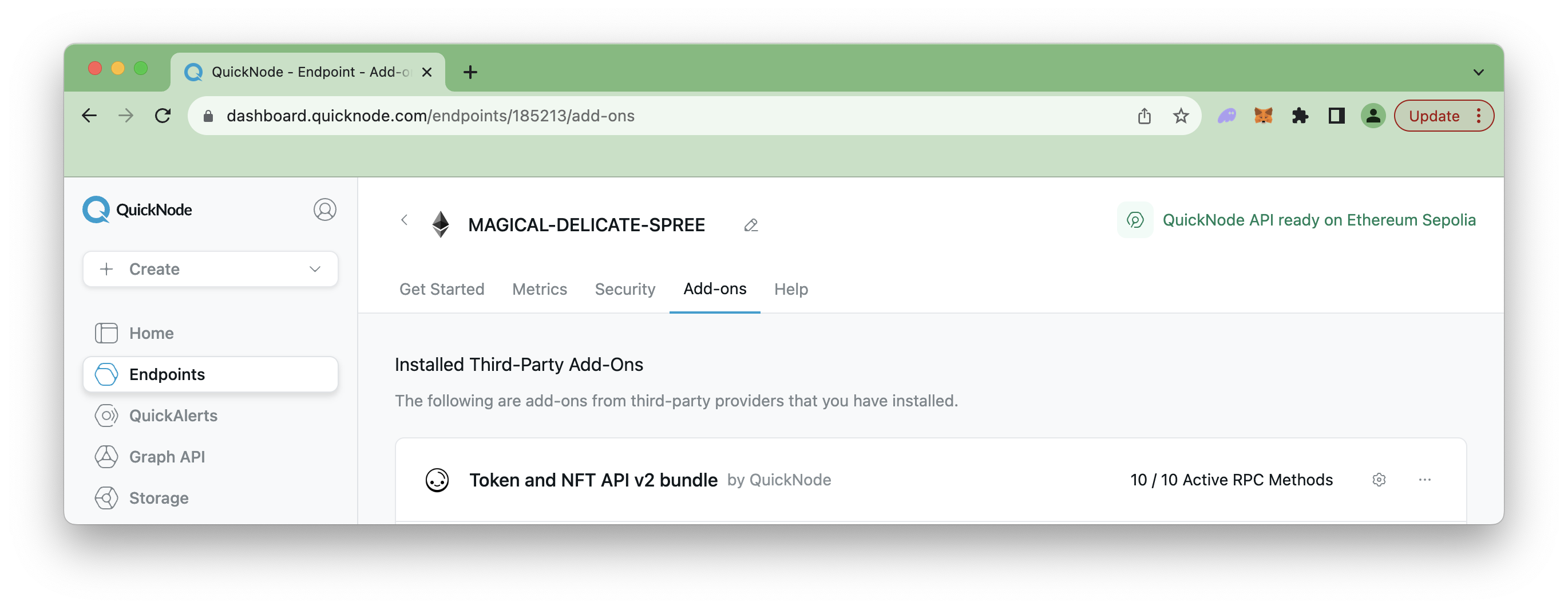
Go back to your Quicknode dashboard and navigate to the Sepolia endpoint you previously created. Click the Add-ons tab and then enable the Token and NFT API v2 bundle.
Deep Dive into the Code
Now, it is time to get to work. Open a terminal window and let's get started.
Setting the Environment
If your terminal is in the defi_dex folder that we currently use for smart contract deployment, you can go to the parent folder and run the following command. Ensure you are on node version 18.18 or later.
npm create vite@latest
Then, input your project name, framework, and variant. This course uses defi_dex_frontend as the project name plus React and TypeScript as the framework and variant.
✔ Project name: … defi_dex_frontend
✔ Select a framework: › React
✔ Select a variant: › TypeScript
Run the commands to set up your environment in the project directory defi_dex_frontend. These commands install required packages like the Quicknode SDK, React Helmet, and Tailwind CSS, along with initializing Tailwind configuration for styling.
cd defi_dex_frontend
npm install
npm install @quicknode/sdk react-helmet-async react-icons dotenv
npm install -D tailwindcss postcss autoprefixer
Now, set up Tailwind CSS in the project by running the command:
npx tailwindcss init -p
Modify the tailwind.config.js file to add the paths in the configuration file:
/** @type {import('tailwindcss').Config} */
export default {
  content: ['./index.html', './src/**/*.{js,ts,jsx,tsx}'],
  theme: {
    extend: {},
  },
  plugins: [],
}
Delete all code in the ./src/index.css file and add the @tailwind directives in it.
@tailwind base;
@tailwind components;
@tailwind utilities;
After these commands, the required packages are installed, and Tailwind configuration files are completed.
Lastly, create an .env file. An .env file is a configuration file used in software development to store environment-specific settings and sensitive information as key-value pairs, allowing developers to manage variables like API keys, database URLs, and other configuration options without hardcoding them in the code. Run the command below to create the file:
echo > .env
Then, modify it like the sample below:
VITE_VERCEL_QUICKNODE_ENDPOINT = "QUICKNODE_ENDPOINT_HTTP_PROVIDER"
Replace QUICKNODE_ENDPOINT_HTTP_PROVIDER with the HTTP Provider URL that you created previously in lesson 4.
Directory Structure
The directory structure in the project folder defi_dex_frontend includes node_modules for installed packages, public for public assets, and src for your application's source code.
├── .env                // This file typically contains environment variables used by the application.
├── .eslintrc.cjs       // Configuration file for ESLint, a JavaScript linter.
├── .git                // The Git version control system directory, which tracks changes in your project.
├── .gitignore          // A file that specifies which files and directories Git should ignore when tracking changes.
├── README.md           // A markdown file that contains essential information about your project.
├── index.html          // The HTML template that serves as the entry point for your application.
├── node_modules        // A directory where installed packages are stored.
├── package-lock.json   // Files that manage the dependencies and configuration of your project.
├── package.json        // Files that manage the dependencies and configuration of your project.
├── postcss.config.js   // Configuration file for PostCSS, a tool for transforming CSS with JavaScript.
├── public              // A directory for static assets that will be served as-is.
├── src                 // The directory where you'll write your application's source code.
├── tailwind.config.js  // Configuration file for Tailwind CSS, a utility-first CSS framework.
├── tsconfig.json       // TypeScript configuration files that define how TypeScript should behave in your project.
├── tsconfig.node.json  // TypeScript configuration files that define how TypeScript should behave in your project.
└── vite.config.ts      // Configuration file for Vite, the build tool and development server you're using for your project.
As the src directory is the heart of the source code, let's review the directory structure of it. As moving forward through this lesson, we will create other files and folders to create our components and helper functions.
├── App.css       // CSS file for styling your application.
├── App.tsx       // The main TypeScript file that contains the root component of your application.
├── assets        // A directory where you can store assets like images (e.g., react.svg).
│   └── react.svg
├── index.css     // CSS file for styling your application.
├── main.tsx      // The entry point of your Vite application, where the app is initialized.
└── vite-env.d.ts // A TypeScript declaration file for environment variables and types used in your Vite app.
Before jumping into the coding, let's create some folders and files in the src folder.
Make sure your terminal points to your project folder (i.e., defi_dex_frontend) before running the command below.
Run the command below to create the files and folders:
mkdir src/components
mkdir src/components/utils
mkdir src/components/utils/constants

echo > src/components/utils/addLiquidity.tsx
echo > src/components/utils/client.tsx
echo > src/components/utils/createExchange.tsx
echo > src/components/utils/getData.tsx
echo > src/components/utils/removeLiquidity.tsx
echo > src/components/utils/swap.tsx

echo > src/components/utils/constants/index.tsx

echo > src/components/AddLiquidity.tsx
echo > src/components/CreateExchange.tsx
echo > src/components/Header.tsx
echo > src/components/Liquidity.tsx
echo > src/components/RemoveLiquidity.tsx
echo > src/components/Swap.tsx
Setting Constants
Storing constant variables in a separate file has many advantages, including readability and reusability. Thus, it is preferable to define ABIs and addresses of smart contracts in a separate file.
Modify the src/components/utils/constants/index.tsx file and include the constants below:
export const TOKEN_CONTRACT_ADDRESS = "ADDRESS_OF_TOKEN_CONTRACT";
export const FACTORY_CONTRACT_ADDRESS = "ADDRESS_OF_FACTORY_CONTRACT";
export const TOKEN_CONTRACT_ABI = ABI_OF_TOKEN_CONTRACT;
export const FACTORY_CONTRACT_ABI = ABI_OF_FACTORY_CONTRACT;
export const EXCHANGE_CONTRACT_ABI = ABI_OF_EXCHANGE_CONTRACT;
In the next steps, we will retrieve the ABIs of the smart contracts we deployed in lesson 4, along with their associated contract addresses.
Token Smart Contract Address and ABI
Retrieve the address of the token contract you deployed in lesson 4 and paste it in the TOKEN_CONTRACT_ADDRESS variable.
To retrieve the ABI, navigate to the defi_dex directory and go to the out folder. Find the ERC20.sol/MyToken.json file and copy the ABI section.
Factory Smart Contract Address and ABI
Perform the same steps to retrieve the Factory contract address and ABI. Alternatively, to fetch the ABI, you can either run the following code in your project folder (i.e., defi_dex) to print out the ABI in your terminal:
jq '.abi' out/Factory.sol/Factory.json
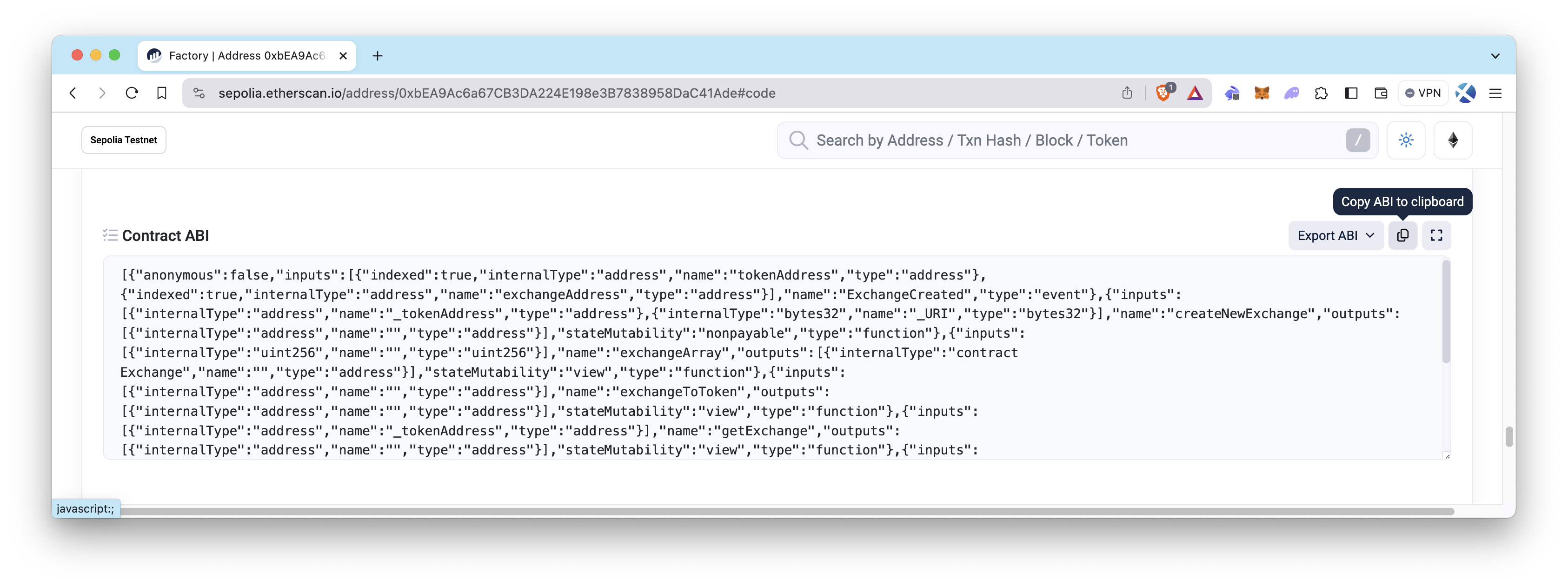
Or, if you verified your Factory contract as demonstrated in lesson 4, obtain the ABI of the Factory smart contract by going to the Code section under the Contract tab on Etherscan.
Exchange Smart Contract ABI
Apply one of the methods mentioned above (excluding Etherscan) to retrieve the ABI of the Exchange smart contract. Since the Exchange smart contract will be deployed later, its address will be fetched automatically. So, it is enough to define only the ABI of Exchange smart contract.
Creating Helper Functions
As we explained the functionalities of helper functions before, we will build these helper functions in this section. Any code editor (like VS Code) can modify the files.
NOTE: All helper function files are located in the
./src/components/utils/folder.
Modifying the client.tsx file
The client.tsx file configures and creates the blockchain clients using the "viem" and "quicknode/sdk" libraries, allowing us to interact with the blockchain.
Modify the file like the below example. For detailed explanations, you can refer to the comments in the code.
import Core from "@quicknode/sdk/core";
import {
  createWalletClient,
  createPublicClient,
  http,
  custom,
  Address,
} from "viem";
import { sepolia } from "viem/chains";
import "viem/window";

export const qnCore = new Core({
  endpointUrl: import.meta.env.VITE_VERCEL_QUICKNODE_ENDPOINT,
  config: {
    addOns: { nftTokenV2: true },
  },
});

// Create an HTTP transport for communication with the Sepolia node
const transport = http(import.meta.env.VITE_VERCEL_QUICKNODE_ENDPOINT);

// Create a public blockchain client using the Sepolia chain and the HTTP transport
export const publicClient = createPublicClient({
  chain: sepolia,
  transport,
});

// Create a wallet blockchain client using the Sepolia chain and the browser's Ethereum provider
export const walletClient = createWalletClient({
  chain: sepolia,
  transport: custom(window.ethereum!),
});

// Retrieve the user's account address using the wallet client
let account: Address;

(async () => {
  [account] = await walletClient.getAddresses();
})();

export { account };
Modifying the addLiquidity.tsx file
The addLiquidity file handles adding liquidity to the exchange pool. The addLiquidity function first sets the allowance for the exchange contract to spend the specified token amount. Then it adds liquidity by calling the addLiquidity function of the exchange contract. The calculateToken function calculates the amount of tokens to add based on the provided Ether amount, considering the Ether balance of the contract and the token reserve.
Modify the file like the below example. For detailed explanations, you can refer to the comments in the code.
// Import necessary modules and constants
import {
  TOKEN_CONTRACT_ABI,
  TOKEN_CONTRACT_ADDRESS,
  EXCHANGE_CONTRACT_ABI,
} from "./constants"; // Import contract ABIs and addresses

import { parseEther, Address } from "viem"; // Import parseEther function to convert tokens to Wei
import { sepolia } from "viem/chains"; // Import a blockchain context

import { qnCore, walletClient } from "./client"; // Import blockchain clients

// Function to add liquidity to the exchange pool
export const addLiquidity = async (
  addTokenAmountWei: bigint,
  addEtherAmountWei: bigint,
  account: Address,
  exchangeAddress: Address
) => {
  // Increase the allowance of tokens for the exchange contract
  const { request: requestOne } = await qnCore.client.simulateContract({
    account,
    address: TOKEN_CONTRACT_ADDRESS,
    abi: TOKEN_CONTRACT_ABI,
    functionName: "approve",
    args: [exchangeAddress, addTokenAmountWei],
    chain: sepolia,
  });

  // Write the transaction to the blockchain and wait for receipt
  let hash = await walletClient.writeContract(requestOne);
  await qnCore.client.waitForTransactionReceipt({ hash });
  console.log(`approve Tx is: ${hash}`);

  // Add liquidity to the exchange pool
  const { request: requestTwo } = await qnCore.client.simulateContract({
    account,
    address: exchangeAddress,
    abi: EXCHANGE_CONTRACT_ABI,
    functionName: "addLiquidity",
    args: [addTokenAmountWei],
    value: addEtherAmountWei,
    chain: sepolia,
  });

  // Write the transaction to the blockchain and wait for receipt
  hash = await walletClient.writeContract(requestTwo);
  await qnCore.client.waitForTransactionReceipt({ hash });
  console.log(`AddLiquidity Tx is: ${hash}`);
};

// Function to calculate the amount of tokens to add based on provided Ether amount
export const calculateToken = async (
  _addEther = "0",
  etherBalanceContract: bigint,
  tokenReserve: bigint
): Promise<bigint> => {
  try {
    const _addEtherAmountWei = parseEther(_addEther);

    // Calculate the token amount to be added based on the formula
    const tokenAmount =
      (_addEtherAmountWei * tokenReserve) / etherBalanceContract;

    return tokenAmount;
  } catch (err) {
    console.error(err);
    return BigInt(0);
  }
};
Modifying the getData.tsx file
These utility functions in the getData.tsx file can be used to fetch exchange contract address, various balances and reserve amounts from the blockchain. Note that error handling is included in each function to handle potential errors that may occur during contract interactions.
Modify the file like the below example. For detailed explanations, you can refer to the comments in the code.
import { Address } from "viem";
import { qnCore } from "./client"; // Import the public client instance
import {
  TOKEN_CONTRACT_ABI,
  TOKEN_CONTRACT_ADDRESS,
  EXCHANGE_CONTRACT_ABI,
  FACTORY_CONTRACT_ADDRESS,
  FACTORY_CONTRACT_ABI,
} from "./constants"; // Import ABIs and contract addresses

// Retrieve the exchange address associated with a given token address
export const getExchangeAddress = async (address: string): Promise<Address> => {
  try {
    const exchangeAddress = (await qnCore.client.readContract({
      address: FACTORY_CONTRACT_ADDRESS,
      abi: FACTORY_CONTRACT_ABI,
      functionName: "getExchange",
      args: [address],
    })) as Address;
    return exchangeAddress;
  } catch (err) {
    console.error(err);
    return "0x";
  }
};

// Retrieve the Ethereum balance of a given address
export const getEtherBalance = async (address: Address): Promise<bigint> => {
  if (address === "0x") {
    return BigInt(0);
  }

  try {
    const balance = await qnCore.client.getBalance({ address });

    return balance;
  } catch (err) {
    console.error(err);
    return BigInt(0);
  }
};

// Retrieve the balance of a specific token associated with a given address
export const getTokenBalance = async (address: Address): Promise<bigint> => {
  if (address === "0x") {
    return BigInt(0);
  }

  try {
    const balanceOfToken = (await qnCore.client.readContract({
      address: TOKEN_CONTRACT_ADDRESS,
      abi: TOKEN_CONTRACT_ABI,
      functionName: "balanceOf",
      args: [address],
    })) as bigint;
    return balanceOfToken;
  } catch (err) {
    console.error(err);
    return BigInt(0);
  }
};

// Retrieve the balance of an LP token associated with a given address
export const getLpTokenBalance = async (
  address: Address,
  exchangeAddress: Address
): Promise<bigint> => {
  if (
    address === "0x" ||
    exchangeAddress === "0x" ||
    exchangeAddress === "0x0000000000000000000000000000000000000000"
  ) {
    return BigInt(0);
  }

  try {
    const balanceOfLpToken = (await qnCore.client.readContract({
      address: exchangeAddress,
      abi: EXCHANGE_CONTRACT_ABI,
      functionName: "balanceOf",
      args: [address],
    })) as bigint;
    return balanceOfLpToken;
  } catch (err) {
    console.error(err);
    return BigInt(0);
  }
};

// Retrieve the reserve amount of a token within the exchange contract
export const getReserveOfToken = async (
  exchangeAddress: Address
): Promise<bigint> => {
  if (exchangeAddress === "0x") {
    return BigInt(0);
  }

  try {
    const reserve = (await qnCore.client.readContract({
      address: exchangeAddress,
      abi: EXCHANGE_CONTRACT_ABI,
      functionName: "getTokenReserves",
    })) as bigint;
    return reserve;
  } catch (err) {
    console.error(err);
    return BigInt(0);
  }
};

// Retrieve the token symbol by the address
export const getTokenData = async (address: Address): Promise<string> => {
  try {
    const tokenMetadata =
      await qnCore.client.qn_getTokenMetadataByContractAddress({
        contract: address,
      });

    return tokenMetadata?.symbol ?? "Unknown";
  } catch (err) {
    console.error(err);
    return "Unknown";
  }
};
Modifying the removeLiquidity.tsx file
removeLiquidity file allows you to interact with the Exchange contract by simulating and executing the removal of liquidity tokens. Additionally, the getTokensAfterRemove function calculates the amounts of Ether and tokens that will be received after removing a specific amount of liquidity tokens from the pool. The error handling within each function ensures that any errors during contract interactions are properly handled.
Modify the file like the below example. For detailed explanations, you can refer to the comments in the code.
import { EXCHANGE_CONTRACT_ABI } from "./constants"; // Import the contract ABI and address
import { sepolia } from "viem/chains"; // Import the chain details
import { qnCore, walletClient } from "./client"; // Import the client instances
import { Address } from "viem";

// Simulate and execute the removal of liquidity tokens from the pool
export const removeLiquidity = async (
  removeLPTokensWei: bigint,
  account: Address,
  exchangeAddress: Address
) => {
  {
    const { request } = await qnCore.client.simulateContract({
      account,
      address: exchangeAddress,
      abi: EXCHANGE_CONTRACT_ABI,
      functionName: "removeLiquidity",
      args: [removeLPTokensWei],
      chain: sepolia,
    });

    const hash = await walletClient.writeContract(request);
    await qnCore.client.waitForTransactionReceipt({ hash });
    console.log(`RemoveLiquidity Tx is: ${hash}`);
  }
};

// Calculate the amounts of Ether and tokens after removing liquidity
export const getTokensAfterRemove = async (
  removeLPTokenWei: bigint,
  ethReserve: bigint,
  tokenReserve: bigint,
  exchangeAddress: Address
): Promise<TokenAfterRemove> => {
  try {
    // Get the total supply of liquidity tokens in the pool
    const _totalSupply = (await qnCore.client.readContract({
      address: exchangeAddress,
      abi: EXCHANGE_CONTRACT_ABI,
      functionName: "totalSupply",
    })) as bigint;

    // Calculate the amount of Ether that will be received after removing liquidity
    const _removeEther = (ethReserve * removeLPTokenWei) / _totalSupply;

    // Calculate the amount of tokens that will be received after removing liquidity
    const _removeToken = (tokenReserve * removeLPTokenWei) / _totalSupply;

    // Return the calculated amounts of Ether and tokens
    return {
      _removeEther,
      _removeToken,
    };
  } catch (err) {
    console.error(err);
    return { _removeEther: BigInt(0), _removeToken: BigInt(0) };
  }
};

// Define the TokenAfterRemove interface
interface TokenAfterRemove {
  _removeEther: bigint;
  _removeToken: bigint;
}
Modifying the swap.tsx file
The swap.tsx file contains two main functions:
getAmountOfTokensReceivedFromSwap: This function calculates the amount of tokens to be received from a swap operation. It takes parameters to determine the direction of the swap (ETH to tokens or tokens to ETH), the amount to be swapped in Wei, and the reserves of ETH and tokens in Wei. The function uses the appropriate contract's getAmountOfTokens function to perform the calculation and returns the resulting token amount in Wei.
swapTokens: This function executes a token swap. If ETH is selected as the base currency, it simulates an ethToToken transaction by invoking the exchange contract's function. If tokens are selected, it first sets the allowance for the token contract using the approve function, then simulates a tokenToEth transaction. The ethSelected parameter determines the swap direction. The code logs the transaction hash for each step.
Modify the file like the below example. For detailed explanations, you can refer to the comments in the code.
// Import contract ABIs and addresses
import {
  TOKEN_CONTRACT_ABI,
  TOKEN_CONTRACT_ADDRESS,
  EXCHANGE_CONTRACT_ABI,
} from "./constants";

// Import the Sepolia chain information
import { sepolia } from "viem/chains";

import { Address } from "viem";

// Import the public and wallet clients for interacting with the blockchain
import { qnCore, walletClient } from "./client";

// Function to calculate the amount of tokens to be received from a swap
export const getAmountOfTokensReceivedFromSwap = async (
  ethSelected: boolean,
  swapAmountWei: bigint,
  exchangeAddress: Address
): Promise<bigint> => {
  let amountOfTokens;

  // Check if ETH is being swapped for tokens or vice versa
  if (ethSelected) {
    // Calculate the amount of tokens to be received when swapping ETH for tokens
    amountOfTokens = (await qnCore.client.readContract({
      address: exchangeAddress,
      abi: EXCHANGE_CONTRACT_ABI,
      functionName: "getTokenAmount",
      args: [swapAmountWei],
    })) as bigint;
  } else {
    // Calculate the amount of tokens to be received when swapping tokens for ETH
    amountOfTokens = (await qnCore.client.readContract({
      address: exchangeAddress,
      abi: EXCHANGE_CONTRACT_ABI,
      functionName: "getEthAmount",
      args: [swapAmountWei],
    })) as bigint;
  }

  return amountOfTokens;
};

// Function to perform a token swap
export const swapTokens = async (
  ethSelected: boolean,
  swapAmountWei: bigint,
  tokenToBeReceivedAfterSwap: bigint,
  account: Address,
  exchangeAddress: Address
) => {
  const minimumTokenToBeReceivedAfterSwap =
    (tokenToBeReceivedAfterSwap * 90n) / 100n;

  if (ethSelected) {
    // Swap ETH for tokens
    const { request } = await qnCore.client.simulateContract({
      account,
      address: exchangeAddress,
      abi: EXCHANGE_CONTRACT_ABI,
      functionName: "swapEthForTokens",
      args: [minimumTokenToBeReceivedAfterSwap, account],
      value: swapAmountWei,
      chain: sepolia,
    });

    // Write the contract transaction and wait for confirmation
    const hash = await walletClient.writeContract(request);
    await qnCore.client.waitForTransactionReceipt({ hash });
    console.log(`Swap Tx is: ${hash}`);
  } else {
    // Increase allowance for the token contract
    const { request: requestOne } = await qnCore.client.simulateContract({
      account,
      address: TOKEN_CONTRACT_ADDRESS,
      abi: TOKEN_CONTRACT_ABI,
      functionName: "approve",
      args: [exchangeAddress, swapAmountWei],
      chain: sepolia,
    });

    // Write the contract transaction and wait for confirmation
    let hash = await walletClient.writeContract(requestOne);
    await qnCore.client.waitForTransactionReceipt({ hash });
    console.log(`approve Tx is: ${hash}`);

    // Swap tokens for ETH
    const { request: requestTwo } = await qnCore.client.simulateContract({
      account,
      address: exchangeAddress,
      abi: EXCHANGE_CONTRACT_ABI,
      functionName: "tokenForEthSwap",
      args: [swapAmountWei, minimumTokenToBeReceivedAfterSwap],
      chain: sepolia,
    });

    // Write the contract transaction and wait for confirmation
    hash = await walletClient.writeContract(requestTwo);
    await qnCore.client.waitForTransactionReceipt({ hash });
    console.log(`Swap Tx is: ${hash}`);
  }
};
Modifying the createExchange.tsx file
The createExchange file allows you to interact with the Factory contract by simulating and executing the creation of a new Exchange contract. This code snippet demonstrates how to create a new Exchange contract for a token by invoking the createNewExchange function.
Modify the file like the below example. For detailed explanations, you can refer to the comments in the code.
// Import necessary modules and constants
import { FACTORY_CONTRACT_ADDRESS, FACTORY_CONTRACT_ABI } from "./constants";

import { Address } from "viem";
import { sepolia } from "viem/chains";

import { qnCore, walletClient } from "./client";

// Function to create a new exchange contract for a token
export const createNewExchange = async (
  tokenAddress: string,
  account: Address
) => {
  // Simulate the "createNewExchange" contract function call
  const { request: requestOne } = await qnCore.client.simulateContract({
    account,
    address: FACTORY_CONTRACT_ADDRESS,
    abi: FACTORY_CONTRACT_ABI,
    functionName: "createNewExchange",
    args: [tokenAddress],
    chain: sepolia,
  });

  // Write the transaction to the blockchain and wait for receipt
  const hash = await walletClient.writeContract(requestOne);
  await qnCore.client.waitForTransactionReceipt({ hash });
  console.log(`createNewExchange Tx is: ${hash}`);
};
Creating Components
After completing the helper functions and the constants file, we will build our components one by one.
NOTE: All component files are located in the
./src/components/folder.
Header
The Header.tsx file is a React component that represents the navigation bar section of our DEX frontend. It provides a title, navigation tabs for swapping and liquidity, and a button to connect the user's wallet. It interacts with the wallet client to request addresses and updates the UI accordingly. The useEffect hooks are used to manage the wallet connection and tab selection. The UI elements are styled using Tailwind CSS classes.
Modify the file like the below example. For detailed explanations, you can refer to the comments in the code.
// Import necessary modules and components
import { useState, useEffect } from "react";
import { Helmet, HelmetProvider } from "react-helmet-async";
import { Address } from "viem";
import { sepolia } from "viem/chains";
import { walletClient } from "./utils/client";

// Define the HeaderProps interface
interface HeaderProps {
  setTab: React.Dispatch<React.SetStateAction<string>>;
  setWalletConnected: React.Dispatch<React.SetStateAction<boolean>>;
  setAccount: React.Dispatch<React.SetStateAction<Address>>;
  setWrongNetwork: React.Dispatch<React.SetStateAction<boolean>>;
}

// Function to shorten the displayed address (e.g. 0xabcd...abcd)
function shortAddress(_address: Address) {
  return _address.substring(0, 6) + "..." + _address.slice(-4);
}

// Header component
const Header: React.FC<HeaderProps> = (props) => {
  // Initialize state variables
  const [tab, setTab] = useState(() => {
    const savedTab = localStorage.getItem("currentTab");
    return savedTab || "swap";
  });
  const [account, setAccount] = useState<Address>("0x");
  const [wrongNetwork, setWrongNetwork] = useState(false);

  // Function to connect the wallet
  const connectWallet = async () => {
    try {
      // Connect to Wallet
      const [address] = await walletClient.requestAddresses();
      setAccount(address);
      props.setAccount(address);
      props.setWalletConnected(true);
    } catch (err) {
      console.error(err);
    }
  };

  const disconnectWallet = () => {
    setAccount("0x"); // Reset the account
    props.setWalletConnected(false); // Update the parent component's state
    props.setAccount("0x"); // Reset the account in the parent component
  };

  // Function to get connected address
  const getConnectedAddress = async () => {
    try {
      const [address] = await walletClient.getAddresses();
      if (address == undefined) {
        return;
      }
      setAccount(address);
      props.setAccount(address);
      props.setWalletConnected(true);
    } catch (err) {
      console.error(err);
    }
  };

  // Function to detect if the wallet connects to another blockchain
  const getConnectedChain = async () => {
    try {
      const chainIdClient = await walletClient.getChainId();
      if (chainIdClient !== undefined) {
        const isWrongNetwork = chainIdClient != sepolia.id;
        setWrongNetwork(isWrongNetwork);
        props.setWrongNetwork(isWrongNetwork); // Update app level state
      }
    } catch (err) {
      console.error(err);
    }
  };

  // Function to handle tab change
  const handleTab = (newTab: string) => {
    setTab(newTab);
    props.setTab(newTab);
  };

  // Update the tab when walletConnected changes
  useEffect(() => {
    props.setTab(tab);
    // eslint-disable-next-line react-hooks/exhaustive-deps
  }, [props.setWalletConnected]);

  // Connect the wallet on component mount
  useEffect(() => {
    getConnectedAddress();
    getConnectedChain();

    if (typeof window.ethereum !== "undefined") {
      // The user has Metamask installed and enabled
      window.ethereum.on("accountsChanged", getConnectedAddress);
      window.ethereum.on("chainChanged", getConnectedChain);
    } else {
      console.log("Install browser-based wallet (i.e., Metamask)");
    }
    // eslint-disable-next-line react-hooks/exhaustive-deps
  }, []);

  // Render the UI components
  return (
    <div className="py-4 px-6 bg-white shadow-md">
      <HelmetProvider>
        <Helmet>
          <title>DeFi Course DEX</title>
          <meta name="description" content="DeFi Course DEX" />
          <link rel="icon" href="/favicon.ico" />
        </Helmet>
      </HelmetProvider>

      <p className="text-lg font-semibold">DeFi Course DEX</p>

      <div className="flex justify-between items-center">
        {/* This is a container that holds the tabs and the connect wallet button. */}
        <div className="flex lg:flex-row">
          {/* This is a wrapper that makes the connect wallet button responsive. */}
          <div className="lg:relative lg:w-fit">
            {/* This is a container that holds the three tabs. */}
            <div className="flex flex-row py-1 space-x-6 text-blue-500 text-lg ">
              {/* This is a button that opens the create exchange tab. */}
              <button
                onClick={() => handleTab("create-exchange")}
                className={
                  tab === "create-exchange"
                    ? "font-semibold underline"
                    : "font-semibold"
                }
              >
                Create Exchange
              </button>
              {/* This is a button that opens the liquidity tab. */}
              <button
                onClick={() => handleTab("liquidity")}
                className={
                  tab === "liquidity"
                    ? "font-semibold underline"
                    : "font-semibold"
                }
              >
                Liquidity
              </button>
              {/* This is a button that opens the swap tab. */}
              <button
                onClick={() => handleTab("swap")}
                className={
                  tab === "swap" ? "font-semibold underline" : "font-semibold"
                }
              >
                Swap
              </button>
            </div>
          </div>
        </div>
        {/* This is a container that holds the warning message and the connect wallet button. */}
        <div className="flex flex-row space-x-4">
          {/* This is a warning message that is displayed if the network is not Sepolia. */}
          <div
            className={`bg-yellow-100 border-l-4 border-yellow-500 p-4 ${
              wrongNetwork ? "block" : "hidden"
            }`}
          >
            <p className="text-xs">Change your network to Sepolia.</p>
          </div>
          {/* This is a button that connects the wallet to the DEX. */}
          <button
            onClick={connectWallet}
            className="bg-blue-200 px-3 py-2 rounded-xl text-blue-500 hover:bg-blue-300"
          >
            {account.length > 40 ? shortAddress(account) : "Connect Wallet"}
          </button>
          {account !== "0x" && (
            <button
              onClick={disconnectWallet}
              className="bg-red-200 px-3 py-2 rounded-xl text-red-500 hover:bg-red-300"
            >
              Disconnect
            </button>
          )}
        </div>
      </div>
    </div>
  );
};

Header.displayName = "Header";

export default Header;
AddLiquidity
The AddLiquidity.tsx is a React component that represents an interface for adding liquidity to a decentralized exchange. It interacts with a wallet client and a smart contract to fetch balances and reserve amounts, calculate token amounts for liquidity addition, and manage the UI interactions. It utilizes React hooks and state management to update the component's state and render the appropriate user interface elements.
Modify the file like the below example. For detailed explanations, you can refer to the comments in the code.
// Import necessary modules and components
import { useEffect, useState } from "react";
import { AiOutlineLoading3Quarters } from "react-icons/ai";
import { HiOutlineChevronDoubleLeft, HiPlus } from "react-icons/hi";
import { formatEther, parseEther, Address } from "viem";
import { TOKEN_CONTRACT_ADDRESS } from "./utils/constants";
import {
  getTokenBalance,
  getEtherBalance,
  getReserveOfToken,
  getTokenData,
} from "./utils/getData";
import { addLiquidity, calculateToken } from "./utils/addLiquidity";

interface AddLiquidityProps {
  goBack: (value: boolean) => void;
  getLpAmount: () => void;
  walletConnected: boolean;
  account: Address;
  exchangeAddress: Address;
  wrongNetwork: boolean;
}

// Define the main component
function AddLiquidity(props: AddLiquidityProps) {
  // Initialize state variables
  const zero = BigInt(0);
  const [secondToken, setSecondToken] = useState("");
  const [showEthBal, setShowEthBal] = useState("");
  const [showTokenBal, setShowTokenBal] = useState("");
  const [firstValue, setFirstValue] = useState("");
  const [secondValue, setSecondValue] = useState("");
  const [ethReserve, setEthReserve] = useState(zero);
  const [tokenReserve, setTokenReserve] = useState(zero);
  const [loading, setLoading] = useState(false);
  const [message, setMessage] = useState("");

  const firstToken = "ETH";
  // Function to get LP amount
  const getLpAmount = () => {
    props.getLpAmount();
  };

  // useEffect hook to fetch account balances and reserve amounts
  useEffect(() => {
    (async () => {
      getAmounts();
      getLpAmount();
    })();
    // eslint-disable-next-line react-hooks/exhaustive-deps
  }, [loading, props.account, props.walletConnected, props.wrongNetwork]);

  // useEffect hook to get token symbol
  useEffect(() => {
    getTokenSymbol(TOKEN_CONTRACT_ADDRESS);
  }, []);

  // Function to get token symbol
  const getTokenSymbol = async (address: Address) => {
    const _symbol = await getTokenData(address);
    setSecondToken(_symbol);
  };

  // Function to fetch balances and reserve amounts
  const getAmounts = async () => {
    const _ethBalance = await getEtherBalance(props.account);
    const _tokenBalance = await getTokenBalance(props.account);
    const _ethReserve = await getEtherBalance(props.exchangeAddress);
    const _tokenReserve = await getReserveOfToken(props.exchangeAddress);

    setEthReserve(_ethReserve);
    setTokenReserve(_tokenReserve);

    const showEth = parseFloat(formatEther(_ethBalance)).toFixed(5);
    const showToken = parseFloat(formatEther(_tokenBalance)).toFixed(5);
    setShowEthBal(showEth);
    setShowTokenBal(showToken);
  };

  // Function to update the second value based on the first value
  const toAdd = async (value: string) => {
    setFirstValue(value);
    setMessage("");

    try {
      if (ethReserve !== zero && tokenReserve !== zero) {
        const amountToAdd = await calculateToken(
          value,
          ethReserve,
          tokenReserve
        );
        setSecondValue(formatEther(amountToAdd));
      }
    } catch (err) {
      console.error(err);
    }
  };

  // Function to handle adding liquidity
  const onLiquidity = async () => {
    try {
      setLoading(true);
      const etherAmountWei = parseEther(firstValue);
      const tokenAmountWei = parseEther(secondValue);

      await addLiquidity(
        tokenAmountWei,
        etherAmountWei,
        props.account,
        props.exchangeAddress
      );
      toAdd("");
      setLoading(false);
      setFirstValue("");
      setSecondValue("");
      setMessage(
        `${firstValue} ${firstToken} and ${parseFloat(
          formatEther(tokenAmountWei)
        ).toFixed(5)} ${secondToken} are added to the liquidity pool.`
      );
    } catch (err) {
      console.error("Failed to add liquidity:", err);
      setMessage("Failed to add liquidity. Please try again.");
    } finally {
      setLoading(false);
      setFirstValue("");
      setTimeout(() => {
        goBack(false);
      }, 1000);
    }
  };

  // Function to go back to the previous screen
  const goBack = (value: boolean) => {
    props.goBack(value);
  };

  // Render the UI components
  return (
    <div className="flex justify-center min-h-fit bg-blue-100 mt-4">
      {/* This is a container that centers the content and sets the minimum height. */}
      <div className="w-full max-w-lg bg-white p-6 rounded-lg shadow-xl">
        {props.wrongNetwork && (
          <div className="bg-yellow-100 border-l-4 border-yellow-500 p-4 my-4">
            <p className="text-center text-sm">
              Change your network to Sepolia.
            </p>
          </div>
        )}

        {!props.wrongNetwork && (
          <div>
            {/* This is a button that goes back to the previous screen. */}
            <button onClick={() => goBack(false)} className="text-2xl mb-4">
              <HiOutlineChevronDoubleLeft />
            </button>
            {/* This is a container that holds the input fields for the first and second tokens. */}
            <div className="mb-4">
              {/* This is an input field for the first token. */}
              <input
                className="px-4 py-3 w-full border rounded-lg placeholder-gray-400 focus:outline-none focus:ring focus:ring-blue-300"
                placeholder="0.0"
                onChange={(e) => toAdd(e.target.value)}
                value={firstValue}
              />
              {/* This is a label for the first token. */}
              <div className="mt-2 text-sm text-gray-600">{firstToken}</div>
              {/* This is a text field that shows the balance of the first token. */}
              <div className="mt-1 text-xs text-gray-400">
                {showEthBal ? showEthBal + " " + firstToken : "0.0"}
              </div>
            </div>
            {/* This is a container that holds a plus sign and a divider. */}
            <div className="flex items-center justify-center">
              <span className="bg-blue-100 p-3 rounded-lg">
                <HiPlus />
              </span>
            </div>
            {/* This is a container that holds the input field for the second token. */}
            <div className="mt-4">
              {/* This is an input field for the second token. */}
              <input
                className="px-4 py-3 w-full border rounded-lg placeholder-gray-400 focus:outline-none focus:ring focus:ring-blue-300"
                placeholder="0.0"
                disabled={ethReserve !== zero}
                onChange={
                  ethReserve === zero
                    ? (e) => setSecondValue(e.target.value)
                    : undefined
                }
                value={secondValue}
              />
              {/* This is a label for the second token. */}
              <div className="mt-2 text-sm text-gray-600">{secondToken}</div>
              {/* This is a text field that shows the balance of the second token. */}
              <div className="mt-1 text-xs text-gray-400">
                {showTokenBal ? showTokenBal + " " + secondToken : "0.0"}
              </div>
            </div>
            {/* This is a button that approves and adds liquidity. */}
            {props.walletConnected ? (
              <button
                onClick={onLiquidity}
                className={`mt-6 w-full py-3 font-semibold rounded-lg ${
                  parseFloat(firstValue) > parseFloat(showEthBal) ||
                  parseFloat(secondValue) > parseFloat(showTokenBal)
                    ? "bg-gray-300 text-gray-500 cursor-not-allowed"
                    : "bg-blue-500 text-white hover:bg-blue-600 focus:outline-none focus:ring focus:ring-blue-300"
                }`}
                disabled={
                  parseFloat(firstValue) > parseFloat(showEthBal) ||
                  parseFloat(secondValue) > parseFloat(showTokenBal)
                }
              >
                {loading ? (
                  <AiOutlineLoading3Quarters className="animate-spin inline-block mr-2" />
                ) : (
                  <span>
                    {parseFloat(firstValue) > parseFloat(showEthBal) ||
                    parseFloat(secondValue) > parseFloat(showTokenBal)
                      ? "Insufficient balance"
                      : "Approve & Add Liquidity"}
                  </span>
                )}
              </button>
            ) : (
              <button className="w-full bg-blue-200 text-blue-700 font-semibold rounded-xl py-3 mt-4 hover:bg-blue-300">
                No wallet detected
              </button>
            )}
            {/* Message display for success or error */}
            {message && (
              <div
                className={`bg-${
                  message.startsWith("Failed")
                    ? "red-100 border-red-500 text-red-700"
                    : "green-100 border-green-500 text-green-700"
                } p-4 mt-4 text-left`}
              >
                <p>{message}</p>
              </div>
            )}
          </div>
        )}
      </div>
    </div>
  );
}

export default AddLiquidity;
RemoveLiquidity
The RemoveLiquidity.tsx file is a React component that represents the interface for removing liquidity from the Exchange contract. It calculates the amounts of ETH and token tokens a user would receive when removing LP tokens from a liquidity pool. It interacts with the wallet client, smart contract, and utility functions to provide this functionality. The UI elements are styled using Tailwind CSS classes.
Modify the file like the below example. For detailed explanations, you can refer to the comments in the code.
// Import necessary modules and components
import { useState, useEffect } from "react";
import { AiOutlineLoading3Quarters } from "react-icons/ai";
import { formatEther, parseEther, Address } from "viem";
import { TOKEN_CONTRACT_ADDRESS } from "./utils/constants";
import {
  getEtherBalance,
  getReserveOfToken,
  getTokenData,
} from "./utils/getData";
import { removeLiquidity, getTokensAfterRemove } from "./utils/removeLiquidity";

interface RemoveLiquidityProps {
  lpBalance: string;
  getLpAmount: () => void;
  walletConnected: boolean;
  account: Address;
  exchangeAddress: Address;
  wrongNetwork: boolean;
}

// Define the RemoveLiquidity component
function RemoveLiquidity(props: RemoveLiquidityProps) {
  // Initialize state variables
  const zero = BigInt(0);
  const [secondToken, setSecondToken] = useState("");
  const [ethReserve, setEthReserve] = useState(zero);
  const [tokenReserve, setTokenReserve] = useState(zero);
  const [firstValue, setFirstValue] = useState("");
  const [showEth, setShowEth] = useState("");
  const [showToken, setShowToken] = useState("");
  const [loading, setLoading] = useState(false);
  const [message, setMessage] = useState("");

  const firstToken = "ETH";

  // Function to go back to the previous screen
  const getLpAmount = () => {
    props.getLpAmount();
  };

  // useEffect hook to fetch reserve amounts on component mount
  useEffect(() => {
    (async () => {
      getAmounts();
      getLpAmount();
    })();

    // eslint-disable-next-line react-hooks/exhaustive-deps
  }, [loading, props.account, props.walletConnected, props.wrongNetwork]);

  // useEffect hook to get token symbol
  useEffect(() => {
    getTokenSymbol(TOKEN_CONTRACT_ADDRESS);
  }, []);

  // Function to get token symbol
  const getTokenSymbol = async (address: Address) => {
    const _symbol = await getTokenData(address);
    setSecondToken(_symbol);
  };

  // Function to fetch reserve amounts
  const getAmounts = async () => {
    const _ethReserve = await getEtherBalance(props.exchangeAddress);
    const _tokenReserve = await getReserveOfToken(props.exchangeAddress);

    setEthReserve(_ethReserve);
    setTokenReserve(_tokenReserve);
  };

  // Function to calculate received tokens after removing LP
  const calculateReceivedTokens = async (value: string) => {
    setFirstValue(value);
    setMessage("");
    try {
      const valueToWei = parseEther(value);
      const removeTokens = await getTokensAfterRemove(
        valueToWei,
        ethReserve,
        tokenReserve,
        props.exchangeAddress
      );
      const _showEth = parseFloat(
        formatEther(removeTokens._removeEther)
      ).toFixed(5);
      const _showToken = parseFloat(
        formatEther(removeTokens._removeToken)
      ).toFixed(5);

      setShowEth(_showEth);
      setShowToken(_showToken);
    } catch (err) {
      console.error(err);
    }
  };

  // Function to handle the remove liquidity process
  const handleRemove = async () => {
    try {
      setLoading(true);
      const valueToWei = parseEther(firstValue);
      await removeLiquidity(valueToWei, props.account, props.exchangeAddress);
      setMessage(
        `${parseFloat(formatEther(valueToWei)).toFixed(
          5
        )} LP is removed from the liquidity pool.`
      );
      setLoading(false);
      setFirstValue("");
    } catch (err) {
      console.error("Failed to remove liquidity:", err);
      setMessage("Failed to remove liquidity. Please try again.");
    } finally {
      setLoading(false);
      setFirstValue("");
    }
  };

  // Render the UI components
  return (
    <div className="flex justify-center">
      {/* This is a container that centers the content. */}
      <div className="w-3/4 bg-white p-6 rounded-xl shadow-md mt-4 ">
        {/* This is a heading that says "Remove Liquidity". */}
        <span className="flex justify-center font-semibold">
          Remove Liquidity
        </span>
        {/* This is a container that holds the input field for the amount of LP tokens to remove. */}

        {props.wrongNetwork && (
          <div className="bg-yellow-100 border-l-4 border-yellow-500 p-4 my-4">
            <p className="text-center text-sm">
              Change your network to Sepolia.
            </p>
          </div>
        )}

        {!props.wrongNetwork && (
          <div>
            <div className="flex flex-row bg-white p-4 rounded-xl border border-gray-300">
              {/* This is an input field for the amount of LP tokens to remove. */}
              <input
                className="bg-transparent px-3 focus:outline-none w-full text-lg font-semibold"
                placeholder="0.0"
                onChange={(e) => calculateReceivedTokens(e.target.value)}
                value={firstValue}
              />
              {/* This is a container that holds the LP balance. */}
              <div className="flex flex-col w-1/6">
                {/* This is a container that holds the LP symbol and the LP balance. */}
                <div className="flex flex-row bg-blue-100 m-auto px-3 py-1 rounded-3xl">
                  <span className="text-lg mt-0">LP</span>
                </div>
                {/* This is the LP balance. */}
                <span className="text-xs m-auto">
                  {Number(props.lpBalance) > 0
                    ? props.lpBalance + " LP"
                    : "0.0"}
                </span>
              </div>
            </div>
            {/* This is a table that shows the amount of tokens that will be received. */}
            <div className="flex px-2 my-7 justify-center">
              <table className=" table-auto">
                <tbody>
                  <tr className="bg-red-100">
                    <td className="px-4 py-2">
                      <span className="mr-2">➖</span>
                      {firstValue ? firstValue : "0"} LP
                    </td>
                  </tr>
                  <tr className="bg-green-100">
                    <td className="px-4 py-2">
                      <span className="mr-2">➕</span>
                      {showEth ? showEth : "0.00000"} {firstToken}
                    </td>
                  </tr>
                  <tr className="bg-green-100">
                    <td className="px-4 py-2">
                      <span className="mr-2">➕</span>
                      {showToken ? showToken : "0.00"} {secondToken}
                    </td>
                  </tr>
                </tbody>
              </table>
            </div>
            {/* This is a button that removes liquidity. */}
            {props.walletConnected ? (
              <button
                onClick={handleRemove}
                className={`flex flex-row justify-center text-center w-full py-4 my-3 font-semibold rounded-2xl ${
                  parseFloat(firstValue) > parseFloat(props.lpBalance)
                    ? "bg-gray-300 text-gray-500 cursor-not-allowed"
                    : "bg-blue-500 text-white hover:bg-blue-600"
                }`}
                disabled={parseFloat(firstValue) > parseFloat(props.lpBalance)}
              >
                <svg
                  className={
                    loading
                      ? "animate-spin h-5 w-5 mr-3 font-bold"
                      : "animate-spin h-5 w-5 mr-3 font-bold hidden"
                  }
                  viewBox="0 0 16 16"
                >
                  <AiOutlineLoading3Quarters />
                </svg>
                {parseFloat(firstValue) > parseFloat(props.lpBalance)
                  ? "Insufficient balance"
                  : "Remove Liquidity"}
              </button>
            ) : (
              <button className="w-full bg-blue-200 text-blue-700 font-semibold rounded-xl py-3 mt-4 hover:bg-blue-300">
                No wallet detected
              </button>
            )}
            {/* Message display for success or error */}
            {message && (
              <div
                className={`bg-${
                  message.startsWith("Failed")
                    ? "red-100 border-red-500 text-red-700"
                    : "green-100 border-green-500 text-green-700"
                } p-4 mt-4 text-left`}
              >
                <p>{message}</p>
              </div>
            )}
          </div>
        )}
      </div>
    </div>
  );
}

export default RemoveLiquidity;
Liquidity
The Liquidity.tsx file is a React component that manages the Liquidity page of the DEX application. It displays the user's LP (Liquidity Provider) token balance and provides options to add or remove liquidity. The component conditionally renders either the AddLiquidity or RemoveLiquidity components based on the addLp state variable. It fetches the LP token balance and interacts with the wallet client and other utility functions to provide this functionality. The UI elements are styled using Tailwind CSS classes.
Modify the file like the below example. For detailed explanations, you can refer to the comments in the code.
// Import necessary modules and components
import { useEffect, useState } from "react";
import AddLiquidity from "./AddLiquidity";
import RemoveLiquidity from "./RemoveLiquidity";
import { getLpTokenBalance } from "./utils/getData";
import { formatEther, Address } from "viem";

// Define the SwapProps interface
interface LiquidityProps {
  walletConnected: boolean;
  account: Address;
  exchangeAddress: Address;
  wrongNetwork: boolean;
}

// Define the Liquidity component
const Liquidity: React.FC<LiquidityProps> = (props) => {
  // Initialize state variables
  const [lpBalance, setLpBalance] = useState(parseFloat("0").toFixed(5));
  const [addLp, setAddLp] = useState(false);

  // useEffect hook to fetch LP token balance on component mount
  useEffect(() => {
    (async () => {
      await getAmounts();
    })();

    // eslint-disable-next-line react-hooks/exhaustive-deps
  }, [
    props.account,
    props.walletConnected,
    props.wrongNetwork,
    props.exchangeAddress,
  ]);

  // Function to fetch LP token balance
  const getAmounts = async () => {
    const _lpBalance = await getLpTokenBalance(
      props.account,
      props.exchangeAddress
    );

    const showLp = parseFloat(formatEther(_lpBalance)).toFixed(5);
    setLpBalance(showLp);
  };

  // Function to handle showing AddLiquidity component
  const handleAddLp = (value: boolean) => {
    setAddLp(value);
  };

  // Render the UI components
  return (
    <div className="flex justify-center">
      {/* This is a container that centers the content. */}
      <div className="w-3/4 rounded-xl">
        {/* This is a conditional statement that renders the AddLiquidity component if the addLp prop is true. */}
        {addLp ? (
          <AddLiquidity
            goBack={handleAddLp}
            getLpAmount={getAmounts}
            walletConnected={props.walletConnected}
            account={props.account}
            exchangeAddress={props.exchangeAddress}
            wrongNetwork={props.wrongNetwork}
          />
        ) : (
          <div className="flex flex-col sm:w-3/4 m-auto">
            <div className="flex justify-center ">
              {/* This is a button that opens the Add Liquidity modal. */}
              <button
                onClick={() => handleAddLp(true)}
                className={`font-semibold rounded-xl p-2 ${
                  props.wrongNetwork
                    ? "bg-gray-300 text-gray-500 cursor-not-allowed"
                    : "bg-blue-500 text-white hover:bg-blue-600"
                } `}
                disabled={props.wrongNetwork}
              >
                Add Liquidity
              </button>
            </div>
            <div>
              {/* This is a conditional statement that renders the RemoveLiquidity component if the lpBalance prop is not equal to 0. */}
              {lpBalance !== parseFloat("0").toFixed(5) ? (
                <RemoveLiquidity
                  lpBalance={lpBalance}
                  getLpAmount={getAmounts}
                  walletConnected={props.walletConnected}
                  account={props.account}
                  exchangeAddress={props.exchangeAddress}
                  wrongNetwork={props.wrongNetwork}
                />
              ) : (
                <div className="bg-white rounded-2xl drop-shadow-2xl lg:mt-2">
                  <div className="flex flex-col items-center gap-y-5 p-10">
                    {props.wrongNetwork && (
                      <div className="bg-yellow-100 border-l-4 border-yellow-500 p-4 my-4">
                        <p className="text-center text-sm">
                          Change your network to Sepolia.
                        </p>
                      </div>
                    )}

                    {!props.wrongNetwork && (<span className="text-center">
                      You have no Liquidity Positions.
                    </span>)}
                  </div>
                </div>
              )}
            </div>
          </div>
        )}
      </div>
    </div>
  );
};

export default Liquidity;
Swap
The Swap.tsx file is a React component representing the "Swap" feature in a DEX. It calculates the amounts of tokens a user would receive after performing a token swap. The UI components are styled using Tailwind CSS classes. The component interacts with the wallet client, smart contract, and utility functions to provide this functionality.
Modify the file like the below example. For detailed explanations, you can refer to the comments in the code.
// Import necessary modules and components
import { useEffect, useState } from "react";
import { HiOutlineRefresh } from "react-icons/hi";
import { AiOutlineLoading3Quarters } from "react-icons/ai";
import { formatEther, parseEther, Address } from "viem";
import { TOKEN_CONTRACT_ADDRESS } from "./utils/constants";

import {
  getEtherBalance,
  getTokenBalance,
  getTokenData,
} from "./utils/getData";

import { getAmountOfTokensReceivedFromSwap, swapTokens } from "./utils/swap";

// Define the SwapProps interface
interface SwapProps {
  walletConnected: boolean;
  account: Address;
  exchangeAddress: Address;
  wrongNetwork: boolean;
}

// Define the Swap component
const Swap: React.FC<SwapProps> = (props) => {
  // Initialize state variables
  const zero = BigInt(0);
  const [firstToken, setFirstToken] = useState("ETH");
  const [secondToken, setSecondToken] = useState("");
  const [showEthBal, setShowEthBal] = useState("");
  const [showTokenBal, setShowTokenBal] = useState("");
  const [firstValue, setFirstValue] = useState("");
  const [secondValue, setSecondValue] = useState("");
  const [loading, setLoading] = useState(false);
  const [flip, setFlip] = useState(false);
  const [message, setMessage] = useState("");

  // useEffect hook to fetch data on component mount
  useEffect(() => {
    (async () => {
      getAmounts();
    })();

    // eslint-disable-next-line react-hooks/exhaustive-deps
  }, [loading, props.walletConnected, props.account, props.wrongNetwork]);

  // useEffect hook to get token symbol
  useEffect(() => {
    getTokenSymbol(TOKEN_CONTRACT_ADDRESS);
  }, []);

  // Function to get token symbol
  const getTokenSymbol = async (address: Address) => {
    const _symbol = await getTokenData(address);
    setSecondToken(_symbol);
  };

  // Function to fetch wallet amounts
  const getAmounts = async () => {
    const _ethBalance = await getEtherBalance(props.account);
    const _tokenBalance = await getTokenBalance(props.account);

    // Calculate and display balances
    const showEth = parseFloat(formatEther(_ethBalance)).toFixed(5);
    const showToken = parseFloat(formatEther(_tokenBalance)).toFixed(5);
    if (flip) {
      setShowEthBal(showToken);
      setShowTokenBal(showEth);
    } else {
      setShowEthBal(showEth);
      setShowTokenBal(showToken);
    }
  };

  // Function to handle the swap process
  const onSwap = async () => {
    try {
      setLoading(true);
      const firstValueInWei = parseEther(firstValue);
      const secondValueInWei = parseEther(secondValue);

      if (firstToken == "ETH") {
        if (firstValue) {
          await swapTokens(
            true,
            firstValueInWei,
            secondValueInWei,
            props.account,
            props.exchangeAddress
          );
        }
      } else {
        await swapTokens(
          false,
          firstValueInWei,
          secondValueInWei,
          props.account,
          props.exchangeAddress
        );
      }
      setMessage(
        `${firstValue} ${firstToken} swapped to ${parseFloat(
          formatEther(secondValueInWei)
        ).toFixed(5)} ${secondToken}`
      );
      setLoading(false);
      setFirstValue("");
      setSecondValue("");
    } catch (err) {
      setLoading(false);
      setFirstValue("");
      setSecondValue("");
      console.error(err);
    }
  };

  // Function to calculate received tokens after swap
  const toReceive = async (value: string) => {
    setFirstValue(value);
    setMessage("");

    try {
      const valueToWei = parseEther(value);
      if (valueToWei !== zero) {
        if (firstToken == "ETH") {
          const amountToReceive = await getAmountOfTokensReceivedFromSwap(
            true,
            valueToWei,
            props.exchangeAddress
          );
          setSecondValue(formatEther(amountToReceive));
        } else {
          const amountToReceive = await getAmountOfTokensReceivedFromSwap(
            false,
            valueToWei,
            props.exchangeAddress
          );
          setSecondValue(formatEther(amountToReceive));
        }
      }
    } catch (err) {
      console.error(err);
      setMessage(
        "Error calculating received tokens. Please try again or lower the input amount."
      ); // Set error message for the UI
    }
  };

  // Function to handle token flipping
  const onFlip = () => {
    setFlip(!flip);
    setFirstToken(secondToken);
    setSecondToken(firstToken);
    setFirstValue(secondValue);
    setSecondValue(firstValue);
    setShowEthBal(showTokenBal);
    setShowTokenBal(showEthBal);
  };

  // Render the UI components
  return (
    <div className="flex justify-center">
      {/* Container for the main content */}
      <div className="w-3/4 bg-white p-6 rounded-xl shadow-md mt-14 lg:w-1/2 lg:mt-4">
        {/* Input section for the first value */}

        {props.wrongNetwork && (
          <div className="bg-yellow-100 border-l-4 border-yellow-500 p-4 my-4">
            <p className="text-center text-sm">
              Change your network to Sepolia.
            </p>
          </div>
        )}

        {!props.wrongNetwork && (
          <div>
            <div className="flex flex-row bg-white p-4 rounded-xl border border-gray-300">
              <input
                className="bg-transparent px-3 focus:outline-none w-full text-lg font-semibold"
                placeholder="Enter amount"
                onChange={(e) => toReceive(e.target.value)}
                value={firstValue}
              />
              <div className="flex flex-col w-1/6">
                <div className="flex flex-row bg-blue-100 m-auto px-3 py-1 rounded-xl">
                  <span className="text-lg mt-0">{firstToken}</span>
                </div>
                <span className="text-xs m-auto">
                  {showEthBal ? showEthBal + " " + firstToken : "0.0"}
                </span>
              </div>
            </div>
            {/* Button to trigger a value flip */}
            <div className="flex justify-center my-4">
              <button
                onClick={onFlip}
                className="bg-gray-100 p-2 rounded-xl text-xl text-blue-500 hover:bg-gray-200"
              >
                <HiOutlineRefresh />
              </button>
            </div>
            {/* Input section for the second value */}
            <div className="flex flex-row bg-white p-4 rounded-xl border border-gray-300">
              <input
                className="bg-transparent px-3 focus:outline-none w-full text-lg font-semibold"
                placeholder="0.0"
                disabled={true}
                onChange={(e) => setSecondValue(e.target.value)}
                value={secondValue}
              />
              <div className="flex flex-col w-1/6">
                <div className="bg-blue-100 m-auto px-3 py-1 rounded-xl">
                  <span className="text-lg mt-0">{secondToken}</span>
                </div>
                <span className="text-xs m-auto">
                  {showTokenBal ? showTokenBal + " " + secondToken : "0.0"}
                </span>
              </div>
            </div>
            {/* Conditional rendering of the swap button */}
            {props.walletConnected ? (
              <button
                onClick={onSwap}
                className={`flex justify-center w-full py-3 mt-4 font-semibold rounded-xl ${
                  parseFloat(firstValue) > parseFloat(showEthBal)
                    ? "bg-gray-300 text-gray-500 cursor-not-allowed"
                    : "bg-blue-500 text-white hover:bg-blue-600"
                }`}
                disabled={parseFloat(firstValue) > parseFloat(showEthBal)}
              >
                <span className="mr-2">
                  {parseFloat(firstValue) > parseFloat(showEthBal)
                    ? "Insufficient balance"
                    : firstToken === "ETH"
                    ? "Swap"
                    : "Approve & Swap"}
                </span>
                <svg
                  className={
                    loading
                      ? "animate-spin h-5 w-5 font-bold"
                      : "animate-spin h-5 w-5 font-bold hidden"
                  }
                  viewBox="0 0 16 16"
                >
                  <AiOutlineLoading3Quarters />
                </svg>
              </button>
            ) : (
              <button className="w-full bg-blue-200 text-blue-700 font-semibold rounded-xl py-3 mt-4 hover:bg-blue-300">
                No wallet detected
              </button>
            )}
            {/* Message display for success or error */}
            {message && (
              <div
                className={`bg-${
                  message.startsWith("Error")
                    ? "red-100 border-red-500 text-red-700"
                    : "green-100 border-green-500 text-green-700"
                } p-4 mt-4 text-left`}
              >
                <p>{message}</p>
              </div>
            )}
          </div>
        )}
      </div>
    </div>
  );
};

export default Swap;
CreateExchange
The CreateExchange.tsx file is a React component representing the "CreateExchange" component which is designed to create an exchange contract for a given token. The UI components are styled using Tailwind CSS classes.
This application supports only one active ERC-20 token at a time. In case of creating another Exchange for a new token, it is necessary to manually update the ERC-20 token contract address in the code to reflect the new token exchange.
Modify the file like the below example. For detailed explanations, you can refer to the comments in the code.
// Import necessary modules and components
import { useEffect, useState } from "react";
import { getExchangeAddress } from "./utils/getData";
import { createNewExchange } from "./utils/createExchange";
import { Address, isAddress } from "viem";
import { AiOutlineLoading3Quarters } from "react-icons/ai";

// Define the Props interface
interface Props {
  walletConnected: boolean;
  account: Address;
  exchangeAddress: Address;
  wrongNetwork: boolean;
  getExchange: () => void;
}


// Define the CreateExchange component
const CreateExchange: React.FC<Props> = (props) => {
  // Initialize state variables
  const [tokenAddress, setTokenAddress] = useState("");
  const [notAddress, setNotAddress] = useState(false);
  const [loading, setLoading] = useState(false);
  const [alreadyCreated, setAlreadyCreated] = useState(false);
  const [message, setMessage] = useState("");

  const ZERO_ADDRESS = "0x0000000000000000000000000000000000000000";

  // Effect to check the token address when changes
  useEffect(() => {
    // Check if the entered address is an EVM address
    isAddress(tokenAddress!) ? setNotAddress(false) : setNotAddress(true);
  }, [tokenAddress]);

  // Function to handle creating exchange
  const createExchange = async () => {
    try {
      setLoading(true);

      const exchangeAddress = await getExchangeAddress(tokenAddress);
      if (exchangeAddress == ZERO_ADDRESS) {
        setAlreadyCreated(false);
        await createNewExchange(tokenAddress, props.account);
        setMessage(
          `New Exchange Contract is created. It's associated with Token ${tokenAddress}`
        );
        props.getExchange();
      } else {
        setAlreadyCreated(true);
      }
      setLoading(false);
      setTokenAddress("");
    } catch (err) {
      console.error("Failed to create the Exchange contract:", err);
      setMessage("Failed to create the Exchange contract. Please try again.");
    } finally {
      setLoading(false);
      setTokenAddress("");
    }
  };

  // Render the UI components
  return (
    <div className="flex justify-center min-h-fit bg-blue-100 mt-4">
      {/* Main content container */}
      <div className="w-full max-w-lg bg-white p-6 rounded-lg shadow-xl">
        {props.wrongNetwork && (
          <div className="bg-yellow-100 border-l-4 border-yellow-500 p-4 my-4">
            <p className="text-center text-sm">
              Change your network to Sepolia.
            </p>
          </div>
        )}
        {/* Note about single token handling */}
        {/* Note about single token handling and manual address update */}
        {!props.wrongNetwork && (
          <div className="text-center p-2 bg-blue-100 mb-4 rounded">
            <p className="text-xs text-gray-700">
              Note: This platform supports one active ERC-20 token at a time. In
              case of creating another Exchange for a new token, it is necessary
              to manually update the ERC-20 token contract address in the code
              to reflect the new token exchange.
            </p>
          </div>
        )}
        {/* Token Address input */}
        {!props.wrongNetwork && (
          <div>
            <div className="mb-4">
              <label className="block mb-1 text-sm font-medium text-gray-700">
                Token Address
              </label>
              <input
                className="px-4 py-3 w-full border rounded-lg placeholder-gray-400 focus:outline-none focus:ring focus:ring-blue-300"
                placeholder="Enter Token Address"
                onChange={(e) => setTokenAddress(e.target.value)}
                value={tokenAddress}
              />
              {/* Display a warning if the input is not a valid address */}
              {tokenAddress && notAddress ? (
                <div className="bg-yellow-100 border-l-4 border-yellow-500 text-yellow-700 p-2 text-left text-xs mt-1">
                  <p>This address is not an EVM address. Check your address.</p>
                </div>
              ) : null}
            </div>

            {/* Conditional rendering of the create exchange button */}
            {props.walletConnected ? (
              <button
                onClick={createExchange}
                className={`mt-6 w-full py-3 font-semibold rounded-lg ${
                  (notAddress)
                    ? "bg-gray-300 text-gray-500 cursor-not-allowed"
                    : "bg-blue-500 text-white hover:bg-blue-600 focus:outline-none focus:ring focus:ring-blue-300"
                }`}
                disabled={notAddress}
              >
                {/* Display loading spinner or button label */}
                {loading ? (
                  <AiOutlineLoading3Quarters className="animate-spin inline-block mr-2" />
                ) : (
                  <span>
                    {!notAddress
                      ? "Create Exchange"
                      : "Enter Token Address"}
                  </span>
                )}
              </button>
            ) : (
              <button className="w-full bg-blue-200 text-blue-700 font-semibold rounded-xl py-3 mt-4 hover:bg-blue-300">
                No wallet detected
              </button>
            )}
            {/* Display a warning if an exchange contract is already created */}
            {alreadyCreated ? (
              <div className="bg-yellow-100 border-l-4 border-yellow-500 text-yellow-700 p-2 text-left text-xs mt-1">
                <p>
                  There is already an Exchange contract associated with this
                  token address.
                </p>
              </div>
            ) : null}

            {message && (
              <div
                className={`bg-${
                  message.startsWith("Failed")
                    ? "red-100 border-red-500 text-red-700"
                    : "green-100 border-green-500 text-green-700"
                } p-4 mt-4 text-left`}
              >
                <p>{message}</p>
              </div>
            )}
          </div>
        )}
      </div>
    </div>
  );
};

export default CreateExchange;
App
App component is the root component of your application. It is located in the ./src/ folder.
In this App component, the state variable tab is used to determine which tab is currently active. The Header component is rendered at the top of the layout, and it receives the setTab function as a prop. Depending on the value of the tab, Swap, Liquidity, or CreateExchange component is rendered. This allows the user to select the section of the application by changing the active tab.
Modify the file like the below example. For detailed explanations, you can refer to the comments in the code.
// Import necessary modules and components
import { useEffect, useState } from "react";
import "./App.css"; // Import a CSS file for styling
import Header from "./components/Header"; // Import the Header component
import Swap from "./components/Swap"; // Import the Swap component
import Liquidity from "./components/Liquidity"; // Import the Liquidity component
import CreateExchange from "./components/CreateExchange"; // Import the CreateExchange component
import { Address } from "viem";
import { getExchangeAddress } from "./components/utils/getData";
import { TOKEN_CONTRACT_ADDRESS } from "./components/utils/constants";

// Define the main App component
function App() {
  // Initialize state to track the active tab
const [tab, setTab] = useState(() => {
  const savedTab = localStorage.getItem("currentTab");
  return savedTab || "swap";
});
  const [walletConnected, setWalletConnected] = useState(false);
  const [account, setAccount] = useState<Address>("0x");
  const [exchangeAddress, setExchangeAddress] = useState<Address>("0x");
  const [wrongNetwork, setWrongNetwork] = useState(false);

  // Function to fetch the exchange address
  const getExcAddr = async () => {
    const exAddress = await getExchangeAddress(TOKEN_CONTRACT_ADDRESS);
    setExchangeAddress(exAddress);
  };

  // useEffect hook to fetch exchange address data on component mount
  useEffect(() => {
    getExcAddr();
  }, [walletConnected, account]);

  // Update local storage when the tab changes
  useEffect(() => {
    localStorage.setItem("currentTab", tab);
  }, [tab]);

  return (
    // Render the main layout of the application
    <div className="min-h-screen min-w-screen bg-blue-100 p-1 font-sans">
      {/* Render the Header component and pass setTab as a prop */}
      <Header
        setTab={setTab}
        setWalletConnected={setWalletConnected}
        setAccount={setAccount}
        setWrongNetwork={setWrongNetwork}
      />

      {/* Conditionally render the Swap, Liquidity, or CreateExchange component based on the selected tab */}
      <div className="mt-2 p-2 bg-blue-100 rounded-lg">
        {tab === "swap" ? (
          <Swap
            walletConnected={walletConnected}
            account={account}
            exchangeAddress={exchangeAddress}
            wrongNetwork={wrongNetwork}
          />
        ) : tab === "liquidity" ? (
          <Liquidity
            walletConnected={walletConnected}
            account={account}
            exchangeAddress={exchangeAddress}
            wrongNetwork={wrongNetwork}
          />
        ) : tab === "create-exchange" ? (
          <CreateExchange
            walletConnected={walletConnected}
            account={account}
            exchangeAddress={exchangeAddress}
            wrongNetwork={wrongNetwork}
            getExchange={getExcAddr}
          />
        ) : null}
      </div>
    </div>
  );
}

export default App;
Previewing the App
After all these modifications, you can preview the app locally by running the command below. It provides a live development area. It means that whenever you change anything in your code, it will be reflected immediately in the app in your browser.
Ensure that your terminal points to your project directory ./defi_dex_frontend/.
npm run dev
After calling the command, the console output should be similar to the one below. Go to the localhost URL (http://localhost:5173/ in this case) in your browser to preview the app.
  VITE v4.4.9  ready in 170 ms

  ➜  Local:   http://localhost:5173/
  ➜  Network: use --host to expose
  ➜  press h to show help
If everything goes well, the website looks like the below. After you click Connect Wallet, the installed browser-based EVM-compatible wallet (e.g., Rabby, MetaMask, Phantom) sends a connection request.
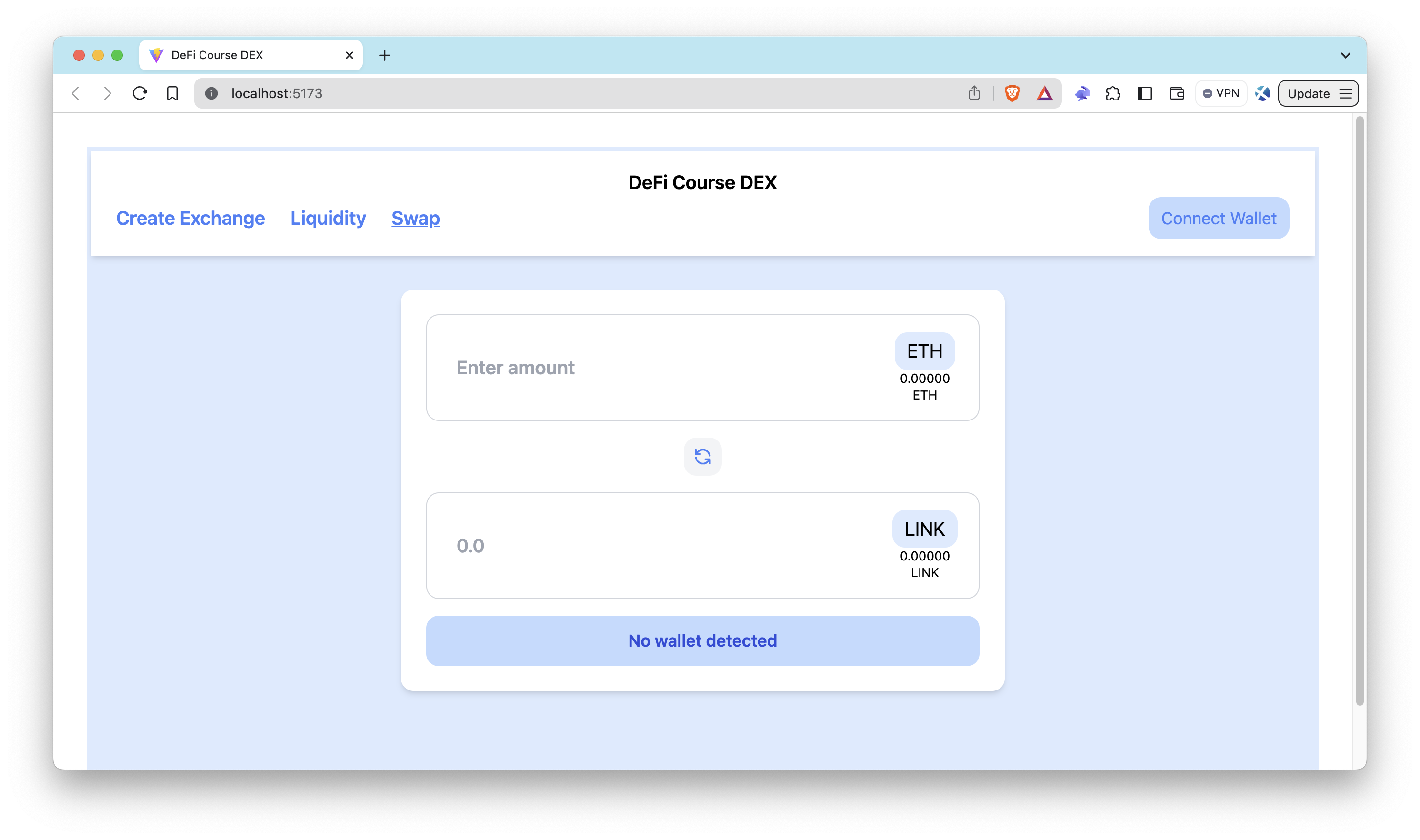
After connecting the wallet, the website should be seen as similar to the one below. As seen below, the frontend shows the ETH balance and token balance of the connected wallet in the swap component.
Note that although the website runs locally, it interacts with the smart contracts that are deployed on the Sepolia testnet.
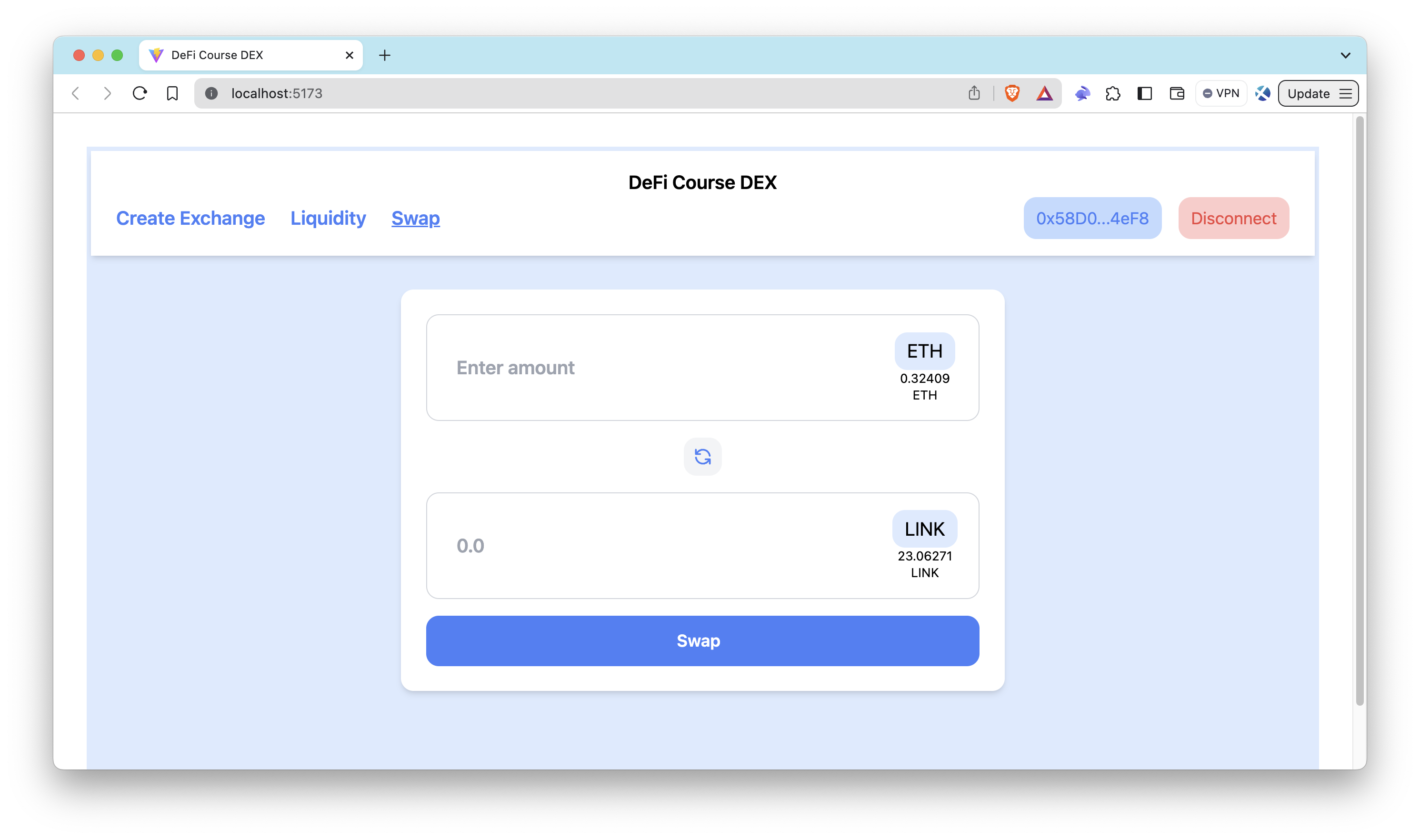
Now, let's create the Exchange smart contract through the UI.
- Click the
Create Exchangetab - Enter the token address you want to provide liquidity for (that is not already registered with the Exchange contract)
- Click the Create Exchange button
Since our dApp supports only one token, use the token address that you use in the Setting Constants section.
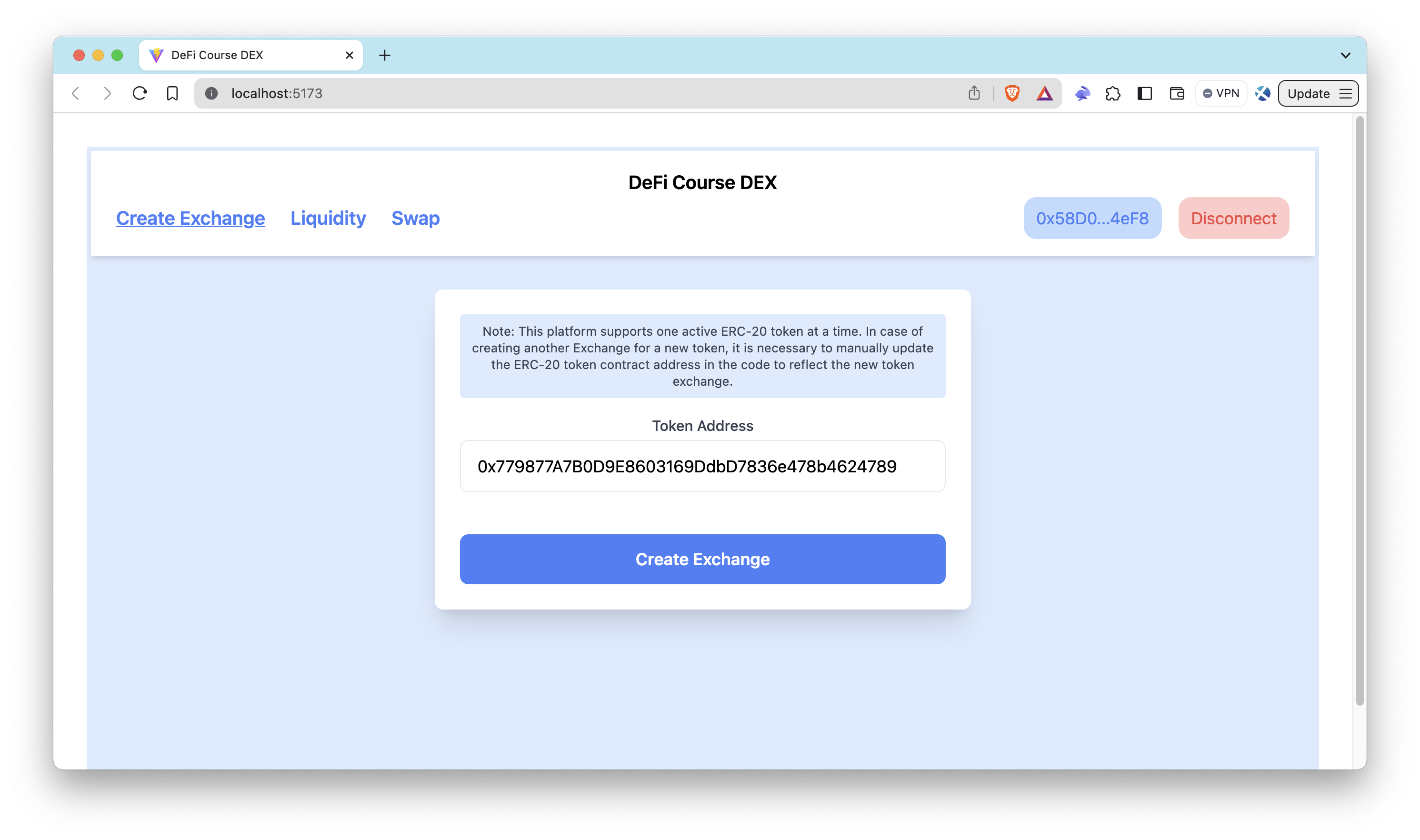
After the creating Exchange smart contract, feel free to add some liquidity and then swap in order to test your dApp locally.
Quiz
To reinforce what you've learned, let's finish off with a quiz. This quiz will cover the topics discussed during this lesson, including questions on the design and functionality of your frontend.
Conclusion
Congratulations! 🎉 In this section of our guide, we've explored the foundational components constituting a DEX platform's frontend. From understanding the importance of smart contracts and frontend interactions to leveraging essential helper functions and maintaining a well-organized structure, you've gained insights into the core elements of building a successful decentralized exchange. Armed with this knowledge, you're well-equipped to move forward and dive into the implementation details, bringing your DEX to life. In the next section, we'll shift our focus to the critical aspect of security, governance, and risk management.