4 min read
Overview
Understanding Solana Program Library (SPL) Tokens is critical for Solana development. Whether you are airdropping whitelist tokens to your community, bulk sending NFTs to another wallet, or managing token flows between escrow accounts, you will inevitably need to be able to transfer SPL tokens. Utilizing SPL tokens is slightly different from native SOL, so it is essential to understand how it works as you progress on your Solana development journey.
SPL Token Accounts
If you are new to web3, tokens are a data construct to define a digital asset on a blockchain. Tokens are typically defined by a few key attributes:
- Mint: The mint is the unique identifier for the token. It is used to discern one token from another. For example, the mint for $USDC is EPjFWdd5AufqSSqeM2qN1xzybapC8G4wEGGkZwyTDt1v and the mint for $SAMO is 7xKXtg2CW87d97TXJSDpbD5jBkheTqA83TZRuJosgAsU.
- Supply: The total supply of the token. This is the number of tokens that can be minted. Note: mints with a supply of 1 are typically referred to as Non-Fungible Tokens (NFTs). This just means that there are no like assets that can be used/represented fungibly.
- Decimals: Effectively, how divisible the token is (e.g., 9 for SOL). This is necessary for how the runtime processes which integer values to use to represent the token supply.
- Metadata (optional):
- Name: The name of the token (e.g., "US Dollar Coin")
- Symbol: The symbol of the token (e.g., "USDC")
In the case of Solana, tokens are governed by the Solana Program Library (SPL) Token Program. The program is responsible for minting, burning, and transferring tokens. It also manages token accounts and account balances.
Just like most elements of the Solana ecosystem, token accounts are built on Solana's account model. This means that token accounts are actually Solana accounts that are associated with a specific token mint and a user's wallet. These accounts are owned by the SPL Token Program (TokenkegQfeZyiNwAJbNbGKPFXCWuBvf9Ss623VQ5DA) and controlled by a user's wallet address. Though having multiple token accounts associated with a single wallet address is possible, each token account is unique to a specific mint. To reduce friction in token management, Solana introduced the Associated Token Program, a way to deterministically map a user's wallet to a token account for an associated mint.
Other Key Terms
Here are a few other key terms you should know as you start interacting with tokens:
- Mint (verb): The process of creating a new token.
- Burn: The process of destroying a token.
- Transfer: The process of moving a token from one account to another. From a data perspective, this is a simultaneous increment and decrement of two token account balances.
- Freeze: The process of preventing a token account from being able to transfer tokens.
- Thaw: The process of allowing a token account to transfer tokens after it has been frozen.
- Authority: The authorized wallet that can before a specified action (e.g., a Mint Authority can mint new tokens, a Freeze Authority can freeze a token account, etc.).
Mint IDs
Every SPL token has a unique Mint PublicKey that can discern it from any other type of token. For example, the $USDC SPL Token Mint ID is EPjFWdd5AufqSSqeM2qN1xzybapC8G4wEGGkZwyTDt1v and the $SAMO mint ID is 7xKXtg2CW87d97TXJSDpbD5jBkheTqA83TZRuJosgAsU.
It is worth noting that every NFT has a unique mint address (which is partly what makes it non-fungible). For example, Famous Fox #4679 has a Mint ID of GS2AtoEoL9DgaYg9xC7cUumftB7vb2CPMrczZCKgJv1Y and Famous Fox #6562 has a Mint ID of 7FTdQdMqkk5Xc2oFsYR88BuJt2yyCPReTpqr3viH6b6C. As you'll see in a second, this is a significant distinction between the two tokens.
Associated Token Accounts
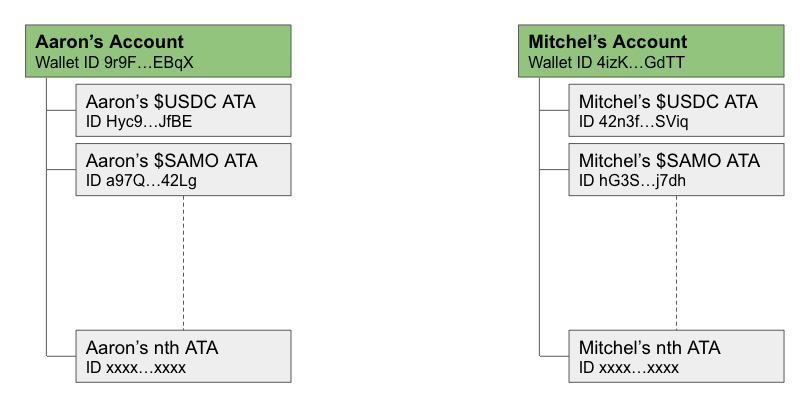
The Solana Token Program derives "a token account key from a user's main System account address and a token mint address, allowing the user to create a main token account for each token they own" (Source: spl.solana.com). That account is referred to as an Associated Token Account or "ATA." Effectively an ATA is a unique account linked to a user and a specific token mint. For example, let's say I am the owner of Account "DEMO...1234". I can have many ATAs--one for each token mint I hold (e.g., a unique ATA for each $USDC, $SAMO, etc., as illustrated below).
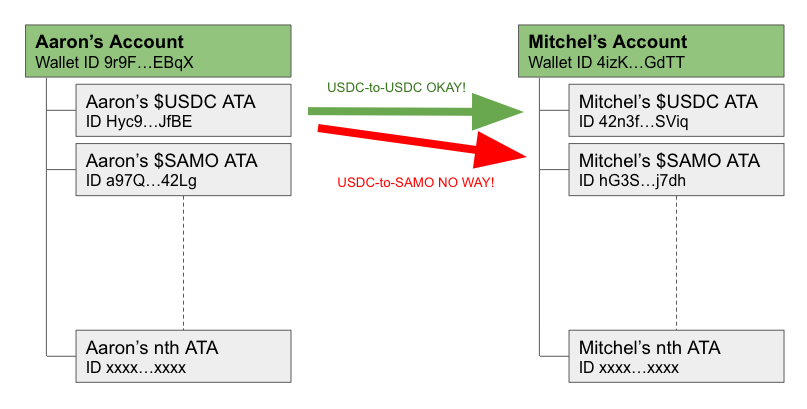
Token Transfers must always occur between two ATAs associated with the same associated mint address. This means we cannot send $USDC from my ATA to your $SAMO ATA (see example below).
As you'll see in our code in a bit, every account does not already have an ATA for every mint. If a user hasn't interacted with a token before, the sender must "create" it and deposit the necessary rent for the account to remain active.
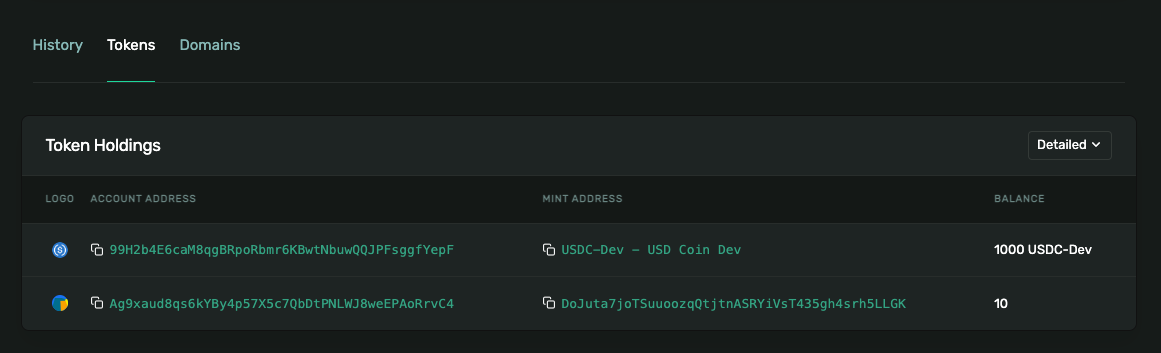
This concept can be tricky at first, but it's important, so take the time to ensure you understand this! I find it helpful to browse my wallet on Solana Explorer on the tokens detail page: https://explorer.solana.com/address/YOUR_WALLET_ADDRESS/tokens?display=detail. You can see each of your ATAs, their Account ID, and the associated Mint ID:
If you want to dig in a little more on the Solana SPL Token Program Library, head over to spl.solana.com.