Streams Webhook Signature Validator
A lightweight Express server that verifies Quicknode Streams webhook HMAC-SHA256 signatures and supports gzip-compressed request bodies.

Übersicht
Quicknode Streams can sign each webhook delivery with an HMAC-SHA256 signature so you can confirm that a request originated from Quicknode and was not tampered with in transit. This sample app is a minimal Express server that shows exactly how to verify those signatures, including the edge case where Streams sends a gzip-compressed body.
The signature is computed over the concatenation of nonce + timestamp + payload (UTF-8), keyed with your Stream's security token. When compression is enabled, Streams signs the uncompressed JSON before gzipping it for transport, so the verifier must run HMAC on the decoded bytes rather than the raw gzip octets. This app uses express.raw() with body-parser's built-in gzip decompression to handle that correctly.
For a detailed walkthrough of the signature verification logic, see the companion guide: How to Validate Incoming Streams Webhook Messages.
Tech Stack
- Runtime: Node.js (>=16)
- Framework: Express
- Language: JavaScript
- Crypto: Node.js built-in
cryptomodule (HMAC-SHA256)
Funktionen
- HMAC-SHA256 verification: Validates the
x-qn-signatureheader against a locally computed digest using your Stream security token. - Gzip body support: Correctly handles
Content-Encoding: gziprequests by running HMAC on the decompressed JSON, not the raw bytes. - Timing-safe comparison: Uses
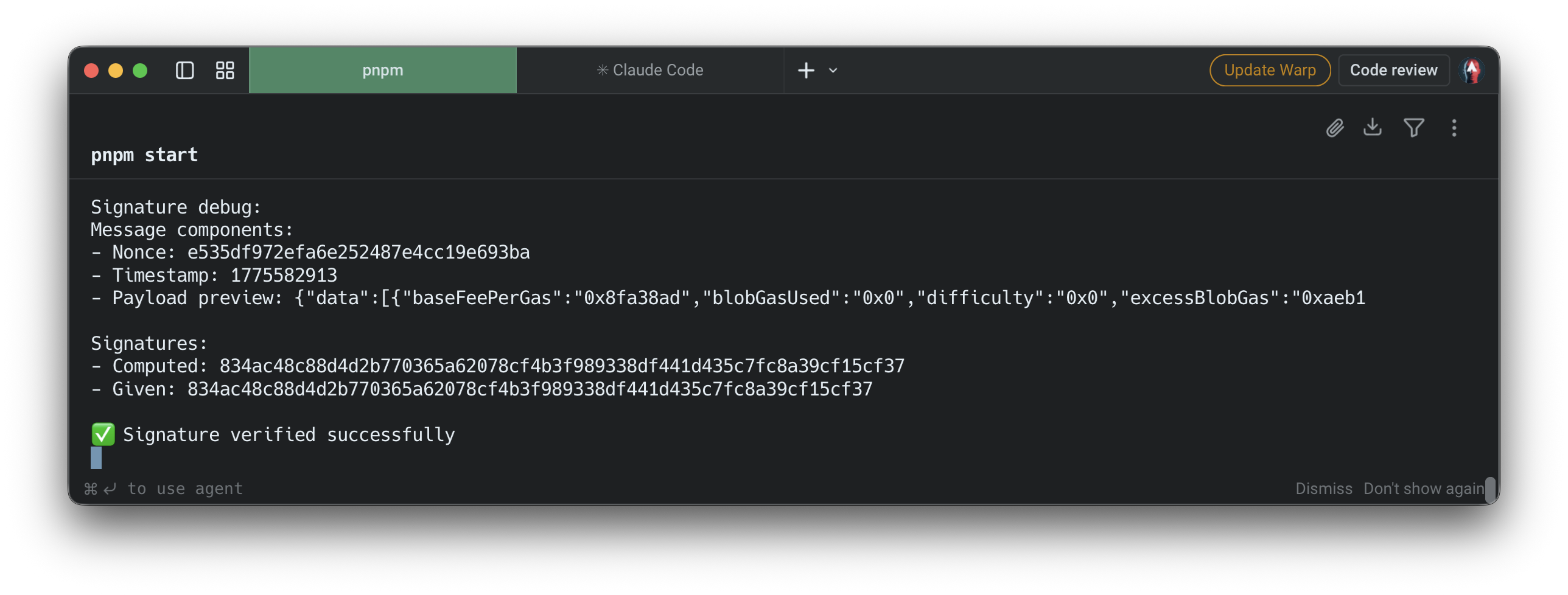
crypto.timingSafeEqualto prevent timing attacks during signature comparison. - Debug logging: Prints nonce, timestamp, payload preview, and both the computed and provided signatures to aid local debugging.
- Configurable port: Defaults to
9999; override with thePORTenvironment variable.
Voraussetzungen
- Node.js v16 or later installed on your machine.
- A Quicknode account with at least one Stream configured.
- The security token from your Stream's Settings tab in the Quicknode dashboard.
- ngrok (or any tunnel tool) to expose your local server to the internet so Streams can reach it.
Projektstruktur
streams-webhook-validate-signature/
├── .env.example    # Environment variable template
├── .gitignore
├── package.json
├── package-lock.json
└── server.js       # Express webhook receiver and HMAC verifier
Umgebungsvariablen
Kopieren .env.example zu .env and set your Stream security token:
QN_STREAM_SECRET=your_more_than_32_bytes_security_token_here
You can find this token in your Stream's Settings tab at dashboard.quicknode.com/streams.
Erste Schritte
1. Das Repository klonen
git clone https://github.com/quiknode-labs/streams-webhook-validate-signature.git
cd streams-webhook-validate-signature
2. Abhängigkeiten installieren
npm installieren
3. Configure environment variables
cp .env.example .env
Open .env and set QN_STREAM_SECRET to your Stream's security token.
4. Start the server
npm start
The server listens on http://localhost:9999/webhook by default. To use a different port:
PORT=3000 npm start
5. Expose with ngrok
Streams needs a publicly accessible URL to deliver webhooks. In a separate terminal:
ngrok http 9999
Copy the HTTPS forwarding URL (e.g. https://abc123.ngrok.io) and set it as your Stream's webhook URL with the /webhook path appended:
https://abc123.ngrok.io/webhook
6. Send a test payload
Once the webhook URL is saved, use the Send Payload button in the Streams dashboard to fire a signed test delivery without waiting for real on-chain activity. This works both when creating a new Stream and when editing an existing one. Check your server terminal for the signature debug output to confirm the request was received and verified.
API Endpoints
| Verfahren | Path | Beschreibung |
|---|---|---|
BEITRAG | /webhook | Receives and verifies a Streams webhook delivery |
Expected request headers
| Header | Beschreibung |
|---|---|
x-qn-nonce | Random nonce included in the signature input |
x-qn-timestamp | Unix timestamp included in the signature input |
x-qn-signature | Hex-encoded HMAC-SHA256 digest to verify |
Responses
| Status | Meaning |
|---|---|
200 | Signature verified successfully |
400 | Required headers are missing |
401 | Signature verification failed |
500 | Server misconfiguration (missing secret) or processing error |
Vorschau
- Das Repository forken
- Erstelle einen Feature-Branch:git checkout -b feature/amazing-feature
- Speichere deine Änderungen:git commit -m "Tolle Funktion hinzufügen"
- Deinen Branch pushen:git push origin feature/amazing-feature
- Erstelle einen Pull Request.