Overview
Flat Rate Requests Per Second (RPS) is a billing option that provides predictable monthly costs for blockchain endpoints. Instead of metering individual requests through API Credits, you pay a fixed monthly fee based on your configured request capacity, so your bill stays the same regardless of actual usage.
What's included:
- Fixed monthly pricing – Your bill never changes based on usage
- Configured RPS capacity – Specific requests-per-second for your tier
- Single endpoint scope – One blockchain in one region per subscription
- Instant activation – No provisioning delays or setup time
- Flexible terms – Month-to-month (Standard) or annual contracts (Enterprise)
Best suited for: Applications with consistent traffic patterns running on a single blockchain in one region.
Available for EVM chains (Ethereum, Base, Optimism, Arbitrum, BSC, Polygon) and Solana mainnet endpoints starting March 4, 2026.
How It Differs from Credit-Based Billing
Flat Rate RPS is fundamentally different from Quicknode's standard credit-based plans:
| Factor | Credit-Based Plans | Flat Rate RPS |
|---|---|---|
| Payment Model | Pay per request with API credits | Fixed monthly fee regardless of usage |
| Billing Scope | Account-level billing | Per-endpoint billing |
| Endpoint Flexibility | Credits work across all endpoints | Capacity tied to one endpoint, one chain, one region |
| Cost Predictability | Variable monthly costs | Predictable monthly costs |
| Rate Limits | Flexible rate limits | Fixed RPS and concurrent connection limits |
| Architecture Support | Multi-chain and multi-region support | Single chain, single region per subscription |
Key takeaway: Flat Rate RPS trades flexibility for predictability. If your traffic is consistent and concentrated on one chain in one region, you get budget certainty without tracking credit consumption.
Available Plans and Pricing
Standard Tiers (EVM Chains)
The following tiers are available for all supported EVM chains (Ethereum, Base, Optimism, Arbitrum, BSC, Polygon) endpoints:
| RPS Limit | Concurrent Connections | WebSocket Connections | Monthly Price |
|---|---|---|---|
| 75 | 2 | 10 | $799 |
| 150 | 4 | 20 | $1,499 |
| 250 | 6 | 30 | $1,949 |
Standard Tiers (Solana)
Solana endpoints use a 1.5x pricing multiplier due to higher resource requirements. The following tiers are available for Solana endpoints:
| RPS Limit | Concurrent Connections | WebSocket Connections | Monthly Price |
|---|---|---|---|
| 75 | 2 | 10 | $1,199 |
| 150 | 4 | 20 | $2,299 |
| 250 | 6 | 30 | $2,925 |
Paid accounts (Build, Accelerate, Scale, and Business) can subscribe directly from the Dashboard to the Standard tiers shown above.
Enterprise accounts cannot subscribe to Flat Rate RPS directly through the Dashboard. To request Enterprise access or RPS tiers above 250, contact sales@quicknode.com.
Understanding RPS and Concurrent Connections
Flat Rate RPS capacity is governed by two limits:
- RPS (Requests Per Second) – how many new requests can start each second
- Concurrent Connections – how many requests can be processing at the same time
Both limits apply simultaneously. Your effective throughput is determined by whichever limit you reach first.
RPS (Requests Per Second)
RPS controls how many new requests your endpoint accepts each second.
Example: On a 75 RPS tier, your endpoint accepts up to 75 requests per second.
If 100 requests arrive in one second, 75 are processed and 25 return HTTP 429 responses.
Concurrent Connections
The maximum number of requests that can be actively processing at the same time. Each request uses one concurrent connection from the moment it starts until it completes.
Because of this, response time directly impacts throughput. Longer-running requests hold connections longer, reducing how many new requests can be processed.
You can estimate required concurrency using:
Concurrent connections = RPS × Response time (seconds)
| RPS | Response Time | Concurrent Connections Required |
|---|---|---|
| 75 | 0.05s | ~4 |
| 75 | 5s | 375 |
Lightweight methods like eth_blockNumber complete quickly and require minimal concurrency.
Heavier methods such as debug_traceTransaction hold connections longer and require significantly more.
Which Limit Becomes the Bottleneck?
Your throughput depends on request speed:
- Fast queries – Connections free up quickly, so RPS becomes the limiting factor
- Slow queries – Connections remain occupied longer, so concurrent connections become the limiting factor
When concurrency is the bottleneck, maximum throughput becomes:
Effective throughput = Concurrent connections ÷ Response time
For example, with 1 concurrent connection:
- At 50ms response time → ~20 RPS maximum
- At 5 seconds response time → 0.2 RPS maximum
This is why lightweight RPC methods scale well on lower tiers, while tracing-heavy or long-running queries can hit concurrency limits long before reaching the configured RPS tier.
What Happens When You Hit a Limit?
If you exceed either your RPS limit or concurrent connection limit:
- Requests return HTTP 429 (rate limit) responses
- No overage charges apply
If you frequently hit limits, consider upgrading to a higher tier or evaluating whether your workload is a good fit for Flat Rate RPS.
Is Flat Rate RPS Right for You?
Flat Rate RPS is best for consistent traffic on a single chain with fast queries (under 500ms). If your traffic spikes heavily, runs across multiple regions/chains, or uses slower methods like debug_traceTransaction, consider credit-based plans instead.
When Flat Rate RPS Works
| Factor | Requirements |
|---|---|
| Traffic Pattern | Consistent, steady volume without large spikes |
| Architecture | Single chain in one region |
| Request Speed | Most queries complete in under 500ms |
| Concurrency | Low simultaneous requests |
| Billing Priority | Predictable monthly costs over usage-based pricing |
Example methods: eth_blockNumber, eth_call, eth_getBalance, eth_getTransactionReceipt
When to Use Other Plans Instead
Consider credit-based plans, Dedicated Capacity, or Enterprise plans if you need:
- Traffic that spikes significantly (10x bursts, event-driven patterns, seasonal changes)
- Multi-region or multi-chain architecture
- Slow or heavy methods like
debug_traceTransaction(5-30s) or largeeth_getLogsranges - High concurrency with many simultaneous requests
- SLAs or guaranteed uptime commitments
Infrastructure Considerations
Flat Rate RPS runs on Shared Pro infrastructure without SLA guarantees or infrastructure isolation. If your application requires contractual uptime commitments or dedicated resources, use Dedicated or Enterprise plans.
How to Activate Flat Rate RPS
For Standard Tiers
Step 1: Access your endpoint – Log into the Quicknode Dashboard, then select an existing endpoint or create a new one on any supported EVM chain (Ethereum, Base, Optimism, Arbitrum, BSC, Polygon) or Solana mainnet.
Step 2: Disable multi-chain (if enabled) – If your endpoint has multi-chain enabled, disable it before subscribing. The multi-chain toggle will be locked once you activate Flat Rate RPS.
Step 3: Open Flat Rate settings – Navigate to your endpoint's Settings tab, then go to the Flat-rate section.
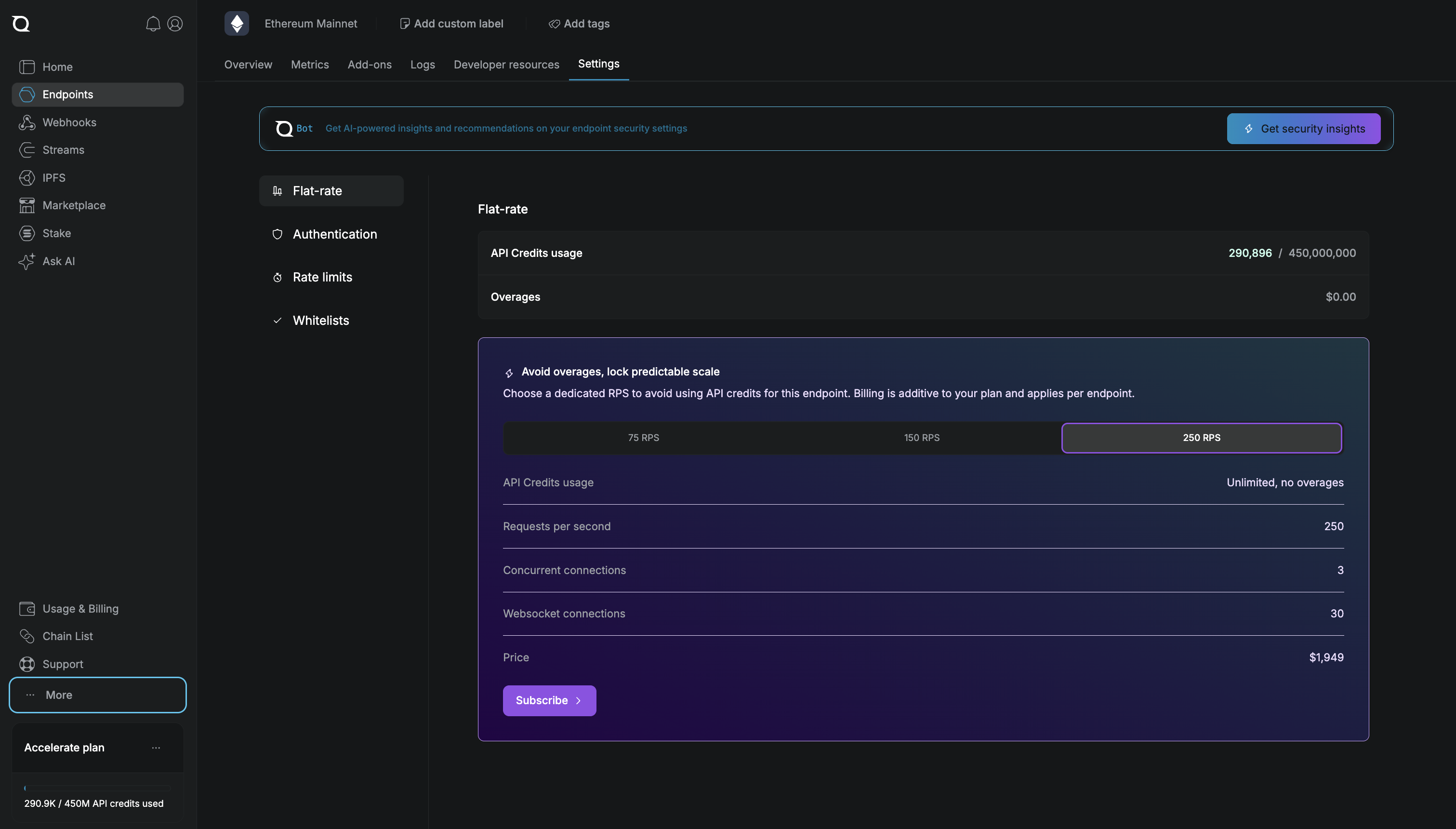
Step 4: Select your tier – Choose your RPS tier based on your capacity needs. The interface shows concurrent connections, WebSocket connections, and monthly pricing for each tier.
Step 5: Configure and subscribe – Click Subscribe, select your region (US East, EU Central, or APAC NE), review your configuration, and confirm.
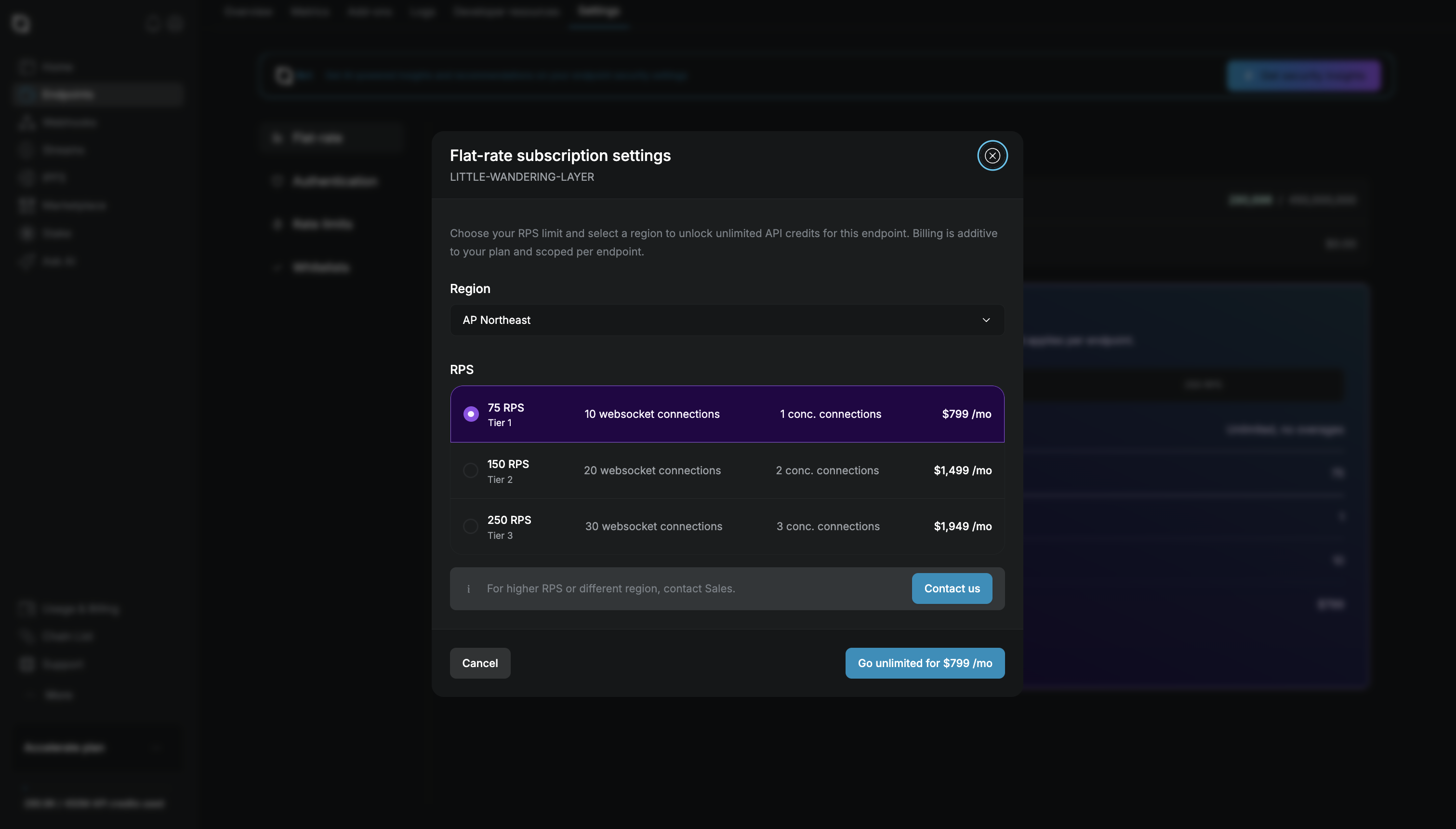
Your endpoint activates immediately with no provisioning wait time. Billing starts right away, and your configured RPS and concurrent connection limits apply to all requests.
Region changes: You can change your endpoint's region anytime from the endpoint settings page. Changes take effect immediately.
For Enterprise Accounts
Enterprise accounts should contact sales@quicknode.com to activate Flat Rate RPS.
Billing and Cancellation
How Billing Works
Flat Rate RPS charges a fixed monthly fee based on your selected tier. The charge is the same every month regardless of actual usage. Requests are not metered, and the subscription does not consume API credits.
When you hit limits: Requests that exceed your RPS or concurrent connection limits receive HTTP 429 responses. There are no overage charges.
Unused capacity: Does not roll over to the next billing period.
Contract Terms
Contract terms differ between Standard and Enterprise accounts:
| Standard | Enterprise | |
|---|---|---|
| Contract Term | Month-to-month | Annual contracts |
| Cancellation | Via Dashboard | Contact account manager |
| Payment Terms | Standard billing | Custom payment terms available |
How to Cancel the Subscription
Standard: Dashboard → Select endpoint → Settings → Flat-rate section → Click "Cancel flat-rate subscription". The endpoint remains active until the end of the current billing period.
Enterprise: Contact your account manager at sales@quicknode.com to process cancellations or contract changes. Terms depend on your Enterprise agreement.
Frequently Asked Questions
Need Help?
For questions about Flat Rate RPS subscriptions, plan selection, or billing:
📧 Email: sales@quicknode.com
For technical support or other issues, submit a ticket through the Support Portal:
🎫 Submit a ticket: Quicknode Support Portal