Kafka destinations let you stream blockchain data to Apache Kafka topics for high-throughput event streaming and integration with existing data pipelines.
Why use Kafka?
- High Throughput: Handle massive volumes of blockchain data with Kafka's distributed architecture
- Real-Time Processing: Enable real-time stream processing with Kafka Streams or ksqlDB
- Durability: Messages are persisted to disk and replicated across brokers
- Integration: Connect to your existing data infrastructure, analytics tools, and microservices
- Scalability: Horizontally scale consumers to process data in parallel
Configuration
Follow the Quickstart Guide to create a stream. When you reach the destination step, select Kafka and configure the following fields:
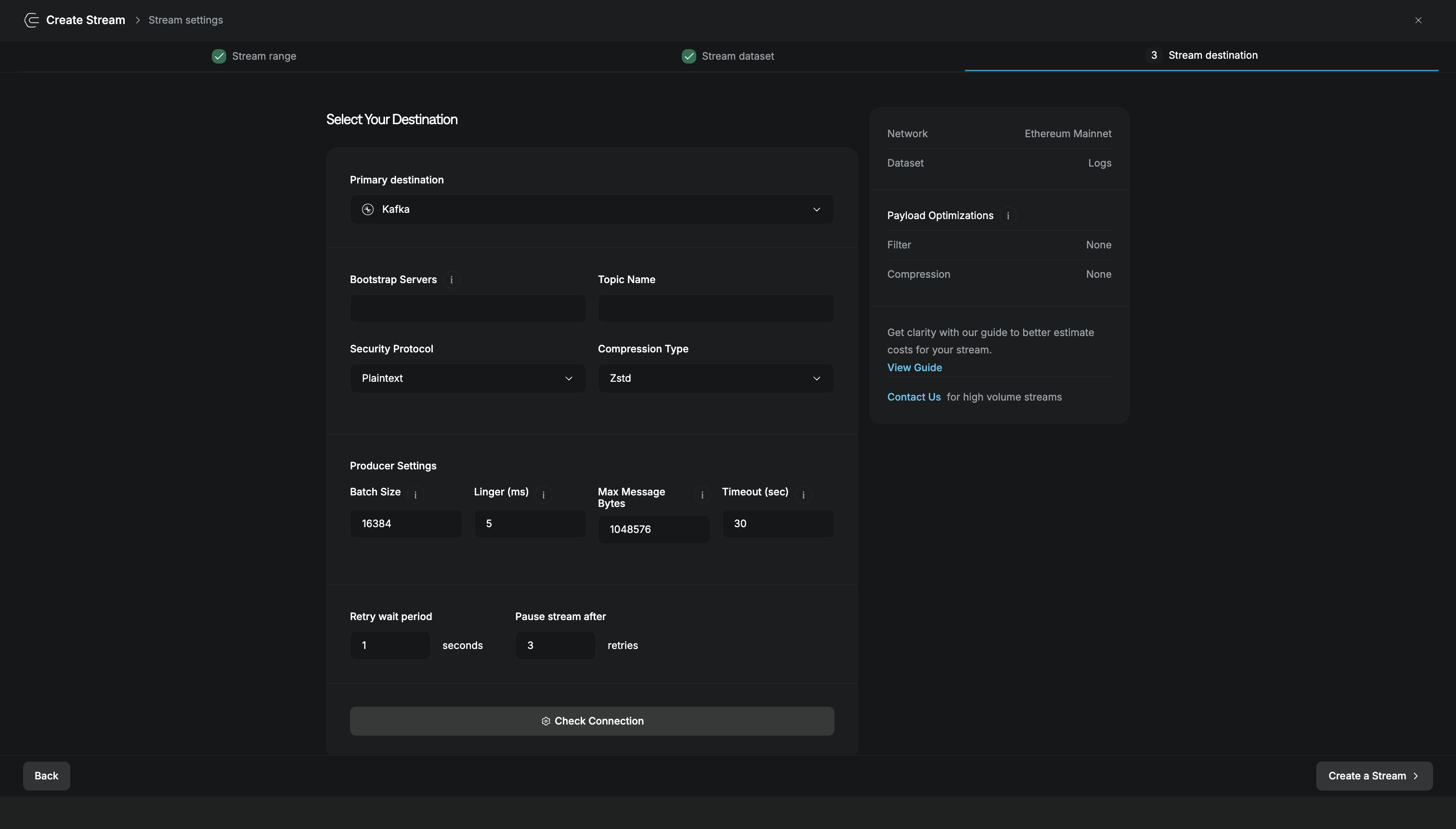
| Field | Description |
|---|---|
| Bootstrap Servers | Comma-separated list of Kafka broker addresses (host:port) |
| Topic Name | Kafka topic to publish messages to |
| Security Protocol | Connection security: Plaintext, SSL, SASL_Plaintext, or SASL_SSL |
| Compression Type | Message compression: None, Gzip, Snappy, LZ4, or Zstd |
| Batch Size | Maximum bytes to batch before sending (default: 16384) |
| Linger (ms) | Time to wait for additional messages before sending a batch (default: 5) |
| Max Message Bytes | Maximum size of a single message (default: 1048576) |
| Timeout (sec) | Time to wait for broker acknowledgment (default: 30) |
| Retry wait period | Seconds to wait between retry attempts (default: 1) |
| Pause stream after | Number of failed retries before the stream pauses (default: 3) |
Click Check Connection to verify your Kafka cluster is reachable before creating the stream.
Security Protocols
Kafka supports multiple security protocols for connecting to your cluster. Choose based on your security requirements:
| Protocol | Description |
|---|---|
| Plaintext | No encryption or authentication (development only) |
| SSL | TLS encryption without SASL authentication |
| SASL_Plaintext | SASL authentication without encryption |
| SASL_SSL | Both TLS encryption and SASL authentication (recommended for production) |
Compression
Compression reduces network bandwidth and storage costs. Choose based on your priorities:
| Type | Speed | Ratio | CPU Usage | Best For |
|---|---|---|---|---|
| None | Fastest | None | Lowest | Low latency requirements |
| LZ4 | Very fast | Good | Low | General use |
| Snappy | Fast | Good | Low | Balanced performance |
| Zstd | Moderate | Best | Moderate | Best compression |
| Gzip | Slow | Very good | High | Maximum compatibility |
For most use cases, Zstd offers the best balance of compression ratio and speed.
Other Destinations
Deliver stream data to your HTTP endpoint in real-time.
Archive to Amazon S3, GCS, Backblaze B2, and more.
Microsoft Azure cloud storage with enterprise features.
Store in a relational database for SQL queries and joins.