
14 min read
Overview
The Machine Payments Protocol (MPP) lets you pay for API access inline with an HTTP request. No accounts, no API keys. Just a wallet with a stablecoin balance.
Sessions take this a step further. You open a payment channel once, then reuse it for every request. Each call is paid with a small signed voucher, so there is no onchain transaction each time and requests stay fast.
In this guide, you will build a TypeScript script that opens a single MPP session, queries native token balances across 15 EVM chains using Quicknode's MPP endpoints, and outputs a formatted report with a cost breakdown.
This is a great fit for sessions because the script makes several RPC calls across different networks in a single run. Instead of paying for each call individually, all requests flow through one payment channel. You pay the setup cost once, then reuse it for the rest.
Quicknode supports MPP sessions across all supported chains. The same session that queries Ethereum can also query Base, Arbitrum, Polygon, and others with no extra setup.
Each wallet gets a shared free tier of 1,000,000 API credits / month across Quicknode's agentic payment surfaces, including MPP and x402. Standard RPC requests consume 1 API credit each, while SQL Explorer consumes the API credits used by the query.
Quicknode supports two wallet-based payment protocols for accountless RPC access: MPP (used in this guide) and x402 (an open standard by Coinbase). Both let scripts and AI agents pay for API calls inline, with no account or API keys required, but they differ in wire format, session mechanics, and supported payment methods. See the Agentic Payments overview for a side-by-side comparison, or jump to the x402 docs and MPP docs for protocol details.
What You Will Learn
- How the Machine Payments Protocol works and why sessions exist
- The full session lifecycle: 402 challenge, channel deposit, voucher signing, and settlement
- How to use the
mppxSDK to create and manage payment sessions - How to make multiple RPC calls in a single session across different chains using Quicknode's MPP endpoints
What You Will Need
- Node.js v20 or later
- Basic familiarity with TypeScript and EVM chains
- No Quicknode account or API keys needed (MPP handles access and billing)
- A small amount of PathUSD on Tempo testnet (auto-funded via faucet in the script) or PathUSD/USDC.e on Tempo mainnet for production use
What is the Machine Payments Protocol?
The Machine Payments Protocol is an open standard proposed to the IETF that adds inline payments to any HTTP endpoint. It is designed to solve a specific problem: programmatic clients (agents, scripts, bots) have no good way to pay for API access without a human setting up billing first.
Traditional payment flows rely on checkout forms, browser sessions, and visual CAPTCHAs. MPP replaces those with a machine-readable payment negotiation built on HTTP 402 Payment Required.
How It Works
The protocol follows a challenge-response pattern:
- Request: The client sends a normal HTTP request to a paid endpoint.
- Challenge: The server responds with
402 Payment Requiredand aWWW-Authenticate: Paymentheader describing the price, accepted currencies, and available payment methods. - Pay: The client picks a payment method and fulfills it (signs a stablecoin transfer, opens a payment channel, etc.).
- Retry: The client re-sends the original request with an
Authorization: Paymentheader containing proof of payment. - Deliver: The server verifies the payment and returns the response with a
Payment-Receiptheader.
Client libraries like mppx handle steps 2 through 4 automatically. From your code's perspective, the request just works.
Charge vs. Session
MPP defines two payment intents that control how billing works:
| Charge | Session | |
|---|---|---|
| Pattern | One-time payment per request | Pay-as-you-go via payment channel |
| Settlement | Onchain transaction per request | Off-chain vouchers, onchain settlement only at open/close |
| Verification latency | Hundreds of milliseconds (onchain) | Microseconds (CPU-bound ecrecover) |
| Best for | Occasional queries, simple integrations | High-frequency requests, batch workflows, agents |
The key difference is how payment verification happens. With charge, every request triggers an onchain transaction. With sessions, the server verifies a signed voucher using a single ecrecover call, with no RPC calls or database writes in the critical path. This means the server never touches the chain during the session, so throughput is bounded by server CPU, not blockchain consensus.
On Quicknode's MPP endpoints, this translates to concrete cost savings as well: charge requests cost $0.001 each, while session requests cost $0.00001 each. For a script that fires 15+ RPC calls across different networks in one run, sessions are the natural fit:
| Chains queried | Charge ($0.001/req) | Session ($0.00001/req) |
|---|---|---|
| 10 | $0.010 | $0.0001 |
| 25 | $0.025 | $0.00025 |
| 50 | $0.050 | $0.0005 |
Understanding the Session Lifecycle
Before jumping into the code, it is important to understand how sessions work under the hood. The following diagram shows the full flow for our multichain balance checker:
Key Concepts
Payment channel: An onchain escrow contract where the client deposits funds up front. This happens once when the session starts.
Cumulative vouchers: Each request includes a signed message saying "I have now consumed up to X total." Vouchers are cumulative, not incremental. The server only needs the latest voucher to claim all owed funds. For example, after three requests at $0.00001 each: voucher(1) = 10, voucher(2) = 20, voucher(3) = 30 atomic units.
Multi-network sessions: A single session instance handles requests across different /session/:network endpoints. The session manages the payment channel; the network slug determines which Quicknode RPC backend the request is proxied to.
Settlement: When the session closes, the server settles the final voucher onchain. The client receives a refund of any unused deposit.
Project Setup
The complete script lives in the qn-guide-examples repository (view the source file directly). Clone it and install dependencies:
git clone https://github.com/quiknode-labs/qn-guide-examples.git
cd qn-guide-examples/mpp/multichain-balance-checker
npm install
You can also copy the index.ts file into your own project and install the required dependencies.
The project uses two runtime dependencies:
| Package | Purpose |
|---|---|
mppx | MPP protocol client (session management, voucher signing) |
viem | Wallet operations and balance formatting |
And two dev dependencies: tsx for running TypeScript directly, and typescript for type checking.
Defining the Chain Registry
The script queries native balances across multiple EVM chains. Each chain is defined with its MPP network slug, display name, native token symbol, and decimal precision:
const CHAINS = [
  { slug: 'ethereum-mainnet', name: 'Ethereum', symbol: 'ETH', decimals: 18 },
  { slug: 'base-mainnet', name: 'Base', symbol: 'ETH', decimals: 18 },
  { slug: 'arbitrum-mainnet', name: 'Arbitrum', symbol: 'ETH', decimals: 18 },
  { slug: 'optimism-mainnet', name: 'Optimism', symbol: 'ETH', decimals: 18 },
  { slug: 'matic-mainnet', name: 'Polygon', symbol: 'POL', decimals: 18 },
  { slug: 'worldchain-mainnet', name: 'World Chain', symbol: 'ETH', decimals: 18 },
  { slug: 'bsc-mainnet', name: 'BNB Chain', symbol: 'BNB', decimals: 18 },
  { slug: 'celo-mainnet', name: 'Celo', symbol: 'CELO', decimals: 18 },
  { slug: 'xdai-mainnet', name: 'Gnosis', symbol: 'xDAI', decimals: 18 },
  { slug: 'zksync-mainnet', name: 'zkSync Era', symbol: 'ETH', decimals: 18 },
  { slug: 'scroll-mainnet', name: 'Scroll', symbol: 'ETH', decimals: 18 },
  { slug: 'linea-mainnet', name: 'Linea', symbol: 'ETH', decimals: 18 },
  { slug: 'mantle-mainnet', name: 'Mantle', symbol: 'MNT', decimals: 18 },
  { slug: 'blast-mainnet', name: 'Blast', symbol: 'ETH', decimals: 18 },
]
The network slug is the key piece here. It maps to the MPP session endpoint at https://mpp.quicknode.com/session/:slug. The /session/ prefix in the URL is what tells the server to use session intent instead of charge intent.
You can add or remove chains as needed. Quicknode's MPP endpoints support all supported networks. You can also fetch the full list of supported slugs dynamically:
curl https://mpp.quicknode.com/networks
Note that the chains you query are decoupled from the payment network. Your session runs on the Tempo blockchain (testnet or mainnet), but it can access RPC endpoints on any supported chain.
Setting Up the Wallet
The script needs a wallet to sign vouchers for the payment channel. It can either use an existing private key from the environment or generate a fresh one automatically:
import { generatePrivateKey, privateKeyToAccount } from 'viem/accounts'

const privateKey = (process.env.MPPX_PRIVATE_KEY as `0x${string}`) || generatePrivateKey()
const account = privateKeyToAccount(privateKey)
When a key is auto-generated, the script saves it to a .env file (with chmod 600 permissions) so future runs reuse the same wallet:
import { existsSync, writeFileSync } from 'fs'

if (isGenerated && !existsSync(envPath)) {
  writeFileSync(
    envPath,
    [
      '# Auto-generated by multichain balance checker',
      '# This file is gitignored — never commit private keys.',
      `MPPX_PRIVATE_KEY=${privateKey}`,
      '',
    ].join('\n'),
    { mode: 0o600 },
  )
}
Funding via the Testnet Faucet
For testnet usage, the script automatically funds the wallet using the Tempo testnet faucet. This gives the wallet PathUSD (a testnet stablecoin) and gas on Tempo Moderato (chain ID 42431):
async function fundWallet(address: string): Promise<void> {
  const res = await fetch('https://docs.tempo.xyz/api/faucet', {
    method: 'POST',
    headers: { 'Content-Type': 'application/json' },
    body: JSON.stringify({ address }),
  })
  if (res.ok) {
    console.log('Faucet: Request accepted — waiting for onchain confirmation...')
    await waitForFunding(address)
  }
}
The waitForFunding function polls the PathUSD contract on Tempo Moderato to confirm the balance has arrived before proceeding:
const TEMPO_RPC = 'https://rpc.moderato.tempo.xyz'
const PATHUSD_ADDRESS = '0x20c0000000000000000000000000000000000000'

async function getPathUSDBalance(walletAddress: string): Promise<bigint> {
  const data = '0x70a08231' + walletAddress.slice(2).padStart(64, '0')
  const res = await fetch(TEMPO_RPC, {
    method: 'POST',
    headers: { 'Content-Type': 'application/json' },
    body: JSON.stringify({
      jsonrpc: '2.0', id: 1,
      method: 'eth_call',
      params: [{ to: PATHUSD_ADDRESS, data }, 'latest'],
    }),
  })
  const json = (await res.json()) as { result?: string }
  return BigInt(json.result ?? '0x0')
}
This zero-friction setup means anyone can clone the repo and run the script without signing up for anything or funding a wallet manually.
Quicknode's MPP session flow uses the same free-tier bucket as x402: 1,000,000 API credits / month per wallet. RPC requests consume 1 API credit each, while SQL Explorer consumes the API credits used by the query. After the free tier is exhausted, switch to a mainnet-funded wallet. See Going to Production.
Creating the Session and Querying Balances
This is where the core session logic lives. The script creates an MPP session with tempo.session(), then iterates through each chain, sending eth_getBalance requests through the session:
import { tempo } from 'mppx/client'

const session = tempo.session({
  account,
  maxDeposit: '1', // 1 PathUSD — covers 100,000 requests at $0.00001/each
})
The maxDeposit parameter sets the total budget for the payment channel. You get back whatever you do not spend when the session closes.
If the channel deposit runs out mid-session, the mppx client can top up the channel with an additional onchain deposit without closing and reopening the session. For our 15-chain script, even a small deposit is more than enough, but this is useful if you are building longer-running applications that make thousands of requests.
Making RPC Calls Through the Session
For each chain, the script calls session.fetch() with a standard JSON-RPC eth_getBalance payload. The session handles all MPP mechanics automatically:
const MPP_BASE_URL = 'https://mpp.quicknode.com/session'

for (const chain of CHAINS) {
  const response = await session.fetch(`${MPP_BASE_URL}/${chain.slug}`, {
    method: 'POST',
    headers: { 'Content-Type': 'application/json' },
    body: JSON.stringify({
      jsonrpc: '2.0',
      id: 1,
      method: 'eth_getBalance',
      params: [WALLET_ADDRESS, 'latest'],
    }),
  })

  const data = (await response.json()) as { result?: string; error?: { message: string } }
  // Parse hex balance to human-readable format
  const balance = formatBalance(data.result!, chain.decimals)
}
On the first request, session.fetch() handles the full 402 challenge-response flow: it receives the challenge, deposits PathUSD into the onchain escrow contract, and retries with a signed voucher. This takes roughly 500ms.
On every subsequent request, the session simply increments the cumulative voucher and includes it in the Authorization header. The server verifies the voucher with a single ecrecover operation (no onchain transaction needed), so responses come back with near-zero payment overhead.
The script also includes a retry on 404 responses to handle transient MPP routing issues:
if (response.status === 404) {
  response = await session.fetch(`${MPP_BASE_URL}/${chain.slug}`, {
    method: 'POST',
    headers: { 'Content-Type': 'application/json' },
    body: rpcBody,
  })
}
Formatting the Balance
The eth_getBalance response returns a hex string representing the balance in wei (or the chain's equivalent smallest unit). The script converts this to a human-readable decimal:
import { formatUnits } from 'viem'

function formatBalance(hexBalance: string, decimals: number): string {
  const value = BigInt(hexBalance)
  return parseFloat(formatUnits(value, decimals)).toFixed(4)
}
Closing the Session
After all queries complete, the script closes the session to trigger onchain settlement. The server settles the final cumulative voucher and refunds unused deposit back to the wallet:
// Capture session data before closing
const channelId = session.channelId
const cumulativeSpend = session.cumulative

console.log('Closing session and settling onchain...')
const receipt = await session.close()
The script then prints a summary showing total cost, refund amount, and settlement details:
printSummary(
      results,
      totalRequests,
      channelId,
      cumulativeSpend,
      receipt?.txHash,
    );
The script also wraps the entire query loop in a try/catch and attempts to close the session even on errors, so the payment channel does not remain open indefinitely:
try {
  // ... query loop ...
  await session.close()
} catch (err) {
  console.error('Fatal error:', err instanceof Error ? err.message : err)
  try {
    await session.close()
    console.log('Session closed after error.')
  } catch {
    console.log('Could not close session.')
  }
  process.exit(1)
}
Running the Script
With everything set up, run the script:
# Run with an auto-generated testnet wallet (zero setup)
npx tsx index.ts

# Or provide your own private key via a .env file
echo "MPPX_PRIVATE_KEY=0x..." > .env
npx tsx --env-file=.env index.ts
You should see output like this:
Multichain Balance Checker (via MPP Session)
━━━━━━━━━━━━━━━━━━━━━━━━━━━━━━━━━━━━━━━━━━━━━━━━━━━━━━━━

Wallet:  0x1234...abcd (auto-generated)
Target:  0xd8dA...6045

 Chain            | Balance               | Status
──────────────────┼───────────────────────┼──────────
 Ethereum         | 1.2345 ETH            | ok
 Base             | 0.5000 ETH            | ok
 Arbitrum         | 0.0000 ETH            | ok
 Optimism         | 2.1000 ETH            | ok
 Polygon          | 150.0000 POL          | ok
 BNB Chain        | 0.0312 BNB            | ok
 ...              | ...                   | ...

━━━━━━━━━━━━━━━━━━━━━━━━━━━━━━━━━━━━━━━━━━━━━━━━━━━━━━━━
 Session Summary
━━━━━━━━━━━━━━━━━━━━━━━━━━━━━━━━━━━━━━━━━━━━━━━━━━━━━━━━
 Chains queried:    15 (15 ok, 0 errors)
 Total RPC calls:   15
 Session cost:      0.000150 PathUSD ($0.00015)
 Channel deposit:   1.000000 PathUSD
 Refunded:          0.999850 PathUSD
 Channel ID:        0xdef456...abc123
 Settlement tx:     0xabc123...def456
Once the session closes, you can verify the settlement on the block explorer. The Settlement tx hash in the output links to the final onchain transaction. Use the testnet explorer for Tempo Moderato or the mainnet explorer for production runs.
The screenshot below shows what a settlement transaction looks like:
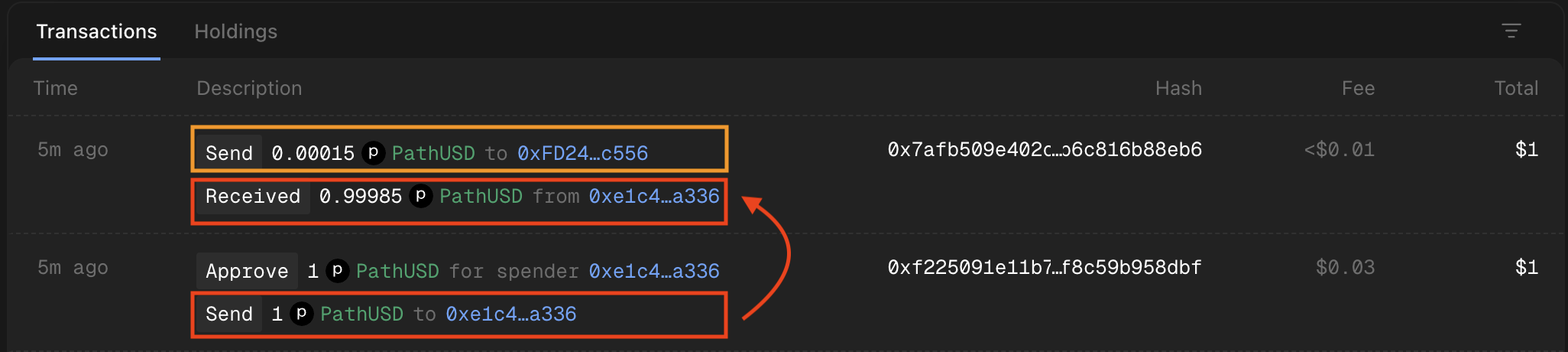
The red box shows the two balance transfers tied to the payment channel: 1 PathUSD sent to the escrow contract when the session opened, and 0.99985 PathUSD returned as a refund when it settled. The orange box shows the actual session cost (0.00015 PathUSD) paid to the server as part of the settlement transaction.
You can change the wallet address being checked by editing the WALLET_ADDRESS constant at the top of index.ts:
const WALLET_ADDRESS = '0xd8dA6BF26964aF9D7eEd9e03E53415D37aA96045' // any address
Going to Production
The script defaults to testnet for frictionless onboarding. Here is what changes for production usage:
| Testnet (default) | Mainnet | |
|---|---|---|
| Payment network | Tempo Moderato (chain ID 42431) | Tempo mainnet (chain ID 4217) |
| Currency | PathUSD | PathUSD or USDC.e |
| Free tier | Shared 1,000,000 API credits / month per wallet across MPP and x402 | Unlimited |
| Wallet funding | Auto-funded via faucet | Manual funding required |
To switch to mainnet, provide a wallet key that has PathUSD or USDC.e on Tempo mainnet. The mppx client automatically detects available balances and picks the right payment method from the 402 challenge.
Extending the Script
The balance checker is intentionally simple to keep the focus on session mechanics. The important takeaway is the pattern: open one session, make many RPC calls across different chains, close and settle. Since a single MPP session handles requests across all network slugs, you can extend the script to call any RPC method on any supported chain without changing the session setup. For example, you could add ERC-20 token balance checks by swapping eth_getBalance for an eth_call to the token contract's balanceOf function.
Conclusion
You built a multichain balance checker that queries 15 EVM chains through a single MPP session. The key pattern to take away: open one payment channel, make as many RPC calls as you need across any combination of supported chains using off-chain vouchers, then close and settle. The session handled all the payment mechanics automatically, from the initial 402 challenge through voucher signing to final settlement and refund.
This pattern applies to any workflow that makes multiple RPC calls: portfolio trackers, monitoring scripts, data pipelines, or AI agents that need to read onchain state across networks. Sessions let these tools pay for access programmatically, without accounts or API keys, while keeping payment overhead out of the critical path.
Next Steps
To learn more about MPP, Tempo, and Quicknode's MPP integration, check out the following resources:
- Machine Payments Protocol docs
- MPP session-based billing guide
- mppx SDK on npm
- Quicknode MPP protocol reference
- IETF Payment Authentication spec
- Use MPP with Foundry and Tempo (companion guide for Solidity developers)
- Quicknode CLI guide (open an MPP session and pay for RPC calls directly from the terminal)
Frequently Asked Questions
What is MPP and how is it different from traditional API key authentication?
The Machine Payments Protocol (MPP) is an open standard that adds inline payments to HTTP endpoints using the 402 Payment Required status code. Instead of signing up for an account and managing API keys, you pay per request using stablecoins from a wallet. This lets scripts, agents, and bots start using APIs immediately without human-mediated billing setup.
When should I use an MPP session instead of per-request charge payments?
Use sessions when your script or application makes multiple RPC calls in a single run. Sessions open one payment channel onchain and use off-chain vouchers for subsequent requests. Voucher verification is a CPU-bound signature check that adds microseconds of overhead, compared to hundreds of milliseconds for onchain charge payments. On Quicknode's MPP endpoints, sessions are also significantly cheaper per request. If you are making fewer than 10 requests, charge is simpler.
Do I need a Quicknode account to use MPP endpoints?
No. MPP endpoints require no account, no API keys, and no signup. You only need a wallet with stablecoins (or testnet tokens). The payment happens inline with each HTTP request.
Can I query non-EVM chains like Solana through an MPP session?
Quicknode's MPP endpoints support Solana and other non-EVM chains. You can use the same session instance to query any supported chain by changing the network slug in the URL. For example, use /session/solana-mainnet to query Solana RPC endpoints through the same payment channel.
What happens if my script crashes before closing the session?
If the session is not explicitly closed, the payment channel remains open until it times out. The server can still settle the last voucher it received. To avoid this, the script wraps the query loop in a try/catch and attempts to close the session even on errors.
How does the free tier work and how do I move to mainnet?
Quicknode's MPP endpoints use the same 1,000,000 API credits / month per wallet free-tier bucket shared with x402. RPC requests consume 1 API credit each, while SQL Explorer consumes the API credits used by the query. For unlimited usage, provide a wallet funded with PathUSD or USDC.e on Tempo mainnet (chain ID 4217).