
9 min read
Overview
In the intro guide, we covered Aleo's architecture: offchain execution, onchain verification, and records as private state. This guide puts that into practice. You'll write a private token in Leo, test it, and deploy it to Aleo Testnet through a Quicknode endpoint.
The token we're building is deliberately simple: two functions, no public state. You mint tokens as encrypted records and transfer them privately. The network verifies every transaction with a zero knowledge proof but never sees who sent tokens, who received them, or how many moved. That's Aleo's core pitch, and it's what we're building toward here.
- We build a private token with two functions:
mint_privateandtransfer_private - All state lives in encrypted records, so nothing is visible onchain
- All code uses Leo 4.0 syntax:
fnfor functions,recordfor private state types - Deploy to Aleo testnet through a Quicknode endpoint with
leo deploy --broadcast
What You Will Learn
- How to write a Leo program using records for fully private state
- How to test with
@testannotations andleo test - How to deploy to Aleo Testnet via
leo deploy - How to execute private transactions and understand what's visible onchain (nothing)
What You Will Need
- Familiarity with the concepts from the Introduction to Aleo and Leo guide
- Rust 1.94.1 or newer (Leo requires this version. Run
rustup updateto upgrade if needed) - A Quicknode account with an Aleo Testnet endpoint
- Testnet ALEO credits from the Aleo faucet
- Terminal access
Create a Quicknode Endpoint
To deploy and interact with programs on the Aleo network, you need access to an Aleo RPC endpoint. You could run your own node, but Quicknode handles the infrastructure so you don't have to.
Sign up for a Quicknode account if you haven't already. Once logged in, click Create an endpoint and select the Aleo chain and Testnet network.
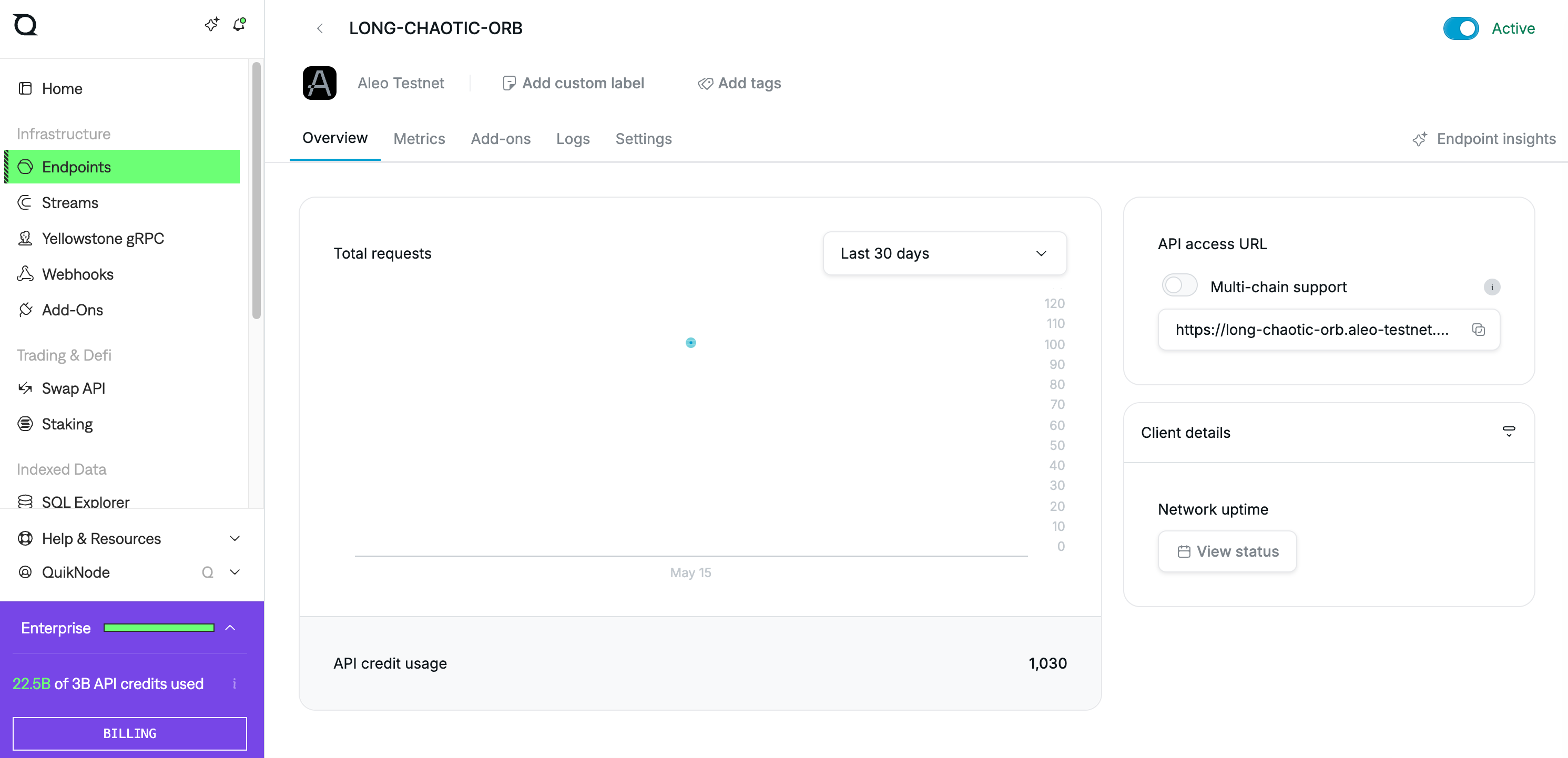
After creating the endpoint, copy the HTTP Provider URL. You'll add this to your project configuration later.
Append /v2 to the end of your Quicknode endpoint URL. Leo appends the network path (/testnet/...) automatically when making API calls, and Quicknode's Aleo endpoints require the /v2 prefix.
Setting Up the Development Environment
Install the Leo compiler via cargo:
cargo install leo-lang
Verify the installation:
leo --version
Scaffold a new project:
leo new private_token
cd private_token
This creates the following project structure:
| File/Directory | Purpose |
|---|---|
src/main.leo | Your program source code |
tests/ | Test files with @test annotated functions |
program.json | Project metadata: program name, version, dependencies |
You'll also need a .env file for deployment configuration. Create one in the project root:
Add .env to your .gitignore. Never commit your private key to version control.
touch .env
Add the following:
NETWORK=testnet
PRIVATE_KEY=APrivateKey1zkp...  # generate one with: leo account new
ENDPOINT=https://your-quicknode-aleo-endpoint.quiknode.pro/your-auth-token/v2
If you don't have a private key yet, generate one with leo account new and paste it in. For the endpoint, use the Quicknode URL you copied earlier with /v2 appended.
Writing the Token Program
We're building a private token. There's no public ledger of balances, no onchain mapping anyone can read. Every token exists as an encrypted record that only the owner can see. When someone transfers tokens, the old record is consumed and new records are created, all offchain. The network only sees a proof that the rules were followed.
Two functions handle everything:
mint_privatecreates new tokens as an encrypted recordtransfer_privatemoves tokens from one address to another, privately
Replace the contents of src/main.leo with:
program private_token.aleo {

    record Token {
        owner: address,
        amount: u64,
    }

    fn mint_private(receiver: address, amount: u64) -> Token {
        return Token {
            owner: receiver,
            amount: amount,
        };
    }

    fn transfer_private(sender: Token, receiver: address, amount: u64) -> (Token, Token) {
        let difference: u64 = sender.amount - amount;

        let remaining: Token = Token {
            owner: sender.owner,
            amount: difference,
        };

        let transferred: Token = Token {
            owner: receiver,
            amount: amount,
        };

        return (remaining, transferred);
    }

    @noupgrade
    constructor() {}
}
Let’s walk through what's here:
record Token defines the private state. Each token is an encrypted record on the ledger with an owner and an amount. Only the owner's view key can decrypt it. There's no public balance table.
mint_private creates a new Token record. It runs entirely offchain. The network verifies the proof but never sees the receiver or amount.
transfer_private takes an existing Token record, consumes it, and produces two new records: one for the receiver with the transferred amount, and one for the sender with the remaining balance. This is similar to how Bitcoin's UTXO model works, except everything is encrypted. There's no explicit balance check because Leo integers don't wrap on underflow. If sender.amount - amount would go negative, the transaction fails automatically.
@noupgrade The @noupgrade annotation locks the program so it can't be changed after deployment. For upgradable programs, you'd write a constructor with authorization logic instead and use leo upgrade to push new versions
constructor() {} - a constructor is required for all Aleo programs.
Testing the Program
Leo has a built-in test framework. Test functions live in the tests/ directory and use the @test annotation. Test files are Leo programs themselves, so they need a program block and an import for the program they're testing.
Open the existing tests/test_private_token.leo and replace its contents with:
import private_token.aleo;

program test_private_token.aleo {

    @test
    fn test_mint_private() {
        let receiver: address = aleo1qqqqqqqqqqqqqqqqqqqqqqqqqqqqqqqqqqqqqqqqqqqqqqqqqqqq3ljyzc;
        let result: private_token.aleo::Token = private_token.aleo::mint_private(receiver, 100u64);
        assert_eq(result.owner, receiver);
        assert_eq(result.amount, 100u64);
    }

    @test
    fn test_transfer_private() {
        let alice: address = self.signer;
        let bob: address = aleo1qgqqqqqqqqqqqqqqqqqqqqqqqqqqqqqqqqqqqqqqqqqqqqqqqqqqanmpl0;

        let minted: private_token.aleo::Token = private_token.aleo::mint_private(alice, 100u64);
        let (remaining, transferred): (private_token.aleo::Token, private_token.aleo::Token) = private_token.aleo::transfer_private(minted, bob, 30u64);

        assert_eq(transferred.owner, bob);
        assert_eq(transferred.amount, 30u64);
        assert_eq(remaining.owner, alice);
        assert_eq(remaining.amount, 70u64);
    }

    @test
    @should_fail
    fn test_transfer_more_than_balance() {
        let alice: address = aleo1qqqqqqqqqqqqqqqqqqqqqqqqqqqqqqqqqqqqqqqqqqqqqqqqqqqq3ljyzc;
        let bob: address = aleo1qgqqqqqqqqqqqqqqqqqqqqqqqqqqqqqqqqqqqqqqqqqqqqqqqqqqanmpl0;

        let minted: private_token.aleo::Token = private_token.aleo::mint_private(alice, 50u64);
        // This should fail: transferring 100 from a record with only 50
        let (remaining, transferred): (private_token.aleo::Token, private_token.aleo::Token) = private_token.aleo::transfer_private(minted, bob, 100u64);
    }

    @noupgrade
    constructor() {}
}
Run the tests:
leo test
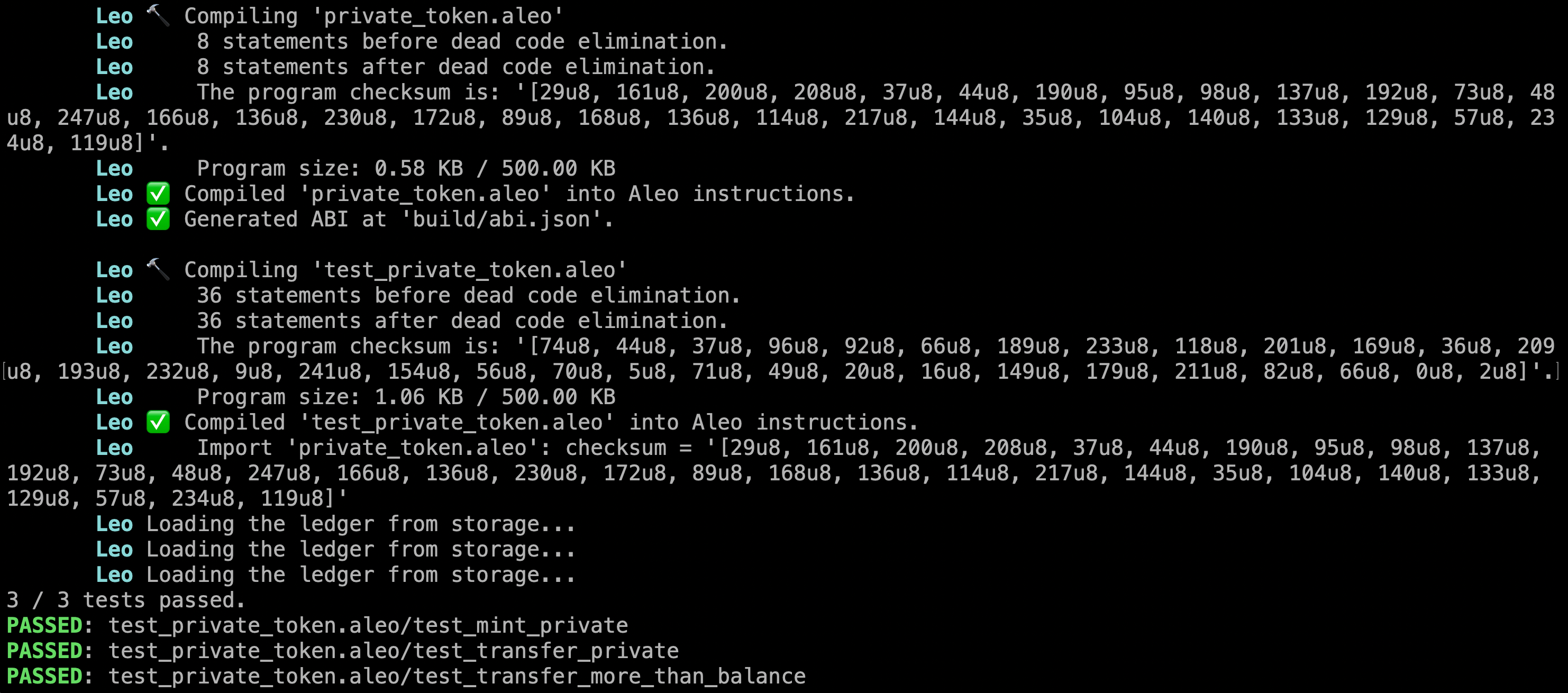
A few things to notice about the test file:
import private_token.aleo;brings the main program into scope- Types and functions use the full path:
private_token.aleo::Token,private_token.aleo::mint_private() - In
test_transfer_private, we useself.signeras the minting address because the VM requires that input records belong to the transaction signer @should_failtells Leo that the test is expected to fail. If the function completes without error, the test itself fails- Every program (including test programs) needs a constructor. We use
@noupgradehere to keep things simple
You can filter tests by name:
leo test mint
This only runs tests with "mint" in the name.
Deploying to Aleo Testnet
With the program compiling and tests passing, it's time to deploy.
Get Testnet Credits
Visit the Aleo faucet and request testnet credits for your account address.
How to find your Aleo address
Run leo account import with the private key from your .env:
leo account import APrivateKey1zkp...
This prints your address, view key, and private key. Copy the address.
Choose a Program Name
Your program name must be unique across the entire network. If private_token.aleo is already taken, update the name in both src/main.leo and program.json. Names shorter than 10 characters incur a namespace fee that increases as the name gets shorter, similar to how short domain names cost more. Names with 10 or more characters have no namespace fee.
Deploy
leo deploy --broadcast
Leo will show you a fee breakdown before asking for confirmation:
| Fee component | What it covers |
|---|---|
| Storage | 1 millicredit per byte of program data |
| Synthesis | Proportional to circuit complexity (num_variables + num_constraints) |
| Namespace | Extra cost for program names under 10 characters (0 for 10+ character names) |
| Priority | Optional tip for faster inclusion (defaults to 0) |
After confirmation, Leo broadcasts the deployment transaction and monitors the network for up to 12 blocks to confirm inclusion.
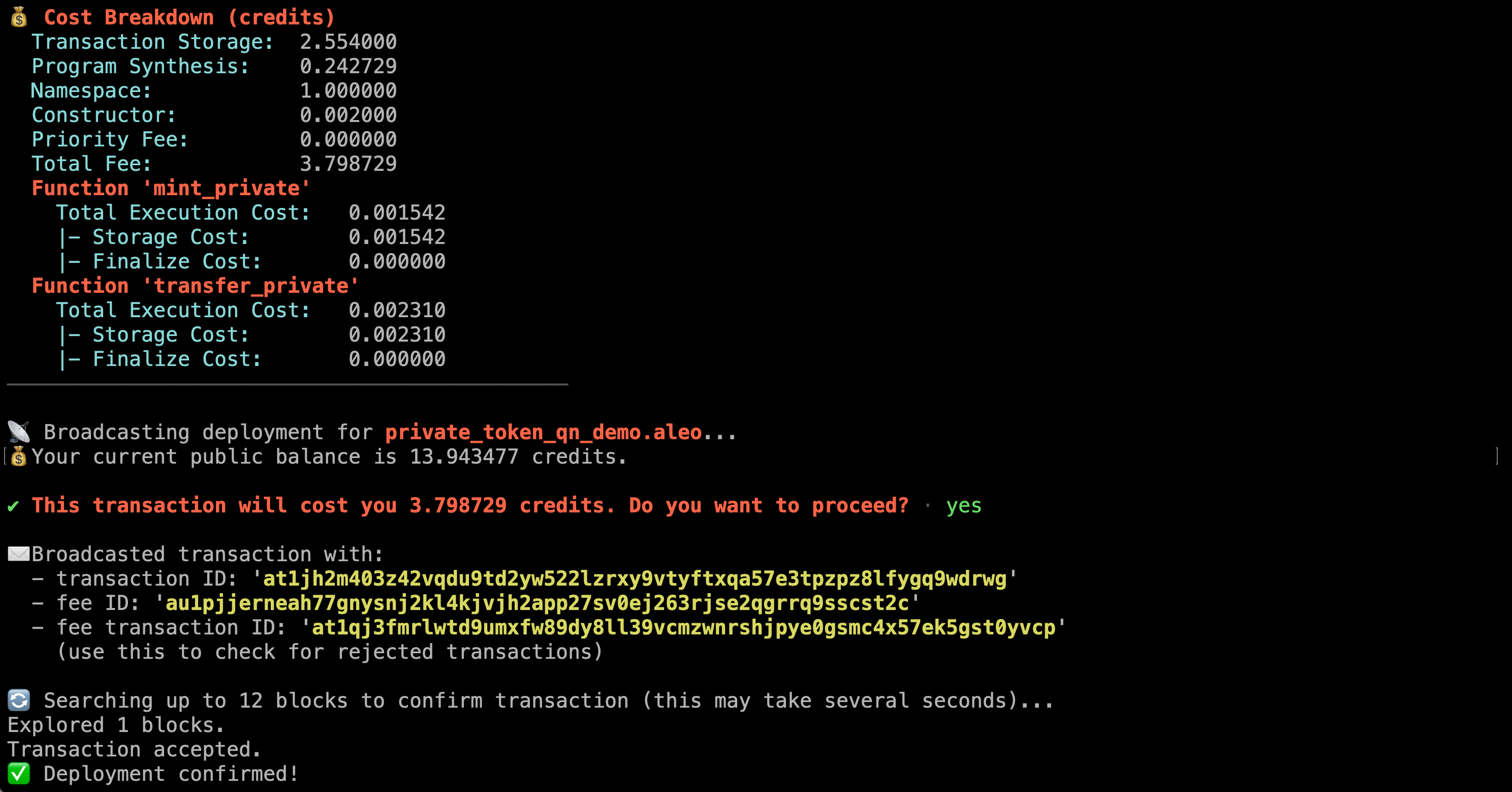
You can verify the deployment on the Aleo Explorer.
Executing Private Transactions
With the program deployed, let's actually use it. Every step below runs offchain on your machine, the network only sees a proof.
Mint Tokens
leo execute mint_private <RECEIVER_ADDRESS> 1000u64 --broadcast
Replace <RECEIVER_ADDRESS> with your Aleo address. This creates a Token record encrypted to the receiver. The transaction goes onchain, but the record contents (owner, amount) are encrypted. Nobody watching the chain can tell what was minted or to whom.
Leo prints the output record after execution. It looks like this:
{
  owner: aleo1abc...def.private,
  amount: 1000u64.private,
  _nonce: 6068899261705353026606683251009719039686976057706338283793929594435531277185group.public,
  _version: 1u8.public
}
The owner and amount fields are marked .private, meaning they're encrypted on the ledger. Save the full record, because you'll need to pass it as input to transfer_private.
Transfer Tokens
leo execute transfer_private "{ owner: aleo1abc...def.private, amount: 1000u64.private, _nonce: 6068...185group.public, _version: 1u8.public }" <RECEIVER_ADDRESS> 300u64 --broadcast
Replace the record with the full output from your mint step, wrapped in quotes. The entire { owner: ..., amount: ..., _nonce: ..., _version: ... } block is a single argument. This consumes your existing record and creates two new ones: 300 tokens for the receiver and 700 for you (the updated amount).
Here's what the network sees: a valid proof. That's it. No sender address, no receiver address, no amount. The validators confirm the math checks out without knowing what the math is about.
What's Visible Onchain
This is the point of the whole exercise. Here's what you see locally in your terminal after the transfer:
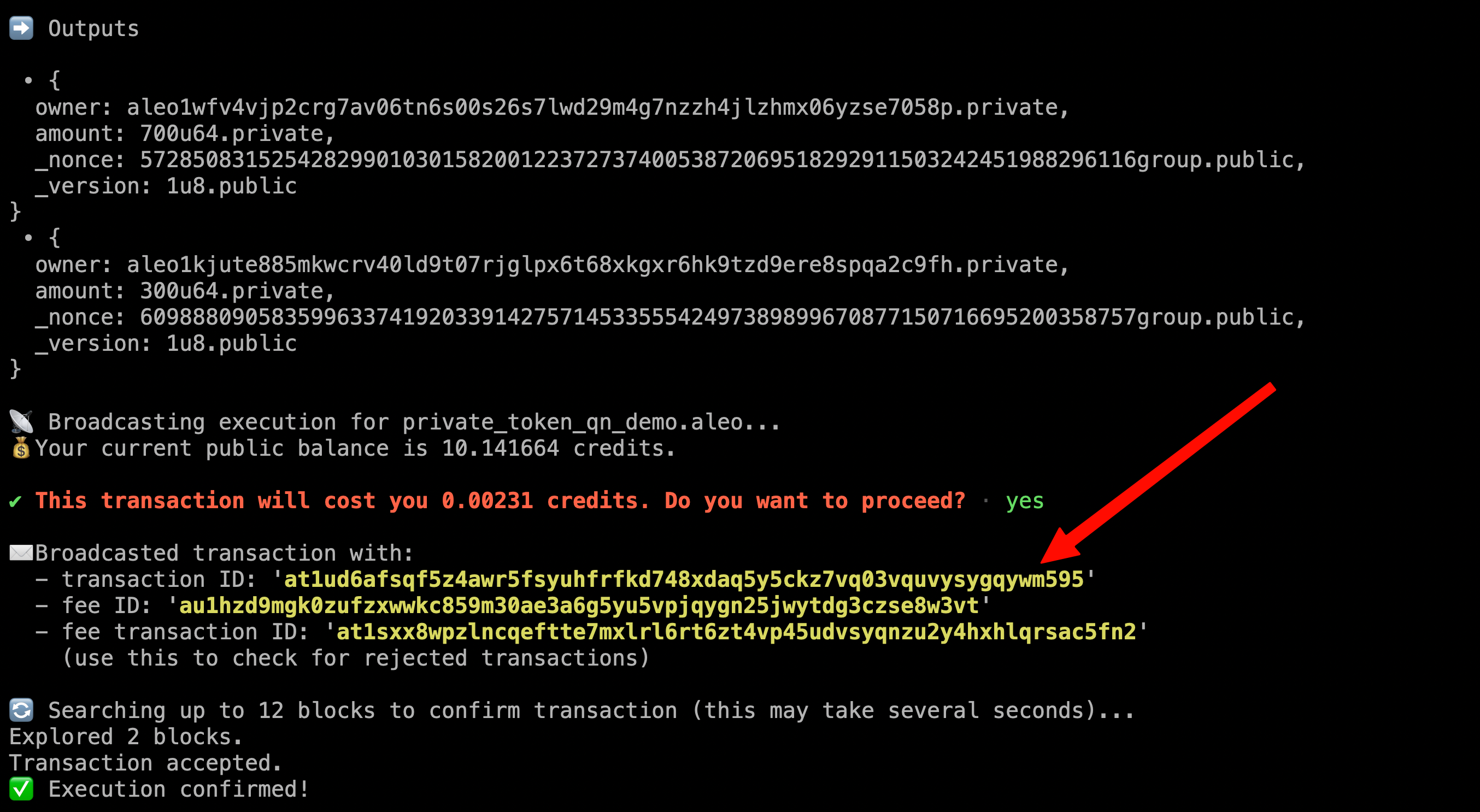
Your terminal shows both output records (300 tokens to the receiver, 700 back to you) and a transaction ID. You know exactly what happened.
Now take that transaction ID and search for it on the Aleo Explorer. The overview tab confirms the transaction landed onchain:
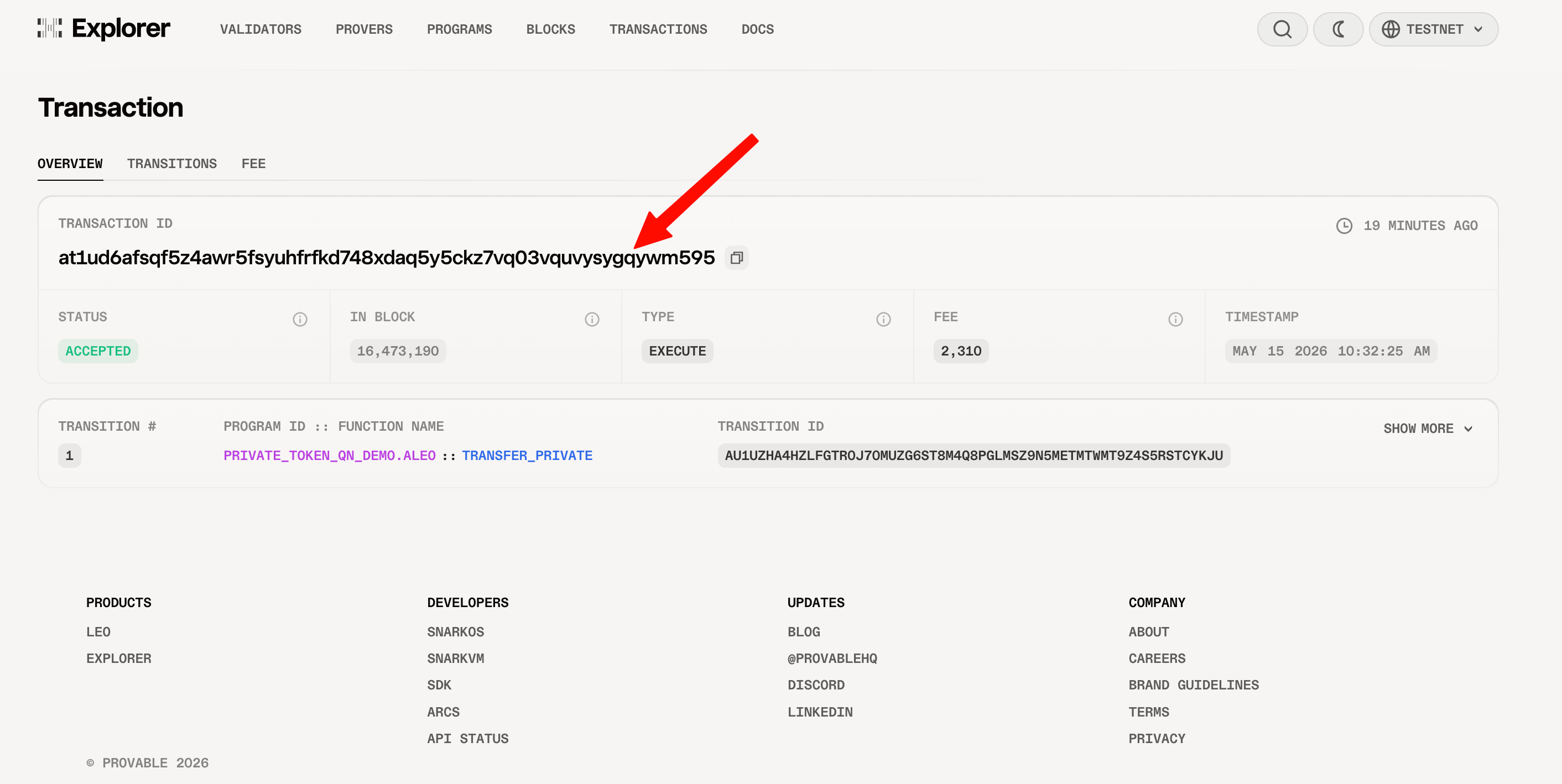
Same transaction ID, confirmed on the network. But click the transaction tab:
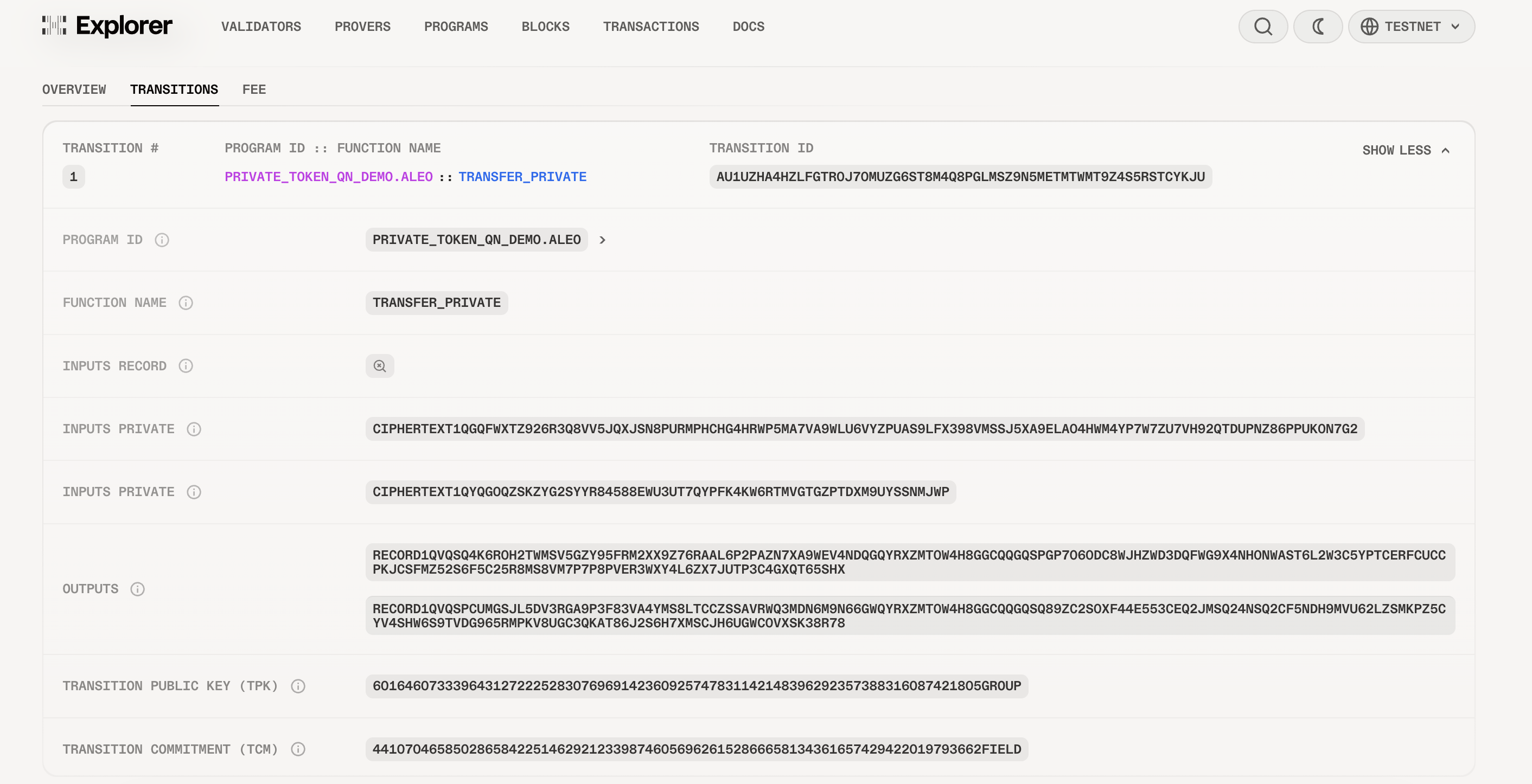
The inputs and outputs are encrypted. No sender, no receiver, no amounts. The validators confirmed the proof was valid without knowing what the transfer was about.
Compare this to a standard EVM token transfer where the sender, receiver, amount, and full transaction history are readable by anyone.
Conclusion
We went from an empty project to a deployed private token on Aleo testnet. The program has two functions: mint_private creates tokens, transfer_private moves them. All state lives in encrypted records. Nothing about the token balances or transfer history is visible onchain.
This is a minimal example, but it shows the core pattern. A production token would add public balances (using mappings and final blocks), conversion functions to move between public and private, and access controls on minting. The intro guide covers how mappings and final blocks work if you want to extend this further.
For cross-program calls, composed Futures, and more advanced patterns, check the Aleo Developer Documentation and leo-examples repo.
Frequently Asked Questions
How much does it cost to deploy a Leo program on Aleo?
Deployment fees have three components: a storage cost of 1 millicredit per byte of program data, a synthesis cost proportional to the circuit complexity (based on the number of variables and constraints), and a namespace fee for program names shorter than 10 characters. Priority fees are optional and default to 0. The Leo CLI shows you the full cost breakdown before you confirm deployment.
What is the difference between leo run and leo execute?
leo run compiles and executes a function locally without generating a proof. It's useful for quick testing during development. leo execute does the same local execution but also synthesizes the circuit and generates a zk-SNARK proof, which is what you need for deployment and onchain execution.
Can I update a deployed Leo program on Aleo?
Yes, if the program was deployed as upgradable, you can use the leo upgrade command to deploy a new version. The upgrade replaces the program bytecode onchain while keeping the same program name and address.
Why can't I see my token balance on a block explorer?
Private tokens use records, not public mappings. Records are encrypted on the ledger and only the owner can decrypt them with their view key. Block explorers can only show public state (mappings), so private token balances are invisible to them. You can only see your own records locally through the Leo CLI.