
28 min read
Overview
If you are building with USDC on Arc, an open, Layer-1 blockchain designed for reliable value exchange at internet scale built by Circle, you may need a way to track every transfer as it happens. You could poll the chain with eth_getLogs and manage your own database, but handling historical data, new blocks, retries, and duplicate events can quickly become difficult.
In this guide, we will show you how to use Quicknode Streams to index Arc USDC movements and send them to PostgreSQL. You will create a Stream that watches for USDC transfers, store the results in a database, and verify that the data matches what is onchain.
By the end, you will have a simple foundation for building tools such as payment activity dashboards, transaction reporting, or USDC monitoring workflows on Arc.
Let's get started!
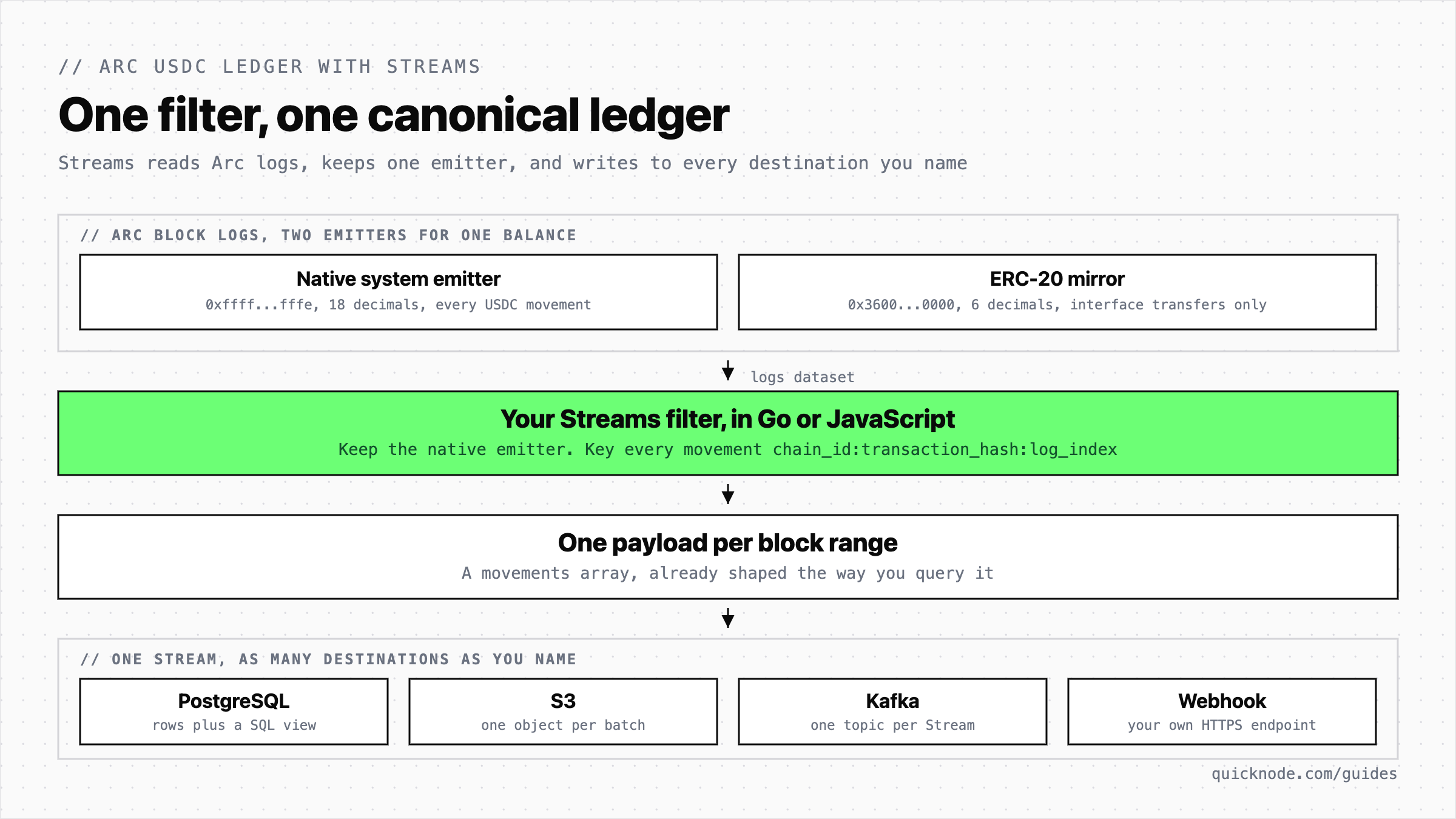
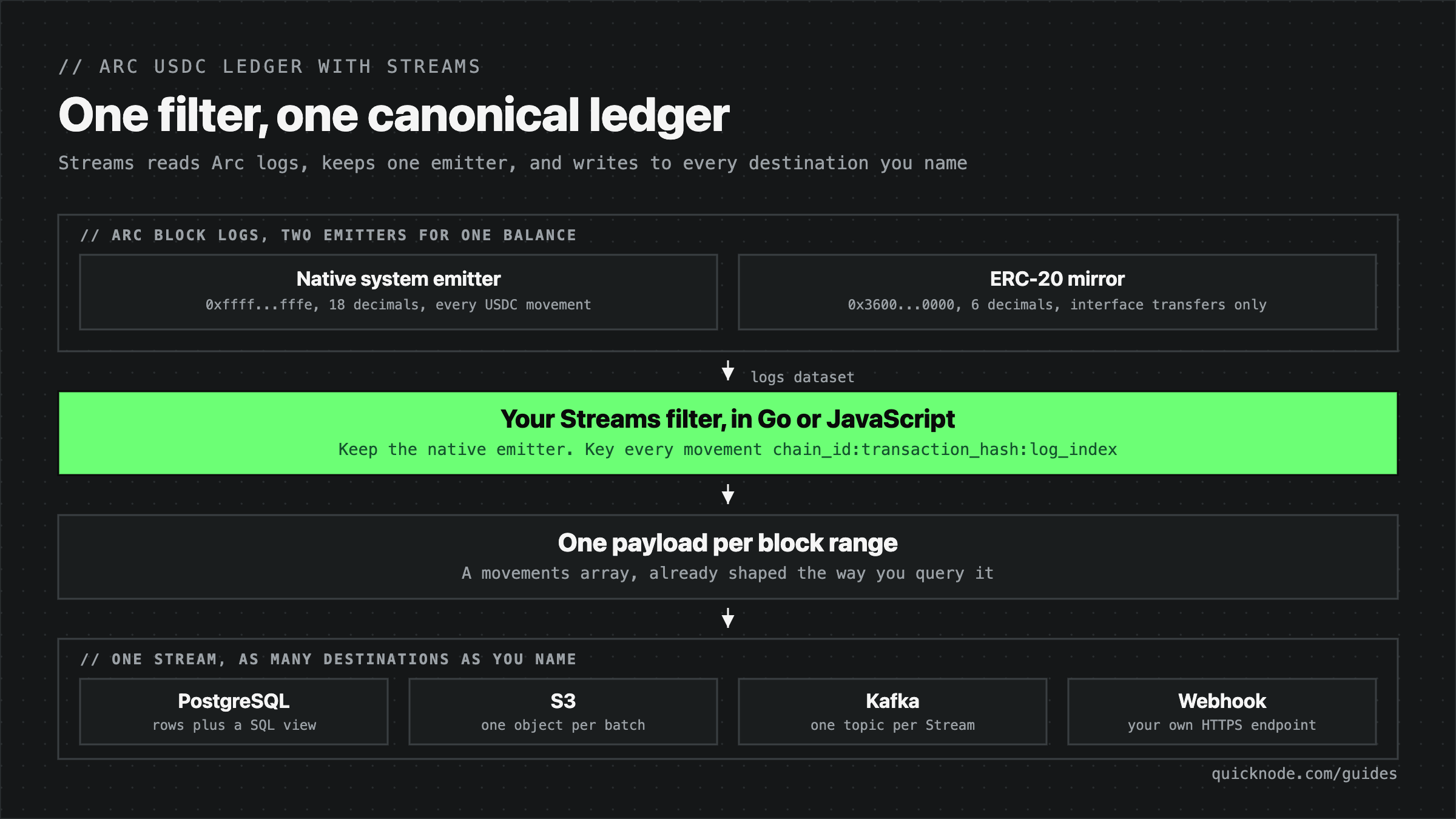
- One filter and one destination replace the indexing loop. Streams runs your JavaScript against every block and writes the result straight into PostgreSQL, so there is no
eth_getLogspagination, noeth_subscribereconnect handling, and no backfill-to-live handoff to write. - Pick one emitter, not two. Arc's EIP-7708 native system emitter at
0xfffffffffffffffffffffffffffffffffffffffelogs every USDC movement in 18 decimals. The 6-decimal ERC-20 mirror is a second view of the same balance, so indexing both double counts. - Skip the reorg machinery. Arc has deterministic finality, so a block that lands is irreversible. You index at the tip with no confirmation delay and no rollback code.
- One filter, multiple destinations. A single Stream can write the same filtered payload to several destinations at once, so PostgreSQL, S3, Kafka, and a webhook all read from one run.
What You Will Do
- Build an Arc USDC indexer with Quicknode Streams
- Capture native USDC movements without managing polling or WebSocket connections
- Avoid double-counting Arc's ERC-20 USDC mirror
- Store indexed movements in PostgreSQL and query them through a SQL view
- Verify your results against
eth_getLogs
What You Will Need
- A Quicknode account with Streams enabled on your plan
- Any PostgreSQL 15 or newer database that Quicknode can reach over the public internet, with SSL enabled.
security_invokerviews, used later in this guide, need 15 or newer. Supabase gives you one in a few minutes, and every SQL statement here is plain PostgreSQL that runs anywhere psql, or any SQL client that can reach that databasejq, used to read JSON output from the CLI commands below- (Optional) The Quicknode CLI (
qn), authenticated withqn auth login. Creating and testing the Stream has a dashboard path first, so the CLI is a convenience there - (Optional) The Supabase CLI, only if you create the database from the terminal rather than the dashboard
- Basic JavaScript, including
BigIntarithmetic, and familiarity with EVM event logs (topics, indexed parameters, and ERC-20Transferencoding)
Choose the Right USDC Emitter on Arc
Arc exposes USDC transfers from two emitters. The native system emitter is the source of truth, because it records every native USDC movement in 18 decimals. Arc's ERC-20 USDC interface contract at 0x3600000000000000000000000000000000000000 mirrors some of those movements in 6 decimals.
If you index both emitters, some transfers appear twice. If you index only the ERC-20 interface, you miss native transfers that never use that interface. For a complete ledger, filter for the native system emitter:
0xfffffffffffffffffffffffffffffffffffffffe
Both emitters use the standard ERC-20 Transfer event, topic 0xddf252ad1be2c89b69c2b068fc378daa952ba7f163c4a11628f55a4df523b3ef, so filtering by the event topic alone is not enough. The emitter address is what tells the two apart.
The transaction below shows why this matters. It contains two real native USDC movements, one mirrored ERC-20 event, and one unrelated token transfer. It is Arc mainnet transaction 0xf5b7b6680a390bac7864f99d204828c33cd4ec25934319e2ac211ef138a10d31 in block 19051680, one swap in which a wallet spends 2 USDC through a router and receives a different token back:
| Log index | Emitter | Topic | Decimals | Raw value | What it is |
|---|---|---|---|---|---|
| 0 | 0xffff...fffe | Transfer | 18 | 2000000000000000000 | Native system emitter. The wallet sends 2 USDC to the router |
| 1 | 0x86b9...4bb0 | Transfer | token's own | 65553266303084464313943 | A different ERC-20 token, not USDC at all |
| 2 | 0xffff...fffe | Transfer | 18 | 2000000000000000000 | Native system emitter. The router forwards the same 2 USDC to the pool |
| 3 | 0x3600...0000 | Transfer | 6 | 2000000 | ERC-20 mirror of log 2 |
| 4 | 0x9651...0811 | Swap | n/a | n/a | The pool's own swap event |
Two USDC movements happened. Count them four different ways and only one answer is correct:
| Match rule | Count | Verdict |
|---|---|---|
Transfer topic only | 4 | Wrong. Log 1 is a different token |
Transfer topic on both USDC emitters | 3 | Wrong. Log 3 repeats log 2 |
Transfer topic on the ERC-20 mirror only | 1 | Wrong. Log 0 has no mirror |
Transfer topic on the native emitter only | 2 | Correct |
Circle's EVM differences reference states the rule directly: the system emitter log uses 18 decimals and is distinct from the ERC-20 USDC contract's own 6-decimal Transfer, so match on the emitter address to avoid counting the same movement twice.
Note also that the two native logs sit at index 0 and index 2, not 0 and 1. Log 1 belongs to another contract. Log indexes count every log in the receipt, so the native ones are never contiguous. Read the logIndex field on each log. Never number the matches yourself.
Keeping the native emitter, rather than the mirror, buys two things:
- Complete coverage. The native emitter logs every movement of the native balance: plain sends with empty calldata, contract endowments, and the precompile-backed mint, burn, and transfer operations. The ERC-20 mirror only appears when the movement went through the interface contract. Log 0 in the table above is exactly that case. It moves 2 USDC and has no mirror log anywhere in the receipt. A mirror-only indexer misses it.
- One scale. Every native log uses 18 decimals, so normalization is a single constant rather than a per-emitter lookup.
Mints and burns need no special dataset. They are ordinary Transfer logs where one side is the zero address: from is 0x0000000000000000000000000000000000000000 for a mint, to is the zero address for a burn. Arc mainnet block 19035885 carries two mints in one transaction, at native log indexes 4 and 7. Block 19029010 carries a burn of 0.5 USDC at native log index 16. The filter classifies all three types from the addresses alone.
Identify Each Movement by Log Index
A canonical ledger needs a key that is unique per movement and stable across replays. On Arc, that key is:
canonical_id = <chain_id>:<transaction_hash>:<log_index>
A transaction can contain more than one USDC movement. The transaction hash alone cannot separate them, and neither can the sender, the recipient, or the amount. The filter uses chain_id:transaction_hash:log_index so each movement has a stable, unique ID. You will use that ID again when you reconcile the ledger.
For the same reason, order the ledger by block number and then log index, never by timestamp. Arc blocks are sub-second, so many movements share a timestamp and a timestamp sort produces a different order on every query.
Finally, note what is not in this ledger. Gas fees and block rewards move value on Arc but do not emit Transfer logs, so they never appear here. Circle's USDC system events reference puts both explicitly out of scope for these events. A ledger that must balance every wei of supply needs a separate source for those flows.
Arc's consensus provides sub-second deterministic finality: a block that lands is irreversible. That removes the two settings most EVM indexers need. This guide runs with fix_block_reorgs: 0 and keep_distance_from_tip: 0, indexes at the tip with no confirmation delay, and adds no rollback logic. On a probabilistic chain you would raise both values and read the Streams reorg handling documentation before going live.
Build the Streams Filter
Create a file named filter.js wherever you want to work. You do not need a Node.js project for this, since the file is source code that you will paste into the Streams dashboard or pass to the qn CLI.
This filter reads the logs dataset. For each delivery, Quicknode passes an object whose stream.data holds the raw event logs for the blocks in that batch, and whose stream.metadata carries the network name and the batch's block range. Raw logs already contain every field this ledger needs: address, topics, data, blockNumber, transactionHash, logIndex, and (on Arc) blockTimestamp and transactionIndex.
Streams also offers decodeEVMReceipts, a helper that decodes receipts against ABIs you supply and hands back named fields. It is the right tool when you need receipt-level context, such as the transaction status or several different events correlated inside one receipt. This guide does not use it. A Transfer log has a fixed shape (three topics and one 32-byte data word), decoding it by hand is a few lines, and the logs dataset is lighter than block-with-receipts.
Let's build filter.js in three parts:
- Constants and small decoding helpers for addresses,
uint256values, and 18-decimal formatting normalizeLog, which validates one log and turns it into a canonical movement rowmain(stream), which walks the batch and returns a single object for the destination
Define the Constants and Decoding Helpers
Start with the values that define the selection rule, then the helpers that turn hex into strings.
// Quicknode Streams JavaScript filter for Arc's EIP-7708 native USDC events.
// Dataset: logs

const NATIVE_USDC_EMITTER = '0xfffffffffffffffffffffffffffffffffffffffe';
const TRANSFER_TOPIC =
  '0xddf252ad1be2c89b69c2b068fc378daa952ba7f163c4a11628f55a4df523b3ef';
const ZERO_ADDRESS = '0x0000000000000000000000000000000000000000';
const USDC_DECIMALS = 18;
const CHAIN_ID = '5042';
const FILTER_VERSION = '1.0.0';
const BYTES32_PATTERN = /^0x[0-9a-fA-F]{64}$/;

// stream.data nests logs differently across datasets and batch sizes.
// Walk the structure and collect anything that looks like an event log.
function collectLogs(value, output) {
  if (Array.isArray(value)) {
    for (const item of value) collectLogs(item, output);
    return;
  }

  if (
    value &&
    typeof value === 'object' &&
    typeof value.address === 'string' &&
    Array.isArray(value.topics) &&
    typeof value.data === 'string'
  ) {
    output.push(value);
  }
}

function topicToAddress(topic) {
  if (typeof topic !== 'string' || !BYTES32_PATTERN.test(topic)) return null;
  return `0x${topic.slice(-40).toLowerCase()}`;
}

function hexToDecimalString(value) {
  if (typeof value !== 'string' || !/^0x[0-9a-fA-F]+$/.test(value)) return null;

  try {
    return BigInt(value).toString(10);
  } catch {
    return null;
  }
}

function uint256ToDecimalString(value) {
  if (typeof value !== 'string' || !BYTES32_PATTERN.test(value)) return null;
  return hexToDecimalString(value);
}

// String math only. A single USDC movement can exceed Number.MAX_SAFE_INTEGER
// at 18 decimals, so parseFloat would silently round the ledger.
function formatUnits(rawValue, decimals) {
  const value = BigInt(rawValue);
  const negative = value < 0n;
  const digits = (negative ? -value : value)
    .toString(10)
    .padStart(decimals + 1, '0');
  const whole = digits.slice(0, -decimals);
  const fraction = digits.slice(-decimals).replace(/0+$/, '');
  const formatted = fraction ? `${whole}.${fraction}` : whole;

  return negative ? `-${formatted}` : formatted;
}

function unixSecondsToIso(value) {
  if (value === null) return null;

  const seconds = Number(value);
  if (!Number.isSafeInteger(seconds) || seconds < 0) return null;

  try {
    return new Date(seconds * 1000).toISOString();
  } catch {
    return null;
  }
}
FILTER_VERSION is worth keeping even though nothing enforces it. Every stored row carries it, so when you change the decoding rules you can tell which rows came from which version of this file and re-query or backfill only the affected range. CHAIN_ID stays a constant because a Stream is bound to exactly one network at creation time.
Normalize One Log into a Movement
normalizeLog is where the selection rule lives. It rejects anything that is not a native system Transfer, validates every field it is about to store, and returns null rather than a partially decoded row.
function normalizeLog(log, network) {
  if (log.removed === true) return null;
  if (log.address.toLowerCase() !== NATIVE_USDC_EMITTER) return null;
  if (log.topics.length !== 3 || log.topics[0]?.toLowerCase() !== TRANSFER_TOPIC) {
    return null;
  }

  const fromAddress = topicToAddress(log.topics[1]);
  const toAddress = topicToAddress(log.topics[2]);
  const amountRaw = uint256ToDecimalString(log.data);
  const blockNumber = hexToDecimalString(log.blockNumber);
  const transactionIndex = hexToDecimalString(log.transactionIndex);
  const logIndex = hexToDecimalString(log.logIndex);
  const blockTimestampUnix = hexToDecimalString(log.blockTimestamp);

  if (
    !fromAddress ||
    !toAddress ||
    amountRaw === null ||
    blockNumber === null ||
    logIndex === null ||
    typeof log.transactionHash !== 'string' ||
    !BYTES32_PATTERN.test(log.transactionHash) ||
    (log.blockHash != null &&
      (typeof log.blockHash !== 'string' || !BYTES32_PATTERN.test(log.blockHash)))
  ) {
    return null;
  }

  let movementType = 'transfer';
  if (fromAddress === ZERO_ADDRESS) movementType = 'mint';
  if (toAddress === ZERO_ADDRESS) movementType = 'burn';

  const transactionHash = log.transactionHash.toLowerCase();

  return {
    chain_id: CHAIN_ID,
    network,
    block_number: blockNumber,
    block_hash:
      typeof log.blockHash === 'string' ? log.blockHash.toLowerCase() : null,
    block_timestamp_unix: blockTimestampUnix,
    block_timestamp: unixSecondsToIso(blockTimestampUnix),
    transaction_hash: transactionHash,
    transaction_index: transactionIndex,
    log_index: logIndex,
    from_address: fromAddress,
    to_address: toAddress,
    amount_raw: amountRaw,
    decimals: USDC_DECIMALS,
    amount_usdc: formatUnits(amountRaw, USDC_DECIMALS),
    movement_type: movementType,
    source_emitter: 'native_system_eip7708',
    emitter_address: NATIVE_USDC_EMITTER,
    event_signature: TRANSFER_TOPIC,
    filter_version: FILTER_VERSION,
    canonical_id: `${CHAIN_ID}:${transactionHash}:${logIndex}`,
  };
}
Three checks carry most of the weight. The address comparison is what excludes every 6-decimal mirror log. The topics.length !== 3 check rejects any event that happens to share the Transfer topic but has a different shape, so a malformed log cannot be decoded as a movement. Keeping amount_raw as an exact decimal string alongside the formatted amount_usdc means the raw uint256 survives into the database unrounded, and the human-readable value is there for queries that do not need full precision.
Return One Object per Batch
The final part walks the batch and shapes the delivery.
function main(stream) {
  const logs = [];
  collectLogs(stream?.data || [], logs);

  // The Stream configuration binds this filter to one network. Keep chain ID
  // as an environment-specific constant and trust the supplied network label.
  const network = stream.metadata.network;

  const movements = [];
  for (const log of logs) {
    const movement = normalizeLog(log, network);
    if (movement) movements.push(movement);
  }

  if (!movements.length) return null;

  // PostgreSQL stores one row per Streams delivery range. Keep every matching
  // movement from the batch in one object; the destination's generated
  // (from_block_number, to_block_number, network) key stays idempotent.
  return {
    filter_version: FILTER_VERSION,
    network,
    batch_start_range: stream.metadata.batch_start_range ?? null,
    batch_end_range: stream.metadata.batch_end_range ?? null,
    movements,
  };
}
The return shape matters more than it looks. The PostgreSQL destination writes one row per delivery, keyed on the delivery's block range. Returning an array of movements would not produce one row per movement; it would produce one row whose data column holds that array anyway. So the filter returns the wrapper explicitly, with the range echoed into the payload, and a SQL view expands it later. collectLogs walks the payload recursively rather than reading stream.data[0], which is what keeps a 10-block batch from silently indexing only its first block.
Returning null when nothing matched means Streams delivers nothing for that range, so quiet ranges leave no empty rows behind.
Complete filter.js, copy and paste to run as-is
// Quicknode Streams JavaScript filter for Arc's EIP-7708 native USDC events.
// Dataset: logs

const NATIVE_USDC_EMITTER = '0xfffffffffffffffffffffffffffffffffffffffe';
const TRANSFER_TOPIC =
  '0xddf252ad1be2c89b69c2b068fc378daa952ba7f163c4a11628f55a4df523b3ef';
const ZERO_ADDRESS = '0x0000000000000000000000000000000000000000';
const USDC_DECIMALS = 18;
const CHAIN_ID = '5042';
const FILTER_VERSION = '1.0.0';
const BYTES32_PATTERN = /^0x[0-9a-fA-F]{64}$/;

// stream.data nests logs differently across datasets and batch sizes.
// Walk the structure and collect anything that looks like an event log.
function collectLogs(value, output) {
  if (Array.isArray(value)) {
    for (const item of value) collectLogs(item, output);
    return;
  }

  if (
    value &&
    typeof value === 'object' &&
    typeof value.address === 'string' &&
    Array.isArray(value.topics) &&
    typeof value.data === 'string'
  ) {
    output.push(value);
  }
}

function topicToAddress(topic) {
  if (typeof topic !== 'string' || !BYTES32_PATTERN.test(topic)) return null;
  return `0x${topic.slice(-40).toLowerCase()}`;
}

function hexToDecimalString(value) {
  if (typeof value !== 'string' || !/^0x[0-9a-fA-F]+$/.test(value)) return null;

  try {
    return BigInt(value).toString(10);
  } catch {
    return null;
  }
}

function uint256ToDecimalString(value) {
  if (typeof value !== 'string' || !BYTES32_PATTERN.test(value)) return null;
  return hexToDecimalString(value);
}

// String math only. A single USDC movement can exceed Number.MAX_SAFE_INTEGER
// at 18 decimals, so parseFloat would silently round the ledger.
function formatUnits(rawValue, decimals) {
  const value = BigInt(rawValue);
  const negative = value < 0n;
  const digits = (negative ? -value : value)
    .toString(10)
    .padStart(decimals + 1, '0');
  const whole = digits.slice(0, -decimals);
  const fraction = digits.slice(-decimals).replace(/0+$/, '');
  const formatted = fraction ? `${whole}.${fraction}` : whole;

  return negative ? `-${formatted}` : formatted;
}

function unixSecondsToIso(value) {
  if (value === null) return null;

  const seconds = Number(value);
  if (!Number.isSafeInteger(seconds) || seconds < 0) return null;

  try {
    return new Date(seconds * 1000).toISOString();
  } catch {
    return null;
  }
}

function normalizeLog(log, network) {
  if (log.removed === true) return null;
  if (log.address.toLowerCase() !== NATIVE_USDC_EMITTER) return null;
  if (log.topics.length !== 3 || log.topics[0]?.toLowerCase() !== TRANSFER_TOPIC) {
    return null;
  }

  const fromAddress = topicToAddress(log.topics[1]);
  const toAddress = topicToAddress(log.topics[2]);
  const amountRaw = uint256ToDecimalString(log.data);
  const blockNumber = hexToDecimalString(log.blockNumber);
  const transactionIndex = hexToDecimalString(log.transactionIndex);
  const logIndex = hexToDecimalString(log.logIndex);
  const blockTimestampUnix = hexToDecimalString(log.blockTimestamp);

  if (
    !fromAddress ||
    !toAddress ||
    amountRaw === null ||
    blockNumber === null ||
    logIndex === null ||
    typeof log.transactionHash !== 'string' ||
    !BYTES32_PATTERN.test(log.transactionHash) ||
    (log.blockHash != null &&
      (typeof log.blockHash !== 'string' || !BYTES32_PATTERN.test(log.blockHash)))
  ) {
    return null;
  }

  let movementType = 'transfer';
  if (fromAddress === ZERO_ADDRESS) movementType = 'mint';
  if (toAddress === ZERO_ADDRESS) movementType = 'burn';

  const transactionHash = log.transactionHash.toLowerCase();

  return {
    chain_id: CHAIN_ID,
    network,
    block_number: blockNumber,
    block_hash:
      typeof log.blockHash === 'string' ? log.blockHash.toLowerCase() : null,
    block_timestamp_unix: blockTimestampUnix,
    block_timestamp: unixSecondsToIso(blockTimestampUnix),
    transaction_hash: transactionHash,
    transaction_index: transactionIndex,
    log_index: logIndex,
    from_address: fromAddress,
    to_address: toAddress,
    amount_raw: amountRaw,
    decimals: USDC_DECIMALS,
    amount_usdc: formatUnits(amountRaw, USDC_DECIMALS),
    movement_type: movementType,
    source_emitter: 'native_system_eip7708',
    emitter_address: NATIVE_USDC_EMITTER,
    event_signature: TRANSFER_TOPIC,
    filter_version: FILTER_VERSION,
    canonical_id: `${CHAIN_ID}:${transactionHash}:${logIndex}`,
  };
}

function main(stream) {
  const logs = [];
  collectLogs(stream?.data || [], logs);

  // The Stream configuration binds this filter to one network. Keep chain ID
  // as an environment-specific constant and trust the supplied network label.
  const network = stream.metadata.network;

  const movements = [];
  for (const log of logs) {
    const movement = normalizeLog(log, network);
    if (movement) movements.push(movement);
  }

  if (!movements.length) return null;

  // PostgreSQL stores one row per Streams delivery range. Keep every matching
  // movement from the batch in one object; the destination's generated
  // (from_block_number, to_block_number, network) key stays idempotent.
  return {
    filter_version: FILTER_VERSION,
    network,
    batch_start_range: stream.metadata.batch_start_range ?? null,
    batch_end_range: stream.metadata.batch_end_range ?? null,
    movements,
  };
}
Test the Filter Before Creating a Stream
Both test paths below are read-only. They run the filter against a real historical block and show you the output without creating a Stream, touching a database, or spending anything beyond the test call. Run one before every configuration change, and always after editing the emitter address or topic.
- Quicknode Dashboard
- Quicknode CLI
- Open the Streams dashboard and select New Stream.
- Set Network to Arc Mainnet, then set Dataset to Logs on the next page.
- Select Customize your payload and paste the full contents of
filter.js. - Enter
19051680as the test block and run the filter. - Confirm the output before continuing. Do not save or activate the Stream yet. Leave the draft open if you plan to use the dashboard path in the next section, or discard it if you plan to use the CLI.
Run this from the directory holding filter.js, or pass a path to --filter-file:
qn stream test-filter \
  --network arc-mainnet \
  --dataset logs \
  --block 19051680 \
  --filter-file filter.js \
  --filter-language javascript \
  --format json
Either way, block 19051680 should return one object containing 2 movements, both transfers, with 2 distinct canonical_id values at log indexes 0 and 2. That is the swap from the emitter table earlier in this guide. The block holds four Transfer logs. A topic-only filter would report four movements, and a two-emitter filter would report three.
Two more blocks are worth running while the filter is fresh:
| Block | Expected result |
|---|---|
19051680 | 2 transfers at log indexes 0 and 2, 2 distinct canonical IDs |
19035885 | 2 mint rows at log indexes 4 and 7, from_address set to the zero address |
19029010 | 6 movements, 5 transfers and one burn at log index 16, to_address set to the zero address |
If any of these returns null, the emitter address or the topic is wrong. Fix the filter before creating a Stream.
Prepare a PostgreSQL Destination
Streams delivers to several destination types, including S3, Kafka, and webhooks. This guide uses PostgreSQL because it makes the ledger queryable with plain SQL, and because its range key is what makes replays safe later on. The filter you just wrote works with any of them.
Streams connects to PostgreSQL directly over the network, so the requirements are the same for a managed provider, a container, or a self-hosted server:
| Requirement | Notes |
|---|---|
| Host and port | Reachable from the public internet over IPv4. Port 5432 unless your provider says otherwise |
| Database and schema | Any database. public schema unless you set another |
| User | Needs INSERT and UPDATE on the destination table. See the note below on scoping this down |
| SSL | Enable it. This connection carries your data and your credentials |
| Version | PostgreSQL 15 or newer. security_invoker views were added in 15 |
If you already have a database, skip ahead. If you want one in a couple of minutes, Supabase gives you a PostgreSQL 17 instance with a public connection string. These commands use the Supabase CLI. Take <SUPABASE_ORG_ID> from supabase orgs list, and <SUPABASE_PROJECT_REF> from the project URL that supabase projects create prints:
supabase login
supabase projects create arc-usdc-streams \
  --org-id <SUPABASE_ORG_ID> \
  --region eu-central-1

supabase link --project-ref <SUPABASE_PROJECT_REF>
You can also create the project from the Supabase dashboard. Choose a region near your Stream's region to keep write latency low.
Supabase's direct database host, db.<project-ref>.supabase.co, resolves to IPv6 only unless you buy Supabase's IPv4 add-on. Streams cannot reach it, and the Stream terminates as soon as you activate it. Use the session pooler instead, which is IPv4.
In Supabase, open Connect, select Direct and then Session pooler, and copy these values into the destination:
| Field | Value |
|---|---|
| Host | The pooler host, exactly as Connect shows it. For example aws-0-eu-central-1.pooler.supabase.com |
| Port | 5432, the session pooler port. Port 6543 is the transaction pooler, which is the wrong mode here |
| Database | postgres |
| Username | postgres.<project-ref>, including the project reference |
| Password | Your database password |
| SSL mode | require |
The pooler username carries the project reference. A bare postgres username fails against the pooler.
Set the connection as standard PostgreSQL variables. psql reads them on its own, so no command below carries a credential. The last four lines prompt for the password without echoing it:
export PGHOST="<pooler-host>"
export PGPORT=5432
export PGDATABASE=postgres
export PGUSER="postgres.<project-ref>"
export PGSSLMODE=require

printf 'Database password: '
read -rs PGPASSWORD
printf '\n'
export PGPASSWORD
export PGPASSWORD=hunter2 writes the password into ~/.zsh_history or ~/.bash_history in plain text, and it stays there. The read -rs form prompts for it instead and records nothing. Passing PG* variables rather than a postgresql:// URL also saves you from percent-encoding a password that contains @, :, /, #, or ?.
Create the Destination Table
Create the table before creating the Stream. The PostgreSQL destination reference expects it to exist, and creating it yourself shows you the exact schema you are committing to.
The key is a block range, not a single block, because one row stores one delivery:
CREATE TABLE arc_usdc_movement_batches (
  from_block_number bigint  NOT NULL,
  to_block_number   bigint  NOT NULL,
  network           varchar NOT NULL,
  stream_id         uuid    NOT NULL,
  data              jsonb   NOT NULL,
  PRIMARY KEY (from_block_number, to_block_number, network)
);
data holds whatever your filter returned. stream_id records which Stream wrote the row. With dataset_batch_size: 10, each delivery contains up to 10 blocks. The destination stores the delivery's start and end block numbers as its primary key, which is what makes retries and replays safe.
Create it now:
psql -v ON_ERROR_STOP=1 -c "
CREATE TABLE arc_usdc_movement_batches (
  from_block_number bigint  NOT NULL,
  to_block_number   bigint  NOT NULL,
  network           varchar NOT NULL,
  stream_id         uuid    NOT NULL,
  data              jsonb   NOT NULL,
  PRIMARY KEY (from_block_number, to_block_number, network)
);"
Create the Arc USDC Stream
The block range is yours. An explicit start_range and end_range gives you a bounded dataset you can reconcile exactly, which is why this guide uses one. Omit end_range instead and the same Stream backfills from your start block, then continues into live delivery with no handoff to write. The reference run in this guide used Arc mainnet blocks 19050001 through 19051000, inclusive.
This filter expects Arc's current EIP-7708 Transfer event format. Before backfilling older ranges, confirm that your start block is after the relevant Arc upgrade. Test the filter against a block near your chosen start range before creating the Stream.
Use one of the two paths below, not both. Each creates one Stream over your range.
- Quicknode Dashboard
- Quicknode CLI
- Open the Streams dashboard and select New Stream.
- On the first page, set Network to Arc Mainnet, set the start and end blocks to your chosen range, and leave both Reorg handling and Latest block delay as unspecified because of Arc's deterministic finality.
- On the second page, set Dataset to Logs and the batch size to
10. Turn elastic batching off, so every batch covers exactly 10 blocks. - Still on the second page, select Customize your payload, paste
filter.js, and test it against a block from your range. - On the third page, choose PostgreSQL and enter the host, port, database, user, password, and table name
arc_usdc_movement_batches. Enable SSL, then select Check Connection. - Save and activate the Stream.
Write the configuration to a file. Every value below is an example. Read each field against your own range, database, and region before you create the Stream:
{
  "name": "arc-usdc-movements",           // Any label. It appears in the dashboard
  "network": "arc-mainnet",               // The Streams network slug
  "dataset": "logs",                      // The filter reads Transfer logs
  "filter_function": "<BASE64_ENCODED_FILTER>", // filter.js, base64 encoded
  "filter_language": "javascript",        // Go is the other option
  "region": "europe_central",             // Pick the region closest to your database
  "start_range": 19050001,                // First block. Yours will differ
  "end_range": 19051000,                  // Last block. Omit it to continue into live delivery
  "dataset_batch_size": 10,               // Blocks per delivery, and per table row
  "elastic_batch_enabled": false,         // Off, so every batch is exactly 10 blocks
  "destination": "postgres",              // s3, kafka, snowflake, and webhook also work
  "fix_block_reorgs": 0,                  // Arc has deterministic finality
  "keep_distance_from_tip": 0,            // So index at the tip with no delay
  "destination_attributes": {
    "host": "<POSTGRES_HOST>",
    "port": 5432,
    "database": "<POSTGRES_DATABASE>",
    "username": "<POSTGRES_USERNAME>",
    "password": "<POSTGRES_PASSWORD>",    // Inject at run time. Never commit it
    "sslmode": "require",                 // Always require SSL
    "table_name": "arc_usdc_movement_batches",
    "max_retry": 3,                       // Delivery retries before Streams gives up
    "retry_interval_sec": 1
  },
  "status": "paused"                      // Create it paused, inspect it, then activate
}
Inject the filter and the password into the config at run time, then create the Stream paused so you can inspect it before any data moves. This keeps arc-usdc-stream.json free of secrets, so you can commit the template:
# macOS
jq --arg filter "$(base64 -i filter.js | tr -d '\n')" --arg password "$PGPASSWORD" \
  '.filter_function = $filter | .destination_attributes.password = $password' \
  arc-usdc-stream.json > arc-usdc-stream.local.json

# Linux (GNU coreutils)
jq --arg filter "$(base64 -w0 filter.js)" --arg password "$PGPASSWORD" \
  '.filter_function = $filter | .destination_attributes.password = $password' \
  arc-usdc-stream.json > arc-usdc-stream.local.json

chmod 600 arc-usdc-stream.local.json

qn stream create \
  --stream-config-file arc-usdc-stream.local.json \
  --format json \
  --no-input
arc-usdc-stream.local.json holds both the filter and the database password. Add it to .gitignore and delete it once the Stream exists.
Then activate it and watch it run:
qn stream activate <STREAM_ID> --format json --no-input
qn stream show <STREAM_ID> --format json
qn stream show reports status and sequence. When status reads completed and sequence equals your end_range, every block in the range has been processed.
Leave end_range unset (or pass --end -1 on the CLI) and the same Stream backfills from your start block, then continues into live delivery when it reaches the tip. There is no handoff to write and no gap between the two phases.
A single Stream can fan out to more than one destination at once, subject to your plan. The same filtered payload can land in PostgreSQL for querying, in S3 for archival, on a Kafka topic for downstream consumers, and on a webhook for alerting, without running the filter more than once.
Expose Movements with a SQL View
The table now holds one row per delivery range, each with a movements array inside data. That is the right shape for idempotent writes and the wrong shape for querying. A view fixes that without copying any data.
CREATE OR REPLACE VIEW arc_usdc_movements
WITH (security_invoker = true) AS
SELECT
    batches.from_block_number,
    batches.to_block_number,
    batches.network,
    batches.stream_id,
    items.ordinality AS delivery_ordinal,
    (items.movement ->> 'chain_id')::bigint AS chain_id,
    (items.movement ->> 'block_number')::bigint AS block_number,
    lower(items.movement ->> 'block_hash') AS block_hash,
    to_timestamp(
        (items.movement ->> 'block_timestamp_unix')::double precision
    ) AS block_timestamp,
    lower(items.movement ->> 'transaction_hash') AS transaction_hash,
    (items.movement ->> 'transaction_index')::bigint AS transaction_index,
    (items.movement ->> 'log_index')::bigint AS log_index,
    lower(items.movement ->> 'from_address') AS from_address,
    lower(items.movement ->> 'to_address') AS to_address,
    (items.movement ->> 'amount_raw')::numeric(78, 0) AS amount_raw,
    (items.movement ->> 'amount_usdc')::numeric(78, 18) AS amount_usdc,
    (items.movement ->> 'decimals')::integer AS decimals,
    items.movement ->> 'movement_type' AS movement_type,
    items.movement ->> 'source_emitter' AS source_emitter,
    lower(items.movement ->> 'emitter_address') AS emitter_address,
    items.movement ->> 'event_signature' AS event_signature,
    items.movement ->> 'filter_version' AS filter_version,
    items.movement ->> 'canonical_id' AS canonical_id,
    items.movement AS movement_data
FROM arc_usdc_movement_batches AS batches
CROSS JOIN LATERAL jsonb_array_elements(batches.data -> 'movements')
    WITH ORDINALITY AS items(movement, ordinality)
WHERE batches.data ->> 'filter_version' = '1.0.0'
  AND batches.data ->> 'network' = batches.network
  AND (items.movement ->> 'block_number')::bigint
      BETWEEN batches.from_block_number AND batches.to_block_number
  AND items.movement ->> 'network' = batches.network;
jsonb_array_elements ... WITH ORDINALITY is what turns one batch row into one row per movement, and ordinality preserves the order the filter produced. amount_raw lands in numeric(78, 0) so a full uint256 survives without rounding.
The four WHERE clauses are invariants, not filters. Each one asserts something the filter promised: the payload came from the expected filter version, the envelope network matches the payload network, every movement's block number falls inside the delivery range it was delivered in, and every movement carries the same network label as its envelope. If a future filter change breaks one of those promises, the affected rows disappear from the view instead of quietly corrupting your totals, and a reconciliation count catches it.
Note the filter_version literal in that first clause. When you bump FILTER_VERSION in the filter, update the view to match, or widen it to an IN list while both versions coexist in the table.
Add one index. The primary key already covers range lookups, but stream_id does not appear in it, and every replay audit and cleanup query filters on exactly that column:
CREATE INDEX IF NOT EXISTS arc_usdc_movement_batches_stream_idx
    ON arc_usdc_movement_batches (stream_id);
The filter reads blockTimestamp from the raw log and stores null when the field is absent, so block_timestamp in the view is NULL for any delivery whose dataset did not carry it. Order by block_number and log_index, as this guide does throughout, and the column is a display convenience rather than something your queries depend on.
Lock Down Database Access
Both objects are open to anything holding a connection right now. Close that before the ledger holds anything you care about.
ALTER TABLE arc_usdc_movement_batches ENABLE ROW LEVEL SECURITY;
REVOKE ALL ON TABLE arc_usdc_movement_batches FROM anon, authenticated;
REVOKE ALL ON TABLE arc_usdc_movements FROM anon, authenticated;
Run those as two statements, not one. psql -c wraps a multi-statement string in a single transaction, so on a server without the Supabase roles the failing REVOKE would roll back the ALTER TABLE alongside it and leave the table unprotected.
Enabling row level security with no policies attached means no ordinary role can read the table at all. That is the intent here: this ledger is queried by your backend through a privileged connection, not exposed directly to clients.
anon and authenticated are Supabase's roles for its automatically generated Data API. On a plain PostgreSQL server they do not exist, and each REVOKE raises role "anon" does not exist. Under ON_ERROR_STOP=1 that aborts the rest of the script, so guard them if you are not on Supabase:
DO $$
BEGIN
  REVOKE ALL ON TABLE arc_usdc_movement_batches FROM anon, authenticated;
  REVOKE ALL ON TABLE arc_usdc_movements FROM anon, authenticated;
EXCEPTION WHEN undefined_object THEN
  NULL;
END $$;
Revoke whatever public-facing roles your own deployment defines instead.
The Stream keeps writing throughout. The role you configured in the destination is the table's owner, and table owners bypass row-level security by default, so hardening does not interrupt delivery.
The reference run used the database owner, which is convenient and too broad. A destination writer only needs INSERT and UPDATE on one table. Create a dedicated role, grant it exactly that, and give it to the Stream. If you do scope the writer down, note that a non-owner role is subject to row-level security, so it needs an explicit policy permitting its writes.
Confirm the lockdown took effect:
psql -c \
  "select relname, relrowsecurity from pg_class
   where relnamespace = 'public'::regnamespace
     and relname = 'arc_usdc_movement_batches';"
Count the same range twice: once from the chain, once from the table. Call eth_getLogs for your own block range, filtered on the native emitter address and the Transfer topic, and count the results. Then count the rows in arc_usdc_movements for the same range. Those two numbers, and the count of distinct canonical_id values, all have to agree.
Expect fewer table rows than batches. The filter returns null for a range with no matching logs, so Streams delivers nothing and PostgreSQL gets no row. A gap in the stored ranges is only a problem when the chain actually had logs there.
Conclusion
You indexed Arc history into a queryable table without writing a paging loop, a reconnect handler, or an ingestion service. The filter did the shaping, the range key absorbed the replay, and the view exposed one row per movement. The Arc-specific judgment was choosing the EIP-7708 native emitter as the single source of truth and identifying each movement by its log index. Everything else is the same pattern you would use for any event on any chain Streams supports.
Next Steps
- Streams filters reference: the full filter API, including
qnLibhelpers and the Key-Value Store - Streams destinations: send the same payload to S3, Kafka, or a webhook
- Streams backfilling: how one Stream backfills history and then continues live
- Arc USDC system events reference: Circle's authoritative description of the two emitters
Frequently Asked Questions
Why use Quicknode Streams instead of indexing Arc events with eth_getLogs and eth_subscribe?
Both reach the same data, but they put a different amount of code in your hands. With eth_getLogs and eth_subscribe you own the paging logic, the result-cap splitting, the socket reconnects, the gap between where your backfill stopped and where your subscription started, and the service that keeps all of it running. Streams moves that work behind a JavaScript filter and a destination: you declare which logs matter and where rows should land, and a single Stream backfills history and then continues into live delivery with no handoff code. One Stream can also fan out to more than one destination at once, so the same filtered payload lands in PostgreSQL for querying, S3 for archival, a Kafka topic for downstream consumers, and a webhook for alerting, without running the filter more than once. The tradeoff is that filter logic runs on Quicknode rather than in your own process, so a filter change means updating the Stream.
Why index only Arc's native USDC system emitter and not the ERC-20 contract?
On Arc, native USDC and the ERC-20 USDC interface are two views of one balance, not two tokens. A transfer sent through the interface contract emits both an 18-decimal log from the native system emitter at 0xfffffffffffffffffffffffffffffffffffffffe and a 6-decimal mirror log from the interface contract, so indexing both counts every such movement twice. The native emitter is the better of the two because it also logs movements the mirror never sees, including plain native sends with empty calldata, contract endowments, and precompile-backed mint and burn operations. Arc mainnet transaction 0xf5b7b6680a390bac7864f99d204828c33cd4ec25934319e2ac211ef138a10d31 in block 19051680 shows the gap concretely: two native logs, one mirror log.
Why is log index part of the canonical ID instead of just the transaction hash?
Because one Arc transaction can emit the same movement more than once, and both occurrences are real. Arc mainnet transaction 0x0536c7e9c46308431e267eebf44e7ac29ada10b9c56d9c7673be2f37b4da9515 in block 19039309 emits seven movements. Two of them share a sender and a recipient, and two others share an amount. A key built from the transaction hash, or from the business values, would collapse real movements into one row and lose value. The identity used here is chain_id:transaction_hash:log_index, which is unique per movement and stable across replays. For the same reason, order results by block number and then log index rather than by timestamp, since Arc blocks are sub-second and many movements share a timestamp.
Why do you not need reorg handling when indexing Arc?
Arc's consensus provides sub-second deterministic finality, so a block that lands is irreversible and there is no competing chain to roll back to. That is why this guide sets both fix_block_reorgs and keep_distance_from_tip to 0, indexes at the tip with no confirmation delay, and writes no rollback logic. On a probabilistic chain you would raise both values and reconcile reorged blocks as described in the Quicknode Streams reorg handling documentation.
What does the range primary key mean for retries and replays?
The PostgreSQL destination stores one row per delivery range, keyed on (from_block_number, to_block_number, network). A replay that produces the same range writes to the same key, so PostgreSQL replaces the existing row instead of adding a duplicate. An overlapping 10-block replay in the reference run left the table at 64 batch rows and 238 unique movements, changing only the stream_id on the affected row. The one caveat is that a replay with a different dataset_batch_size or different range alignment produces a different key and therefore an additional row, so keep both stable when replaying the same blocks.
Are Arc gas fees and block rewards included in a USDC transfer ledger?
No. This ledger contains only movements that emit a Transfer log from the native system emitter. Gas fees and block rewards move USDC on Arc but are not emitted as Transfer logs, so they never reach the filter. If you need a ledger that accounts for every unit of supply, treat this table as the transfer, mint, and burn record and source fee and reward flows separately, for example from block and receipt data.