
10 min read
Overview
Most order book screens show a compressed market view. A best bid and ask ticker hides the depth behind those prices, while an aggregated depth chart hides the individual orders that form each level. Hyperliquid's underlying HyperCore book contains more structure, including individual resting orders and pseudonymous participant addresses.
In this guide, we will examine the same Hyperliquid mainnet order book at four market-data resolutions. We will map each resolution to Quicknode's Hyperliquid gRPC methods, run the maintained public order book example, derive an anonymous L3 view from L4 data, and understand how L4 orders aggregate into L2 levels.
The terms L1, L2, L3, and L4 describe market-data resolution in this guide. They do not refer to four Hyperliquid blockchain or protocol layers.
- L1 shows the best bid and best ask. Subscribe with
StreamBboBook. - L2 shows aggregated price-level depth with price, total size, and order count. Subscribe with
StreamL2Book. - L3 shows individual orders without wallet attribution. Derive an anonymous L3 view from L4 data because no
StreamL3Bookmethod exists. - L4 shows individual orders with pseudonymous wallet attribution. Use
StreamL4BookUpdatesfor typed state changes orStreamL4Bookfor fuller order and lifecycle details.
What You Will Learn
- What L1, L2, L3, and L4 reveal and hide
- Which Quicknode gRPC method fits each order book use case
- How exact and bucketed L2 depth can change liquidity measurements
- How to maintain L4 state and remove wallet attribution for L3
- How market identifiers and price-time priority affect order book subscriptions
What You Will Need
- A Quicknode Hyperliquid mainnet endpoint with gRPC access (Check the current Hyperliquid plan access documentation before you start.)
- Hyperliquid Orderbook Peel, the interactive visual companion used throughout this guide (optional)
- Node.js 20.6 or later and npm to run the JavaScript example with a
.envfile - Basic JavaScript or TypeScript, gRPC, and central limit order book knowledge
One Order Book, Four Resolutions
Each level answers a different market-data question. Higher resolution adds detail, but it also increases payload size and client-side state requirements.
| Resolution | What you can see | What remains hidden | Quicknode source | Common uses |
|---|---|---|---|---|
| L1 | Best bid and best ask, including aggregated size and order count at each top level | Depth away from the spread and individual orders | StreamBboBook | Tickers, spread monitors, and reference prices |
| L2 | Price levels with aggregate size and number of orders | Individual order sizes, order IDs, and participant addresses | StreamL2Book | Depth charts, liquidity analytics, and wall measurements |
| L3 | Individual order price, size, side, and an internal order key | Participant address and wallet-based grouping | Derived from StreamL4BookUpdates or StreamL4Book | Anonymous queue displays and order composition analysis |
| L4 | Individual orders with order ID and pseudonymous participant address | Verified real-world identity | StreamL4BookUpdates or StreamL4Book | Book reconstruction, microstructure analysis, and market surveillance |
L1 and L2 aggregate information. If three buy orders rest at the same exact price, L2 reports one row with their summed sz and n: 3. L3 separates the row back into three anonymous orders. L4 adds each order's pseudonymous owner address and, with the fuller stream, more order metadata.
Choosing the Correct Hyperliquid Data Stream
Quicknode exposes four relevant methods through the OrderBookStreaming gRPC service. The correct method depends on whether you need self-contained messages or a locally maintained order map.
| Method | Initial message | Later messages | Coin scope | Best fit |
|---|---|---|---|---|
StreamBboBook | Current best bid and ask for a changed coin | A new top-of-book message only when its bid or ask changes | One or more coins | L1 and spread monitoring |
StreamL2Book | Complete aggregated snapshot | Another complete snapshot every block | One coin | L2 depth without client-side reconstruction |
StreamL4BookUpdates | Reset snapshot expressed as typed NEW diffs | Typed NEW, UPDATE, and REMOVE diffs | One or more coins | Maintaining a current per-order L4 map or deriving L3 |
StreamL4Book | Full L4BookSnapshot | JSON-encoded diffs and, when required, a replacement snapshot | One coin | Timestamps, trigger fields, order type, time in force, and lifecycle analysis |
StreamBboBook and StreamL2Book messages are self-contained, so your application can replace its previous view with each valid message. Both L4 methods are stateful between snapshots. For StreamL4BookUpdates, clear the affected book when snapshot is true, then apply later typed diffs to a map keyed by oid. For StreamL4Book, treat every L4BookSnapshot as an authoritative replacement, then apply each later L4BookDiff to that local state. An individual L4 diff is not a complete book.
There is no separate StreamL3Book method. To produce L3, maintain the individual order map from an L4 method, then omit the user field and any wallet-based grouping from your output.
Compare Hyperliquid Order Book Levels with Peel and gRPC
Start with Hyperliquid Orderbook Peel, an interactive explainer that lets you move one order book between L1 and L4 with a slider. It makes the changing resolution visible: L1 leaves only the best bid and ask, L2 aggregates each price level, L3 exposes anonymous individual orders, and L4 adds pseudonymous wallet attribution. The screenshots in the following sections show those views.
Quicknode also maintains the HyperCore gRPC examples repository, a practical reference for building Hyperliquid streaming clients in JavaScript, Python, Go, or Rust. It covers endpoint configuration, protobuf definitions, zstd compression, keep-alives, reconnection, and mainnet or testnet usage. Alongside the order book examples, the repository includes examples for trades, orders, events, blocks, priority streams, and server-side filtering.
For this guide, the JavaScript order book example is the focused starting point. It lets you inspect BBO, full L2 snapshots, full L4 snapshots and diffs, and typed L4 updates against live data.
The commands below use JavaScript, but the repository also includes equivalent Python, Go, and Rust implementations. The repository README covers connection setup, compression, and connection management. The order book example's README lists its supported modes and flags.
TypeScript applications can use the same protobuf methods and message fields with generated types or @grpc/proto-loader. You can inspect the full JavaScript implementation in orderbook_stream_example.js.
Prepare the JavaScript Order Book Example
Clone the repository, enter the JavaScript order book example, and install its dependencies:
git clone https://github.com/quiknode-labs/hypercore-grpc-examples.git
cd hypercore-grpc-examples/javascript/orderbookStreamExample
npm install
Create a .env file in the example directory for the gRPC hostname and token. The endpoint uses port 10000 and does not include https:// or the token path:
GRPC_ENDPOINT=your-endpoint-name.hype-mainnet.quiknode.pro:10000
AUTH_TOKEN=your-token
Find the exact gRPC hostname and auth token in your Quicknode Hyperliquid endpoint dashboard. Node's --env-file=.env option loads these values into the example. The script sends AUTH_TOKEN through the x-token gRPC metadata header. Add .env to .gitignore, and do not commit or print your token.
Use the Correct Market Identifier
The examples below use BTC. Replace it with the identifier for the market you want to inspect:
| Market | Coin example | How to identify it |
|---|---|---|
| Standard perpetual | BTC | Use the human-readable perpetual symbol |
| Spot | @142 | Use the @index returned by HyperCore metadata |
| HIP-3 | xyz:NVDA | Include the builder DEX prefix |
| HIP-4 outcome market | #0 | Use outcomeMeta to map each #N coin to its market and Yes or No side |
Pass the complete identifier to --coin.
The public example opens long-lived streams by default. Add --max-messages=<N> when testing, especially for L4, so the process stops after a known number of messages.
Hyperliquid L1: Read the Best Bid and Ask
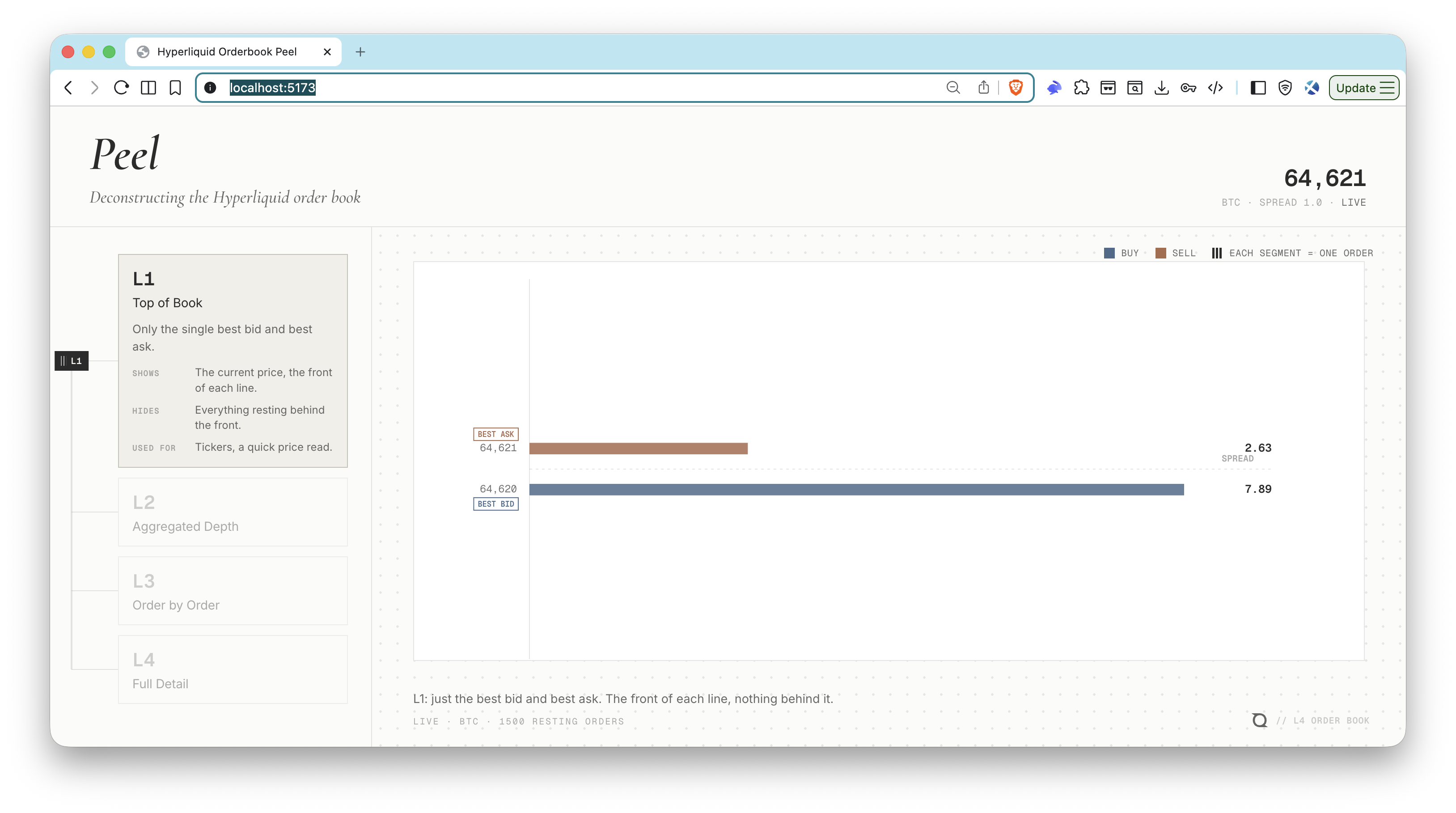
Peel's L1 view leaves only the best bid and best ask—the front of each side of the book.
Run the BBO mode and stop after one message:
node --env-file=.env orderbook_stream_example.js --mode=bbo --coin=BTC --max-messages=1
The first valid BboBookUpdate produces concise output like this:
[1] BBO BTC block=<block-number> bid=<price> / <size> (<order-count>) ask=<price> / <size> (<order-count>)
StreamBboBook returns the current best bid and ask rather than a full book. It emits when either best level changes, including a size change at the same price, instead of sending a snapshot every block. One subscription can cover several coins, and each message identifies the coin that changed.
Either bid or ask can be absent when a book side is empty. The example formats an absent side as n/a.
Choose L1 when you need live top-of-book prices, spreads, or a reference line. It does not tell you how much liquidity rests away from the spread.
Hyperliquid L2: Read Aggregated Market Depth
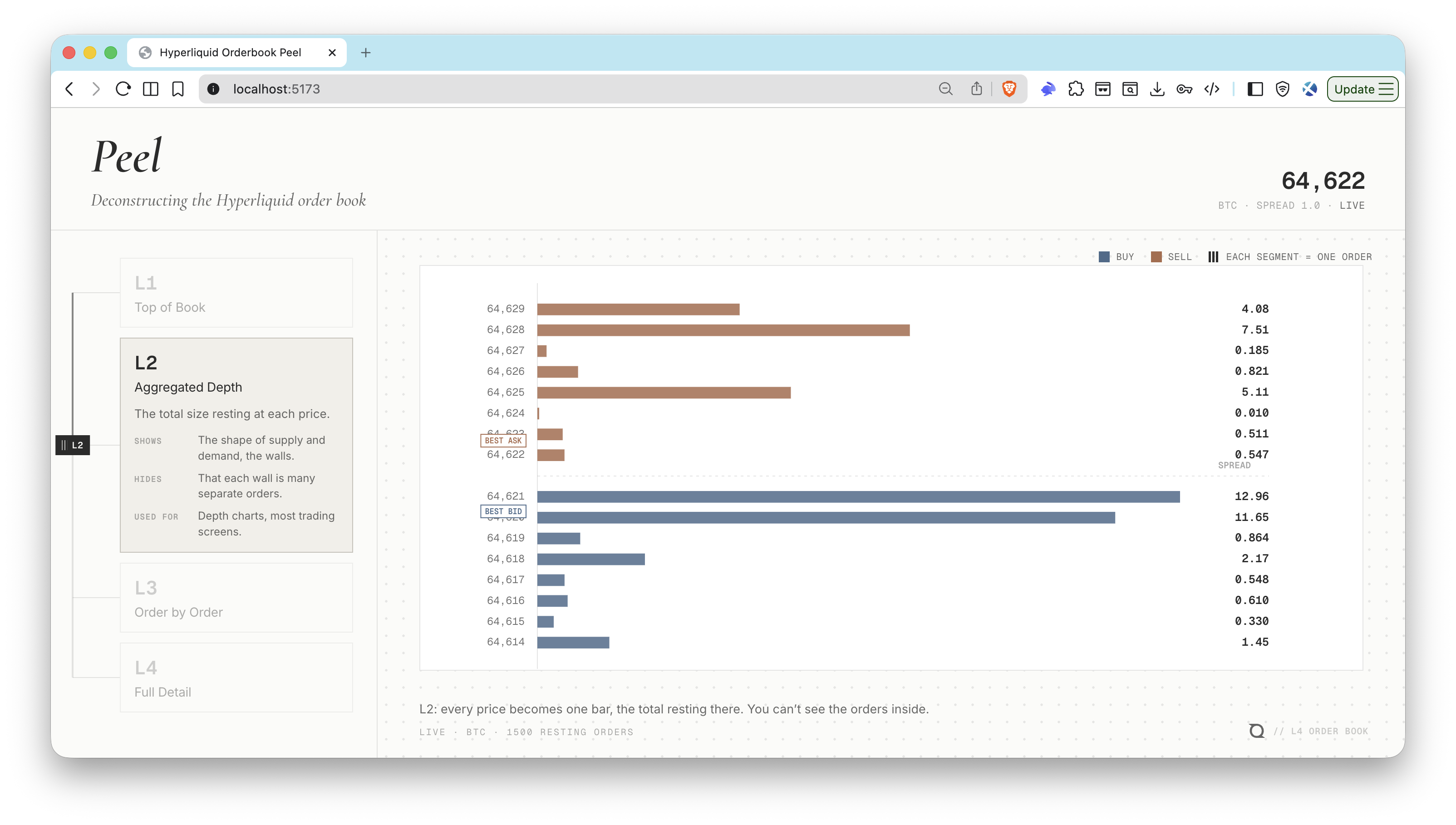
Peel's L2 view turns each price level into one bar, showing aggregated supply and demand while hiding the individual orders that form each bar.
Run L2 mode with exact 10 price levels per side and stop after one snapshot:
node --env-file=.env orderbook_stream_example.js --mode=l2 --coin=BTC --levels=10 --max-messages=1
The example prints the best level on each side and the number of returned bid and ask levels:
[1] L2 BTC block=<block-number> bid=<price> / <size> (<order-count>) ask=<price> / <size> (<order-count>) bids=<bid-level-count> asks=<ask-level-count>
Each StreamL2Book message is a complete snapshot for one coin at one block. Bids arrive from highest to lowest price, and asks arrive from lowest to highest price. Each L2Level contains:
| Field | Meaning |
|---|---|
px | Price as a decimal string |
sz | Total resting size across all orders at px |
n | Number of individual resting orders included in sz |
The request controls how much and how precisely the stream groups the book:
n_levelslimits the number of returned price levels on each side.- Omitting
n_sig_figsreturns exact price levels. n_sig_figscontrols the number of significant figures used for price buckets.mantissaaccepts1,2, or5and adjusts the bucket width for the selected significant-figure precision.
To compare bucketed depth, run the same mode with --sig-figs and --mantissa:
node --env-file=.env orderbook_stream_example.js --mode=l2 --coin=BTC --levels=10 --sig-figs=3 --mantissa=1 --max-messages=1
Orders from several exact prices may then merge into one wider bucket.
Choose L2 for depth charts, slippage models, and price-level liquidity analysis. Use L4 when the composition inside each level matters.
Hyperliquid L3: Derive Anonymous Individual Orders
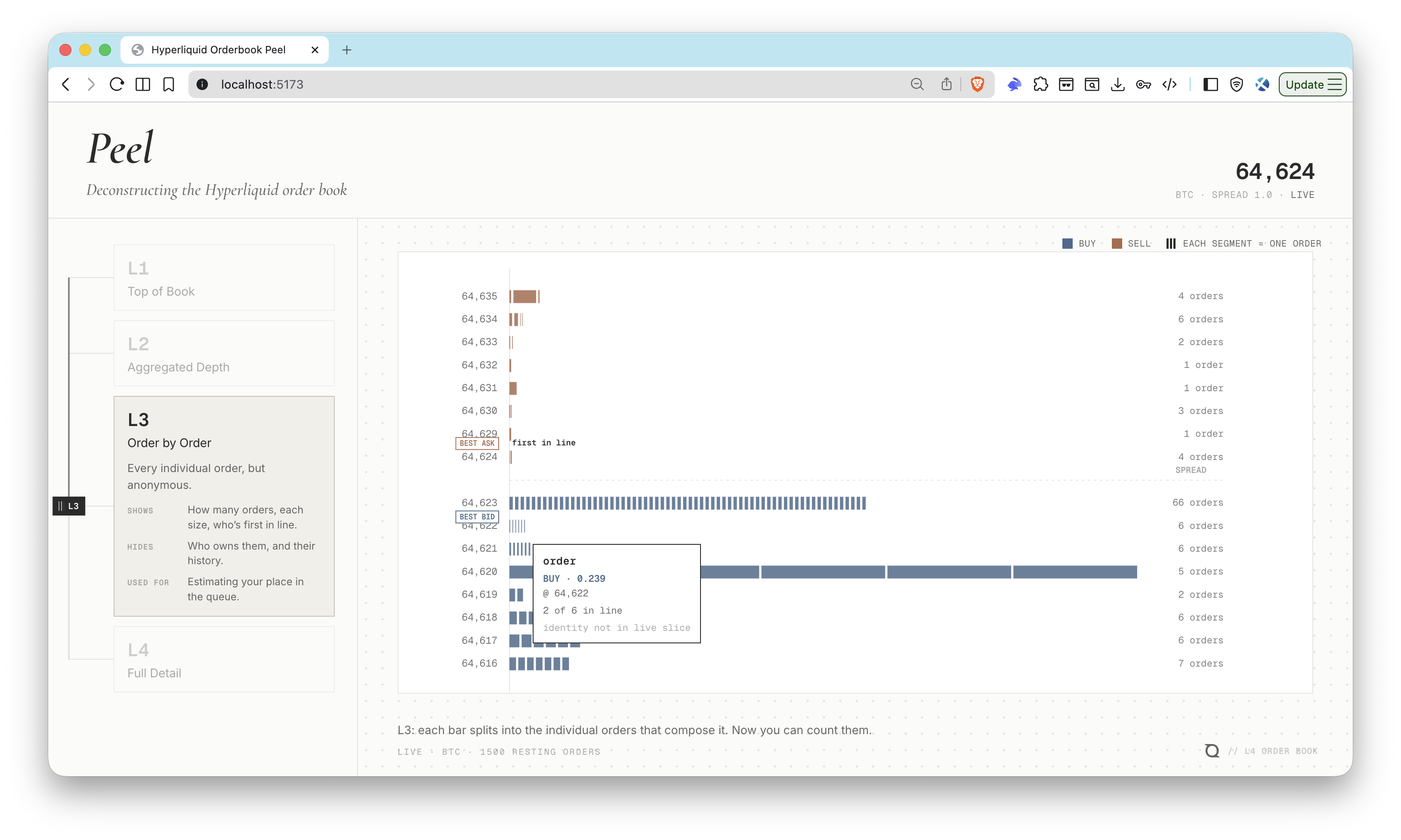
Peel's L3 view splits each price level into individual orders while keeping the owners anonymous.
There is no L3 mode because there is no L3 method. Start with one typed L4 update message:
node --env-file=.env orderbook_stream_example.js --mode=l4-updates --coin=BTC --max-messages=1
The first typed L4 message has snapshot: true and represents the current individual orders as NEW diffs:
[1] L4 updates height=<block-height> snapshot=true diffs=<order-count>
  clear local L4 order state before applying this update
  L4_ORDER_DIFF_TYPE_NEW BTC oid=<order-id> side=B px=<price> sz=<individual-size>
To derive L3, clear your local order map when snapshot is true, apply later NEW, UPDATE, and REMOVE diffs by oid, and expose each order's price, size, and side without exposing user. Do not color, group, or label orders by wallet. Your application may keep oid internally as a stable map key without using it to identify a participant.
This workflow derives an anonymous L3 view from L4 data. It is not an L3 subscription because the gRPC service has no StreamL3Book method.
Hyperliquid L4: Read Wallet-Attributed Orders
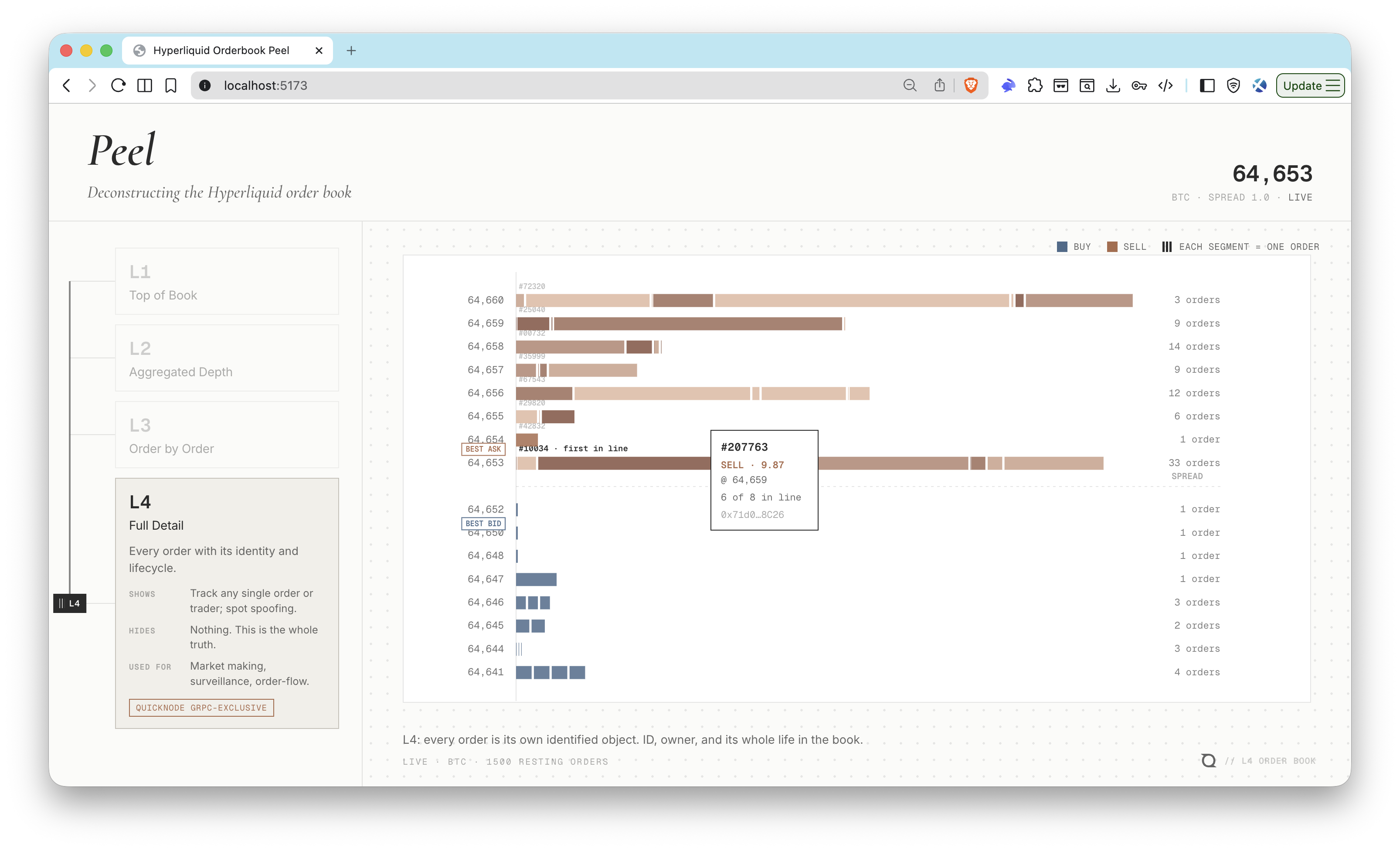
Peel's L4 view keeps the individual orders and exposes pseudonymous wallet attribution in its order details.
Run the full L4 method and stop after the snapshot plus one later message:
node --env-file=.env orderbook_stream_example.js --mode=l4 --coin=BTC --max-messages=2
The example summarizes the snapshot without printing complete orders or wallet addresses. If the second message is a diff, the output looks like this:
[1] L4 snapshot BTC height=<block-height> reset=initial bids=<bid-order-count> asks=<ask-order-count>
[2] L4 diff height=<block-height> order_statuses=<status-count> book_diffs=<diff-count>
The full snapshot objects contain the pseudonymous user address for each order. If you display it, shorten the address rather than printing the complete value in logs or screenshots.
StreamL4BookUpdates represents order movement with three typed protobuf diffs:
| Diff | State change |
|---|---|
NEW | Insert the order into the map by oid |
UPDATE | Replace the order's current size and other typed fields |
REMOVE | Delete the order from the map |
A typed REMOVE only says that an order left the current book. It does not distinguish a fill from a cancellation.
Use StreamL4Book when you need fuller order and lifecycle detail. Its first L4BookSnapshot includes fields such as timestamp, trigger information, reduce_only, order_type, time in force (tif), and client order ID (cloid). L4BookDiff messages contain a data string. Parse that string as JSON, then apply each item in book_diffs to your local map by oid. A raw_book_diff with new adds or updates an order, while remove deletes it.
StreamL4Book can send another full snapshot after normal diffs, including when an ALO priority-fee insertion changes queue order. The public example labels it reset=replacement. Treat every replacement snapshot as authoritative: discard the entire local full L4 book, rebuild both sides in the emitted order, and continue from that replacement state.
The full L4 method can associate a removal with an order status when the status is present. You can also join typed L4 changes with the Orders or Trades datasets when lifecycle reasons matter.
The user field is a participant address, not a verified real-world identity. Treat it as pseudonymous wallet attribution.
Understanding Queue Order at One Price
Hyperliquid documents that its books match orders in price-time priority. A better-priced order executes before a worse-priced order. At a given price, an older resting order is ahead of a newer one.
There is one important exception. Under Hyperliquid's priority-fee rules, the recent tail of each price level (approximately 400 ms) is sorted by decreasing priority rate. A newer order in that window can therefore rank ahead of an older order.
Use ORDER_PRIORITY to observe normalized priority-fee order flow. It is an order-flow stream, not an order book. Reconstruct current order state from StreamL4Book or StreamL4BookUpdates. When StreamL4Book sends an initial or replacement snapshot, rebuild the book in the emitted bid and ask order; that snapshot is the source of truth for relative queue order at a price.
The API does not provide an explicit queue_position field or a fill-probability estimate. Do not sort order IDs and treat that order as queue priority. Price-time priority is the baseline, subject to the recent priority-fee tail exception. ORDER_PRIORITY can show related priority-fee activity, but the emitted StreamL4Book snapshot is the source of truth for current queue order.
Conclusion
Hyperliquid's L1 through L4 labels describe four resolutions of one HyperCore order book. L1 gives you the current best bid and ask. L2 gives you complete aggregated depth snapshots. L3 is an anonymous individual-order view that you derive from L4. L4 adds pseudonymous wallet attribution, while the full L4 method supplies richer order and lifecycle fields.
You now know how to run Quicknode's maintained order book examples for L1, L2, and both L4 methods, derive an anonymous L3 view, and select identifiers for perpetual, spot, HIP-3, and HIP-4 markets. Choose the lowest resolution that answers your application's question, then maintain local state when you use either L4 stream.
Next Steps
- Review the Hyperliquid gRPC API and Hyperliquid data streams references.
- Use the JavaScript order book example or an equivalent Python, Go, or Rust implementation.
- Explore indexed Hyperliquid orders, trades, fills, and order book diffs with SQL Explorer.
- Browse more Hyperliquid guides for related projects and workflows.
- Read Hyperliquid's order book matching rules before building queue models.
- If you want to explore these order book levels interactively, see Hyperliquid Orderbook Peel.
Frequently Asked Questions
Is there a separate Hyperliquid L3 order book stream?
No. The OrderBookStreaming service does not provide a StreamL3Book method. Derive an anonymous L3 view from L4 data by preserving individual orders while omitting the user field and wallet-based grouping.
What is the difference between StreamL4BookUpdates and StreamL4Book?
StreamL4BookUpdates starts with a typed reset snapshot and then sends typed NEW, UPDATE, and REMOVE diffs, which makes current-book maintenance straightforward. StreamL4Book starts with a fuller snapshot containing timestamps, trigger data, order type, time in force, and other fields, then sends JSON-encoded order statuses and book diffs.
Can Hyperliquid L4 data identify the real owner of an order?
No. The user field is a pseudonymous participant wallet address. You can group visible orders by that address, but the field does not verify the participant's legal or real-world identity.
Is every StreamL4Book message a self-contained order book?
No. Each L4BookSnapshot is a complete, authoritative book, but each L4BookDiff contains only incremental changes. Rebuild your local state whenever a snapshot arrives, then apply each later book diff by order ID.
How do Hyperliquid perpetual, spot, HIP-3, and HIP-4 market identifiers differ?
Standard perpetuals use symbols such as BTC, spot markets use an @index such as @142, and HIP-3 markets use a builder-prefixed symbol such as xyz:NVDA. HIP-4 outcome sides use #N coin identifiers. Query outcomeMeta to map each HIP-4 identifier to its market and side.
How can I derive queue order at one Hyperliquid price level?
Hyperliquid uses price-time priority: a better-priced order goes first, and older orders are normally ahead at the same price. The recent tail of a price level (approximately 400 ms) is reordered by decreasing priority rate. Use ORDER_PRIORITY to observe priority-fee order flow, but rebuild current book state from the L4 streams. An emitted StreamL4Book snapshot is the source of truth for the current relative queue. The API does not return a numeric queue position, and order ID sorting is not the documented rule.