
7 min read
Overview
Take-profit and stop-loss orders sit as invisible triggers above and below the current price. When price reaches a trigger level, the order executes, and the market often moves sharply as clustered stops cascade. Quicknode's StreamTpslUpdates gRPC stream gives you live visibility into these trigger orders as they are placed and removed, data that has no equivalent on public Hyperliquid endpoints.
In this guide, you will subscribe to StreamTpslUpdates, understand the ADD and REMOVE diff model, and see how these concepts power the Hyperliquid TP/SL Heatmap sample app.
- Connect to Quicknode's Hyperliquid gRPC endpoint and subscribe to
StreamTpslUpdates - Receive per-block batches with two diff types:
TPSL_DIFF_TYPE_ADD(new resting trigger order) andTPSL_DIFF_TYPE_REMOVE(order left the book) - The
reasonfield on REMOVE diffs explains why: filled, canceled, reduceOnlyCanceled, etc. - There is no separate TRIGGER event; triggered stops appear as REMOVE diffs
What You Will Learn
- Why TP/SL trigger orders have no equivalent on public Hyperliquid endpoints
- The per-block batch model:
TpslUpdatesUpdatewraps adiffsarray and asnapshotbool - What each
TpslOrderDifffield contains, includingreasonandorder_typeas a plain string - The two diff types (ADD and REMOVE) and what
reasontells you on REMOVE - How the stream concepts in this guide map to the Hyperliquid TP/SL Heatmap sample app
What You Will Need
- A Quicknode account with a Hyperliquid endpoint (Build plan or higher required for gRPC access)
- Node.js v18 or later
- Familiarity with TypeScript and basic trading concepts (take-profit, stop-loss, trigger orders)
What StreamTpslUpdates Provides
StreamTpslUpdates is a Quicknode gRPC stream that delivers per-block batches of resting stop-loss and take-profit trigger orders on Hyperliquid, including new orders (TPSL_DIFF_TYPE_ADD) and removed orders (TPSL_DIFF_TYPE_REMOVE). Hyperliquid's public REST and WebSocket APIs do not expose these conditional orders; they sit off the visible book until price reaches their trigger level, making StreamTpslUpdates the only real-time source.
Here is what a few blocks of stream output look like:
[ADD]    oid=477397908047 coin=BTC  Stop Market sell         trigger_px=40021.0  sz=0.00429
[ADD]    oid=477397923750 coin=ETH  Stop Market sell         trigger_px=1150.3   sz=0.6939
[ADD]    oid=477397931759 coin=ETH  Stop Market sell         trigger_px=1106.7   sz=0.1753
[REMOVE] oid=477390148344 coin=ETH  Take Profit Market sell  trigger_px=1754.0   sz=0.0301   reason=canceled
[REMOVE] oid=477397616600 coin=BTC  Stop Market sell         trigger_px=40029.0  sz=0.00429  reason=canceled
[ADD]    oid=477397938673 coin=BTC  Stop Market sell         trigger_px=50758.0  sz=0.01118
Each stream event is a TpslUpdatesUpdate: a per-block batch wrapping a diffs array and a snapshot bool. When snapshot is true, the first batch contains all currently open trigger orders. Subsequent batches are incremental.
There are two diff types. TPSL_DIFF_TYPE_ADD means a new trigger order entered the resting set. TPSL_DIFF_TYPE_REMOVE means it left; the reason field tells you why: "filled" means the stop fired and executed, "canceled" or "reduceOnlyCanceled" means it was removed without executing. There is no separate TRIGGER event: a stop that fires is a REMOVE with reason: "filled".
The fields that matter most in practice:
| Field | Notes |
|---|---|
oid | Unique order ID; correlates ADD and REMOVE for the same order |
trigger_px | Price level where the order fires |
sz | Order size. "0.0" means position-sized TP/SL (actual size unknown until trigger) |
order_type | Plain string: "Take Profit Limit", "Stop Loss", "Take Profit Market", "Stop Loss Market" |
reason | Present on REMOVE: "filled", "canceled", "reduceOnlyCanceled", etc. |
side | "B" (buy trigger) or "A" (sell trigger) |
order_type is not an enum; use string matching to distinguish TP from SL:
const isTakeProfit = diff.order_type.toLowerCase().includes('take profit');
For the complete field reference, see the StreamTpslUpdates dataset documentation.
Setting Up
Install the required packages:
npm install @grpc/grpc-js @grpc/proto-loader dotenv
npm install --save-dev typescript @types/node ts-node
Create .env at the project root:
# Mainnet: your-endpoint-id.hype-mainnet.quiknode.pro:10000
# Testnet: your-endpoint-id.hype-testnet.quiknode.pro:10000
QUICKNODE_GRPC_ENDPOINT=your-endpoint-id.hype-mainnet.quiknode.pro:10000
QUICKNODE_GRPC_TOKEN=your-token-here
Download the Hyperliquid proto file:
mkdir -p proto
curl -o proto/orderbook.proto \
  https://raw.githubusercontent.com/quiknode-labs/hypercore-grpc-examples/main/proto/orderbook.proto
For a full walkthrough of the gRPC client setup, see the Node.js Orderbook Setup guide.
For a complete code example, see the StreamTpslUpdates gRPC Method documentation or the Hyperliquid TP/SL Heatmap sample app.
Connecting and Subscribing
The snippets below use a createClient helper that sets up the gRPC channel and auth metadata. Build it by following the Node.js gRPC client setup guide, then save the result as client.ts in your project root.
import { createClient } from './client';

const COINS = ['BTC', 'ETH'];
const { client, metadata } = createClient();

const stream = client.StreamTpslUpdates({ coins: COINS }, metadata);
Pass coins: [] to receive trigger orders for all coins.
Parsing the Stream
Each data event is a per-block batch. Iterate update.diffs and handle each diff by type:
stream.on('data', (update: any) => {
  if (update.snapshot) {
    console.log(`Snapshot: ${update.diffs.length} open trigger orders`);
  }

  for (const diff of update.diffs) {
    const side = diff.side === 'B' ? 'buy' : 'sell';
    if (diff.diff_type === 'TPSL_DIFF_TYPE_ADD') {
      console.log(`New ${diff.order_type} ${side} trigger: px=${diff.trigger_px} sz=${diff.sz}`);
    } else {
      console.log(`Removed oid=${diff.oid} at ${diff.trigger_px} | reason: ${diff.reason ?? 'unknown'}`);
    }
  }
});

stream.on('error', (err) => console.error('Stream error:', err));
stream.on('end', () => console.log('Stream ended'));
The diff_type values are strings matching the proto enum names ('TPSL_DIFF_TYPE_ADD', 'TPSL_DIFF_TYPE_REMOVE'). When using generated TypeScript types (as in the sample app below), you can compare against the TpslDiffType enum constant instead: diff.diff_type === TpslDiffType.ADD.
Running the Stream
Combine the setup, connection, and parsing code into a single index.ts, then run:
npx ts-node index.ts
The first batch has snapshot: true and contains all currently open trigger orders. Subsequent batches are incremental. Expected output:
Snapshot: 1482 open trigger orders
New Stop Market sell trigger: px=40021.0 sz=0.00429
Removed oid=477390148344 at 1754.0 | reason: canceled
Sample App: Hyperliquid TP/SL Heatmap
The Hyperliquid TP/SL Heatmap sample app puts the concepts from this guide into a live browser dashboard. It renders resting TP/SL trigger orders as a price-level heatmap and overlays the current bid and ask from StreamBboBook as reference lines.
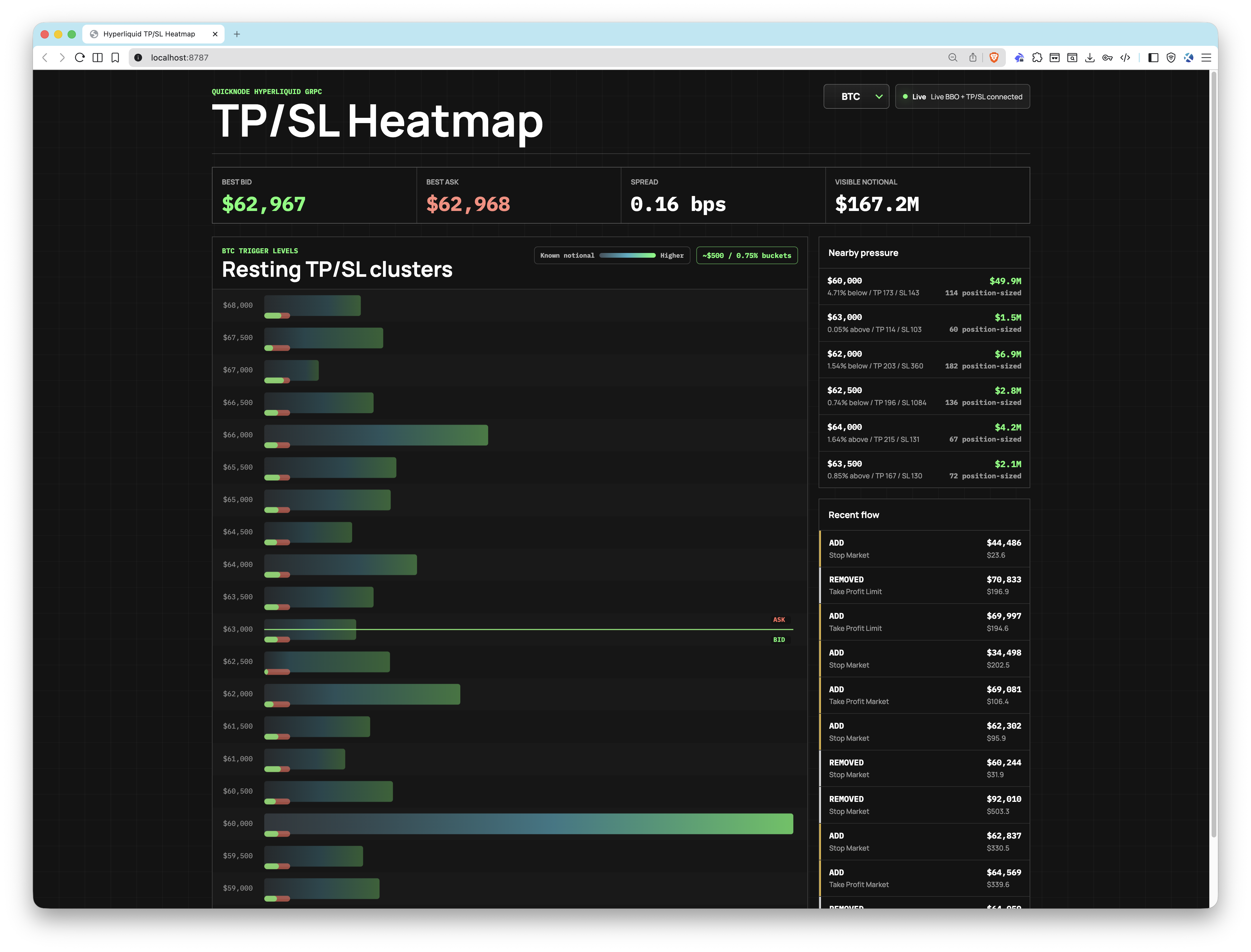
Running the App
The sample app uses pnpm. Clone the repository and navigate to the sample app:
git clone https://github.com/quiknode-labs/qn-guide-examples.git
cd qn-guide-examples/sample-dapps/hyperliquid-tpsl-heatmap
pnpm install && cp .env.example .env
Set your Quicknode endpoint and token in .env:
QUICKNODE_GRPC_ENDPOINT=your-endpoint.hype-mainnet.quiknode.pro:10000
QUICKNODE_GRPC_TOKEN=your-auth-token
DEMO_MODE=false
Start the server:
pnpm dev
Open http://localhost:8787. If credentials are missing, the app starts in clearly labeled demo mode automatically.
How This Guide Connects to the App
The stream concepts from this guide are implemented across two files: src/server/streams.ts opens the gRPC connections, and src/server/cluster-store.ts maintains the live state.
Opening both streams concurrently
The app subscribes to StreamTpslUpdates and StreamBboBook in parallel at startup, each with its own reconnect loop with exponential backoff:
// simplified — reconnect implements exponential backoff; see full source for details
const connectTpsl = () => {
  const { client, metadata } = createGrpcClient(config.endpoint!, config.token!);
  const stream = client.StreamTpslUpdates({ coins: config.coins }, metadata);

  stream.on('data', (update: TpslUpdatesUpdate) => {
    store.applyTpslUpdate(update);
    if (update.snapshot) streamState.snapshot = true;
    publish();
  });

  stream.on('error', reconnect);
  stream.on('end', () => reconnect());
};

connectBbo();   // StreamBboBook
connectTpsl();  // StreamTpslUpdates
Routing ADD and REMOVE diffs
applyTpslUpdate handles the snapshot flag first (clearing stale state on reconnect), then routes each diff by type:
// inside class ClusterStore
applyTpslUpdate(update: TpslUpdatesUpdate): void {
  if (update.snapshot) {
    for (const coin of this.coins) this.clearCoin(coin);
  }
  for (const diff of update.diffs || []) {
    if (diff.diff_type === TpslDiffType.ADD) this.addOrder(diff);
    if (diff.diff_type === TpslDiffType.REMOVE) this.removeOrder(diff);
  }
}
removeOrder uses reason to distinguish a triggered stop from a cancellation, applying the diff semantics from this guide directly:
// inside class ClusterStore — coinOrders is a Map<string, TpslOrderDiff> keyed by oid
removeOrder(diff: TpslOrderDiff): void {
  const existing = coinOrders.get(String(diff.oid));
  if (existing) coinOrders.delete(String(diff.oid));
  this.pushEvent(eventOrder, diff.reason === 'filled' ? 'TRIGGERED' : 'REMOVED', diff.reason);
}
Grouping into price buckets
Orders are aggregated into ClusterBucket entries keyed by a rounded price level. The bucket size scales with the asset's current mid price, so BTC gets ~$500 buckets and ETH gets ~$25 buckets at typical prices:
private bucketSizeForCoin(coin: string): number {
  const mid = this.bbo.get(coin)?.mid;
  const referencePrice = mid ?? fallbackPrice;
  return this.niceBucketSize(referencePrice * (this.bucketSizePct / 100));
}
Each order's notional (trigger_px * sz) is summed into its bucket. Position-sized TP/SL orders where sz: "0.0" are counted but excluded from notional totals. The resulting buckets drive the heatmap render: intensity reflects total notional at each price level, with TP and SL counts broken out per bucket.
For the rendering layer, see src/client/HeatmapCanvas.tsx.
Conclusion
StreamTpslUpdates delivers per-block batches of ADD and REMOVE diffs for resting trigger orders, data that has no equivalent on public Hyperliquid endpoints. The reason field on REMOVE diffs tells you whether an order was triggered or canceled. The Hyperliquid TP/SL Heatmap sample app takes these concepts and renders them as a live price-level heatmap, showing where stop pressure concentrates relative to the current bid and ask.
Next Steps
- Hyperliquid TP/SL Heatmap: The full visual implementation of this guide as a live browser heatmap
- Hyperliquid gRPC API: Full stream reference, proto file, and connection details
- Exchange API: Place and manage orders on Hyperliquid via REST endpoints
- Info Endpoints: Query market data, user positions, open orders, and trading history
- SQL Explorer: Run SQL queries on indexed Hyperliquid data including historical trades, funding rates, and liquidation history
- Quicknode Streams: Push-based event delivery with custom filtering and exactly-once guarantees
- Hyperliquid API Overview: Full overview of all HyperCore and HyperEVM APIs available on Quicknode
Frequently Asked Questions
Can you see stop-loss and take-profit orders on Hyperliquid's public API?
No. Hyperliquid's public REST and WebSocket APIs do not expose resting TP/SL trigger orders. These conditional orders sit off the visible book until price reaches their trigger level. StreamTpslUpdates is the only way to see these resting orders before they fire, giving you advance visibility into where stop cascades may originate.
How do I stream TP/SL trigger orders on Hyperliquid?
Subscribe to StreamTpslUpdates using a Quicknode Hyperliquid gRPC endpoint. Pass a coins array to filter by asset (e.g., ['BTC', 'ETH']) or an empty array for all coins. The first batch has snapshot set to true and contains all currently open trigger orders. Subsequent batches deliver incremental ADD and REMOVE diffs per block.
How can I tell if a trigger order was executed versus canceled?
Check the reason field on REMOVE diffs. A value of 'filled' indicates the order was triggered and executed. Values like 'canceled' or 'reduceOnlyCanceled' indicate the order was removed without executing.
Can I subscribe to all coins at once with StreamTpslUpdates?
Yes. Pass an empty array to the coins field (coins: []) to receive TP/SL updates for all available coins. Maintain separate cluster state per coin for accurate per-coin analysis.
What does the snapshot batch contain and why does it matter?
When snapshot is true on the first TpslUpdatesUpdate batch, it contains all currently open TP/SL trigger orders across the requested coins. This gives your application a complete baseline state before incremental diffs begin. If your stream disconnects and reconnects, a new snapshot is delivered so you can reset local state cleanly without gaps.
Does StreamTpslUpdates require a specific Quicknode plan?
Yes. Access to Hyperliquid gRPC streaming, including StreamTpslUpdates, requires a Quicknode Build plan or higher. Free trial endpoints do not include gRPC access.