
18 min read
Overview
Real-time monitoring of onchain activity usually means polling an RPC endpoint on a timer but that adds delay and wastes requests on blocks with no relevant activity. Stock Tokens on Robinhood Chain, which track real-world stocks like TSLA, AAPL, and NVDA, can move any hour, any day, without waiting for regular market hours. (New to the chain? What is Robinhood Chain? covers the architecture and network parameters.)
Quicknode Streams solves this problem by pushing data to you before you ask, filtering out noise at the source. You write a JavaScript filter that examines each block; if none of your watched tokens moved, no wasted requests. This guide uses Stock Tokens as the concrete example, but the same pattern works for any ERC-20 token list, protocol events, or wallet activity on any EVM chain.
In Streams, that filter logic lives in a JavaScript function named main(stream), which Quicknode runs before delivering each block payload to your webhook, database, or other destination. Here is an example of a response from a Stream filtering Stock Token activity:
{
  "count": 3,
  "matches": [
    {
      "symbol": "TSLA",
      "type": "swap",
      "block": 3270533,
      "txHash": "0x9de6e49d1ffbb5dc0544d463cf44627dda8ca99f53ce83a2cd706787b82af9a9",
      "amount": 0.090487,
      "whale": false
    }
  ]
}
- Build a live filter that detects Stock Token transfers and DEX swaps on Robinhood Chain in real time, sending only relevant blocks to your webhook or database
- Reduce noise: Return
nullfor blocks with no watchlist matches so your destination only receives what matters - Reuse the pattern for any ERC-20 token monitoring, protocol events, or wallet activity on any EVM chain
- Test before deploying: Run the filter against historical blocks with the
qnCLI or dashboard, with zero risk
What You Will Do
- Write a Streams filter that detects
Transferevents for a curated Stock Token watchlist - Distinguish plain wallet-to-wallet transfers from Uniswap V3 and V4 swap legs in the same filter
- Test the filter against real historical blocks using the
qnCLI (or the Quicknode dashboard), with no stream created - Deploy the filter with the
qnCLI or the Quicknode dashboard, and route matches to a destination
What You Will Need
- A Quicknode account
- (Optional) - The Quicknode CLI (
qn) authenticated viaqn auth login, for local filter testing and CLI-based deployment; the Quicknode dashboard alone is also sufficient if you skip the CLI entirely - Basic JavaScript, including
BigIntarithmetic - Familiarity with EVM event logs (topics, indexed parameters, and how ERC-20
Transferevents are encoded)
Understand the Filter Input
You may be wondering: what does Quicknode actually send to my filter? And how do I find the logs I care about inside it?
This guide uses the Block with Receipts dataset on robinhood-mainnet. Each delivery includes a block plus its transaction receipts, and each receipt carries the event logs that transaction emitted. Your filter will scan those logs, find Stock Token transfers, and decide whether to pass the block downstream.
Streams can batch more than one block into a single delivery. The delivery metadata reports the range as batch_start_range and batch_end_range, and stream.data contains one entry per block when the batch spans multiple blocks. This guide keeps the filter focused on stream.data[0] for the common one-block delivery path. To support multi-block batches, iterate stream.data and apply the same receipt-decoding logic to each entry.
The filter itself is a JavaScript function named main(stream). Quicknode calls that function for each delivery and sends whatever it returns to the destination. Returning null means "do not deliver anything for this block."
For EVM logs, the useful data is encoded in topics and data fields. Instead of manually slicing topics or decoding hex values, this guide uses the Streams helper decodeEVMReceipts(receipts, abis). Think of ABIs as a translator's dictionary, decodeEVMReceiptsneeds the ABI vocabulary to convert raw logs into readable field names and values. You pass it the receipts and the event ABIs you care about, and it returns decoded logs with names and parameters that are easier to work with. In this guide, those ABIs are ERC-20Transfer, Uniswap V3 Swap, and Uniswap V4 Swap`.
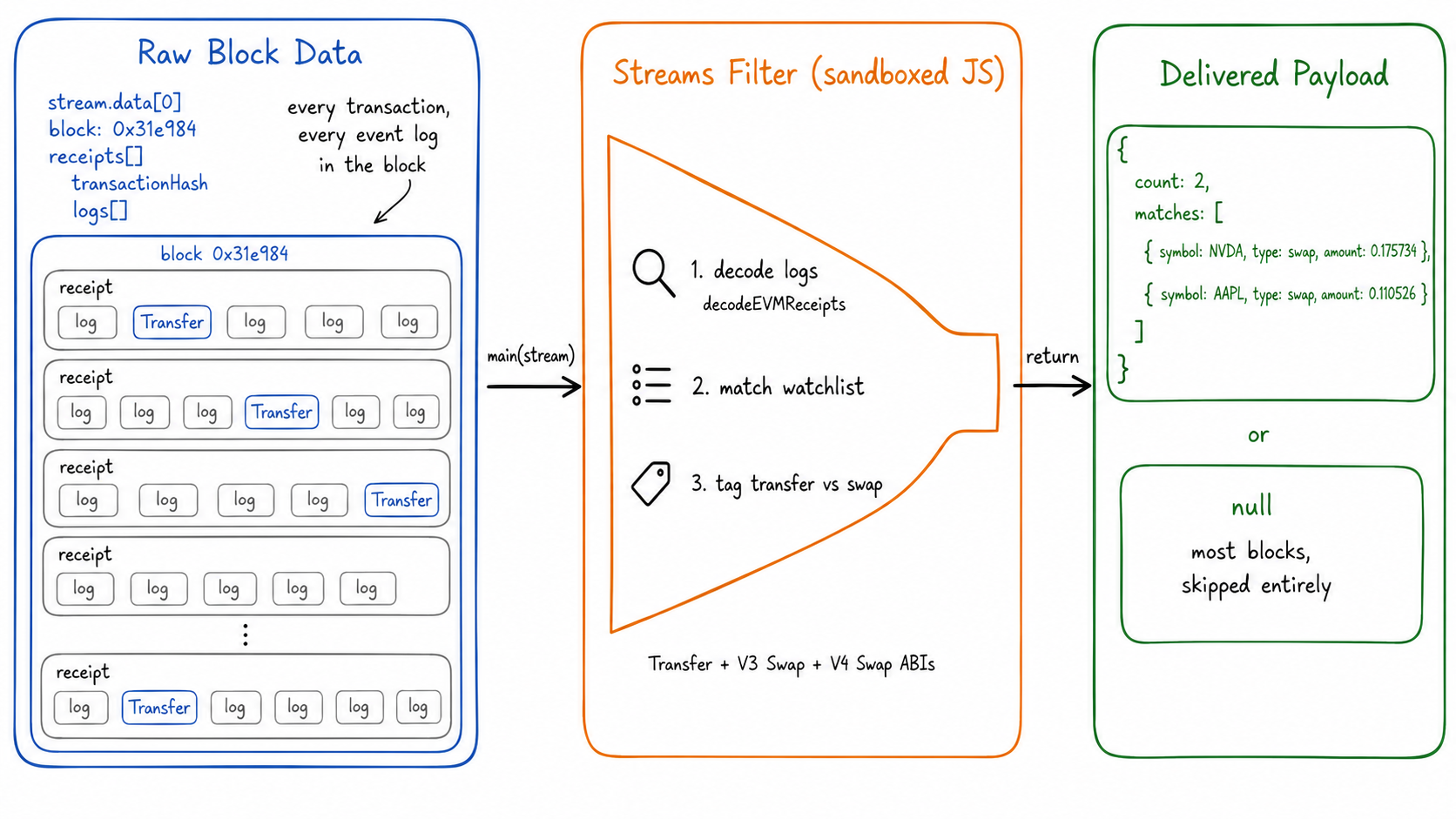
With that input model in mind, the rest of the guide builds a single filter.js file that Quicknode can run in the dashboard or through the CLI. Let's build it in three parts:
- Event ABIs, the Stock Token watchlist, and the whale threshold
- A decimal normalizer for raw ERC-20 amounts
- The
main(stream)function that scans receipts and returns matches
Build the Filter
Create a file named filter.js in the directory where you want to work through the guide. You do not need a full Node.js project for this example. The file is the filter source code that you will paste into the Streams dashboard or pass to the qn CLI later.
You will build filter.js in three parts:
- Event ABIs, the Stock Token watchlist, and the whale threshold
- A decimal normalizer for raw ERC-20 amounts
- The
main(stream)function that scans receipts and returns matches
The example below watches 10 Stock Tokens on Robinhood Chain mainnet:
| Symbol | Name |
|---|---|
| AAPL | Apple |
| AMZN | Amazon |
| TSLA | Tesla |
| NVDA | NVIDIA |
| MSFT | Microsoft |
| GOOGL | Alphabet Class A |
| META | Meta Platforms |
| MSTR | Strategy Inc. |
| SPY | SPDR S&P 500 ETF Trust |
| QCOM | Qualcomm |
Confirm any contract address against the official Robinhood Chain resources before relying on it in production, since new Stock Tokens can be listed over time.
Define the ABIs, the Watchlist, and the Whale Threshold
Start with the event ABIs the filter needs to decode. ERC-20 Transfer logs identify token movements, while the Uniswap V3 and V4 Swap logs help classify whether a matching token movement came from DEX activity instead of a direct transfer.
const ERC20_TRANSFER_ABI = `[{
  "anonymous": false,
  "inputs": [
    {"indexed": true, "type": "address", "name": "from"},
    {"indexed": true, "type": "address", "name": "to"},
    {"indexed": false, "type": "uint256", "name": "value"}
  ],
  "name": "Transfer",
  "type": "event"
}]`;

const UNISWAP_V3_SWAP_ABI = `[{
  "anonymous": false,
  "inputs": [
    {"indexed": true, "type": "address", "name": "sender"},
    {"indexed": true, "type": "address", "name": "recipient"},
    {"indexed": false, "type": "int256", "name": "amount0"},
    {"indexed": false, "type": "int256", "name": "amount1"},
    {"indexed": false, "type": "uint160", "name": "sqrtPriceX96"},
    {"indexed": false, "type": "uint128", "name": "liquidity"},
    {"indexed": false, "type": "int24", "name": "tick"}
  ],
  "name": "Swap",
  "type": "event"
}]`;

const UNISWAP_V4_SWAP_ABI = `[{
  "anonymous": false,
  "inputs": [
    {"indexed": true, "name": "id", "type": "bytes32"},
    {"indexed": true, "name": "sender", "type": "address"},
    {"indexed": false, "name": "amount0", "type": "int128"},
    {"indexed": false, "name": "amount1", "type": "int128"},
    {"indexed": false, "name": "sqrtPriceX96", "type": "uint160"},
    {"indexed": false, "name": "liquidity", "type": "uint128"},
    {"indexed": false, "name": "tick", "type": "int24"},
    {"indexed": false, "name": "fee", "type": "uint24"}
  ],
  "name": "Swap",
  "type": "event"
}]`;

// Lowercased token address -> { symbol, decimals }
const WATCHLIST = {
  "0xaf3d76f1834a1d425780943c99ea8a608f8a93f9": { symbol: "AAPL", decimals: 18 },
  "0x12f190a9f9d7d37a250758b26824b97ce941bf54": { symbol: "AMZN", decimals: 18 },
  "0x322f0929c4625ed5bad873c95208d54e1c003b2d": { symbol: "TSLA", decimals: 18 },
  "0xd0601ce157db5bdc3162bbac2a2c8af5320d9eec": { symbol: "NVDA", decimals: 18 },
  "0xe93237c50d904957cf27e7b1133b510c669c2e74": { symbol: "MSFT", decimals: 18 },
  "0x2e0847e8910a9732eb3fb1bb4b70a580adad4fe3": { symbol: "GOOGL", decimals: 18 },
  "0xc0d6457c16cc70d6790dd43521c899c87ce02f35": { symbol: "META", decimals: 18 },
  "0xec262a75e413fafd0df80480274532c79d42da09": { symbol: "MSTR", decimals: 18 },
  "0x117cc2133c37b721f49de2a7a74833232b3b4c0c": { symbol: "SPY", decimals: 18 },
  "0x0f17206447090e464c277571124dd2688e48aea9": { symbol: "QCOM", decimals: 18 },
};

// Normalized-share whale threshold (e.g. 100 shares of a stock token)
const WHALE_THRESHOLD = 100;
decodeEVMReceipts accepts an array of ABIs, so all three event types decode in a single call later in the filter. Token addresses in WATCHLIST are stored lowercased for a case-insensitive lookup against a decoded log's address field. To track different Stock Tokens, stablecoins, or any other ERC-20 tokens on Robinhood Chain, replace or extend this map with the token contracts and decimals you care about.
Write the Decimal Normalizer
ERC-20 transfer values are emitted as raw integers. For an 18-decimal token, a transfer of 1000000000000000000 represents 1 token. The filter normalizes raw values before comparing them to the whale threshold so the alert logic uses human-readable token amounts.
function normalize(value, decimals) {
  const divisor = 10n ** BigInt(decimals);
  const whole = value / divisor;
  const frac = value % divisor;
  const fracStr = frac.toString().padStart(decimals, "0").slice(0, 6);
  return Number(`${whole}.${fracStr}`);
}
value arrives as a BigInt, since raw token amounts routinely exceed Number.MAX_SAFE_INTEGER. Integer (whole) and remainder (frac) division on the BigInt keeps that arithmetic exact. frac is then zero-padded to the token's full decimal length and truncated to 6 characters before converting to a Number; 6 fractional digits is enough precision for a whale check on stock-sized quantities without risking a Number that overflows or loses precision from an extremely long fractional string.
Write the main Function
The main(stream) function ties the filter together. It reads the receipts from the Streams payload, decodes the logs with the ABIs above, checks each transfer against the watchlist, and returns either a shaped result or null.
function main(stream) {
  try {
    const data = stream.data;
    const receipts = data[0].receipts || [];
    const decoded = decodeEVMReceipts(receipts, [
      ERC20_TRANSFER_ABI,
      UNISWAP_V3_SWAP_ABI,
      UNISWAP_V4_SWAP_ABI,
    ]);

    const matches = [];

    for (const receipt of decoded) {
      if (!receipt.decodedLogs || receipt.decodedLogs.length === 0) continue;

      const hasSwap = receipt.decodedLogs.some((log) => log.name === "Swap");

      for (const log of receipt.decodedLogs) {
        if (log.name !== "Transfer") continue;

        const token = WATCHLIST[log.address.toLowerCase()];
        if (!token) continue;

        const value = BigInt(log.value);
        const amount = normalize(value, token.decimals);

        matches.push({
          symbol: token.symbol,
          type: hasSwap ? "swap" : "transfer",
          block: parseInt(data[0].block.number, 16),
          txHash: receipt.transactionHash,
          from: log.from,
          to: log.to,
          value: value.toString(),
          amount,
          whale: amount >= WHALE_THRESHOLD,
        });
      }
    }

    if (matches.length === 0) return null;

    return { count: matches.length, matches };
  } catch (e) {
    return { error: e.message };
  }
}
decodeEVMReceipts(receipts, [ERC20_TRANSFER_ABI, UNISWAP_V3_SWAP_ABI, UNISWAP_V4_SWAP_ABI]) runs once per block and returns one entry per receipt. Each entry carries a decodedLogs array of only the logs that matched one of the supplied ABIs, and receipts with no matching logs are skipped immediately. hasSwap is computed once per receipt, before the log loop, so every matching Transfer in that receipt reuses the same classification. This same-receipt swap check is a practical monitoring heuristic: it separates direct token movements from DEX activity without making your destination process every raw log. Returning null when matches is empty means blocks with no watchlist activity produce no delivery at all.
Complete filter.js
Complete filter.js, copy and paste to run as-is
// Quicknode Streams filter for the block-with-receipts dataset on robinhood-mainnet.
// Detects Transfer events for a curated tokenized-stock watchlist, tagging each as a
// swap when the same receipt also contains a Uniswap V3 or V4 Swap log, decoded with
// the built-in decodeEVMReceipts() utility.

const ERC20_TRANSFER_ABI = `[{
  "anonymous": false,
  "inputs": [
    {"indexed": true, "type": "address", "name": "from"},
    {"indexed": true, "type": "address", "name": "to"},
    {"indexed": false, "type": "uint256", "name": "value"}
  ],
  "name": "Transfer",
  "type": "event"
}]`;

const UNISWAP_V3_SWAP_ABI = `[{
  "anonymous": false,
  "inputs": [
    {"indexed": true, "type": "address", "name": "sender"},
    {"indexed": true, "type": "address", "name": "recipient"},
    {"indexed": false, "type": "int256", "name": "amount0"},
    {"indexed": false, "type": "int256", "name": "amount1"},
    {"indexed": false, "type": "uint160", "name": "sqrtPriceX96"},
    {"indexed": false, "type": "uint128", "name": "liquidity"},
    {"indexed": false, "type": "int24", "name": "tick"}
  ],
  "name": "Swap",
  "type": "event"
}]`;

const UNISWAP_V4_SWAP_ABI = `[{
  "anonymous": false,
  "inputs": [
    {"indexed": true, "name": "id", "type": "bytes32"},
    {"indexed": true, "name": "sender", "type": "address"},
    {"indexed": false, "name": "amount0", "type": "int128"},
    {"indexed": false, "name": "amount1", "type": "int128"},
    {"indexed": false, "name": "sqrtPriceX96", "type": "uint160"},
    {"indexed": false, "name": "liquidity", "type": "uint128"},
    {"indexed": false, "name": "tick", "type": "int24"},
    {"indexed": false, "name": "fee", "type": "uint24"}
  ],
  "name": "Swap",
  "type": "event"
}]`;

// Lowercased token address -> { symbol, decimals }
const WATCHLIST = {
  "0xaf3d76f1834a1d425780943c99ea8a608f8a93f9": { symbol: "AAPL", decimals: 18 },
  "0x12f190a9f9d7d37a250758b26824b97ce941bf54": { symbol: "AMZN", decimals: 18 },
  "0x322f0929c4625ed5bad873c95208d54e1c003b2d": { symbol: "TSLA", decimals: 18 },
  "0xd0601ce157db5bdc3162bbac2a2c8af5320d9eec": { symbol: "NVDA", decimals: 18 },
  "0xe93237c50d904957cf27e7b1133b510c669c2e74": { symbol: "MSFT", decimals: 18 },
  "0x2e0847e8910a9732eb3fb1bb4b70a580adad4fe3": { symbol: "GOOGL", decimals: 18 },
  "0xc0d6457c16cc70d6790dd43521c899c87ce02f35": { symbol: "META", decimals: 18 },
  "0xec262a75e413fafd0df80480274532c79d42da09": { symbol: "MSTR", decimals: 18 },
  "0x117cc2133c37b721f49de2a7a74833232b3b4c0c": { symbol: "SPY", decimals: 18 },
  "0x0f17206447090e464c277571124dd2688e48aea9": { symbol: "QCOM", decimals: 18 },
};

// Normalized-share whale threshold (e.g. 100 shares of a stock token)
const WHALE_THRESHOLD = 100;

function normalize(value, decimals) {
  const divisor = 10n ** BigInt(decimals);
  const whole = value / divisor;
  const frac = value % divisor;
  const fracStr = frac.toString().padStart(decimals, "0").slice(0, 6);
  return Number(`${whole}.${fracStr}`);
}

function main(stream) {
  try {
    const data = stream.data;
    const receipts = data[0].receipts || [];
    const decoded = decodeEVMReceipts(receipts, [
      ERC20_TRANSFER_ABI,
      UNISWAP_V3_SWAP_ABI,
      UNISWAP_V4_SWAP_ABI,
    ]);

    const matches = [];

    for (const receipt of decoded) {
      if (!receipt.decodedLogs || receipt.decodedLogs.length === 0) continue;

      const hasSwap = receipt.decodedLogs.some((log) => log.name === "Swap");

      for (const log of receipt.decodedLogs) {
        if (log.name !== "Transfer") continue;

        const token = WATCHLIST[log.address.toLowerCase()];
        if (!token) continue;

        const value = BigInt(log.value);
        const amount = normalize(value, token.decimals);

        matches.push({
          symbol: token.symbol,
          type: hasSwap ? "swap" : "transfer",
          block: parseInt(data[0].block.number, 16),
          txHash: receipt.transactionHash,
          from: log.from,
          to: log.to,
          value: value.toString(),
          amount,
          whale: amount >= WHALE_THRESHOLD,
        });
      }
    }

    if (matches.length === 0) return null;

    return { count: matches.length, matches };
  } catch (e) {
    return { error: e.message };
  }
}
Test the Filter
At this point, filter.js contains everything Streams needs to evaluate a block. Before creating a live stream, test the filter against historical blocks. This catches syntax errors and confirms the payload shape without sending anything to a destination.
You can test the filter in the Quicknode dashboard or with the qn CLI. The dashboard path is useful if you do not want to install anything locally, while the CLI path is convenient if you prefer keeping the filter in a local file.
Test with the Quicknode Dashboard
- Open the Streams dashboard and select New Stream.
- Set Network to Robinhood Chain (Mainnet) and Dataset to Block with Receipts.
- In the payload step, click Customize your payload and paste the full contents of
filter.js. - Use the dashboard's test block feature with a block from the table below, such as
3270533. - Confirm the output matches the expected shape before continuing. You do not need to save or activate the stream yet.
Test with the Quicknode CLI
If you prefer the CLI, authenticate the Quicknode CLI once, if not already done:
qn auth login
qn stores its own credentials after this step, so no RPC_URL or API key needs to be passed to the command below. Test the filter against a specific historical block with qn stream test-filter:
qn stream test-filter \
  --network robinhood-mainnet \
  --dataset block-with-receipts \
  --block <block_number> \
  --filter-file filter.js \
  --filter-language javascript \
  -o json
Both test paths are read-only: they evaluate the filter against a real historical block without creating an active stream. Running the filter against a few known blocks confirms it behaves as intended before deploying it:
| Block | Result |
|---|---|
| 3273644 | null, no watchlist matches in this block |
| 3270533 | count: 3, TSLA/NVDA/AAPL legs of a Uniswap V4 swap, tagged type: "swap", all whale: false |
| 3284720 | count: 2, both NVDA transfer legs of a Uniswap V3 swap, tagged type: "swap" |
A test against block 3270533 returns matches like:
{
  "result": {
    "count": 3,
    "matches": [
      {
        "symbol": "TSLA",
        "type": "swap",
        "block": 3270533,
        "txHash": "0x9de6e49d1ffbb5dc0544d463cf44627dda8ca99f53ce83a2cd706787b82af9a9",
        "from": "0x8366a39CC670B4001A1121B8F6A443A643e40951",
        "to": "0x33B0095333e64bf375952eF197b6FDC3437dc014",
        "value": "90487036122894686",
        "amount": 0.090487,
        "whale": false
      },
      { "symbol": "NVDA", "type": "swap", "amount": 0.175734, "whale": false },
      { "symbol": "AAPL", "type": "swap", "amount": 0.110526, "whale": false }
    ]
  }
}
To confirm the whale flag responds correctly to the decimal-normalized amount rather than the raw value, lower WHALE_THRESHOLD to 0.1 in a scratch copy of filter.js and rerun the same block. The TSLA leg (0.090487) stays whale: false, while the NVDA (0.175734) and AAPL (0.110526) legs both flip to whale: true, exactly matching a plain >= comparison against the threshold.
Create a Stream
After the dashboard or CLI test returns the expected payload, attach the same filter to a live stream. A stream can be created through the Quicknode dashboard, the qn CLI, the Admin API, or the Quicknode SDK. The dashboard and CLI paths below both produce the same live stream.
Both paths below route matches to a webhook destination for testing. webhook.site generates a temporary, unique URL and displays every payload sent to it, which makes it a convenient way to see a stream's output without standing up a real backend first. Open webhook.site, copy the unique URL it generates, and use it in place of the placeholder URL shown below.
Create with the Quicknode Dashboard
If you already tested the filter in the dashboard, continue from that draft stream and configure the destination. Otherwise:
- Open the Streams dashboard and select New Stream.
- Set Network to Robinhood Chain (Mainnet) and Dataset to Block with Receipts.
- In the stream payload step, click the Customize your payload button and paste the full contents of
filter.js. - Test the filter with a block number from the table above, such as
3270533, to dry-run the filter and confirm the output before saving. - In the destination step, choose a destination type (webhook, PostgreSQL, S3, and more) and enter its connection details. For a first test, a URL from a public test endpoint like webhook.site works well.
- Save and activate the stream once the dry-run output looks correct and the destination is configured.
Create with the Quicknode CLI
If you prefer a terminal workflow, qn stream create attaches filter.js and creates the stream in a single command:
qn stream create \
  --name robinhood-stock-token-activity \
  --network robinhood-mainnet \
  --dataset block-with-receipts \
  --start 3270533 \
  --end -1 \
  --region usa-east \
  --webhook https://webhook.site/your-unique-url \
  --filter-file filter.js \
  --filter-language javascript \
  --status active
--filter-file reads filter.js from disk and base64-encodes it server-side, the same way qn stream test-filter does for a test run. --start 3270533 backfills from a block already confirmed to match earlier in this guide, and --end -1 keeps the stream running indefinitely against new blocks. --status active starts the stream immediately; pass --status paused instead to create it without processing blocks yet. To use a destination type other than a webhook, pass a full JSON configuration with --stream-config-file instead of --webhook.
Real-time streams can occasionally observe a block that later gets reorganized off the canonical chain. Review the reorg handling documentation for how Streams surfaces reorgs so a destination can reconcile them.
See Live Results and Route to a Destination
With the stream active and pointed at a test endpoint like webhook.site, watch matched payloads arrive there as new blocks land on Robinhood Chain. Each delivery contains the filter's output for one block: either the {count, matches} object shown earlier, or no delivery for blocks with no watchlist activity, since the filter returns null for those.
For production use, swap the test endpoint for one of the destination types Streams supports, including webhooks, PostgreSQL, and Amazon S3. A single stream can fan out to multiple destinations at once based on the pricing plan, so, for example, the same filtered payload could be written to S3 for archival while also triggering a webhook for real-time alerting.
Streams bills based on the number of blocks processed for a given network and dataset, not on what a filter ultimately returns. A filter that returns null for most blocks still reduces noise and storage on the destination side, but it does not reduce the underlying credit consumption for processing those blocks. See the Streams billing documentation for exact credit costs by network and dataset.
Conclusion
You built a Quicknode Streams filter that detects tokenized Stock Token transfers and swaps on Robinhood Chain, tested it against real historical blocks, and deployed it as a live stream. More importantly, you now have a reusable pattern for event-driven monitoring: decode the logs that matter, shape the payload, and return null for everything else. You can adapt the same structure to other ERC-20 token sets, protocol events, wallet activity, or any other EVM event pattern worth routing to a destination.
Next Steps
- Read Stock Tokens Data on Robinhood Chain: query Stock Token metadata, supply, balances, and transfer history directly via RPC and viem
- Quicknode Streams documentation: full product documentation, including supported datasets and destinations
- Streams Filters documentation: the complete filter API reference, including
qnLibhelpers and the Key-Value Store - Robinhood Chain RPC API Reference: full list of supported JSON-RPC methods on Quicknode
Frequently Asked Questions
What does the block-with-receipts dataset deliver to a Streams filter?
For each processed block, stream.data is an array whose first element (data[0]) contains a block object and a receipts array. Each entry in receipts corresponds to one transaction and includes a logs array with every event log that transaction emitted. This filter passes receipts to the built-in decodeEVMReceipts helper, which decodes Transfer and Swap events out of those logs against the supplied ABIs.
How does the filter tell a plain transfer apart from a DEX swap?
It checks whether the same transaction receipt that contains a matching Transfer log (decoded via decodeEVMReceipts) also contains a decoded Uniswap V3 or V4 Swap log. If it does, every Transfer in that receipt is tagged type: "swap"; otherwise it is tagged type: "transfer". Both Uniswap versions are covered because V4 routes swaps through a single PoolManager contract with a differently shaped Swap event than V3, and skipping it would silently misclassify V4 swaps as plain transfers.
How do I add more tokens to the watchlist, including tokens with fewer than 18 decimals?
Add an entry to the WATCHLIST map keyed by the token's lowercased contract address, with its symbol and decimals value. The normalize(value, decimals) helper uses each token's own decimals, so 6-decimal tokens (such as stablecoins) normalize correctly without any other changes to the filter.
Can I use the same Streams pattern for activity other than Stock Tokens?
Yes. Stock Tokens are the example in this guide, but the pattern is general: choose a Streams dataset, provide the event ABIs you care about, decode the receipts, and return only the records your destination needs. You can adapt the same structure for other ERC-20 token lists, protocol events, wallet monitoring, or any EVM log pattern.
Does returning null or filtering out most blocks reduce Streams credit usage?
No. Streams bills based on the number of blocks processed for the selected network and dataset, not on what the filter returns. A filter shapes and reduces the delivered payload for downstream storage and processing, but it does not change the underlying credit consumption. See the Streams billing documentation for details.
Can this filter be tested or deployed on Robinhood Chain testnet?
Yes. Select Robinhood Chain (Testnet) in the dashboard or pass --network robinhood-testnet instead of robinhood-mainnet when using qn stream test-filter. Token contract addresses on testnet differ from mainnet, so the WATCHLIST map needs updated addresses for any tokens that are deployed there.