
10 min read
Overview
Phoenix is a perpetual futures (also called perps) marketplace on Solana that exposes price action, orderbook depth, trade prints, candles, and funding history through a public API. This guide shows you how to use that API to build a real-time dashboard for viewing live Solana perps data, with a companion React sample app you can clone, run, and extend.
- Phoenix is a Solana-native perpetual futures venue that exposes live market data through a free, read-only public API.
- This guide explains perpetual futures, introduces Phoenix, and tours its REST and WebSocket API.
- You will seed market config and historical candles via REST, then stream live data over a single WebSocket connection.
- You will handle Phoenix's payload quirks, reconnect cleanly, and switch chart timeframes without losing state.
- A companion React sample app ties it all together into a perps dashboard you can clone, run, and extend.
What You Will Do
- Get an overview of perps and how Phoenix exposes them on Solana.
- Clone and run the companion sample dashboard app.
- Subscribe to all six Phoenix WebSocket channels (
market,orderbook,trades,candles,fundingRate,exchange) from a single shared connection. - Handle Phoenix's payload quirks (numeric encoding, orderbook shape variance, time-unit mixing) at one boundary.
What You Will Need
- A Quicknode account if you plan to extend the dashboard with onchain reads (optional for the read-only Phoenix API).
- Node.js 22+
- Familiarity with React and TypeScript
- Understanding of How to Create Solana WebSocket Subscriptions
What Are Perps?
Perps are derivatives that track the price of an underlying asset with no expiry date. Traders take long or short positions with leverage, and the program keeps the position's price aligned with spot through a periodic funding payment between longs and shorts. There is no settlement date and no rolling. A position can be held indefinitely as long as it stays solvent.
Four factors drive perps markets:
- Mark price is the program's reference price for the contract. It is what unrealized PnL, liquidations, and funding settle against.
- Oracle (or index) price is the external reference price (typically an oracle aggregate of spot venues such as Pyth). Mark and oracle should track each other closely. Sustained divergence is a signal of stress or illiquidity.
- Funding rate is the periodic payment between longs and shorts that keeps mark close to oracle. The convention used in this guide and in Phoenix's response payloads: positive funding means longs pay shorts, negative means shorts pay longs.
- Open interest is the total notional value of all outstanding positions, the leveraged size of every open long and short added together, not the collateral locked in the protocol which is TVL. It is a proxy for how heavily the market is positioned.
What Is Phoenix?
Phoenix is a Solana-native decentralized exchange. It launched as an onchain limit orderbook for spot trading and has since shipped a perpetual futures product, which is the focus of this guide. Matching happens entirely in a Solana program on mainnet with no offchain matching engine.
For any application that only needs to read market data (a dashboard, a price feed, an analytics tool), Phoenix exposes everything you need at perp-api.phoenix.trade. There is one REST host for snapshots and one WebSocket host for push updates. Public read endpoints require no API key, no signed headers, and no wallet. Onchain order placement is a separate integration that requires a connected wallet and is outside the scope of this guide.
The Phoenix WebSocket API
Phoenix exposes live market data through a single WebSocket endpoint at wss://perp-api.phoenix.trade/v1/ws. You open one connection and subscribe to whichever channels you need. The dashboard in this guide subscribes to all six.
Each subscription follows the same pattern: send a JSON message with a type of subscribe, a channel name, and a symbol:
{
  "type": "subscribe",
  "subscription":
    {
      "channel": "<channel>",
      "symbol": "SOL"
    }
}
The six channels the dashboard uses, and what each one gives you:
market: Pushes the core market numbers: mark price, oracle price, mid price, 24h volume, open interest, and the current funding rate.orderbook: Delivers a full L2 snapshot of the order book on every message with all bid and ask levels with price and size.trades: Streams individual trade prints as they occur: price, size, side (buy or sell), and timestamp.candles: Streams open/high/low/close/volume (OHLCV) candle data for a chosen timeframe (1m,5m,1h, etc.).fundingRate: Pushes the current funding rate each time it changes.exchange: Describes the global health of the exchange. Sends a snapshot on connect, then delta updates.
Phoenix also exposes a full REST API with endpoints for market data snapshots, trader state, registration, authentication, and transaction building.
The companion sample app is a read-only React dashboard that opens a single WebSocket connection to Phoenix, subscribes to all six channels, and renders the data across five panels:
- Market Overview: Header bar showing mark price, oracle price, 24h change, 24h volume, open interest, and current funding rate. Driven by the
marketandfundingRatechannels. Includes a connection status badge from theexchangechannel. - Price Chart: Candlestick chart with a timeframe switcher (
1m,5m,15m,1h,4h,1d). Seeded from REST on load and on reconnect, then updated live from thecandleschannel. - Orderbook: Top 15 bid and ask levels with cumulative size and spread in basis points. Replaced on each
orderbookmessage. - Trade Feed: Live stream of the latest trade, color-coded by side. Updated on each
tradesmessage. - Market Info: Static reference panel showing fees, leverage tiers, margin requirements, tick and lot size.
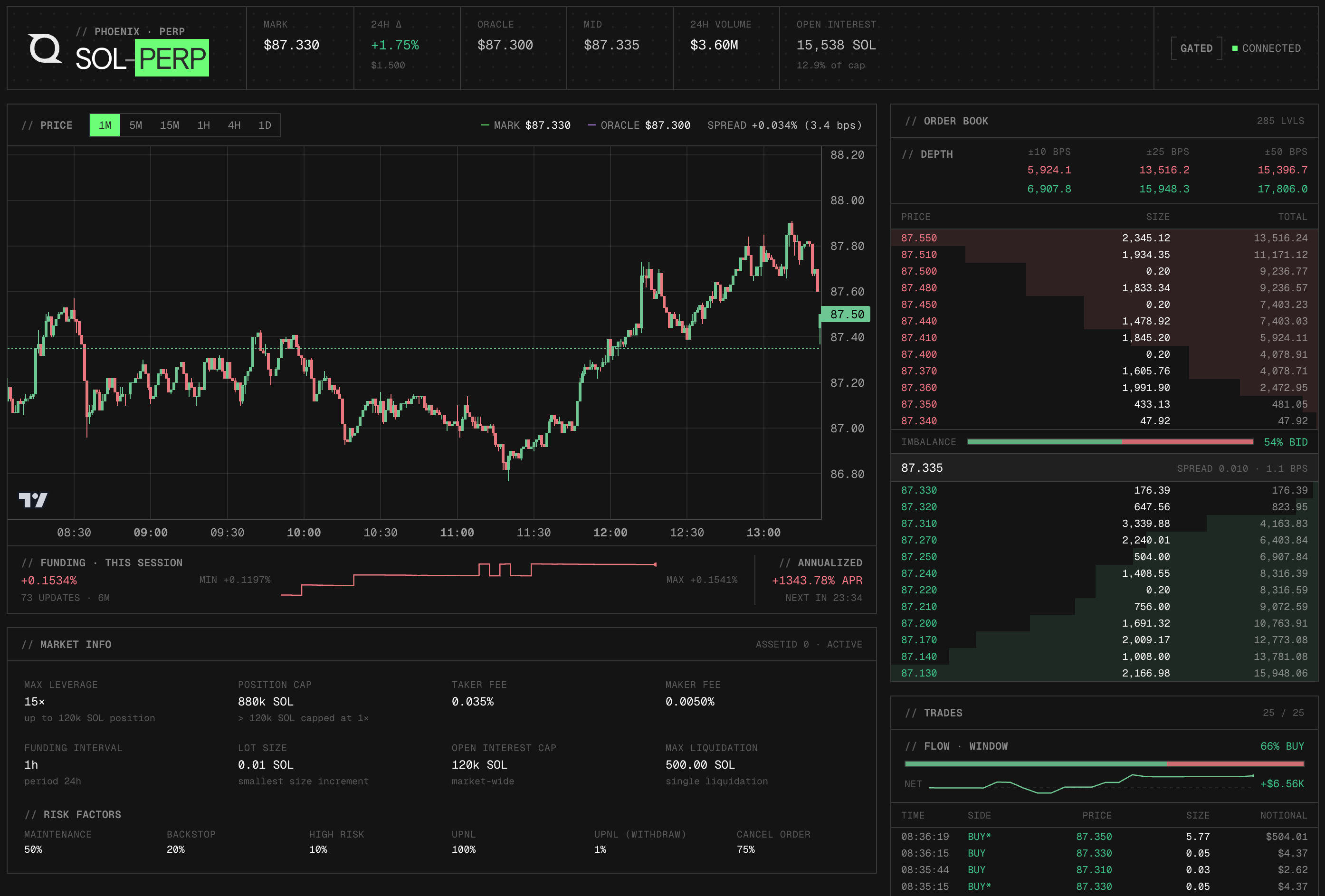
PhoenixProvider / usePhoenix() in src/ws/PhoenixWebSocket.tsx owns the single shared WebSocket, subscription bookkeeping, message dispatch, reconnect logic, timeframe switching, and the exposed state object.
Clone and run it locally to follow along with the rest of the guide:
git clone https://github.com/quiknode-labs/qn-guide-examples.git
cd solana/phoenix-dashboard
npm install
npm run dev
Fetch Market Config and Seed Candles
A dashboard backed by a WebSocket still needs REST. The socket joins mid-stream and sends the next update, not a snapshot. Two pieces of state have to be populated before live updates arrive: the static market config (which the WebSocket never pushes) and the historical candle series (so the chart has more than one bar).
GET /exchange/market/{symbol} returns a single JSON object with the static market parameters. A trimmed example response:
{
  "symbol": "SOL",
  "assetId": 1,
  "marketStatus": "active",
  "marketPubkey": "...",
  "tickSize": 0.01,
  "baseLotsDecimals": 3,
  "takerFee": 0.0005,
  "makerFee": 0.0001,
  "fundingIntervalSeconds": 3600,
  "fundingPeriodSeconds": 86400,
  "maxFundingRatePerIntervalPercentage": 0.05,
  "openInterestCapBaseLots": "100000000",
  "maxLiquidationSizeBaseLots": "5000000",
  "isolatedOnly": false,
  "leverageTiers": [
    { "maxLeverage": 20, "maxSizeBaseLots": 1000000, "limitOrderRiskFactor": 0.05 },
    { "maxLeverage": 10, "maxSizeBaseLots": 5000000, "limitOrderRiskFactor": 0.1 }
  ],
  "riskFactors": {
    "maintenance": 0.03,
    "backstop": 0.01,
    "highRisk": 0.05,
    "upnl": 0.5,
    "upnlForWithdrawals": 0.25,
    "cancelOrder": 0.001
  }
}
The dashboard uses this for the Market Info reference panel (max leverage, tier table, margin requirements, fees, tick/lot size). None of these fields are pushed on any WebSocket channel, so REST is the only source.
GET /candles?symbol=SOL&timeframe=1m&limit=500 returns an array of candle objects with millisecond timestamps:
[
  {
    "time": 1747556400000,
    "open": 170.21,
    "high": 170.55,
    "low": 170.14,
    "close": 170.42,
    "volume": 1284.5,
    "volumeQuote": 218842.71,
    "tradeCount": 42,
    "markOpen": 170.20,
    "markHigh": 170.54,
    "markLow": 170.13,
    "markClose": 170.41
  }
]
Subscribe to the Phoenix WebSocket
const ws = new WebSocket('wss://perp-api.phoenix.trade/v1/ws');

const subscriptions = [
  { type: 'subscribe', subscription: { channel: 'market', symbol: 'SOL' } },
  { type: 'subscribe', subscription: { channel: 'orderbook', symbol: 'SOL' } },
  { type: 'subscribe', subscription: { channel: 'trades', symbol: 'SOL' } },
  { type: 'subscribe', subscription: { channel: 'candles', symbol: 'SOL', timeframe: '1m' } },
  { type: 'subscribe', subscription: { channel: 'fundingRate', symbol: 'SOL' } },
  { type: 'subscribe', subscription: { channel: 'exchange', encoding: 'json' } },
];

ws.onopen = () => {
  for (const msg of subscriptions) ws.send(JSON.stringify(msg));
};
Two things to note: candles carries the timeframe, and exchange carries encoding: 'json' (with no symbol).
Every payload has either a channel or a type field. Dispatch on whichever is present:
ws.onmessage = (event) => {
  const msg = JSON.parse(event.data);
  const key = msg.channel ?? msg.type;
  switch (key) {
    case 'market':         return onMarketStats(msg);
    case 'orderbook':      return onOrderbook(msg);
    case 'trades':         return onTrades(msg);
    case 'candles':        return onCandle(msg);
    case 'fundingRate':    return onFundingRate(msg);
    case 'exchange':       return onExchange(msg);
    case 'subscriptionConfirmed': return;
    case 'subscriptionError':
    case 'error':
      console.error('Phoenix error', msg);
      return;
  }
};
With the connection open and subscriptions sent, the server starts pushing messages. Below is a breakdown the payload of each of the six channels:
Market
MarketStatsUpdate pushes the header numbers:
{
  "channel": "market",
  "markPx": 170.42,
  "oraclePx": 170.41,
  "midPx": 170.42,
  "prevDayPx": 168.15,
  "dayNtlVlm": 218842710.42,
  "openInterest": 4521234.5,
  "funding": 0.00012
}
Replace the in-memory MarketStats wholesale on each message. Compute 24h percent change from markPx and prevDayPx. The dashboard uses funding for both the header badge and a session-local history series rendered alongside the chart.
Orderbook
L2BookUpdate is a full L2 snapshot, not a delta. Replace the in-memory book on every message. Phoenix sends this payload in two shapes (see Handle Phoenix's Payload Quirks). If MarketStatsUpdate has not arrived yet, derive midPx from the top-of-book: (bestBid + bestAsk) / 2.
{
  "channel": "orderbook",
  "symbol": "SOL",
  "orderbook": {
    "bids": [[170.41, 42.5], [170.40, 118.0], [170.38, 75.2]],
    "asks": [[170.42, 30.1], [170.43, 95.0], [170.45, 210.3]],
    "mid": 170.415
  },
  "bypassExecutionBand": false
}
Trades
TradesMessage is append-only on the wire. The dashboard prepends and caps at 100 rows. Key fields:
{
  "channel": "trades",
  "trades": [
    {
      "tradeSequenceNumber": 482113,
      "slot": 281234567,
      "slotIndex": 3,
      "timestamp": "1747556421",
      "time": 1747556421000,
      "side": "b",
      "price": 170.42,
      "size": 12.5,
      "notional": 2130.25,
      "numFills": 1
    }
  ]
}
Candles
CandleData streams the in-progress candle as it updates and the closed candle when the interval ends. Time unit on this channel is seconds (REST is milliseconds). The dashboard upserts by time: if a candle with the same time already exists, replace it; otherwise append.
{
  "channel": "candles",
  "symbol": "SOL",
  "timeframe": "1m",
  "candle": {
    "time": 1747556460,
    "open": 170.42,
    "high": 170.50,
    "low": 170.38,
    "close": 170.45,
    "volume": 92.1,
    "volumeQuote": 15710.2
  }
}
FundingRate
FundingRateUpdate replaces the current funding rate. The dashboard also pushes a { timestamp: Date.now(), rate } entry into a session-local array so the funding history can be charted alongside price. No persistence is required.
{
  "channel": "fundingRate",
  "funding": 0.00012,
  "fundingTime": 1747556400
}
Exchange
The exchange channel describes global exchange health. It sends a snapshot once at subscribe time, then delta messages. Each delta has an op; the only one this dashboard reacts to is exchangeStatusChanged. Other market-level delta operations are intentionally ignored.
{
  "channel": "exchange",
  "type": "snapshot",
  "active": true,
  "gated": false
}
Wrapping Up
You now have a fully push-based SOL perps terminal driven entirely by Phoenix's public API. You know which REST endpoints to seed from, which six WebSocket channels to subscribe to, and how to flatten Phoenix's payload quirks (numeric encoding, orderbook shape, time units) at one boundary so the rest of your code stays clean. Reconnect, resubscribe, and timeframe-switch logic are all wired so the dashboard survives a dropped connection without going stale. From here you can point it at any Phoenix market, layer in onchain context from a Quicknode RPC endpoint, or rebuild the UI in whatever framework you prefer.
Frequently Asked Questions
Is the Phoenix WebSocket rate-limited or authenticated?
The public read-only feeds documented here require no API key, no signed headers, and no wallet. Check the Phoenix documentation for the current rate limits, since public infrastructure limits can change.
What is the difference between mark price and oracle price?
Mark price is the protocol's reference price for the perpetual contract and is used to settle unrealized PnL, liquidations, and funding. Oracle (or index) price is an external reference (typically an aggregate of spot venues). The two should track each other closely; sustained divergence is a stress signal that the dashboard surfaces as a chart overlay.
Can I use this for other Phoenix markets like BTC or ETH?
Yes. Phoenix's REST and WebSocket surface is identical across markets. Parameterize the symbol throughout the provider, lift the in-memory state to a per-symbol map, and the same six channels deliver everything the dashboard renders.
Can I place trades from this dashboard?
No. Trading is out of scope for this guide. Order placement on Phoenix is an onchain Solana program interaction that requires a connected wallet and signed transactions, neither of which the read-only public API surface used here supports.