
16 min read
Transaction v1 ships in Agave v4.2.2 behind the feature gate txv1aq4pp281K9um3tnPgkfX8UqtFT6wcVW3hNezGLL. The gate is active on testnet at epoch 1025 on September 1, 2026. Anza has scheduled mainnet activation for September 9, 2026, and that date may move. Until the gate activates, mainnet rejects v1 transactions and every transaction you fetch is legacy or v0.
Overview
A Solana transaction has always had to fit in 1,232 bytes, a cap derived from the 1,280-byte IPv6 minimum MTU. SIMD-0296 raises that ceiling to 4,096 bytes, and SIMD-0385 defines transaction v1, the format that carries the larger payload.
The larger size limit comes with a new transaction layout, so anything that reads Solana data has to change to handle it, and the failures may be quiet.
You will run a local validator with the v1 feature gate active, send a real v1 transaction, fix four places where reading transaction data breaks with v1, and build v1 transactions correctly on the sending side.
- Run a local validator with the v1 feature gate active and send a real v1 transaction
- Learn the new wire layout:
0x81at byte zero, resource config in the message, no Address Lookup Tables, and signatures at the tail - Fix four places that can break when reading v1 transaction data
- Normalize priority fees so legacy, v0, and v1 report comparable numbers
- Build v1 transactions with the compute unit and data size limits that no longer have defaults
What You Will Need
- Node.js version 22 or higher, to run the TypeScript examples with
tsx - The Solana CLI version 4.2 or higher (the first release whose bundled
solana-test-validatorcan activate the v1 feature gate) - A basic understanding of Solana transactions, instructions, and compute units
- A Quicknode Solana endpoint for the block subscription example, which needs a
wss://URL that servesblockSubscribe. Quicknode endpoints serve v1 transactions with no configuration change, so the same endpoint works when you point the rest of the code at testnet or mainnet
Every other example runs against a local validator, so no funded account is required to follow along.
What Changed in Solana v1 Transactions?
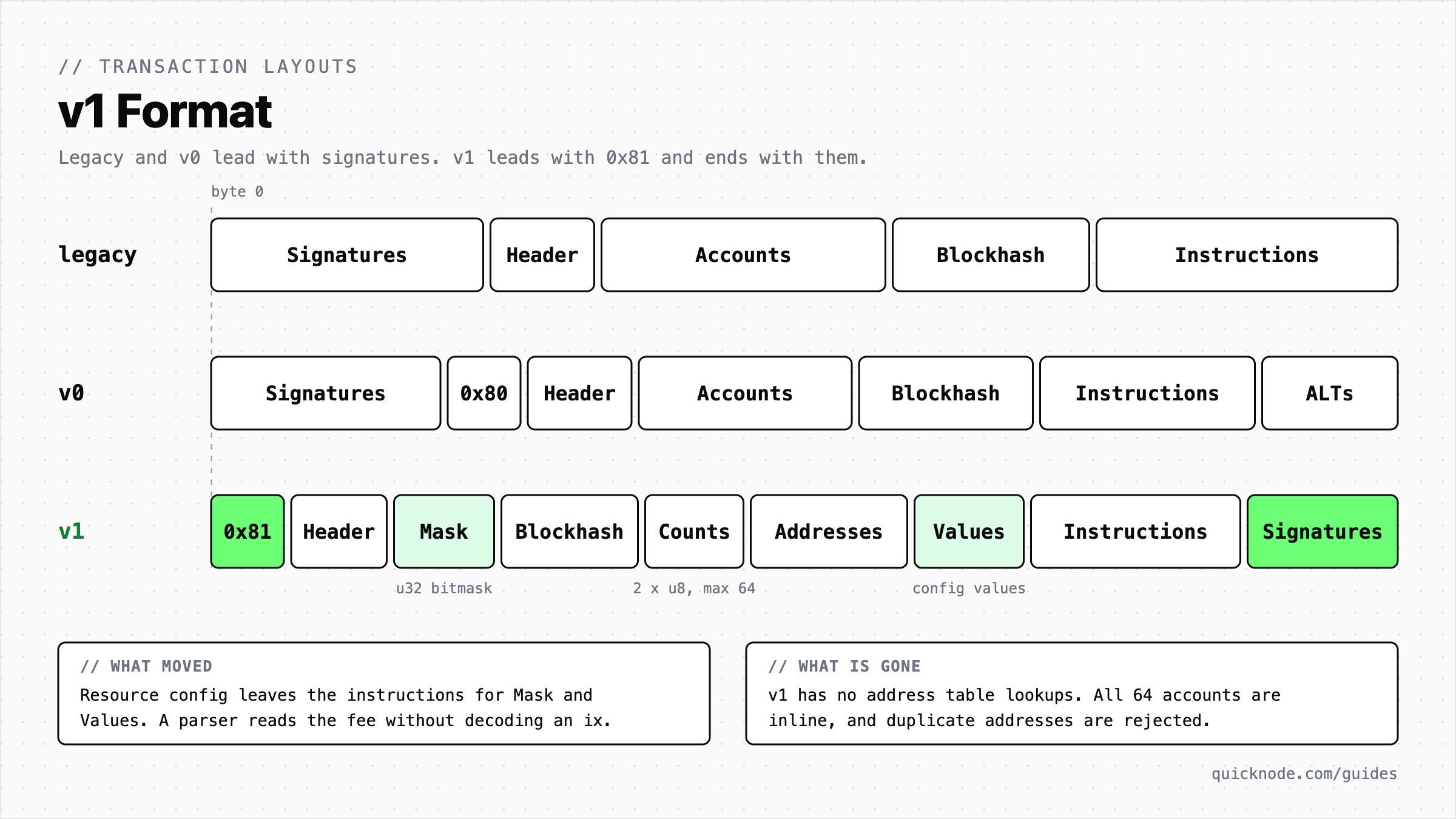
Solana v1 transactions move the compute unit limit and priority fee out of ComputeBudget instructions into a bitmask-described config section, remove Address Lookup Tables in favor of up to 64 inline accounts, and reorder the envelope so it starts with the byte 0x81 and ends with the signatures. Any parser that assumes the legacy or v0 layout reads v1 data incorrectly.
v1 reorders the entire layout of a transaction envelope:
Resource Configuration
In legacy and v0 transactions, a compute unit limit or priority fee is an instruction to the ComputeBudget program. In v1, those values live in a fixed-position config section described by a 32-bit bitmask, so a validator can read a transaction's fee before parsing any instruction.
The bit assignments, shown here as the low byte of the u32 mask, are:
| Config Value | Mask Bits | Type |
|---|---|---|
| Priority fee (total lamports) | 0b00000011 | u64 |
| Compute unit limit | 0b00000100 | u32 |
| Loaded accounts data size limit | 0b00001000 | u32 |
| Requested heap size | 0b00010000 | u32 |
Address Lookup Tables Removed
A v1 transaction carries up to 64 accounts inline as full 32-byte public keys, and the runtime rejects duplicate addresses outright.
Roughly 62% of v0 transactions reference at least one lookup table, and converting them to v1 costs under 420 bytes for half of them and under 1,400 bytes for 90%. The 64-account ceiling did not move, so it remains the binding constraint for account-heavy strategies.
Envelope Reordering
A v1 transaction starts with the byte 0x81, which makes format detection a single-byte check. Signatures move to the tail with no length prefix, since the header already implies the count, and fixed-width u8 counts replace compact-u16 encoding. Legacy and v0 both open with a signature count instead, which is why neither can be identified from its first byte alone.
The fixed run at the front means a parser can read a v1 transaction's fee without touching a single instruction:
| Offset | Field | Size |
|---|---|---|
| 0 | Version discriminator, always 0x81 | 1 byte |
| 1 | Message header | 3 bytes |
| 4 | Config mask | 4 bytes |
| 8 | Recent blockhash, the lifetime specifier | 32 bytes |
| 40 | Instruction and account counts | 2 bytes |
| 42 | Inline addresses | 32 bytes each |
Legacy and v0 transactions are unaffected and keep working exactly as before, still subject to the 1,232-byte cap.
Run a Local Validator With v1 Active
solana-test-validator activates all known feature gates at genesis, so a 4.2 or newer validator gives you a v1-capable cluster immediately. Confirm your toolchain first:
solana --version
You need 4.2.0 or higher. If you are on an older release, switch with agave-install:
agave-install init 4.2.2
Start the validator. This guide uses port 8999 to avoid colliding with anything already bound to the default 8899:
solana-test-validator --reset --quiet --ledger test-ledger --rpc-port 8999 --faucet-port 9901
In a second terminal, verify the v1 feature gate is live:
solana feature status -u http://127.0.0.1:8999 | grep txv1
You should see the gate active from epoch zero:
txv1aq4pp281K9um3tnPgkfX8UqtFT6wcVW3hNezGLL | active since epoch 0 | 0 | SIMD-0385: Transaction V1
If that line reads inactive, your validator predates 4.2 and the rest of this guide will not produce v1 data.
Set Up the Project
Create a project and install the client libraries. Reading and sending v1 transactions requires @solana/kit 8.0.0 or later, so pin a current version:
mkdir solana-v1-lab && cd solana-v1-lab
npm init -y
npm pkg set type=module
npm install @solana/kit@8.2.0 @solana/kit-plugin-rpc@0.19.0 @solana/kit-plugin-signer@0.19.0 @solana-program/system@0.14.1
npm install -D tsx
Send a v1 Transaction
You need real v1 data before you can test reading code against it, so start by producing some. Create send-v1.ts. It builds a Kit plugin client, wires up the RPC and subscription connections along with transaction planning and sending, and airdropSigner funds the payer.
The important part is transactionConfig, which tells the client to build every transaction as version: 1 with the priority fee in the message header instead of in a ComputeBudget instruction. Simulation fills in the compute unit and loaded accounts data size limits before the send:
import { createClient, generateKeyPairSigner, getBase64EncodedWireTransaction, lamports } from '@solana/kit';
import { solanaLocalRpc } from '@solana/kit-plugin-rpc';
import { airdropSigner, generatedSigner } from '@solana/kit-plugin-signer';
import { getTransferSolInstruction } from '@solana-program/system';

const client = await createClient()
  .use(generatedSigner())
  .use(
    solanaLocalRpc({
      rpcUrl: 'http://127.0.0.1:8999',
      rpcSubscriptionsUrl: 'ws://127.0.0.1:9000',
      // Every transaction this client sends is v1, with the priority fee in the header.
      transactionConfig: { version: 1, priorityFeeLamports: lamports(5_000n) },
    }),
  )
  .use(airdropSigner(lamports(1_000_000_000n)));

console.log('payer funded:', client.payer.address);

const recipient = await generateKeyPairSigner();
const result = await client.sendTransaction(
  getTransferSolInstruction({
    source: client.payer,
    destination: recipient.address,
    amount: lamports(1_000_000n),
  }),
);

const wire = Buffer.from(getBase64EncodedWireTransaction(result.context.transaction), 'base64');
console.log('first wire byte (hex):', wire[0].toString(16));
console.log('wire size (bytes):', wire.length);
console.log('sent v1 tx:', result.context.signature);

// The block fetch later in the guide needs the slot this transaction landed in.
const { value: [status] } = await client.rpc.getSignatureStatuses([result.context.signature]).send();
console.log('slot:', `${status?.slot}`);
Run it:
npx tsx send-v1.ts
Expected output:
payer funded: GHQKbpEWLxGpiUDmGLnzQHjGT4uwgBzVAFfiPx4ECpPz
first wire byte (hex): 81
wire size (bytes): 236
sent v1 tx: 3UUXn78vCkuxcvKhQhSKYuRR8vVt1rM756mLBbGKRV9iUQGbuGkkZo95ZbaAAH6rAHopeuHqZfctfCSgWVaQVpa9
slot: 81
That leading 81 is the v1 discriminator. Save the signature and the slot, because the next sections use both.
Fix Transaction and Block Fetches
Ask the RPC for your v1 transaction the way most existing code does, with no version parameter:
curl -s -X POST -H "Content-Type: application/json" \
  -d '{"jsonrpc":"2.0","id":1,"method":"getTransaction","params":["YOUR_V1_SIGNATURE",{"encoding":"json","commitment":"confirmed"}]}' \
  http://127.0.0.1:8999
Expected result:
{
  "jsonrpc": "2.0",
  "error": {
    "code": -32015,
    "message": "Transaction version (1) is not supported by the requesting client. Please try the request again with the following configuration parameter: \"maxSupportedTransactionVersion\": 1"
  },
  "id": 1
}
The fix is to opt in with maxSupportedTransactionVersion: 1. It must be the JSON integer 1, not the string "1":
curl -s -X POST -H "Content-Type: application/json" \
  -d '{"jsonrpc":"2.0","id":1,"method":"getTransaction","params":["YOUR_V1_SIGNATURE",{"encoding":"json","commitment":"confirmed","maxSupportedTransactionVersion":1}]}' \
  http://127.0.0.1:8999
The response now carries version: 1 alongside the slot and fee. Trimmed to the fields that matter here:
{
  "jsonrpc": "2.0",
  "result": {
    "slot": 81,
    "version": 1,
    "meta": { "fee": 10000 },
    "transaction": { "message": { "transactionConfig": { "priorityFee": 5000 } } }
  },
  "id": 1
}
getBlock behaves the same way. A single v1 transaction fails the entire block response rather than just that one entry, so a block containing one v1 transaction and hundreds of legacy ones returns nothing at all. Request the slot that send-v1.ts printed without the version parameter and you get the same -32015 error. With it:
curl -s -X POST -H "Content-Type: application/json" \
  -d '{"jsonrpc":"2.0","id":1,"method":"getBlock","params":[YOUR_SLOT,{"encoding":"json","commitment":"confirmed","transactionDetails":"full","rewards":false,"maxSupportedTransactionVersion":1}]}' \
  http://127.0.0.1:8999
The block holds two transactions: the validator's own vote, which is legacy, and your v1 transfer. Each carries a version field, so a block reader can branch on it directly. Trimmed to those fields:
{
  "blockHeight": 81,
  "transactions": [
    {
      "version": "legacy",
      "transaction": { "message": { "accountKeys": ["<validator identity>", "<vote account>", "Vote111111111111111111111111111111111111111"] } }
    },
    {
      "version": 1,
      "transaction": { "message": { "transactionConfig": { "priorityFee": 5000 } } }
    }
  ]
}
A missing transaction returns null rather than error -32015. Because getTransaction defaults to finalized commitment, querying a freshly confirmed transaction can return null and hide the version problem entirely. Use commitment: 'confirmed' while testing so you see the real error.
Fix Block Subscriptions
blockSubscribe fails less politely than the request and response methods. Per Solana's larger transaction sizes upgrade notes, a subscription that has not opted into v1 emits block: null when it reaches a v1 transaction and then stops advancing. There is no error frame and no disconnect, so the socket looks healthy while the stream is dead.
Pass the version parameter when you subscribe, and add a staleness check regardless, because nothing else will surface a wedged subscription. blockSubscribe is an unstable RPC method, so Kit exposes it through createSolanaRpcSubscriptions_UNSTABLE rather than through the plugin client. Create watch-blocks.ts:
import { createSolanaRpcSubscriptions_UNSTABLE } from '@solana/kit';

// Or your Quicknode endpoint's wss:// URL, pasted as-is with no port added.
const WS_URL = 'ws://127.0.0.1:9000';

// blockSubscribe is an unstable RPC method, so it lives behind the _UNSTABLE factory.
const rpcSubscriptions = createSolanaRpcSubscriptions_UNSTABLE(WS_URL);
const abortController = new AbortController();

// Without maxSupportedTransactionVersion, the first v1 transaction wedges the stream.
const blockNotifications = await rpcSubscriptions
  .blockNotifications('all', {
    commitment: 'confirmed',
    encoding: 'json',
    maxSupportedTransactionVersion: 1,
    showRewards: false,
    transactionDetails: 'full',
  })
  .subscribe({ abortSignal: abortController.signal });

let lastBlockAt = Date.now();

// Alert if no block arrives for 30 seconds.
setInterval(() => {
  if (Date.now() - lastBlockAt > 30_000) {
    console.error('blockSubscribe appears stalled, no block in 30s');
  }
}, 5_000);

for await (const notification of blockNotifications) {
  if (notification.value.block == null) {
    console.error('received null block, check maxSupportedTransactionVersion');
    continue;
  }
  lastBlockAt = Date.now();
  const versions = notification.value.block.transactions.map((tx) => tx.version);
  console.log(`slot ${notification.value.slot}: ${versions.length} transactions, versions ${JSON.stringify(versions)}`);
}
solana-test-validator in Agave 4.2.2 exits at startup when passed --rpc-pubsub-enable-block-subscription, so this file cannot run against the local cluster from this guide. Point WS_URL at a Quicknode Solana endpoint's wss:// URL, which serves blockSubscribe. The :9000 port belongs to the local validator only, so paste the Quicknode URL unchanged. The script then prints one line per confirmed block with the version of every transaction inside.
Fix Resource Config Parsing
This is a silent error. Look at what the RPC returns for the v1 transaction you sent:
"transactionConfig": {
  "computeUnitLimit": 450,
  "heapSize": null,
  "loadedAccountsDataSizeLimit": 149,
  "priorityFee": 5000
}
And its instruction list:
"instructions": [
  {
    "accounts": [0, 1],
    "data": "3Bxs4Bc3VYuGVB19",
    "programIdIndex": 2,
    "stackHeight": 1
  }
]
Just one instruction, the transfer. There is no ComputeBudget instruction, and the ComputeBudget program does not even appear in the account keys. Any pipeline that derives fees by scanning instructions finds nothing and records a zero without raising an error.
A v0 transaction expressing the same economics has three instructions instead and lists ComputeBudget111111111111111111111111111111 among its accounts, with no transactionConfig present.
That difference also gives you a reliable version test. The versioned flag is true for both v0 and v1, so checking it first misclassifies every v1 transaction as v0. Check for the config object first.
If you can hand Kit the raw transaction bytes instead of the JSON, it reads the version from the envelope and exposes the fee fields through version-aware getters, so the only logic left to write is the legacy and v0 fee math. Create audit.ts:
import {
  createClient,
  decompileTransactionMessageFetchingLookupTables,
  getBase64Encoder,
  getCompiledTransactionMessageDecoder,
  getTransactionDecoder,
  getTransactionMessageComputeUnitLimit,
  getTransactionMessageComputeUnitPrice,
  getTransactionMessagePriorityFeeLamports,
  signature,
  type TransactionMessage,
} from '@solana/kit';
import { solanaRpcConnection } from '@solana/kit-plugin-rpc';

const client = createClient().use(solanaRpcConnection({ rpcUrl: 'http://127.0.0.1:8999' }));

// Builtin programs, which the runtime budgets at 3,000 compute units each when no limit is set.
const BUILTIN_PROGRAMS = new Set([
  '11111111111111111111111111111111',
  'ComputeBudget111111111111111111111111111111',
  'Vote111111111111111111111111111111111111111',
  'Stake11111111111111111111111111111111111111',
  'Config1111111111111111111111111111111111111',
  'AddressLookupTab1e1111111111111111111111111',
  'BPFLoader1111111111111111111111111111111111',
  'BPFLoader2111111111111111111111111111111111',
  'BPFLoaderUpgradeab1e11111111111111111111111',
  'LoaderV411111111111111111111111111111111111',
  'Ed25519SigVerify111111111111111111111111111',
  'KeccakSecp256k11111111111111111111111111111',
]);

/** The limit the runtime assumes for a legacy or v0 transaction that never set one. */
function defaultComputeUnitLimit(message: TransactionMessage): number {
  let reserved = 0;
  for (const ix of message.instructions) {
    reserved += BUILTIN_PROGRAMS.has(ix.programAddress) ? 3_000 : 200_000;
  }
  return Math.min(reserved, 1_400_000);
}

/** Return the priority fee in total lamports for any transaction version. */
function priorityFeeLamports(message: TransactionMessage): bigint {
  // v1 states the fee directly, as an absolute lamport total.
  if (message.version === 1) return getTransactionMessagePriorityFeeLamports(message) ?? 0n;

  // legacy and v0 state a price per compute unit, so multiply by the limit.
  const microLamportsPerCu = getTransactionMessageComputeUnitPrice(message);
  if (microLamportsPerCu === undefined) return 0n;
  const units = getTransactionMessageComputeUnitLimit(message) ?? defaultComputeUnitLimit(message);
  // The runtime rounds up to the next whole lamport, so match it or read 1 lamport low.
  return (microLamportsPerCu * BigInt(units) + 999_999n) / 1_000_000n;
}

// Add any legacy or v0 signature from the same cluster to exercise both paths.
const signatures = ['YOUR_V1_SIGNATURE'];

for (const sig of signatures) {
  const tx = await client.rpc
    .getTransaction(signature(sig), {
      commitment: 'confirmed',
      encoding: 'base64',
      maxSupportedTransactionVersion: 1,
    })
    .send();

  if (tx == null) {
    console.error(`${sig} not found`);
    continue;
  }

  // Decode the wire bytes and let Kit read the version from the envelope.
  const wire = getBase64Encoder().encode(tx.transaction[0]);
  const { messageBytes } = getTransactionDecoder().decode(wire);
  const compiled = getCompiledTransactionMessageDecoder().decode(messageBytes);
  const message = await decompileTransactionMessageFetchingLookupTables(compiled, client.rpc);

  const version = message.version === 'legacy' ? 'legacy' : `v${message.version}`;
  console.log(version.padEnd(6), `priorityFee=${priorityFeeLamports(message)} lamports`, `totalFee=${tx.meta!.fee}`);
}
Substitute your signature and run it:
npx tsx audit.ts
Expected output:
v1 priorityFee=5000 lamports totalFee=10000
The v1 transaction reports its priority fee correctly, and the 10,000 lamport total is a 5,000 lamport base fee plus the 5,000 lamport priority fee. Without the normalizer, that row would have read zero. Pass a legacy or v0 signature through the same script and Kit reads the price from its SetComputeUnitPrice instruction instead, multiplied by the limit the transaction set or the default the runtime would have assumed.
Compute unit limits need the same treatment, and getTransactionMessageComputeUnitLimit already does it: it reads config.computeUnitLimit for v1 and the SetComputeUnitLimit instruction for legacy and v0. An absent limit in legacy and v0 means the runtime reserves 3,000 units per builtin instruction and 200,000 per other instruction, capped at 1,400,000 (SIMD-0170), which is what defaultComputeUnitLimit reproduces. In v1 an absent limit means zero.
Fix Geyser and gRPC Streams
Streaming consumers have a version problem of their own. Yellowstone Geyser plugin releases before 15.1.1 downgrade v1 transactions to v0 on the way out, which discards the config section and corrupts exactly the data you were trying to capture. Upgrade the plugin to 15.1.1 or later, and regenerate your protobuf stubs at 12.6.0 or later so the Message.config field exists in your generated types.
Once the field is available, detect the version structurally, in the same order as the JSON path:
function messageVersion(message: any): 'legacy' | 'v0' | 'v1' {
  if (message.config !== undefined) return 'v1';
  return message.versioned ? 'v0' : 'legacy';
}
Set Resource Limits When You Build v1 Transactions
Reading is most of the work, but there are a few rules you cannot skip on the sending side.
Unset limits are zero. Legacy and v0 transactions fall back to the instruction-based default described in the compute unit limits note above. A v1 transaction with no limit set gets zero and fails. You must set both computeUnitLimit and loadedAccountsDataSizeLimit explicitly. The plugin client in send-v1.ts handles this for you, because estimateResourceLimits defaults to true.
If you build transaction messages by hand, do the same thing yourself: simulate and let Kit fill the limits in rather than guessing. Create estimate-limits.ts, which reuses the funded client and builds the transfer message manually:
import {
  appendTransactionMessageInstruction,
  createClient,
  createTransactionMessage,
  estimateAndSetResourceLimitsFactory,
  estimateResourceLimitsFactory,
  fillTransactionMessageProvisoryResourceLimits,
  generateKeyPairSigner,
  getTransactionMessageComputeUnitLimit,
  getTransactionMessageLoadedAccountsDataSizeLimit,
  lamports,
  pipe,
  setTransactionMessageFeePayerSigner,
  setTransactionMessageLifetimeUsingBlockhash,
} from '@solana/kit';
import { solanaLocalRpc } from '@solana/kit-plugin-rpc';
import { airdropSigner, generatedSigner } from '@solana/kit-plugin-signer';
import { getTransferSolInstruction } from '@solana-program/system';

// Same funded client as send-v1.ts. Simulation fails if the payer cannot cover the transfer.
const client = await createClient()
  .use(generatedSigner())
  .use(solanaLocalRpc({ rpcUrl: 'http://127.0.0.1:8999', rpcSubscriptionsUrl: 'ws://127.0.0.1:9000' }))
  .use(airdropSigner(lamports(1_000_000_000n)));

const recipient = await generateKeyPairSigner();
const { value: latestBlockhash } = await client.rpc.getLatestBlockhash().send();

// A v1 message built by hand, with no resource limits set yet.
const messageWithoutLimits = pipe(
  createTransactionMessage({ version: 1 }),
  (m) => setTransactionMessageFeePayerSigner(client.payer, m),
  (m) => setTransactionMessageLifetimeUsingBlockhash(latestBlockhash, m),
  (m) =>
    appendTransactionMessageInstruction(
      getTransferSolInstruction({
        source: client.payer,
        destination: recipient.address,
        amount: lamports(1_000_000n),
      }),
      m,
    ),
);

const estimateResourceLimits = estimateResourceLimitsFactory({ rpc: client.rpc });
const setResourceLimits = estimateAndSetResourceLimitsFactory(estimateResourceLimits);

// Simulate with provisory limits, then set the measured values.
const draft = fillTransactionMessageProvisoryResourceLimits(messageWithoutLimits);
const message = await setResourceLimits(draft);

console.log('computeUnitLimit      :', getTransactionMessageComputeUnitLimit(message));
console.log('loadedAccountsDataSize:', getTransactionMessageLoadedAccountsDataSizeLimit(message));
Run it:
npx tsx estimate-limits.ts
Expected output:
computeUnitLimit      : 150
loadedAccountsDataSize: 149
These are the raw measured values from simulation, with no margin. Compare them with the transactionConfig the RPC returned for send-v1.ts: computeUnitLimit was 450 there because the plugin client adds a buffer of at least 300 compute units on top of the estimate, while loadedAccountsDataSizeLimit was 149 because it passes the data size through as measured. When you set limits by hand, add your own compute headroom, and consider rounding the data size up to the next 32 KiB page, because accounts can be created or grow between your simulation and your send.
Drop ComputeBudget instructions. v1 accepts them and ignores them. They cost 150 compute units each and change nothing, so remove them from v1 builders.
Priority fees are absolute. Set priorityFeeLamports as a total in lamports. There is no compute unit multiplication in v1.
Inline your lookup table addresses. v1 has no ALT support, so resolve any table addresses into the inline account list, keep the total at or below 64, and remove duplicates because v1 rejects them.
Submit as base64. The RPC caps base58 submission at 1,232 bytes regardless of version, so any transaction that uses the larger envelope must be sent with encoding: "base64".
Programs cannot read a v1 transaction's resource config, because no sysvar exposes the message config. If you operate a paymaster or co-signer that inspects fees before signing, detect v1 by the leading 0x81 byte and read transactionConfig off the message rather than looking for ComputeBudget instructions.
Wrapping Up
You now have a local cluster that produces v1 transactions on demand, so you can test against the new v1 format. You ran two of the four breakages yourself: the -32015 error that takes a whole block down with it, and the missing ComputeBudget instruction that turns a real fee into a zero. The other two, stalled blockSubscribe streams and Geyser downgrades, need a node you configure, so this guide gave you the code and the version floors to check against. audit.ts reads the v1 priority fee correctly today, and the same code handles legacy and v0 signatures when you feed it some.
Resources
- Solana v1 Transactions Explained - Size limits and breaking changes at a glance
- SIMD-0296: Larger Transactions - The proposal raising the size cap to 4,096 bytes
- SIMD-0385: Transaction V1 - The v1 format specification
- Larger Transaction Sizes Upgrade Notes - Solana's checklist for readers and senders
- Transaction v1 and the ALT Trade-Off - Measured cost of converting lookup tables to inline accounts
- Solana Kit Documentation - Reference for the plugins used in this guide
- Quicknode getTransaction Reference - Parameters including maxSupportedTransactionVersion
- Quicknode Solana gRPC - Streaming Solana data over gRPC
Frequently Asked Questions
What is the maximum size of a Solana v1 transaction?
A v1 transaction can be up to 4,096 bytes, raised from the 1,232 byte limit under SIMD-0296. Legacy and v0 transactions keep the 1,232 byte cap. The account limit did not change: v1 still allows a maximum of 64 accounts, and because Address Lookup Tables are unsupported, all 64 travel inline as full 32-byte public keys.
Why does my getBlock call fail with error -32015?
The block contains at least one v1 transaction and your request did not include maxSupportedTransactionVersion. A single unsupported transaction fails the entire block response rather than just that entry. Add maxSupportedTransactionVersion: 1 as a JSON integer, not the string "1", to both getBlock and getTransaction.
Can I still use Address Lookup Tables with v1 transactions?
No. v1 removes ALT support entirely, so every referenced account must be inlined as a full 32-byte public key, and duplicate addresses are rejected. Roughly 62% of v0 transactions use at least one lookup table, and converting them costs under 420 bytes for half and under 1,400 bytes for 90%, which the larger envelope absorbs. v0 transactions continue to support ALTs, so you can keep using them where the format fits.
Why does my v1 transaction fail when I do not set a compute unit limit?
Unset resource limits are zero in v1 rather than a default. A legacy or v0 transaction that sets no limit gets a default derived from its instruction list under SIMD-0170. A v1 transaction with no computeUnitLimit gets zero units and fails immediately. Set both computeUnitLimit and loadedAccountsDataSizeLimit explicitly, ideally from a simulation rather than a guess.
Which client libraries support v1 transactions?
@solana/kit 8.0.0 and later can both read and send v1. @solana/web3.js 3.0.0-rc.3 and later can read and send it, while @solana/web3.js 1.x v1 support is still in prerelease and is read-only. On other stacks, use solana-go 1.23.0 or later, solders 0.29.0 or later for Python, and the 4.2.x Rust crates. Yellowstone Geyser needs 15.1.1 or later with protobuf stubs at 12.6.0 or later.