
10 min read
Overview
Starting in web3 means meeting a pile of unfamiliar names at once: wallets, nodes, RPC endpoints, smart contracts, client libraries, indexers, and AI agents that read the chain and write code for you. Each one solves a different problem, and most tutorials pick a tool for you without saying which problem it solves. That makes it hard to know what to swap when you move to another chain or another kind of app.
This guide explains the stack one layer at a time: what each layer does, what you have to decide there, and which tools fill it on Ethereum and other EVM chains, on Solana, and on Hyperliquid. It ends with a short hands-on section where a TypeScript script and an AI agent read the same onchain price through Quicknode, so you can see the layers connect.
- A web3 developer stack has six layers: wallet, node, data tools, smart contracts, client library, and agent tooling.
- Your app reaches the chain in two ways: it calls a node for current state and transactions, or it receives indexed data from products such as Streams and Webhooks. Only writes need a wallet signature.
- The layers stay the same across chains, while the tools change: Solidity and viem on EVM, Rust and
@solana/kiton Solana, and an exchange API plus HyperEVM on Hyperliquid. - Agent tooling such as the Quicknode MCP server gives an AI assistant the same read access your code has.
What You Will Need
The concept sections need no setup. For the hands-on section at the end, you need:
- A Quicknode account with an Ethereum Sepolia endpoint.
- Node.js (latest LTS release, tested with v24.10.0).
- Optional: an MCP client such as Claude Code, and the
qnCLI.
What Is a Web3 Developer Stack?
A web3 developer stack is the set of tools that lets an app read and change state on a blockchain. It has six layers: a wallet that signs, a node that reads and writes state, data tools that deliver events and history, smart contracts that hold onchain logic, a client library that calls them, and agent tooling for AI assistants.
Your app, your wallet, and your agents sit on your side, and none of them talks to the chain directly. Infrastructure sits between you and the chain and gives you two paths. You call a node when you need current state or want to send a transaction. Data products work the other way: they watch the chain, index it, and deliver events or history to you.

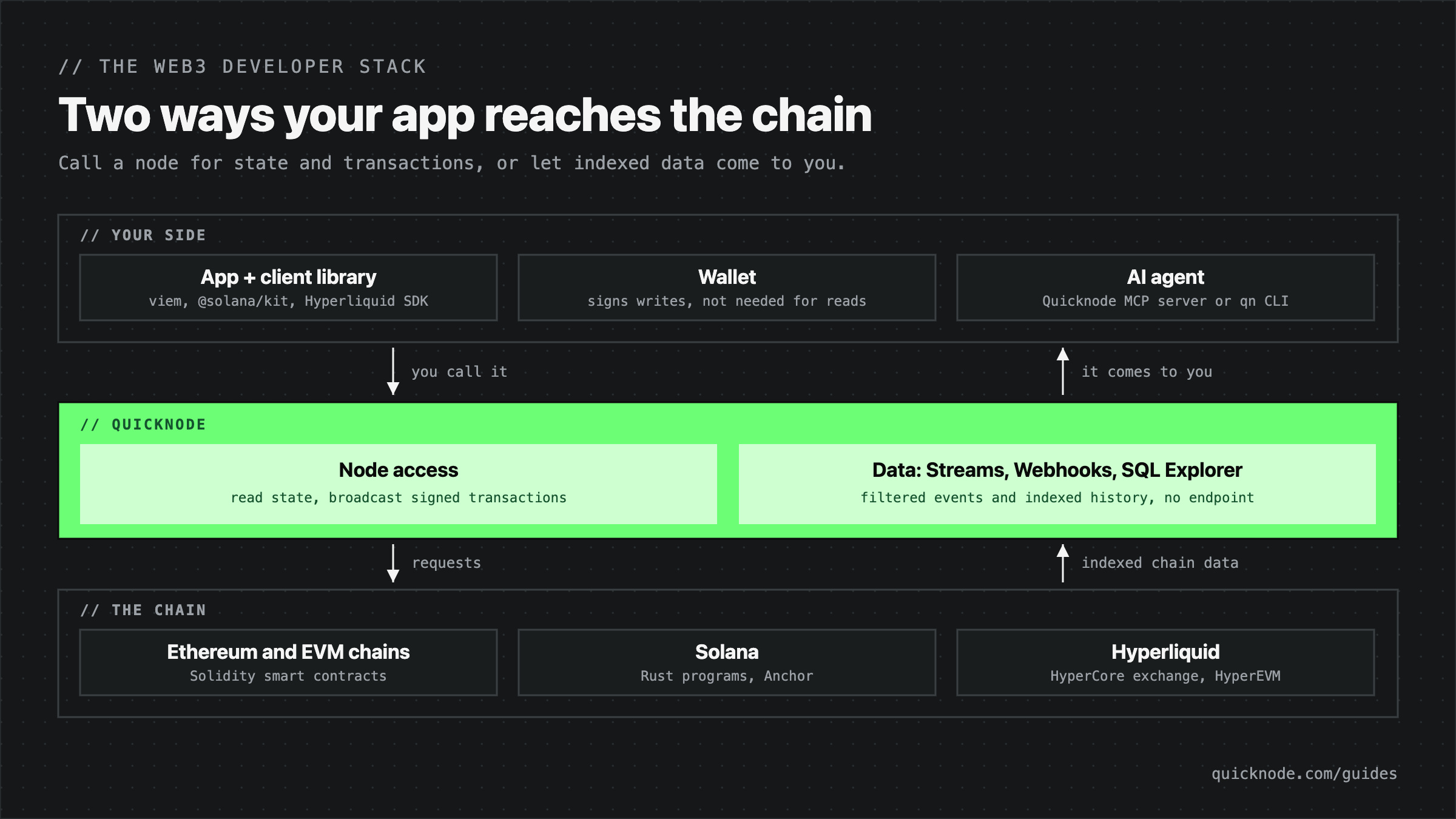
The difference between reads and writes runs through the whole stack. Reading a balance or a contract value is free and needs no signature. Changing state, such as sending tokens or placing an order, is a transaction: a wallet signs it, the node broadcasts it, and the network charges a fee.
If you prefer video, this walkthrough comes from an earlier version of this guide. Some tools and networks in it have changed since, but it still shows how the layers fit together:
Prefer a video walkthrough? Follow along with Radek and learn about the Web3 developer stack in 26 minutes.
Wallets Hold the Keys That Sign Transactions
A wallet holds a private key and uses it to sign transactions. The key is the account: whoever holds it controls the funds and the permissions tied to that address. So the first decision at this layer is where the key lives and who can use it.
For an app that real users click through, the user's own browser or mobile wallet signs, and your app never sees the key. On EVM chains that is MetaMask, Rabby, or a hardware wallet. On Solana it is Phantom, Solflare, or Backpack. Hyperliquid uses Ethereum-style addresses, so the same EVM wallets work there.
For scripts, bots, and deployments, the key sits on a machine you control. Keep it in an encrypted keystore, such as Foundry's cast wallet keystore or a Solana CLI keypair file, rather than in plain text. Hyperliquid adds one option for trading bots: an API wallet that the main account approves, so the bot signs orders with its own key instead of the main one.
Whichever you pick, never paste a private key into a chat with an AI assistant. The agent tools later in this guide do not need it.
Do You Need to Run Your Own Node?
Most teams do not run their own node. A node stores chain state, follows new blocks, and answers requests, which takes disks, bandwidth, and upkeep. A node provider such as Quicknode runs that infrastructure and gives you an endpoint. Run your own only when you need full control over the client or the hardware.
The endpoint is the address your app and wallet use. Your client library sends JSON-RPC requests to it, and your wallet's transactions are broadcast through it. One Quicknode account covers many chains, so switching chains usually means creating a new endpoint, not changing providers.
Protocols differ by job. JSON-RPC over HTTP handles single reads and transaction broadcasts. WebSocket subscriptions push new blocks and events as they happen. gRPC streams high-volume data with lower overhead, which matters on fast chains. On Hyperliquid, one Quicknode endpoint reaches both the HyperEVM JSON-RPC API and the HyperCore APIs, as the Hyperliquid docs describe.
Each endpoint has a Base URL and an Auth token. Treat the token like a password: keep it in an environment variable, not in source code, and send it in a request header so it stays out of URLs that logs record.
Data Tools Bring Chain Data to You
A node answers questions about the current state: what a balance is now, what a contract returns now. It is a poor fit for two other jobs: reacting to activity as it happens, and answering questions about the past, such as every transfer a wallet made last month. Polling a node or scanning block by block for those takes many requests and breaks when a connection drops.
Data products handle those jobs on Quicknode's side. Streams and Webhooks push filtered chain data to a destination you choose. Neither uses an RPC endpoint, so an app that only reacts to onchain activity may never call a node at all. For past activity, Indexed Data gives you onchain datasets that Quicknode has already built from raw blocks. Each fits a different job:
| You need to | Use |
|---|---|
| Move filtered chain data into your own database or queue | Streams |
| Get notified when a wallet or contract does something | Webhooks |
| Look up past activity, such as every transfer a wallet made | Indexed Data |
Indexed Data has more than one access method. SQL Explorer lets you write your own SQL query over the datasets. The Explorer API returns a wallet's transfer history from one JSON-RPC method, qn_getAssetTransfers, on your endpoint.
Each product lists the chains it supports in its documentation. On Hyperliquid, HyperCore also offers gRPC and WebSocket streams of trades, orders, and book updates through a Hyperliquid endpoint.
Smart Contracts and Programs Hold the Onchain Logic
Smart contracts are code deployed to the chain. Once deployed, anyone can call them, and the chain runs them the same way for everyone. Each ecosystem has its own language and tooling:
| Chain | Language | Frameworks | Start here |
|---|---|---|---|
| Ethereum and EVM chains | Solidity, Vyper | Foundry, Hardhat | Intro to Foundry |
| Solana | Rust | Anchor, Pinocchio | First Anchor program |
| Hyperliquid (HyperEVM) | Solidity | Foundry, Hardhat | Read HyperCore prices in HyperEVM |
Solana calls its contracts programs, and they keep code and data in separate accounts. If you come from Solidity, the Solana development for EVM developers guide maps one model to the other.
Hyperliquid splits its chain into two layers that share one state. HyperCore is the exchange itself: order books, matching, and positions are built into the chain, so you do not deploy a contract to trade. You call its APIs instead. HyperEVM is an EVM-compatible layer where you deploy Solidity contracts with the same tools as on Ethereum, and those contracts can read HyperCore data.
Many apps never deploy a contract at all. A wallet tracker, a trading bot, or a dashboard only calls contracts that already exist, which moves the work to the next layer.
Client Libraries Call the Node from Your App
A client library turns contract calls and transactions into function calls in your language. It builds the JSON-RPC request, sends it to your endpoint, and decodes the response into typed values. This is the layer most of your app code touches.
| Chain | TypeScript libraries | When to use |
|---|---|---|
| Ethereum and EVM chains | viem, ethers v6, wagmi | viem for scripts and backends, wagmi for React frontends |
| Solana | @solana/kit | Transactions, accounts, and subscriptions |
| Hyperliquid | Hyperliquid SDK, viem | The SDK for HyperCore trading and market data, viem for HyperEVM |
Agent Tooling Lets AI Assistants Read and Build
AI coding assistants write better web3 code when they can check the chain and the docs instead of guessing. Agent tooling connects an assistant to the same node and documentation you use:
- The Quicknode MCP server gives an MCP client tools for your Quicknode account, including a read-only
call-rpctool that runs JSON-RPC reads on a chosen network. - The
qnCLI runs the same calls from a terminal withqn rpc call, so any agent with shell access can use it. - The Build Web3 plugin adds a skill with Quicknode product references, which an agent uses when it plans and builds an app.
llms.txtindexes give any agent a map of the Quicknode documentation.
The boundary from the wallet layer still holds. None of these tools signs a transaction, so signing stays with you. Review generated code before you deploy it or fund a wallet with it.
How Do You Choose a Stack for Your Project?
Choose the chain first, because it decides the language and libraries. Match the wallet to who signs: users sign in their own wallets, bots sign with keys you control. Most apps call a node, but apps that only react to events or query history can run on data tools alone. Add agent tooling when an AI assistant helps you build.
| You are building | Who signs | Typical stack |
|---|---|---|
| A dApp frontend | The user, in a browser wallet | EVM: wagmi and viem. Solana: @solana/kit with a wallet adapter |
| A backend that reacts to onchain events | Nobody, it only receives data | Webhooks or Streams to your server, with no RPC endpoint |
| An analytics dashboard | Nobody, it only reads | Indexed Data for history, plus a client library for live reads |
| A trading bot on Hyperliquid | An API wallet that your main account approves | The Hyperliquid SDK for HyperCore, plus streams for market data |
| An AI agent that answers onchain questions | Nobody, for read-only work | Quicknode MCP server or qn CLI, plus llms.txt |
Read a Price Feed with viem and an AI Agent
To see the layers connect, read one onchain value two ways. The value is the ETH/USD price from a Chainlink price feed, which is a smart contract that already exists on Ethereum Sepolia. You read it once with a TypeScript script and once with an AI agent, both through Quicknode's node layer. Neither path needs a wallet, because a read changes nothing onchain.
Read the Feed with viem
Create an Ethereum Sepolia endpoint in the Quicknode dashboard. Its overview shows the Base URL and the Auth token as separate values, and How to authenticate shows the request formats. Load both into your shell with prompts, so the token stays out of your shell history:
printf 'Base URL: '
read -r QUICKNODE_RPC_URL
printf 'Auth token: '
read -rs QUICKNODE_RPC_TOKEN
printf '\n'
export QUICKNODE_RPC_URL QUICKNODE_RPC_TOKEN
Create a project and install viem and tsx, which runs TypeScript files directly:
mkdir price-reader
cd price-reader
npm init -y
npm pkg set type=module
npm install viem@2.58.4 tsx@4.23.15 --save-exact
Create price.ts. The script builds a client for Sepolia that sends the Auth token in the x-token header, calls latestRoundData on the feed contract, and formats the price, which Chainlink USD feeds report with 8 decimals:
import { createPublicClient, http, parseAbi, formatUnits } from 'viem';
import { sepolia } from 'viem/chains';

// Chainlink ETH/USD price feed on Ethereum Sepolia
const ETH_USD_FEED = '0x694AA1769357215DE4FAC081bf1f309aDC325306';

const client = createPublicClient({
  chain: sepolia,
  transport: http(process.env.QUICKNODE_RPC_URL, {
    fetchOptions: { headers: { 'x-token': process.env.QUICKNODE_RPC_TOKEN ?? '' } },
  }),
});

const abi = parseAbi([
  'function latestRoundData() view returns (uint80 roundId, int256 answer, uint256 startedAt, uint256 updatedAt, uint80 answeredInRound)',
]);

try {
  const [, answer, , updatedAt] = await client.readContract({
    address: ETH_USD_FEED,
    abi,
    functionName: 'latestRoundData',
  });
  const updated = new Date(Number(updatedAt) * 1000).toISOString();
  console.log(`ETH/USD: $${formatUnits(answer, 8)} (updated ${updated})`);
} catch (error) {
  console.error('Failed to read price:', (error as Error).message);
  process.exit(1);
}
parseAbi takes a one-line function signature, so you do not need the full ABI file. readContract sends an eth_call to your endpoint, which runs the function without a transaction. That is why the script has no private key and pays no gas.
Run it in the same terminal:
npx tsx price.ts
ETH/USD: $1673.4844 (updated 2026-11-24T20:18:24.000Z)
Your price and timestamp will differ, because the feed updates over time. A result proves that the endpoint, the library, and the contract all work together. If you see HTTP request failed with Status: 401, the token is missing or wrong: check that QUICKNODE_RPC_TOKEN is set in this terminal and matches the endpoint's Auth token.
Read the Same Feed with an AI Agent
An agent reaches the chain through the same node layer, but it does not need your Base URL or Auth token. In Claude Code, add the Quicknode MCP server, then type /mcp and authorize it in the browser window that opens:
claude mcp add --transport http quicknode https://mcp.quicknode.com/mcp
The call-rpc tool runs through your account's Tooling Access setting instead of a provisioned endpoint. An account Admin enables it once, as the Quicknode MCP documentation describes. Pick the Viewer role during authorization when you only need reads. Then ask in plain language:
Use the Quicknode call-rpc tool on ethereum-sepolia to call latestRoundData()
on the Chainlink ETH/USD feed at 0x694AA1769357215DE4FAC081bf1f309aDC325306.
Decode the answer field, which has 8 decimals, and show the price in USD.
The tool sends the same eth_call your script sent and returns five 32-byte values in one hex string. The second value is answer, so the agent reports the same price your script printed.
Without an MCP client, the qn CLI makes the same call from a terminal after qn auth login. The data value 0xfeaf968c is the function selector for latestRoundData():
qn rpc call eth_call '[{"to":"0x694AA1769357215DE4FAC081bf1f309aDC325306","data":"0xfeaf968c"},"latest"]' --network ethereum-sepolia
The same tools work on other chains by changing the network. For example, hype-mainnet reaches HyperEVM and solana-mainnet reaches Solana.
Next Steps
Pick the layer you want to go deeper on, on the chain you plan to build for:
- Browse the Ethereum, Solana, or Hyperliquid guides for builds on each layer of that chain.
- Track live Hyperliquid positions with the HyperCore portfolio tracker guide.
- Let an agent pay for endpoint access per request with the x402 payments guide.
Wrapping Up
You now have a map of the web3 developer stack: who signs, where requests go, where logic lives, which library calls it, where history comes from, and how an AI assistant joins in. You also saw a script and an agent read the same contract value through Quicknode, with no wallet involved. When you pick up a new chain, keep the map and change the tools in each layer.
Resources
- Quicknode Hyperliquid documentation, for HyperCore and HyperEVM APIs on one endpoint
- Hyperliquid SDKs, for the community SDKs in four languages
- Quicknode Indexed Data, for the onchain datasets and the ways to query them
- Quicknode Build with AI documentation, for every tool that connects agents to Quicknode
- Quicknode CLI documentation, for installing
qnand its RPC commands - Introduction to Solana wallets, for wallet types on Solana
- Chainlink price feed addresses, for feed contracts on each network
- viem documentation, for the EVM client library used in the hands-on section
Frequently Asked Questions
Do I need a wallet to read data from a blockchain?
No. Reads such as eth_call on EVM chains or getAccountInfo on Solana return current state without a signature and cost nothing onchain. You need a node endpoint only. A wallet is needed for transactions that change state, such as sending tokens, deploying a contract, or placing an order.
Do I need an RPC endpoint to use Streams or Webhooks?
No. Streams and Webhooks index chain data on Quicknode's side and push filtered results to a destination you choose, such as your server, database, or queue. For past activity, SQL Explorer queries Indexed Data with its own API key. You need an RPC endpoint when your app reads current state on demand, sends transactions, or calls Explorer API methods.
Which client library should I use for EVM, Solana, and Hyperliquid?
On EVM chains, viem fits scripts and backends, and wagmi fits React frontends. On Solana, use @solana/kit. On Hyperliquid, use the Hyperliquid SDK for HyperCore trading and market data, and viem for HyperEVM contracts.
Can an AI agent send transactions through the Quicknode MCP server?
No. The call-rpc tool in the Quicknode MCP server runs read-only JSON-RPC methods, so an agent can read balances and contract state but cannot sign or broadcast a transaction. Signing stays with your wallet. Do not give an agent your private key.
Should I run my own node or use a node provider?
Use a provider unless you need control over the client software or hardware. A node provider such as Quicknode handles syncing, storage, and uptime, and gives you an endpoint for each chain. Running your own node makes sense for specialized needs, such as custom client changes or full control over hardware.