Aave V3 Liquidation Tracker
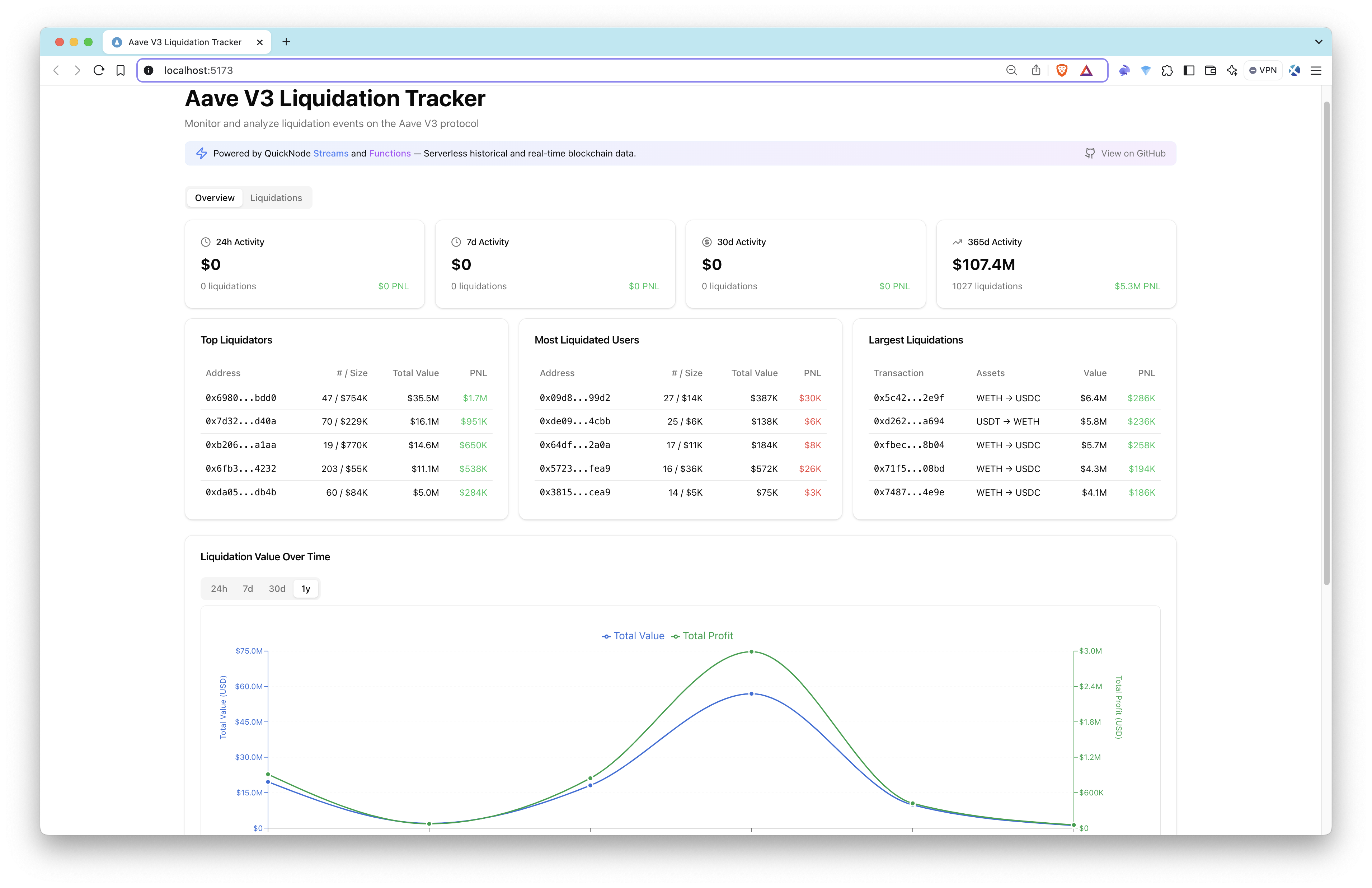
Monitor and analyze liquidation events on the Aave V3 protocol in real-time. This project demonstrates the power of serverless blockchain data streaming using Quicknode's Streams.



Introduction
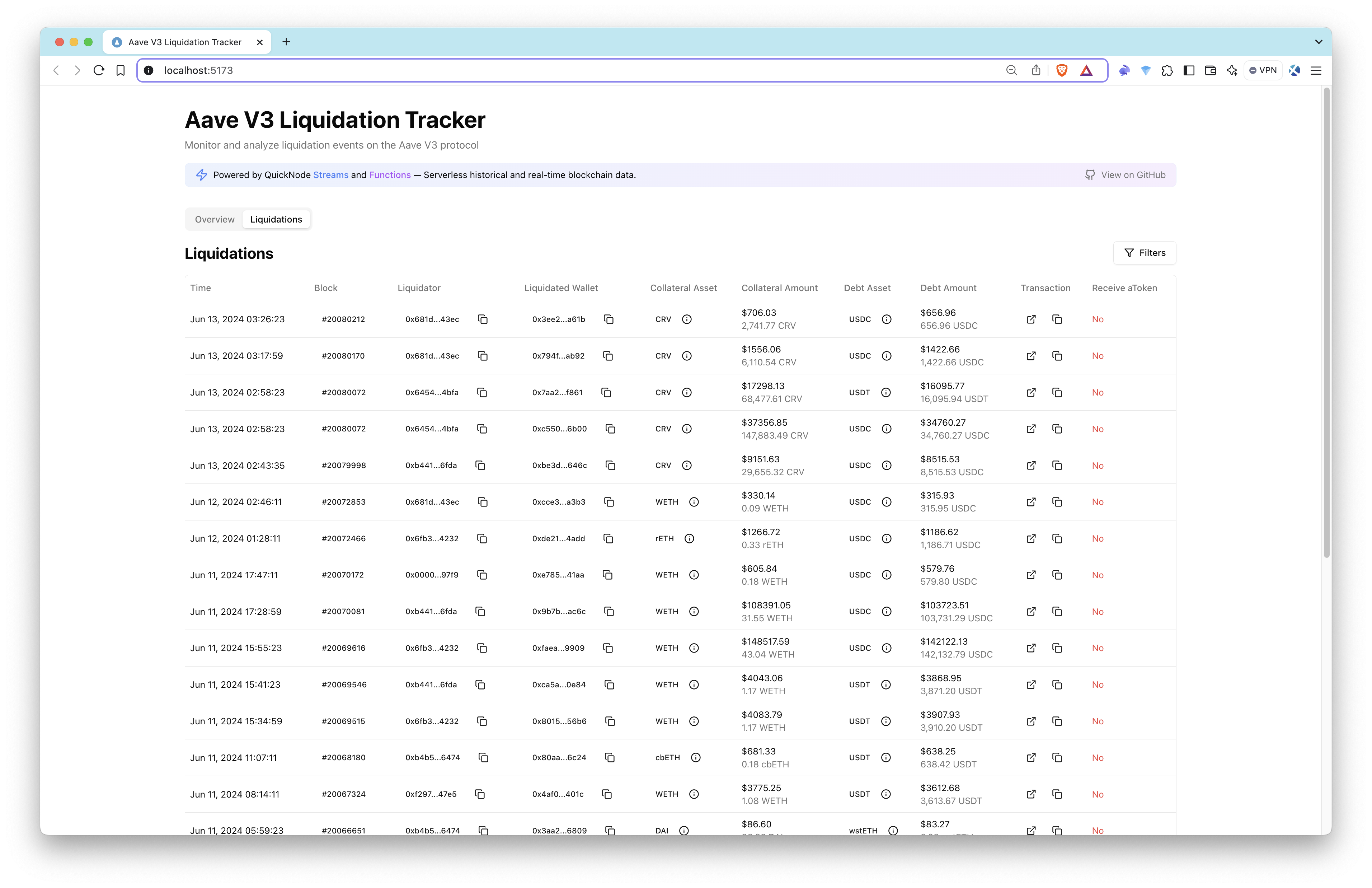
Monitor and analyze liquidation events on the Aave V3 protocol in real-time. This project demonstrates the power of serverless blockchain data streaming using Quicknode's Streams.
| Dashboard Overview | Liquidations Table |
|---|---|
|  |
Features
- 📊 Real-time liquidation monitoring
- 💰 Detailed metrics and analytics
- 📈 Historical liquidation trends
- 🔄 Asset distribution analysis
- ⚡ Serverless architecture
Aave Pool Contract and LiquidationCall Event
Aave V3 Pool Contract Overview
The Pool.sol contract (For Ethereum Mainnet, 0x87870Bca3F3fD6335C3F4ce8392D69350B4fA4E2) in the Aave V3 protocol is the core of the lending and borrowing system. It facilitates deposits, borrowing, repayments, and liquidations.
Event to Track: LiquidationCall
The LiquidationCall event is emitted when a liquidation occurs in the Aave protocol. It provides critical information about the liquidation transaction, including the collateral seized and the debt repaid.
// Event Signature
// 0xe413a321e8681d831f4dbccbca790d2952b56f977908e45be37335533e005286

LiquidationCall(
    address collateralAsset,
    address debtAsset,
    address user,
    uint256 debtToCover,
    uint256 liquidatedCollateralAmount,
    address liquidator,
    bool receiveAToken
)
Event Parameters
| Parameter | Type | Description |
|---|---|---|
collateralAsset | address | The address of the asset being seized as collateral. |
debtAsset | address | The address of the asset that the liquidator is repaying. |
user | address | The address of the borrower being liquidated. |
debtToCover | uint256 | The amount of debt being repaid during the liquidation. |
liquidatedCollateralAmount | uint256 | The amount of collateral seized by the liquidator. |
liquidator | address | The address of the liquidator performing the liquidation. |
receiveAToken | bool | If true, liquidator receives aTokens instead of collateral. |
We will be using decoded logs of the LiquidationCall event to track liquidations on the Ethereum Mainnet.
How It Works
This application uses a completely serverless architecture to track and analyze Aave V3 liquidation events:
- Data Collection: Streams monitors the raw blockchain event data for Aave V3's liquidation events in both historical and real-time
- EVM Decoding: Streams decode the raw event data using the EVM Decoder to extract the relevant information
- Data Processing: Using
viemand webhooks, we temporarily listen to incoming data and process the decoded event data by fetching token prices and token details - Data Storage: Enriched event data is automatically stored in the PostgreSQL database
- Frontend Display: React application fetches and displays the data with real-time updates
Tech Stack
-
Frontend
- React
- TypeScript
- TanStack Query for data fetching
- Tailwind CSS for styling
- shadcn/ui for UI components
- Recharts for data visualization
-
Backend
Architecture
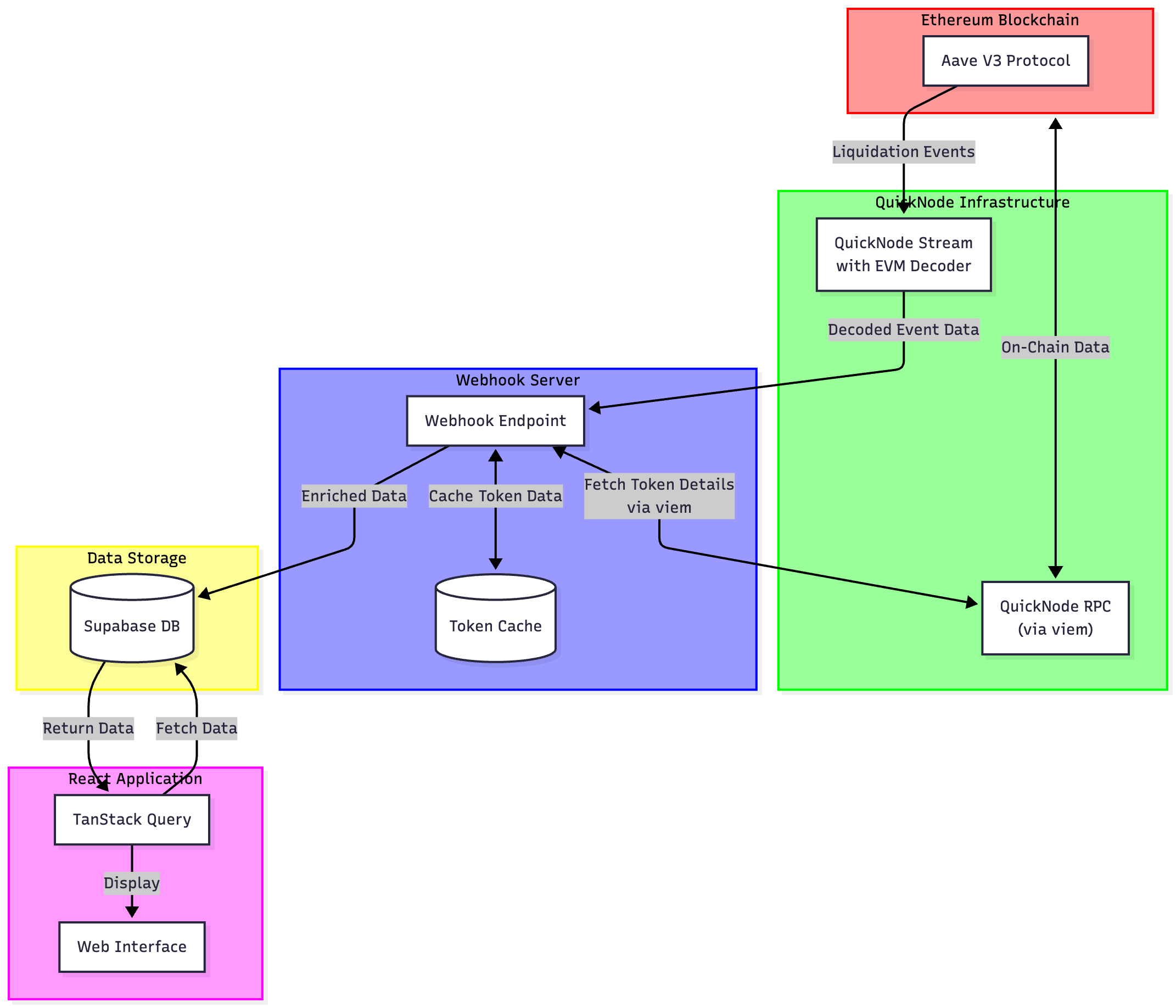
The architecture demonstrates how the system leverages Quicknode's infrastructure to process blockchain data efficiently:
- Quicknode Stream monitors Aave V3 contract events
- Events are sent to webhook server for processing
- Data is enriched with token and price information
- Processed data is stored in Supabase
- Frontend fetches and displays real-time data
Data Collection & Processing
Quicknode Streams
Quicknode Streams provide real-time blockchain data without running a node:
- Monitors Aave V3 contracts for liquidation events
- Filters and delivers only relevant events
- Ensures reliable data delivery with retry mechanisms
- Streams manages blockchain data delivery; the webhook worker still needs hosting
Webhook Server
We are using a webhook server to receive and validate incoming streams data:
Additionally, we enrich streams data by providing the following data points:
- Token names/symbols (WETH, USDC, etc.)
- USD prices at liquidation time
- Formatted amounts (convert bigints to decimals)
Getting Started
Prerequisites
- Node.js 22.12 or later and npm.
- A Quicknode account with Streams and an Ethereum mainnet RPC endpoint. Historical price enrichment needs archive access for the replay block.
- A Supabase project with its project URL, publishable key, and a separate backend secret key.
- ngrok or another HTTPS tunnel for local webhook delivery.
Installation
- Clone the repository and install the locked dependencies:
git clone https://github.com/quiknode-labs/qn-guide-examples.git
cd qn-guide-examples/sample-dapps/ethereum-aave-liquidation-tracker
npm ci
cp .env.example .env
- Fill in
.envusing your Quicknode endpoint and Supabase Project Settings > API Keys:
# Public browser configuration. Both clients point to the same Supabase project.
VITE_SUPABASE_URL=https://YOUR_PROJECT.supabase.co
VITE_SUPABASE_PUBLISHABLE_KEY=YOUR_SUPABASE_PUBLISHABLE_KEY

# Backend only. Never prefix this secret with VITE_.
SUPABASE_URL=https://YOUR_PROJECT.supabase.co
SUPABASE_SECRET_KEY=YOUR_SUPABASE_SECRET_KEY

# Full endpoint: https://your-endpoint.ethereum-mainnet.quiknode.pro/your-token/
QUICKNODE_RPC_URL=YOUR_ETHEREUM_MAINNET_RPC_ENDPOINT
PORT=3005
WEBHOOK_SECRET_KEY=REPLACE_WITH_YOUR_STREAM_SECURITY_TOKEN
The VITE_ values are exposed in the browser. SUPABASE_SECRET_KEY, the RPC endpoint, and the Stream token stay on the server. Keep .env out of Git. The backend requires its own secret so the browser can read liquidation data without permission to write it.
- For a new database, run
supabase/schema.sqlin the Supabase SQL Editor. It creates the event identity constraint and read-only public dashboard policy. Then runsupabase/analytics.sqlto install the three dashboard query functions shown below.
For an existing installation, pause the Stream and back up the table, then run supabase/migration-event-identity.sql instead of schema.sql. This adds columns without deleting old data and restricts public writes. Existing rows have a null log index and cannot be deduplicated retroactively from their transaction hash alone. Backfill their log identities from receipts before replaying old ranges if you need accurate totals across legacy data. Update the Stream filter and backend together before reactivating.
- Check the application, then start the frontend:
npm test
npm run build
npm run dev
Connect the Webhook and Stream
The frontend and webhook server are separate processes. Deploying the frontend to Vercel does not host the webhook worker. For a local test, copy the security token during Stream creation, then start and verify the worker before finishing the creation wizard.
- In the Streams dashboard, begin creating an Ethereum mainnet Stream with Blocks with Receipts, batch size 1, and Modify payload enabled. Start with block
18983377and end block18983378for a bounded replay. - Paste the filtering code below and run the filter test at
18983377. The filter processes all blocks in a batch, keeps each event's timestamp, and includes its transaction hash, log index, and block hash. Empty matches returnnull; broken input raises a visible error. - In another terminal, run
ngrok http 3005. Choose Webhook as the Stream destination and append/webhookto the tunnel's HTTPS address. - Set compression to None, destination timeout to 30 seconds, maximum failed retries to 3, and retry interval to 3 seconds. In this destination step, copy the Security token to
WEBHOOK_SECRET_KEYin.env. Leave the creation wizard open while you start and verify the worker. - Start the backend in another terminal:
npm run server
The command loads .env before importing the RPC and security modules. Missing configuration stops startup. Verify http://localhost:3005/health and your tunnel's HTTPS /health endpoint, then return to the dashboard and finish creating the Stream to start the replay.
The webhook limits each connected IP to 120 requests per minute before authentication or processing; excess requests return 429 with a retry interval. The in-memory limiter is for one worker. Behind a tunnel or proxy, requests may share the proxy IP; configure a trusted proxy and a shared limiter store before scaling. Unsigned requests to /webhook return 401. Signed malformed payloads return 400; compressed requests return 415. A processing or storage failure returns 503 so Streams can retry. Success returns 200 only after the batch is persisted. The database upserts by transaction hash and log index, keeping replays from adding duplicate events. Multiple liquidation logs from the same transaction remain separate rows.
The sample enriches each event before responding. Keep batch size one and use the short replay first. If processing repeatedly exceeds the delivery timeout, use a durable queue before acknowledging larger workloads. Changing the timeout alone does not make background work durable.
Verify Delivery and Replay
After the Stream completes the short range:
- Check the worker logs for
Data written to Supabase successfullyand inspect rows inliquidations. Each new row should havelog_indexandblock_hash. - Confirm the dashboard's liquidation table displays the rows. Historical events may fall outside the analytics panels' default time windows.
- Record the row count, replay the same range, and verify that the count stays the same. Group by
(transaction_hash, log_index)to check for duplicates among new rows. - Stop and restart the backend with
npm run server. Replay once more to verify that database deduplication survives a restart. - Pause or delete the test Stream, stop the tunnel and worker, and remove test rows when finished. Avoid deleting pre-existing data.
Reorg handling does not remove an orphaned liquidation row automatically. Use a sufficient distance from the chain tip and reconcile block hashes before treating this sample as a canonical event index. An upsert updates an event if it is re-included, but does not delete an event absent from the replacement chain.
Streams Filtering Code
// Test block: 18983377 or any other block that has a liquidation event
// Dataset: Block with receipts
// Chain and Network: Ethereum Mainnet -- Update all related fields (e.g., contract addresses, test block, etc.) to match your specific project and network

// Filtering function on Streams
function main(stream) {
  // Aave V3 LiquidationCall ABI
  const aaveLiquidationAbi = `[{
    "anonymous": false,
    "inputs": [
      {"indexed": true, "type": "address", "name": "collateralAsset"},
      {"indexed": true, "type": "address", "name": "debtAsset"},
      {"indexed": true, "type": "address", "name": "user"},
      {"indexed": false, "type": "uint256", "name": "debtToCover"},
      {"indexed": false, "type": "uint256", "name": "liquidatedCollateralAmount"},
      {"indexed": false, "type": "address", "name": "liquidator"},
      {"indexed": false, "type": "bool", "name": "receiveAToken"}
    ],
    "name": "LiquidationCall",
    "type": "event"
  }]`;

  // Pool.sol addresses for Aave V3 (lowercase)
  const normalizedAddresses = ["0x87870bca3f3fd6335c3f4ce8392d69350b4fa4e2"];

  if (!Array.isArray(stream.data)) throw new Error('Expected Blocks with Receipts');
  const filteredLogs = [];
  for (const entry of stream.data) {
    if (!entry.block || !Array.isArray(entry.receipts)) throw new Error('Missing block or receipts');
    const timestamp = Number(BigInt(entry.block.timestamp));
    const receipts = decodeEVMReceipts(entry.receipts, [aaveLiquidationAbi]);
    for (const receipt of receipts) {
      if (BigInt(receipt.status) !== 1n) continue;
      for (const log of receipt.decodedLogs || []) {
        if (log.name !== 'LiquidationCall' || !normalizedAddresses.includes(log.address.toLowerCase())) continue;
        const receiveAToken = String(log.receiveAToken);
        if (!['true', 'false'].includes(receiveAToken)) throw new Error('Invalid receiveAToken');
        filteredLogs.push({
          collateralAsset: log.collateralAsset,
          debtAsset: log.debtAsset,
          user: log.user,
          liquidator: log.liquidator,
          receiveAToken: receiveAToken === 'true',
          debtToCover: String(log.debtToCover),
          liquidatedCollateralAmount: String(log.liquidatedCollateralAmount),
          transactionHash: receipt.transactionHash,
          blockNumber: BigInt(entry.block.number).toString(),
          blockHash: entry.block.hash,
          logIndex: Number(BigInt(log.logIndex)),
          timestamp,
        });
      }
    }
  }
  return filteredLogs.length ? { timestamp: filteredLogs[0].timestamp, filteredLogs } : null;
}
Setting up PostgreSQL Functions
To fetch the data from the database, you can use the following PostgreSQL queries to create some functions. These functions are used in the frontend to display the data.View PostgreSQL Functions Code
Setting up PostgreSQL Indexes
For better query performance, we can create indexes on the liquidations table. Here's an example of how to create the necessary indexes:
CREATE INDEX IF NOT EXISTS idx_debt_asset ON liquidations(debt_asset_symbol text_ops);
CREATE INDEX IF NOT EXISTS idx_timestamp ON liquidations(timestamp timestamp_ops);
CREATE INDEX IF NOT EXISTS idx_liquidator_address ON liquidations(liquidator_address text_ops);
CREATE INDEX IF NOT EXISTS idx_liquidated_wallet ON liquidations(liquidated_wallet text_ops);
CREATE INDEX IF NOT EXISTS idx_collateral_asset ON liquidations(collateral_asset_symbol text_ops);
CREATE INDEX IF NOT EXISTS idx_liquidations_assets ON liquidations(collateral_asset_symbol text_ops,debt_asset_symbol text_ops);
Development
Project Structure
src/
  ├── components/       # Reusable UI components
  ├── hooks/            # Custom React hooks
  ├── lib/
  │   ├── payload.ts           # Validating the Streams payload shape
  │   ├── security.ts          # Verifying the webhook signature
  │   ├── server.ts            # Starting the webhook server
  │   ├── supabase-backend.ts  # Supabase keys for backend operations
  │   ├── supabase-frontend.ts # Supabase keys for frontend operations
  │   ├── transform.ts         # Enriching and storing incoming Streams data
  │   ├── utils.ts             # General utility functions
  │   └── webhook.ts           # Webhook routes, rate limit, and signature check
  └── types/            # TypeScript type definitions
Available Scripts
npm run dev: Start development servernpm run build: Build for productionnpm run server: Start webhook servernpm run lint: Run ESLint
Possible Future Features
Advanced Features
- Whale wallet tracking
- Custom alert thresholds
- Portfolio risk assessment
- Integration with other DeFi protocols
- Real-time notifications for:
- Large liquidations
- Specific assets
- Price threshold alerts
Technical Enhancements
- WebSocket support for real-time updates
- Multiple network support (Polygon, Arbitrum, etc.)
- Advanced data visualization options
- Mobile app version
- API access for developers
- Fork the repository
- Create a feature branch:git checkout -b feature/amazing-feature
- Commit your changes:git commit -m "Add amazing feature"
- Push your branch:git push origin feature/amazing-feature
- Open a Pull Request.


