EVM MCP Server
EVM MCP Server connects AI assistants like Claude or Cursor to blockchain data across Ethereum and other EVM-compatible chains. This MCP server tool lets Claude check wallet balances, analyze contracts, and monitor gas prices through natural conversation, making crypto data accessible to AI agents.


Overview
The Model Context Protocol (MCP) enables Large Language Models (LLMs) to interact with external tools — like HTTP APIs, files, or even blockchains — using a standardized message-based protocol. Think of it as a "function-calling" interface that agents like Claude or Cursor can plug into, turning a script or service into an AI-native extension.
In this guide, you'll learn how to build and deploy a MCP server that enables LLM agents to access blockchain data across multiple EVM-compatible networks. This powerful integration allows AI models like Claude to interact directly with blockchain data, opening up new possibilities for Web3 automation and analysis.
Tech Stack
Written tutorial of this project: Create an EVM MCP Server with Claude Desktop
Getting Started
Install Dependencies
- Clone the repository
git clone https://github.com/quiknode-labs/qn-guide-examples.git
cd qn-guide-examples/AI/evm-mcp-server
- Install dependencies
npm install
- Build the project
Compile the TypeScript code:
npm run build
Configure Claude Desktop
Environment variables are used to configure the server. These variables will be defined in Claude Desktop's configuration file, claude_desktop_config.json.
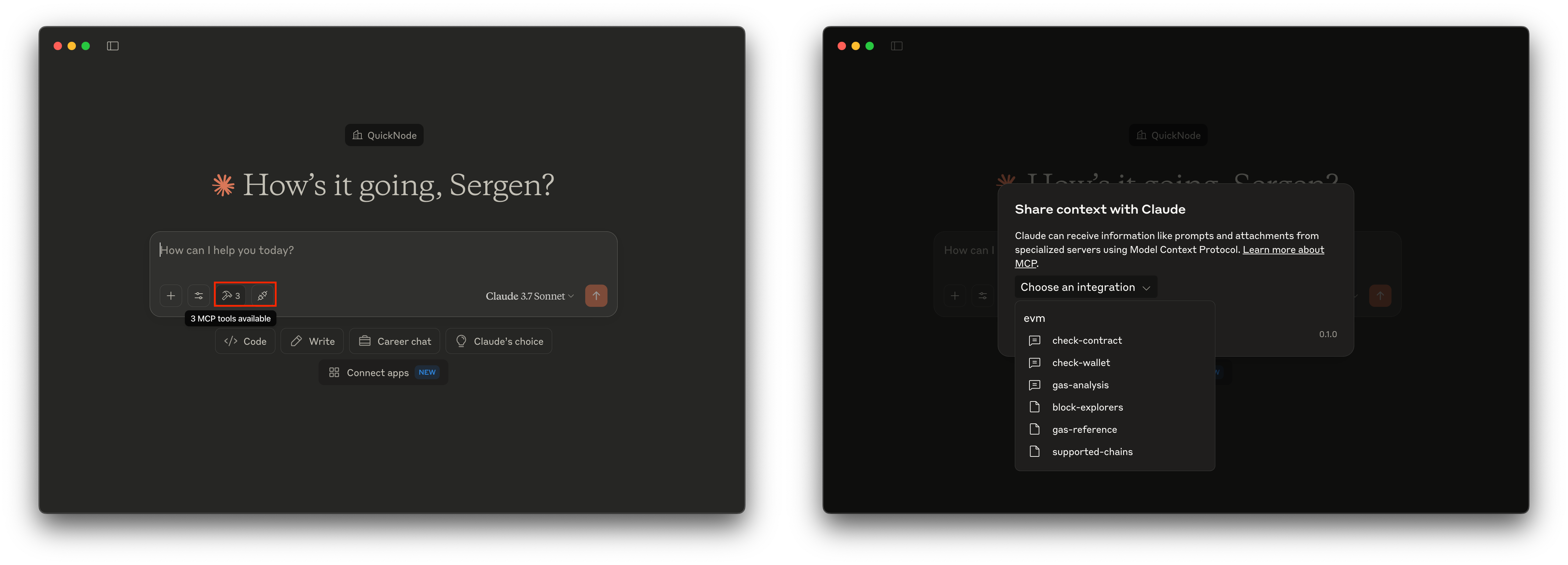
To configure, open the Claude Desktop app, go to Claude > Settings > Developer. Then, modify the claude_desktop_config.json file with the following content: (if you already have other configurations, add the new configuration under the mcpServers object)
{
    "mcpServers": {
        "evm": {
            "command": "node",
            "args": [
                "/absolute-path-to/evm-mcp-server/build/index.js"
            ],
            "env": {
                "QN_ENDPOINT_NAME": "your-quicknode-endpoint-name",
                "QN_TOKEN_ID": "your-quicknode-token-id"
            }
        }
    }
}
- Replace
your-quicknode-endpoint-namewith the name of your Quicknode endpoint. - Replace
your-quicknode-token-idwith the token ID of your Quicknode endpoint. - Replace
/absolute-path-towith the absolute path to theevm-mcp-serverdirectory.
Test the MCP Server
Restart Claude Desktop and test the server by asking Claude Desktop to perform a task that requires the EVM MCP Server. For example, ask Claude Desktop to get balance of an address on any supported chain.
Example Agent Interactions
- Check a wallet balance:
Give the balance of the 0xd8dA6BF26964aF9D7eEd9e03E53415D37aA96045 address on Ethereum
- Analyze a contract:
Analyze 0xC02aaA39b223FE8D0A0e5C4F27eAD9083C756Cc2 on Ethereum
- Get current gas prices:
Analyze the current gas prices on Ethereum, is it a good time to use the chain?
- Fork the repository
- Create a feature branch:git checkout -b feature/amazing-feature
- Commit your changes:git commit -m "Add amazing feature"
- Push your branch:git push origin feature/amazing-feature
- Open a Pull Request.