Validador de firmas de Streams
Un servidor Express ligero que verifica las firmas HMAC-SHA256Streams de Quicknode Streams y admite cuerpos de solicitud comprimidos con gzip.

Resumen
Quicknode Streams puede firmar cada entrega de webhook con una firma HMAC-SHA256 para que puedas confirmar que una solicitud procede de Quicknode que no ha sido alterada durante la transmisión. Esta aplicación de ejemplo es un servidor Express mínimo que muestra exactamente cómo verificar esas firmas, incluido el caso extremo en el que Streams un cuerpo comprimido con gzip.
La firma se calcula sobre la concatenación de valor aleatorio + marca de tiempo + carga útil (UTF-8), con la clave de tu Stream token de seguridad. Cuando la compresión está activada, Streams el JSON sin comprimir antes de comprimirlo con gzip para su transmisión, por lo que el verificador debe ejecutar HMAC sobre los bytes descodificados en lugar de sobre los octetos gzip sin procesar. Esta aplicación utiliza express.raw() con la descompresión gzip integrada en body-parser para gestionarlo correctamente.
Para obtener una explicación detallada de la lógica de verificación de firmas, consulta la guía complementaria: «Cómo validar los mensajes Streams entrantes».
Pila tecnológica
- Entorno de ejecución: Node.js (>=16)
- Marco de trabajo: Express
- Lenguaje: JavaScript
- Criptomonedas: Integrado en Node.js
criptomonedasmódulo (HMAC-SHA256)
Características
- Verificación HMAC-SHA256: Valida el
x-qn-signatureencabezado con un resumen calculado localmente utilizando tu token de seguridad de Stream. - Compatibilidad con el cuerpo de mensaje comprimido con Gzip: Gestiona correctamente
Content-Encoding: gzipsolicitudes ejecutando HMAC sobre el JSON descomprimido, y no sobre los bytes sin procesar. - Comparación con seguridad temporal: Usos
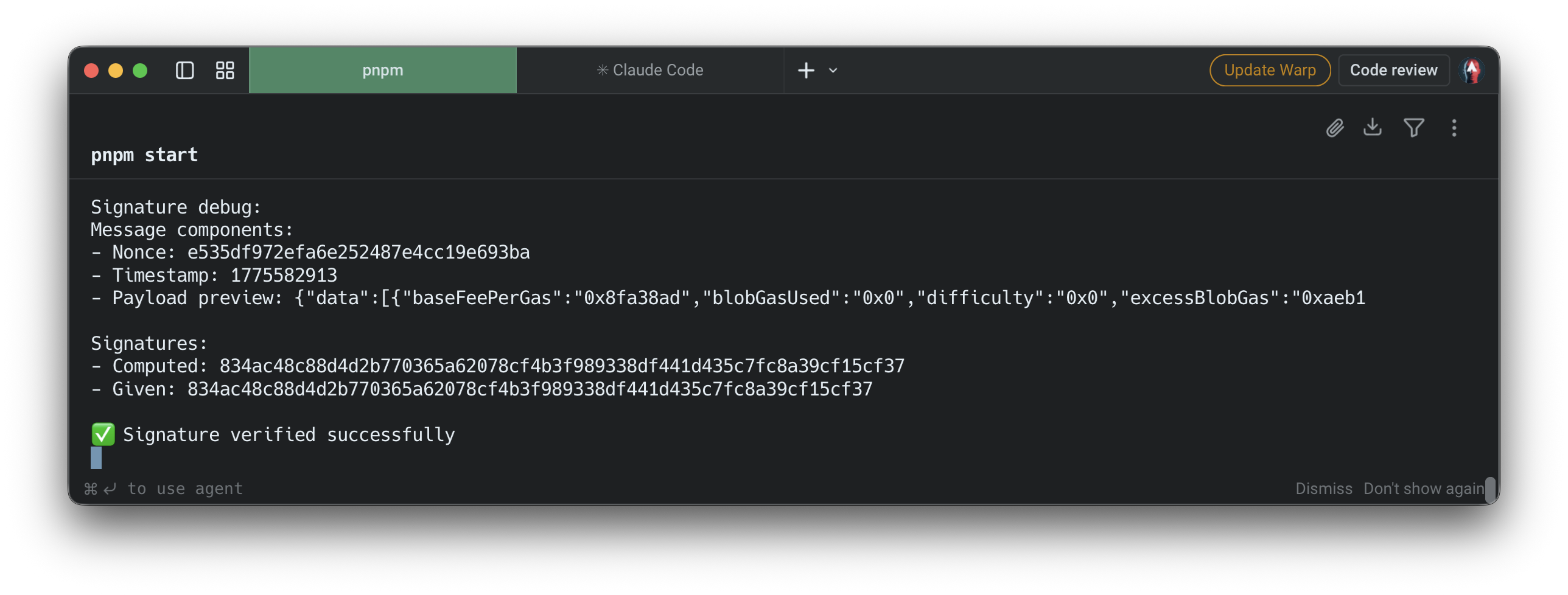
crypto.timingSafeEqualpara evitar ataques de sincronización durante la comparación de firmas. - Registro de depuración: muestra el nonce, la marca de tiempo, la vista previa de la carga útil y tanto la firma calculada como la proporcionada para facilitar la depuración local.
- Puerto configurable: El valor por defecto es
9999; sobrescribir con elPUERTOvariable de entorno.
Requisitos previos
- Node.js v16 o posterior instalado en tu ordenador.
- Una Quicknode con al menos un Stream configurado.
- El token de seguridad de la pestaña «Configuración» de tu Stream en el Quicknode .
- ngrok (o cualquier herramienta de túnel) para exponer tu servidor local a Internet, de modo que Streams acceder a él.
Estructura del proyecto
streams
├── .env.example    # Plantilla de variables de entorno
├── .gitignore
├── package.json
├── package-lock.json
└── server.js       # Receptor de webhooks de Express y verificador HMAC
Variables de entorno
Copiar .env.example a .env y configura tu token de seguridad de Stream:
QN_STREAM_SECRET=tu_token_de_seguridad_de_más_de_32_bytes_aquí
Puedes encontrar este token en la pestaña «Configuración» de tu Stream, en dashboard.quicknode.streams.
Primeros pasos
1. Clona el repositorio
git clonestreams
cdstreams
2. Instalar las dependencias
npm instalar
3. Configurar las variables de entorno
cp .env.example .env
Abrir .env y establecer QN_STREAM_SECRET al token de seguridad de tu Stream.
4. Inicia el servidor
npm iniciar
El servidor está a la escucha en http://localhost:9999/webhook por defecto. Para utilizar un puerto diferente:
PUERTO=3000 npm start
5. Publicar con ngrok
Streams una URL de acceso público para enviar webhooks. En otra ventana de terminal:
ngrok http 9999
Copia la URL de redireccionamiento HTTPS (p. ej., https://abc123.ngrok.io) y configúralo como la URL del webhook de tu Stream con el /webhook ruta añadida:
https://abc123.ngrok.io/webhook
6. Enviar una carga útil de prueba
Una vez guardada la URL del webhook, utiliza el botón «Enviar carga útil» del Streams para activar un envío de prueba firmado sin esperar a que se produzca actividad real en la cadena de bloques. Esto funciona tanto al crear un nuevo Stream como al editar uno ya existente. Comprueba en la terminal de tu servidor la salida de depuración de la firma para confirmar que la solicitud se ha recibido y verificado.
Puntos de conexión de la API
| Método | Ruta | Descripción |
|---|---|---|
PUBLICAR | /webhook | Recibe y verifica la entrega de un Streams |
Encabezados de solicitud esperados
| Encabezado | Descripción |
|---|---|
x-qn-nonce | Nonce aleatorio incluido en la entrada de la firma |
x-qn-marca de tiempo | Marca de tiempo Unix incluida en la entrada de la firma |
x-qn-signature | Resumen HMAC-SHA256 codificado en hexadecimal para verificar |
Respuestas
| Estado | Significado |
|---|---|
200 | La firma se ha verificado correctamente |
400 | Faltan los encabezados obligatorios |
401 | Error en la verificación de la firma |
500 | Configuración incorrecta del servidor (falta el secreto) o error de procesamiento |
Vista previa
- Hacer un fork del repositorio
- Crear una rama de características:git checkout -b feature/amazing-feature
- Guarda los cambios:git commit -m "Añadir una función increíble"
- Envía tu rama:git push origin feature/amazing-feature
- Abre una solicitud de incorporación de cambios.