नमूना ऐप्स पर वापस जाएँ
Solana टोकन मिंटर
The Solana Token Minter app allows you to create fungible tokens on the Solana blockchain with built-in support for IPFS image uploads.
Author



फ्रंटएंड फ्रेमवर्क/लाइब्रेरी:
रिएक्ट/नेक्स्ट.जेएस
भाषा:
टाइपप्रति
बिल्ड टूल/डेवलपमेंट सर्वर:
Next.js
अवलोकन
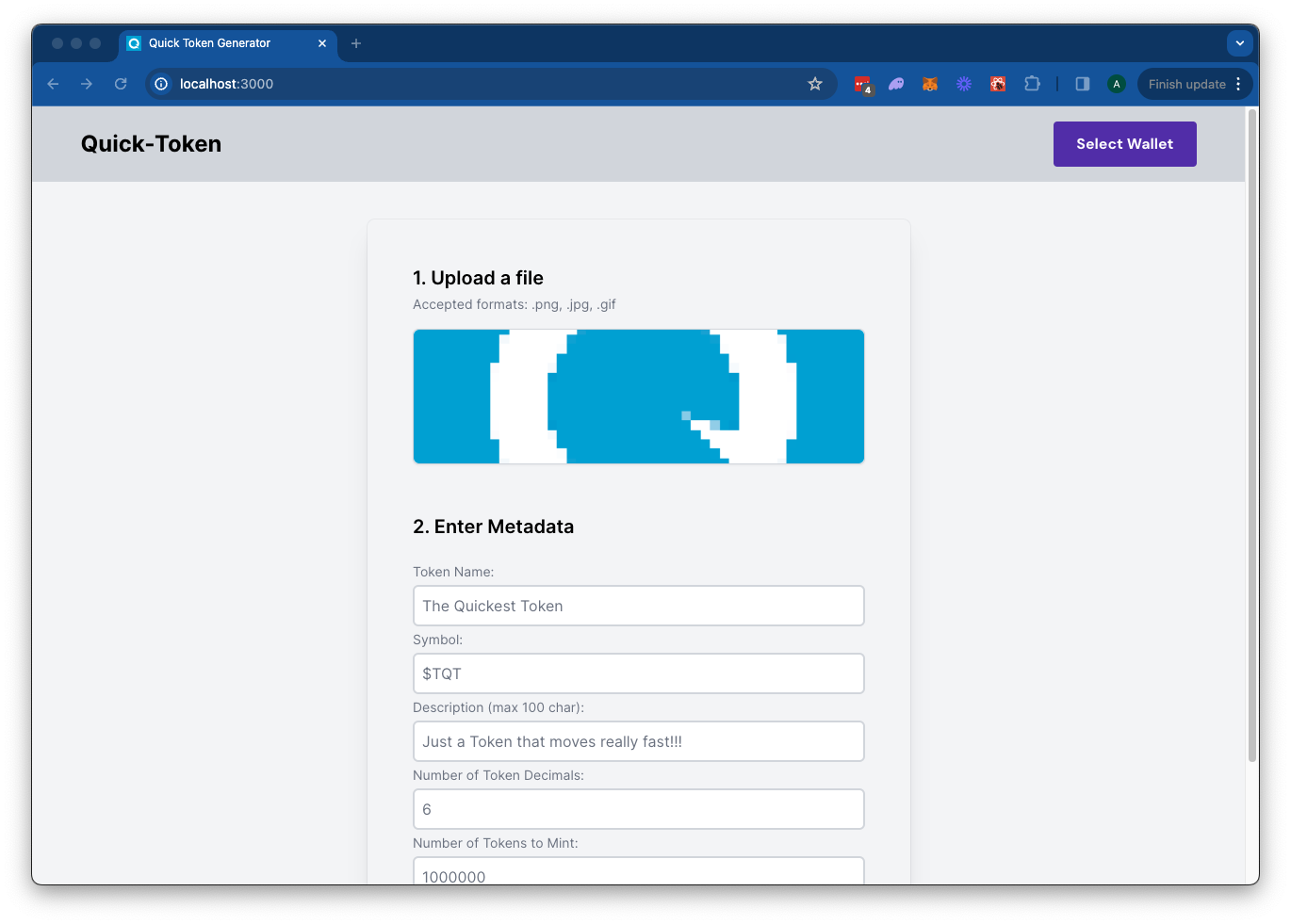
The Solana Token Minter app allows you to create fungible tokens on the Solana blockchain with built-in support for IPFS image uploads using Quicknode's IPFS API. Simply upload an image for your token metadata, fill out the token details, and connect your wallet. Click "Mint" to upload your metadata to IPFS and mint your token seamlessly.This app uses Next.js 14 परियोजना को बूटस्ट्रैप किया गया create-next-app.
शुरू करना
Install Dependencies
Open the project directory:
cd sample-dapps/solana-token-maker
Then, install the dependencies:
NPM स्थापित करना
 # या
 धागा
 # या
 पीएनपीएम स्थापित करना
 # या
 बन इंस्टॉल
Set Environment Variables
सुनिश्चित करें कि आपके पास एक Quicknode endpoint यह सुविधाजनक है—आप इसे यहां से मुफ्त में प्राप्त कर सकते हैं।
- नाम बदलें
.env.exampleको.env.localand update with your Quicknode Solana Node Endpoint and Quicknode IPFS key. - Make sure to update the cluster to ensure your transaction URLs point to the correct explorer (use only of the enum values provided in the
.env.examplefile). - You can use Quicknode's public IPFS Gateway URL or replace it with your own.
QN_IPFS_API=QN_abc123456789xyz_REPLACE_THIS
QN_ENDPOINT=https://example.solana-mainnet.quiknode.pro/123456
NEXT_PUBLIC_CLUSTER=mainnet-beta # mainnet-beta | devnet | testnet | local
NEXT_PUBLIC_GATEWAY_URL=https://quicknode.quicknode-ipfs.com/ipfs/
सबसे पहले, डेवलपमेंट सर्वर चलाएं:
npm run dev
 # या
 यार्न देव
 # या
 पीएनपीएम देव
 # या
 बन देव
परिणाम देखने के लिए अपने ब्राउज़र में http://localhost:3000 खोलें।
डीऐप का उपयोग करना
- Upload an Image (this will be used for your token metadata)
- Fill out the form with the token details
- Connect your wallet
- Make sure you have ~0.04 SOL in your wallet to cover the new account fees
- If you are using Devnet, you can get free SOL from the Solana Faucet
- Click "Mint" to upload your image and metadata to IPFS and mint your token!
वास्तुकला
src/
├── app/
│   ├── page.tsx
│   └── layout.tsx
│   └── api/
│       └── solana/
│           └── createMintTx/route.ts   # Create New Mint Transaction
│           └── sendAndConfirm/route.ts # Send and Confirm Transaction
│       └── upload/
│           └── image/route.ts  # IPFS Image Upload
│           └── json/route.ts   # IPFS JSON Upload
└── components/
    ├── SolanaProviders.tsx     # Wallet Adapter Context providers
    ├── Minter.tsx              # Main component
    └── [supporting components]
वर्सेल पर तैनात करें
Next.js दस्तावेज़ीकरण
Next.js के बारे में अधिक जानने के लिए, निम्नलिखित संसाधनों पर एक नज़र डालें:
- Next.js डॉक्यूमेंटेशन - Next.js की विशेषताओं और API के बारे में जानें।
- Next.js सीखें - एक इंटरैक्टिव Next.js ट्यूटोरियल।
आप Next.js के GitHub रिपॉजिटरी को देख सकते हैं - आपकी प्रतिक्रिया और योगदान का स्वागत है!
योगदान और प्रतिक्रिया
हमें आपकी प्रतिक्रिया सुनकर खुशी होगी और इस सैंपल ऐप में किसी भी तरह के योगदान का हम स्वागत करते हैं!
समस्याओं की रिपोर्ट करने या प्रतिक्रिया साझा करने के लिए, GitHub में एक समस्या खोलें। प्रश्न-मार्गदर्शिका-उदाहरण भंडार।
योगदान देने के लिए, इन चरणों का पालन करें:
- रिपॉजिटरी को फोर्क करें
- एक फीचर ब्रांच बनाएं:git checkout -b feature/amazing-feature
- अपने बदलावों को सेव करें:git commit -m "अद्भुत सुविधा जोड़ें"
- अपनी शाखा को आगे बढ़ाएं:git push origin feature/amazing-feature
- एक पुल रिक्वेस्ट खोलें।
और भी सैंपल ऐप्स देखें