2 min read
概要
You can build Ethereum applications in different programming languages. In this article, we will connect to the Ethereum network using Python.
Prerequisite
- Ethereum Node (We will use Quicknode’s free version)
- Python installed in your system (version >=3.5.3) and Pip3
- Install web3.py (A Python wrapper for Ethereum node APIs)
- A text editor
Note: We need Python version >=3.5.3 and install web3.py using pip3 install web3.
Python and other library versions are the cause of the common installation problems. Therefore, if you face any problem, try setting up a virtual environment and troubleshoot web3.py installation.
Connecting to Ethereum Blockchain
A network of Ethereum nodes is called Ethereum blockchain. To interact with Etherum blockchain, these nodes expose APIs which are available using web3.py library.
In addition, we will need a running Ethereum node, therefore, we will connect to one using Quicknode’s Free Trial plan. Sign up here and create an Ethereum endpoint.
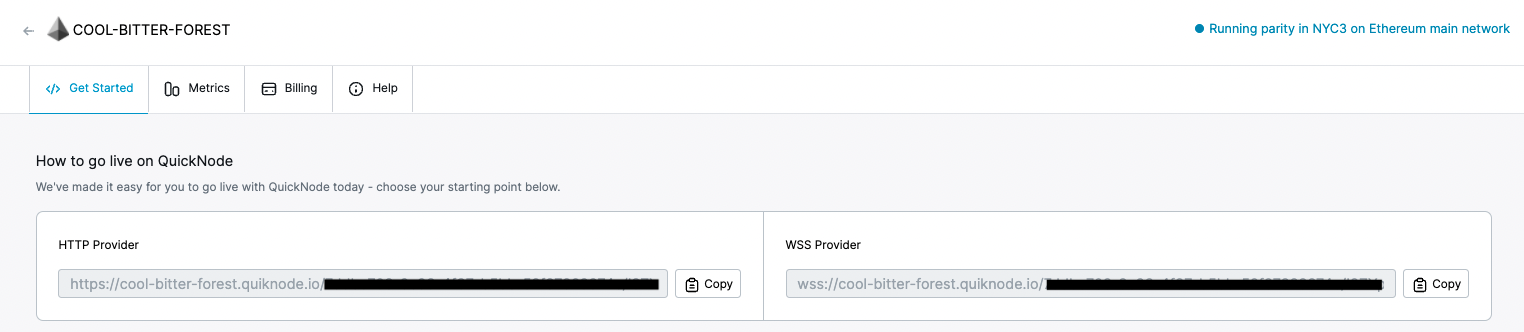
We will use web3.py to get the latest Ethereum block number. For this, we will use the code snippet given below.
from web3 import Web3, HTTPProvider
w3 = Web3(HTTPProvider('YOUR_ETHEREUM_NODE_URL'))
print ("Latest Ethereum block number" , w3.eth.blockNumber)
In this snippet, we are importing web3.py library and adding our Ethereum node URL and getting the latest Ethereum block number using w3.eth.blockNumber API.
Now, we will save this code snippet in index.py file and then run it using python index.py command. After running this command we will see the latest Ethereum block number as shown below.

That’s it you have connected through the Ethereum network using Python. In addition, you can learn more web3.py APIs to build complex applications on Ethereum.