Rich ETH Node Analytics for your Quicknode with Terminal.co | Quicknode
USDC Yield With Cover Built InQuicknode Earn now runs USDC yield with cover for protocol risk built in, underwritten by OpenCover. Six covered vaults on Base.
Integrating Quicknode Provider Endpoints with Terminal
Today, we will go through integrating your Quicknode endpoint with the TerminalSDK. If you are a dApp developer then you probably know retrieving dApp-specific logging and infrastructure analytics is one of the most important parts of the development process, but can also be the most difficult.
We'll be walking through how to surface all logs from a Quicknode endpoint into Terminal, a monitoring platform for your blockchain application. Quicknode is a powerful web3 infrastructure provider that offers private nodes to ensure maximum security and speed for your dApp.
To begin, we will assume that you have a Quicknode endpoint. If not you can checkout the website here to get one. Once you have a Quicknode endpoint integrated with a basic dApp, surfacing logs with the TerminalSDK is easy and straightforward. In this tutorial, you’ll see how to build a simple dApp to make basic Web3 calls and surface the logs.
For this tutorial we’re going to use a simple JavaScript file that retrieves the balance of an address as well as the transaction details of a transaction. We chose the address and transaction arbitrarily from Etherscan. The full code for the script is available at the bottom of the page.
최신 소식을 받아보세요
최신 엔지니어링 인사이트, 제품 업데이트, 웹3 뉴스를 여러분의 이메일로 바로 받아보세요.
Feel free to substitute in any Web3 methods here. Quicknode supports all the standard web3 RPC methods, as well as Geth and Parity specific modules (eg. debug, txpool, pendingTransactions & parity_).
Below is a sample of what your code might look like before wrapping the TerminalSDK:
In your Javascript project, your Web3 instance probably looks similar to the above code. In order to surface logs to your Terminal account, you will simply need to wrap the Web3 instance with the TerminalSDK. Beforehand, your Quicknode endpoint is passed in to the creation of the Web3 instance like this:
import Web3 from 'web3';

const web3=new Web3(new Web3.providers.HttpProvider("QUICKNODE_ENDPOINT"));
The first step is to signup for a Terminal account here. You will need to generate an API key as well as create a new project and find the projectId. You can find instructions on how to do so here.
Once your account is created install the Terminal SDK with the following command:
npm install @terminal-packages/sdk
Now that you have the TerminalSDK installed, wrap your web3 initialization like this:
const Web3 = require("web3");
const {
  TerminalHttpProvider,
  SourceType
} = require("@terminal-packages/sdk");

const web3 = new Web3(
  new TerminalHttpProvider({
    host: "YOUR_QUICKNODE_ENDPOINT",
    apiKey: "YOUR_TERMINAL_API_KEY",
    projectId: "YOUR_TERMINAL_PROJECTID",
    source: SourceType.QuiCknode // source can be a string as well
  })
);
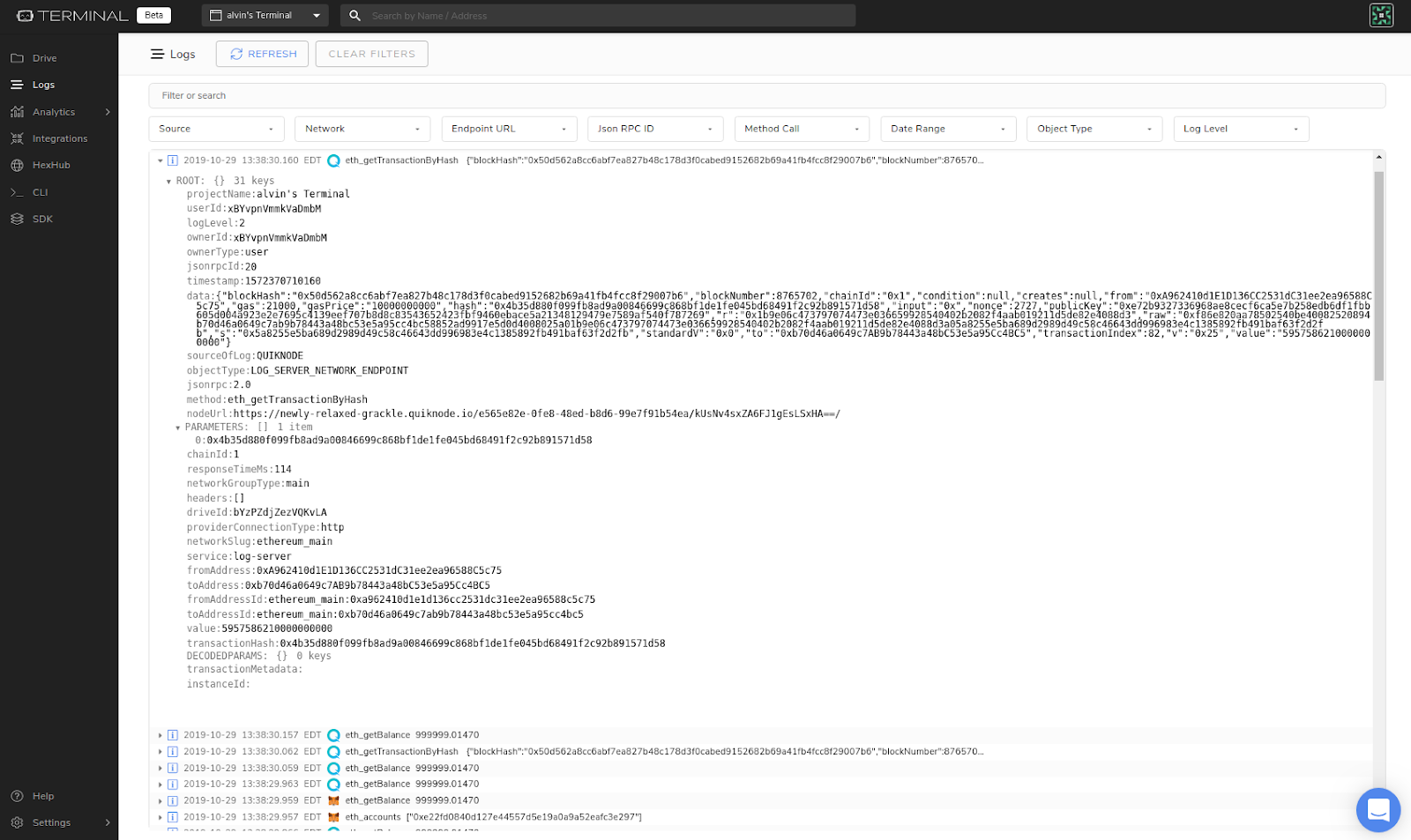
Once you’ve done this, you can simply run the script from your command line using node.js. As soon as you run the script, the logs will get pushed to your Terminal Logging Platform and look something like this:
Now that you are receiving logs directly to your Terminal account, you can sort through your logs using an array of different filters. This makes finding whatever you’re looking for as easy as possible. If you're having trouble getting this to work, please feel free to message the Terminal Support team for help in the discord or on the Terminal.co website using the message icon in the bottom right.
If your project uses other infrastructure or wallet providers, the logs will be surfaceable as well. Terminal Logs offers a host of other logging and analytics services to accommodate all of your Web3 needs:
Surface logs from RPC endpoints like Quicknode.
Surface logs from any injected Web3 wallet providers such as MetaMask
Introduce cloud logging into your Truffle development environment
Compatible with web3.js and ethers.js
Filter logs by type, source, timestamp, and others
Live application and user analytics for your dapp
Check out the docs for information on further use of TerminalSDK!
Below is the full code for the project. Paste in your corresponding endpoint and keys and you should be good to go.
const Web3 = require("web3");
const {
  TerminalHttpProvider,
  SourceType
} = require("@terminal-packages/sdk");

const web3 = new Web3(
  new TerminalHttpProvider({
    host: "YOUR_QUICKNODE_ENDPOINT",
    apiKey: "YOUR_TERMINAL_API_KEY",
    projectId: "YOUR_TERMINAL_PROJECTID",
    source: SourceType.Quicknode // source can be a string as well
  })
);
const address = "0xab7c74abC0C4d48d1bdad5DCB26153FC8780f83E";

web3.eth.getBalance(address, (err, wei) => {
  balance = web3.utils.fromWei(wei, "ether");
  console.log(balance.toString(10));
});

const tx = "0x4b35d880f099fb8ad9a00846699c868bf1de1fe045bd68491f2c92b891571d58";

web3.eth.getTransaction(tx, (error, result) => {
  console.log(error);
  console.log(result);
});
We hope that this integration provides useful insights and actionable data to help you develop a new Web3 dApp... or improve an existing one!
프로젝트와 관련해 도움이 필요하거나 궁금한 점이 있으신가요? 이 양식을 통해, 트위터Quicknode 통해, 또는 디스코드에서 저희에게 연락해 주세요!
Quicknode 소개
2017년에 설립된 Quicknode 개발자와 기업을 위해 기관급 블록체인 인프라를 Quicknode . 99.99%의 가동률과 80개 이상의 체인을 지원함으로써, 팀들은 타협 없이 온체인 애플리케이션을 구축하고 확장할 수 있습니다.