
2 min read
Overzicht
web3.unity is a powerful open-source gaming SDK developed by the Chainsafe team. It lets you add blockchain functionalities to your games created on the Unity engine. In this guide, we'll learn how to configure web3.unity in your Unity editor, create your own blockchain dApp, and add NFT mint functionality in the web.unity game.
Setting Up web3.unity
We'll need the Unity editor and the WebGL plugin. You can download the Unity editor via Unity Hub.
Make sure to only install LTS versions of the Unity editor and avoid Unity 6.
Create a new project of your choice (2D or 3D), then go to package manager from the Window tab. Click on the + button and select Add package from git URL...
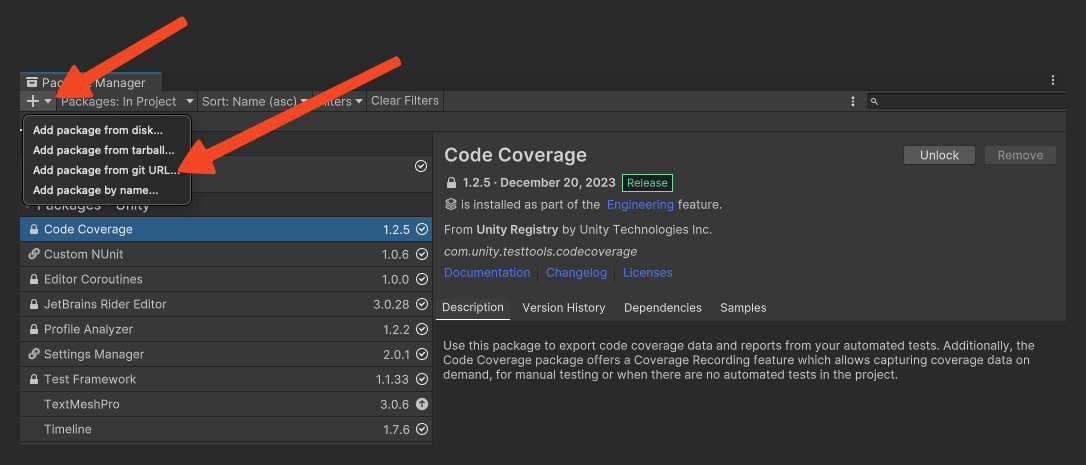
Paste the following URL in the input field and click Add. During installation, you may get a prompt asking to install WebGLThreadingPatcher; click yes to install that too.
https://github.com/ChainSafe/web3.unity.git?path=/Packages/io.chainsafe.web3-unity
Once installed, a server setting window will show up where you can configure your project.
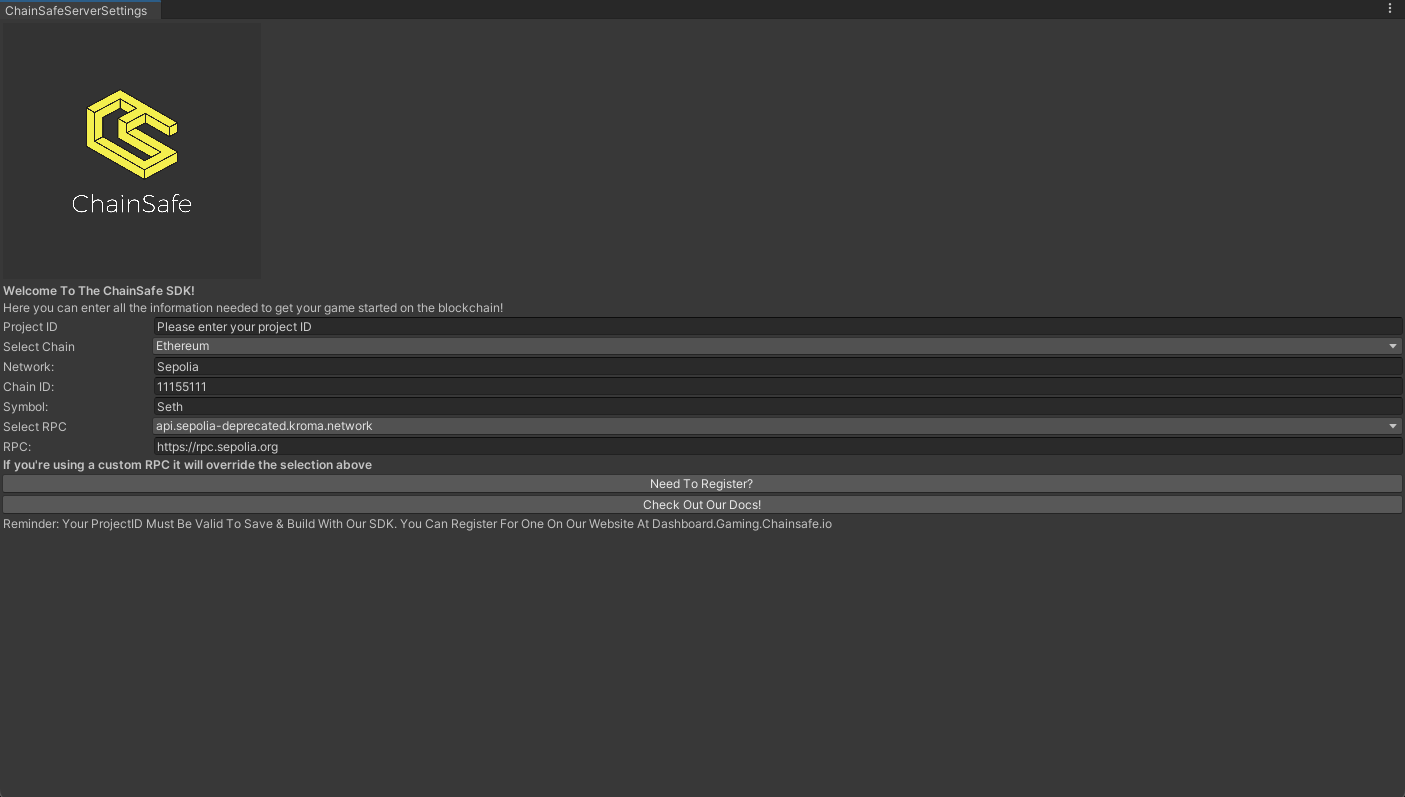
Enter details like:
- Project id (create a new project on the Chainsafe gaming dashboard)
- The chain you want to use
- Enter Quicknode RPC in the RPC section to get an uninterrupted blockchain connection.
Then, close the window. This will be your server setting throughout the project, and your web3 project will be ready in Unity.
Web3.unity comes preloaded with sample apps that you can use in your projects. To import the sample apps, go to the package manager and select web3.unity SDK, go to the Samples tab and click import.
Let's take a look at a script to mint NFTs in our web3.unity game.
Minting an NFT
We used the following script in the latter half of the video to mint our avatars
using UnityEngine;
using ChainSafe.Gaming.Evm.Contracts.BuiltIn;
using ChainSafe.Gaming.UnityPackage;
using Scripts.EVM.Token;

public class Erc721Mint : MonoBehaviour
{
    // Variables
    private string contractAddress = "0x4f75BB7bdd6f7A0fD32f1b3A94dfF409F5a3F1CC"; // web3.unity default contract for ERC-721
    private string uri = "QmfUHuFj3YL2JMZkyXNtGRV8e9aLJgQ6gcSrqbfjWFvbqQ"; // Replace with your own token URI here

    // Function
    public async void MintErc721()
    {
        var response = await Web3Accessor.Web3.Erc721.Mint(contractAddress, uri);
        var output = SampleOutputUtil.BuildOutputValue(response);
        SampleOutputUtil.PrintResult(output, "ERC-721", nameof(Erc721Service.GetUri));
        // You can make additional changes after this line
    }
}
Check out more web3.unity sample scripts in ChainSafe's official docs.