Applicatie voor het rapport over Bitcoin
The Bitcoin Transaction Report app uses Quicknode's Blockbook API to query the Bitcoin blockchain, filter transaction data, calculate key metrics, and display the results.



Inleiding
This application is designed to fetch and analyze Bitcoin transactions associated with a specific address using Quicknode's Blockbook API. It provides users with detailed reports within a specified date range, offering insights into transaction history, balances after each transaction, and the USD value of Bitcoin movements.
For an in-depth walkthrough on how to fetch data and develop further functionalities, refer to our comprehensive guide or our script files.
Technologiestack
- Frontend Framework/Library: React
- Language: TypeScript
- Build Tool/Development Server: Vite
Kenmerken
- Balance Calculation: Calculates the BTC balance before and after each transaction.
- Transaction Direction: Identifies whether transactions are incoming or outgoing.
- Confirmation Status: Determines whether transactions are confirmed.
- USD Conversion: Computes the USD value of each transaction at the time it occurred.
- Transaction Filtering: Excludes internal wallet transactions that are not relevant to the address in question.
- Date Range Filtering: Generates reports for transactions within a specified date range.
- Time Zone Selection: Performs date filtering according to the selected timezone.
- CSV Support: Ability to export or copy result as CSV file.
Aan de slag
Vereisten
Om deze app te gebruiken, heb je het volgende nodig:
- Node.js installed on your system.
- A Quicknode account with access to the paid Blockbook API. See the Blockbook product page for pricing details.
- Een code-editor of een IDE (bijvoorbeeld VS Code)
- TypeScript and ts-node
Run the commands below to install TypeScript and ts-node globally to have TypeScript available across all projects.
npm install -g typescript
npm install -g ts-node
Installatievereisten
- Kloon de repository naar je lokale computer:
git clone https://github.com/quiknode-labs/qn-guide-examples.git
- Ga naar de projectmap:
cd sample-dapps/bitcoin-transaction-report-generator
- Installeer de benodigde afhankelijkheden:
npm installeren
Omgevingsvariabelen instellen
Naam wijzigen .env.voorbeeld naar .env and replace the YOUR_QUICKNODE_BITCOIN_ENDPOINT_URL placeholder with your Quicknode Bitcoin endpoint with Blockbook access.
VITE_QUICKNODE_ENDPOINT = "YOUR_QUICKNODE_BITCOIN_ENDPOINT_URL"
Please note that while we utilize
dotenvfor environment variable management, sensitive information like endpoints can still be visible on the frontend. This configuration is not recommended for production environments as-is.
De applicatie starten
Start de ontwikkelingsserver:
npm run dev
Open http://localhost:5173/ in your browser to see the application.
De app gebruiken
- Input a Bitcoin wallet address.
- (Optional) Select the date range and time zone.
- Press
Generate. - (Optional) Export or copy results as CSV.
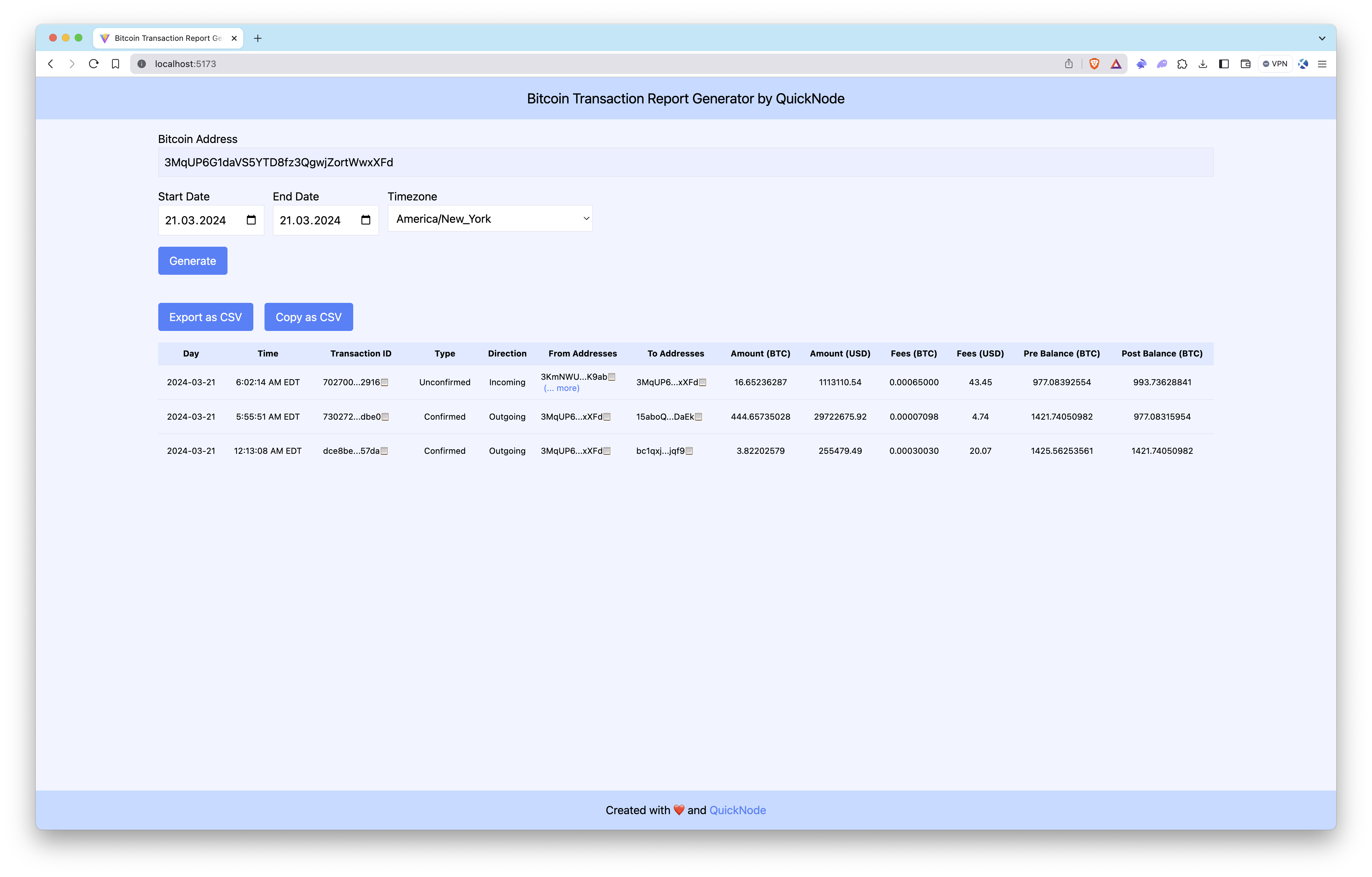
The Bitcoin Transaction Report Generator queries the Bitcoin blockchain for a wallet’s transactions, filters the data, calculates key metrics, and displays the results.
Voorbeeld
Conclusie
Quicknode's Blockbook API facilitates the creation of detailed Bitcoin transaction reports for developers and businesses alike. While this application covers the fundamentals, there's a vast scope for customization and extended functionalities. Whether for audit purposes, regulatory compliance, or market analysis, Blockbook streamlines the process of extracting blockchain data.
To discover more about how Quicknode assists auditing firms and individuals in extracting this type of data from blockchains, please contact us; we're eager to engage with you!
- Maak een fork van de repository
- Maak een feature-branch aan:git checkout -b feature/amazing-feature
- Sla je wijzigingen op:git commit -m "Geweldige functie toevoegen"
- Pusht je branch:git push origin feature/amazing-feature
- Dien een pull-verzoek in.