
阅读时间:20分钟
fromSlot 历史回放参数及其他截至2025年Quicknode fromSlot 该参数可让客户端回放最近最多 3000 个时间槽的数据——约 20 分钟,为可能遇到网络不稳定或在恢复期间需要数据补全的客户端提供了更大的灵活性。
本指南已更新,以反映这一新功能,同时还更新为使用Solana 、最新版本的 Node.js 以及其他更新版工具。
概述
在本指南中,我们将学习如何使用 Solana gRPC (Yellowstone gRPC)来监控实时链上活动。具体来说,我们将创建一个TypeScript应用程序,用于Solana mainnet Solana.fun项目中新增的代币铸造情况。本项目将演示如何Solana gRPC低延迟数据访问能力,构建响应迅速且高效的监控工具。
更喜欢视频形式吗?请观看视频,9gRPC 掌握如何使用Solana gRPC 监控Solana 数据。
您将负责的工作内容
- 了解 Geyser 和Solana gRPC
- 使用 TypeScript 和Solana gRPC Solana上的新 Pump.fun 铸造活动
- 能够将这一逻辑应用到其他程序中
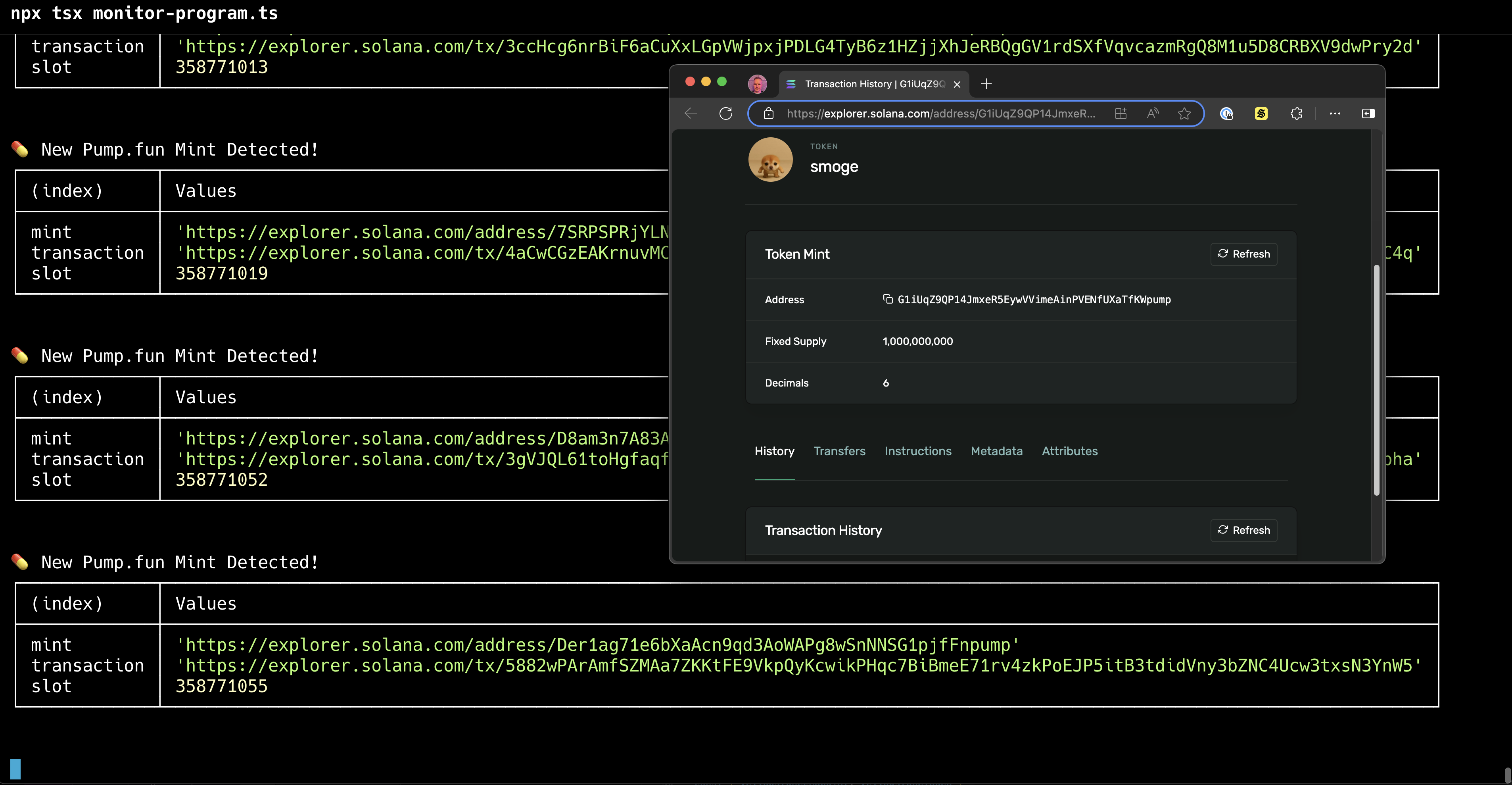
程序的外观如下:
您需要准备的物品
- 对Solana 的基本理解
- Node.js(v20 或更高版本)
- 一个采用 Scale 或 Business 套餐(gRPC Solana gRPC )的Quicknode ,或采用 Build/Accelerate 套餐并添加了Solana gRPC QuicknodeQuicknode
- 您选择的代码编辑器(例如 VS Code)
什么是Geyser?
Geyser 是一个面向Solana 插件系统,它能够以低延迟的方式访问区块链数据,同时避免因大量 RPC 请求而给验证者带来过重负担(例如, getProgramAccounts). Geyser 插件不会直接向验证者发起查询,而是将有关账户、交易、槽位和区块的实时信息流式传输到您选择的外部数据存储中,例如关系型数据库、NoSQL 数据库或 Kafka 等流式处理平台。这种方法在显著减轻验证者负载的同时,还提高了数据访问效率。
Geyser 插件的核心优势在于其能够随高吞吐量的Solana 实现弹性扩展。通过将数据查询路由到外部存储,开发者可以实现缓存和索引等优化访问模式,这对需要频繁访问大型数据集或历史信息的应用程序尤为重要。这种分离使验证者能够专注于其处理交易的主要职责,同时确保开发者能够获得所需的全面、实时的数据访问权限。
什么是Solana gRPC?
Solana gRPC Quicknode Yellowstone GeysergRPC ——可与开源的Yellowstone gRPC生态系统互操作。它利用 gRPC,这是谷歌开发的高性能框架,它将 Protocol Buffers 用于序列化,并结合 HTTP/2 作为传输协议,从而实现分布式系统之间快速且类型安全的通信。
Solana gRPC 以下内容的实时流式传输:
- 账户更新
- 交易
- 条目
- 屏蔽通知
- 插槽通知
与传统的 WebSocket 实现方案相比,Solana gRPC 更低的延迟和更高的稳定性。它还支持一元操作,可实现快速的一次性数据检索。gRPC高效性与类型安全性的结合,使得Solana gRPC 适合用于云端服务和数据库更新。Solana gRPC 在 Scale 和 Business 套餐中。在 Build 和 Accelerate 套餐中,用户仍可通过Solana gRPC 使用该功能。
让我们通过编写一个脚本,监控Solana 上 Pump.fun 的新铸造活动,gRPC 体验一下Solana gRPC 。
如果在 Node.jsgRPC 使用Solana gRPC 处理海量数据,可能会导致单个 CPU 不堪重负。如果您正在构建需要处理繁忙程序的所有交易或同时跟踪多个程序的系统,请考虑以下高性能替代方案:
-
使用多线程。Node.js 有两个模块:
集群(多进程,每个进程一个线程)以及工人(单进程、多线程)。这两种方式都能解决节点导致单个内核过载的问题,但集群由于每个进程都具有内存隔离性,因此这种方式更为简单。将Solana gRPC 分配给多个实例,集群或工人以分散负荷。 -
gRPC GogRPC 使用Solana gRPC (另请参阅《GogRPC Solana gRPC 指南》)。
创建新项目
首先,让我们创建一个新的 TypeScript 项目:
-
为您的项目创建一个新目录,并进入该目录:
mkdir pump-fun-monitor && cd pump-fun-monitor -
初始化一个新的 Node.js 项目:
npm init -y
然后在您的 package.json 在文件中添加以下内容:
{
  ...existing package.json content...
  "type": "module"
}
-
安装所需的依赖项:
npm install tsxgrpc solana -
保存要监控的程序的 IDL 文件。在此示例中,我们将获取 Pump.fun 程序的 IDL 文件。
curl -o program.jsonsdk
现在,你可以开始编写程序了!
编写脚本
让我们编写一个程序,利用Solana gRPC 监控 Pump.fun 的代币铸造情况。我们将把这个过程分解为几个步骤:
步骤 1:定义接口
我们将主要使用来自 grpc 包,因此我们无需在此处定义其中许多内容。创建一个名为 lib/interfaces.ts 并添加以下代码:
export interface CompiledInstruction {
  programIdIndex: number;
  accounts: Uint8Array;
  data: Uint8Array;
}

export interface MintInformation {
  mint: string;
  transaction: string;
  slot: number;
}
步骤 2:创建一个函数来获取您的Solana gRPC endpoint
Solana gRPC 常规 RPCendpoint不同。此函数将把您的Quicknode endpoint Solana gRPC endpoint 。
创建一个名为 quicknode.ts 并添加以下代码:
// Convert the RPC endpoint to a Solana gRPC endpoint and token
export const getYellowstoneEndpointAndToken = (rpcEndpoint: string) => {
  // Convert endpoint to URL object
  const url = new URL(rpcEndpoint);
  const YELLOWSTONE_PORT = 443;

  // Solana gRPC endpoint is the same as the RPC endpoint, but with port 443 and no pathname
  const yellowstoneEndpoint = `${url.protocol}//${url.hostname}:${YELLOWSTONE_PORT}`;

  // The token is the pathname of the RPC endpoint, but without the leading slash
  const yellowstoneToken = url.pathname.replace(/\//g, "");

  return { yellowstoneEndpoint, yellowstoneToken };
};
步骤 3:创建辅助函数
Solana gRPC 交易签名和代币地址以 Uint8ArraygRPC 。我们需要将它们转换为 base58 格式,以便于阅读。创建一个名为 lib/helpers.ts 并添加以下代码:
import { getBase58Decoder } from "@solana/kit";

export const bufferToBase58 = (buffer: Uint8Array): string => {
  return getBase58Decoder().decode(buffer);
};
接下来,我们将添加一个函数,用于获取某个地址或交易的浏览器链接。现代终端应用支持点击链接,因此这将使我们能够在每次铸造发生时实时查看:
export const getExplorerUrl = (address: string, type: "address" | "tx") => {
  return `https://explorer.solana.com/${type}/${address}`;
};
接下来,我们将添加一个函数,用于从程序的 IDL 中获取某个指令处理程序的判别符。稍后我们可以利用它来查找调用过该指令处理程序的指令。
export const getInstructionHandlerDiscriminator = (
  programIdl: any,
  instructionName: string
) => {
  const instruction = programIdl.instructions.find(
    (instruction: any) => instruction.name === instructionName
  );
  const discriminatorBytes = instruction.discriminator;
  return Buffer.from(discriminatorBytes);
};
接下来,我们将添加一个函数,用于获取指令处理程序中使用的账户名称及其索引。稍后我们可以利用该函数对交易进行筛选,仅保留属于特定指令处理程序的指令。
export const getAccountsFromIdl = (
  programIdl: any,
  instructionName: string
): Array<{ name: string; index: number }> => {
  const instruction = programIdl.instructions.find(
    (instruction: any) => instruction.name === instructionName
  );

  if (!instruction) {
    throw new Error(`Instruction '${instructionName}' not found in IDL`);
  }

  return instruction.accounts.map((account: any, index: number) => ({
    name: account.name,
    index: index,
  }));
};
第 4 步:创建常量
有些内容不会经常更改,因此让我们先定义一下。创建一个名为 lib/constants.ts 并添加以下代码:
// Set by Solana
export const SOLANA_SLOT_TIME_MS = 400;

// Set by Quicknode
export const MAX_SLOTS_TO_REPLAY = 3000;

// Set by the late 18th century French scientists
export const SECONDS = 1000;

// Set by ancient Babylonians
export const MINUTES = SECONDS * 60;

export const MAX_TIME_TO_REPLAY_MS = MAX_SLOTS_TO_REPLAY * SOLANA_SLOT_TIME_MS;
export const MAX_TIME_TO_REPLAY_MINUTES = MAX_TIME_TO_REPLAY_MS / 1000 / 60;
第 5 步:创建我们的Solana gRPC
创建一个名为 yellowstone.ts. 我们将尽可能使该代码通用化,以便您能在多个项目中重复使用。首先导入相关的依赖项——即 grpc 客户端、gRPC,以及我们的辅助函数、接口和常量。
import Client, {
  CommitmentLevel,
  SubscribeRequest,
  SubscribeUpdate,
  SubscribeUpdateTransaction,
} from "@triton-one/yellowstone-grpc";
import { ClientDuplexStream } from "@grpc/grpc-js";
import { bufferToBase58, getExplorerUrl } from "./helpers";
import { CompiledInstruction, MintInformation } from "./interfaces";
import {
  MAX_SLOTS_TO_REPLAY,
  MAX_TIME_TO_REPLAY_MINUTES,
  SOLANA_SLOT_TIME_MS,
} from "./constants";
让我们实现几个实用的辅助函数。Solana gRPC 将槽号作为字符串返回,因此我们需要对此进行修正:
export const getCurrentSlot = async (
  yellowstoneClient: Client
): Promise<number> => {
  const currentSlotString = await yellowstoneClient.getSlot();
  return Number(currentSlotString);
};
创建订阅请求
该函数将创建一个 订阅请求 该程序将监控指定的程序 ID 和所需账户。
我们希望尽可能详细地设置过滤条件,以便减少从服务器接收的数据量:
accountInclude: 包含 使用 任何 从数组中删除该账户。accountExclude: 排除 使用 任何 从数组中删除该账户。accountRequired: 仅包含使用 全部 数组中的账户。
我们更倾向于使用 accountRequired 因为它比……更具体 accountInclude 和 accountExclude.
export const createSubscribeRequest = (
  includedAccounts: Array<string>,
  excludedAccounts: Array<string>,
  requiredAccounts: Array<string>,
  fromSlot: number | null = null
): SubscribeRequest => {
  // See https://github.com/rpcpool/yellowstone-grpc?tab=readme-ov-file#filters-for-streamed-data for full list of filters.
  const request: SubscribeRequest = {
    commitment: CommitmentLevel.CONFIRMED,
    accounts: {},
    slots: {},
    transactions: {
      // We can have multiple filters here, but for this demo, we'll only have one.
      // When we get events, we can check which filter was matched.
      // https://github.com/rpcpool/yellowstone-grpc?tab=readme-ov-file#transactions
      pumpFun: {
        vote: false,
        failed: false,
        accountInclude: includedAccounts,
        accountExclude: excludedAccounts,
        accountRequired: requiredAccounts,
      },
    },
    transactionsStatus: {},
    entry: {},
    blocks: {},
    blocksMeta: {},
    accountsDataSlice: [],
    ping: undefined,
  };

  if (fromSlot) {
    // Solana gRPC expects the slot as a string, so let's fix that.
    request.fromSlot = String(fromSlot);
  }

  return request;
};
我们再来实现一个函数,用于将订阅请求发送到Solana gRPC ——我们稍后会创建该流。
export const sendSubscribeRequest = (
  stream: ClientDuplexStream<SubscribeRequest, SubscribeUpdate>,
  request: SubscribeRequest
): Promise<void> => {
  return new Promise<void>((resolve, reject) => {
    stream.write(request, (error: Error | null) => {
      if (error) {
        reject(error);
      } else {
        resolve();
      }
    });
  });
};
添加一些客户端过滤器
我们的过滤工作大部分是通过Solana gRPC 完成的,但它不会直接根据指令处理程序对交易进行过滤, 因此我们将添加一项额外的客户端检查:
// Solana gRPC doesn't directly filter by instruction handler so we have to
// do it client-side.
export const checkInstructionMatchesInstructionHandlers = (
  instruction: CompiledInstruction,
  instructionHandlerDiscriminators: Array<Uint8Array>
): boolean => {
  return (
    instruction?.data &&
    instructionHandlerDiscriminators.some((instructionHandlerDiscriminator) =>
      Buffer.from(instructionHandlerDiscriminator).equals(
        instruction.data.slice(0, 8)
      )
    )
  );
};
我们还将创建一个函数,用来生成一个包含“名称/地址”对的整洁对象,这样我们就能获取该指令
针对特定账户名称所使用的地址(例如 薄荷 (记录Pump.fun上每个新代币的信息),并将其以美观的表格形式展示出来。
export const getAccountsByName = (
  accountsToInclude: Array<{ name: string; index: number }>,
  instruction: CompiledInstruction,
  accountKeys: Array<Uint8Array>
): Record<string, string> => {
  return accountsToInclude.reduce<Record<string, string>>(
    (accumulator, account) => {
      const accountIndex = instruction.accounts[account.index];
      const address = bufferToBase58(accountKeys[accountIndex]);
      accumulator[account.name] = address;
      return accumulator;
    },
    {}
  );
};
完成!现在,让我们开始利用刚刚创建的函数,处理从Solana gRPC 接收到的更新。
编写一个函数,将 SubscribeUpdate 转换为格式美观的薄荷币信息
我们将创建一个函数,用于将一个 订阅更新 从Solana gRPC 一个 MintInformation — 一个包含铸造地址、交易签名和槽号的简单对象。
export const getMintInfoFromUpdate = (
  update: SubscribeUpdate,
  instructionHandlerDiscriminators: Array<Uint8Array>,
  accountsToInclude: Array<{ name: string; index: number }>
): null | MintInformation => {
  // Check the filter name that was matched
  // (Solana gRPC also sends other things like 'ping' updates, but we don't care about those)
  if (!update.filters.includes("pumpFun")) {
    return null;
  }

  // These should never happen in this demo,
  // since our filter's matches will include the right properties.
  // but let's satisfy the type checker.
  const transaction = update.transaction?.transaction;
  const message = transaction?.transaction?.message;
  const slot = update.transaction?.slot;
  if (!transaction || !message || !slot) {
    return null;
  }

  // Find the instruction that matches our target instruction handler
  const instruction =
    message.instructions.find((instruction) =>
      checkInstructionMatchesInstructionHandlers(
        instruction,
        instructionHandlerDiscriminators
      )
    ) || null;
  if (!instruction) {
    return null;
  }

  // Make a nice Object of account value/address pairs, so we can get the address
  // values this instruction used for each account name.
  const accountsByName = getAccountsByName(
    accountsToInclude,
    instruction,
    message.accountKeys
  );

  const base58TransactionSignature = bufferToBase58(transaction.signature);

  return {
    mint: getExplorerUrl(accountsByName.mint, "address"),
    transaction: getExplorerUrl(base58TransactionSignature, "tx"),
    slot: Number(slot),
  };
};
将数据流连接到我们的函数
现在,我们可以将数据流连接到我们的函数了。每当数据流发送更新时,我们就会调用 getMintInfoFromUpdate 获取Mint的相关信息,并将其打印到控制台。
打开 yellowstone.ts 并添加以下代码:
export const handleStreamEvents = (
  stream: ClientDuplexStream<SubscribeRequest, SubscribeUpdate>,
  instructionDiscriminators: Array<Uint8Array>,
  accountsToInclude: Array<{ name: string; index: number }>
): Promise<void> => {
  return new Promise<void>((resolve, reject) => {
    stream.on("data", (update: SubscribeUpdate) => {
      const mintInfo = getMintInfoFromUpdate(
        update,
        instructionDiscriminators,
        accountsToInclude
      );

      if (mintInfo) {
        console.log("💊 New Pump.fun Mint Detected!");
        console.table(mintInfo);
        console.log("\n");
      }
    });
    stream.on("error", (error: Error) => {
      console.error("Stream error:", error);
      reject(error);
      stream.end();
    });
    stream.on("end", () => {
      console.log("Stream ended");
      resolve();
    });
    stream.on("close", () => {
      console.log("Stream closed");
      resolve();
    });
  });
};
以上就是全部的 yellowstone.ts!
第 6 步:选择滤镜并整合所有内容
现在我们可以开始编写主脚本了。在此,我们将为需要监控的交易设置一系列参数,连接到Solana gRPC,然后调用刚刚创建的函数来监控交易。
我们希望将过滤条件设置得尽可能具体,这样既能减少从服务器接收的数据量,又能节省 API 配额,并提高脚本的运行效率。我们可以直接包含 PROGRAM_ID 以获取涉及该程序的所有事务,但由于我们只关注其中一部分指令(在本例中, 创建 (说明),我们可以查看 IDL,并找出可能仅被传递到 创建 指令处理程序。由于 Pump.fun 代币铸造机构 用于每个 创建 指令处理程序,因此通过同时要求这两个账户,我们可以减少接收的数据量,从而提高脚本的运行效率。
我们还需显示用于“mint”操作的具体地址。Solana 而非命名账户,因此我们需要像之前那样,从程序的 IDL 中获取要监视的账户的索引。您可以根据需要添加其他要监视的账户(可从程序的 IDL 中获取其索引)。
创建一个名为 monitor-program.ts 并添加以下代码:
import {
  createSubscribeRequest,
  handleStreamEvents,
  sendSubscribeRequest,
  getSlotFromTimeAgo,
} from "./lib/yellowstone";
import { getYellowstoneEndpointAndToken } from "./lib/quicknode";
import { env } from "node:process";
import { MINUTES } from "./lib/constants";
import Client from "@triton-one/yellowstone-grpc";
import {
  getInstructionHandlerDiscriminator,
  getAccountsFromIdl,
} from "./lib/helpers";
import programIdl from "./program.json";

// We're watching the pump.fun program
const PROGRAM_ID = programIdl.address;

// We're watching the create() instruction handler
const PUMP_FUN_CREATE_INSTRUCTION_HANDLER_DISCRIMINATOR =
  getInstructionHandlerDiscriminator(programIdl, "create");

const PUMP_FUN_MINT_AUTHORITY = "TSLvdd1pWpHVjahSpsvCXUbgwsL3JAcvokwaKt1eokM";

// The program and required accounts to watch via Solana gRPC
// See https://github.com/rpcpool/yellowstone-grpc?tab=readme-ov-file#filters-for-streamed-data for full list of filters.
const requiredAccounts: Array<string> = [PROGRAM_ID, PUMP_FUN_MINT_AUTHORITY];

// After we get the events from Solana gRPC, we'll filter them by the instruction handler (onchain function) being invoked
const instructionDiscriminators: Array<Uint8Array> = [
  PUMP_FUN_CREATE_INSTRUCTION_HANDLER_DISCRIMINATOR,
];

// Get account information from the IDL for the create instruction
// This will include all accounts used in the create instruction with their names and indices
const ACCOUNTS_TO_INCLUDE = getAccountsFromIdl(programIdl, "create");

const rpcEndpoint = env["QUICKNODE_SOLANA_MAINNET_ENDPOINT"];
if (!rpcEndpoint) {
  throw new Error(
    "QUICKNODE_SOLANA_MAINNET_ENDPOINT environment variable is required"
  );
}

const { yellowstoneEndpoint, yellowstoneToken } =
  getYellowstoneEndpointAndToken(rpcEndpoint);

const yellowstoneClient = new Client(yellowstoneEndpoint, yellowstoneToken, {
  grpcDefaultCompressionAlgorithm: 0, // 0 = gzip, 1 = zstd
});
await yellowstoneClient.connect();
// Somewhat confusingly, we need to call `subscribe` on the client to get a stream
// and then make a subscribe request to the stream.
const stream = await yellowstoneClient.subscribe();

// We'll use this later in the guide
const fromSlot = null;

// Create subscribe request with fromSlot parameter
const request = createSubscribeRequest([], [], requiredAccounts, fromSlot);

await sendSubscribeRequest(stream, request);
console.log(
  "🔌 Geyser connection established - watching new Pump.fun token mints...\n"
);
await handleStreamEvents(
  stream,
  instructionDiscriminators,
  ACCOUNTS_TO_INCLUDE
);
将您的Quicknode endpoint 添加endpoint 一个 .env 文件
在运行脚本之前, endpoint Quicknode 获取您的endpoint 并将其添加到一个名为 .env, 将该endpoint 替换endpoint 您的端点:
QUICKNODE"mainnet"
.env 将文件提交到你的代码库!不要提交你的 .env 请将该文件上传到您的代码库,因为其中包含您的Quicknode endpoint。这会带来安全风险,因为任何人都可以未经您的许可访问endpoint 使用endpoint 。请将其添加到您的 .gitignore 文件以避免这种情况。
运行该脚本
现在我们可以运行该脚本了。在终端中,请执行以下命令:
npx tsx --env-file=.env monitor-program.ts
您应该会看到以下输出:
npx tsx --env-file=.env monitor-program.ts
🔌 Geyser connection established - watching new Pump.fun token mints...

💊 New Pump.fun Mint Detected!
┌─────────────┬───────────────────────────────────────────────────────────────────────────────────────────────────────────────────────────┐
│ (index)     │ Values                                                                                                                    │
├─────────────┼───────────────────────────────────────────────────────────────────────────────────────────────────────────────────────────┤
│ mint        │ 'https://explorer.solana.com/address/G8XYfdnujEiwivG8LZuj5NKppUkx6nn6Wo72A1Ckpump'                                        │
│ transaction │ 'https://explorer.solana.com/tx/2sSHoWvNNuHVMJMPLeramPNKj8VJvtjhG6hLrci4FmnYG6xmPEqRiKHAWY15wcTGMxqhgnLi8DRBPWEM3r5bSAut' │
│ slot        │ 358713246                                                                                                                 │
└─────────────┴───────────────────────────────────────────────────────────────────────────────────────────────────────────────────────────┘


💊 New Pump.fun Mint Detected!
┌─────────────┬───────────────────────────────────────────────────────────────────────────────────────────────────────────────────────────┐
│ (index)     │ Values                                                                                                                    │
├─────────────┼───────────────────────────────────────────────────────────────────────────────────────────────────────────────────────────┤
│ mint        │ 'https://explorer.solana.com/address/EjrHSwxfZ3mCbLnnuXg4xYuHuzvMCbB5S4ptVzxAfonq'                                        │
│ transaction │ 'https://explorer.solana.com/tx/2rR47UGUcv5EY5hTij8eVshZPHqLV2mUVJdZYr4kxm25EQwLdumqt3v9RfLMfGBM7ENVpRGbdD1b3Q7L4mo3W9TX' │
│ slot        │ 358713253                                                                                                                 │
└─────────────┴───────────────────────────────────────────────────────────────────────────────────────────────────────────────────────────┘


💊 New Pump.fun Mint Detected!
┌─────────────┬───────────────────────────────────────────────────────────────────────────────────────────────────────────────────────────┐
│ (index)     │ Values                                                                                                                    │
├─────────────┼───────────────────────────────────────────────────────────────────────────────────────────────────────────────────────────┤
│ mint        │ 'https://explorer.solana.com/address/8prBRtMZvYpppiUfcKbmteQx8gHqn8XicDZAPfPRpump'                                        │
│ transaction │ 'https://explorer.solana.com/tx/5cS6buykKeFaE9bNDzoo8PvKixew4cV14hJMMLYSwuvQm5xWrxr2uRf2Hf3ZRrwizKbc8GsytmbxbpaXhHgYaZYJ' │
│ slot        │ 358713276                                                                                                                 │
└─────────────┴───────────────────────────────────────────────────────────────────────────────────────────────────────────────────────────┘
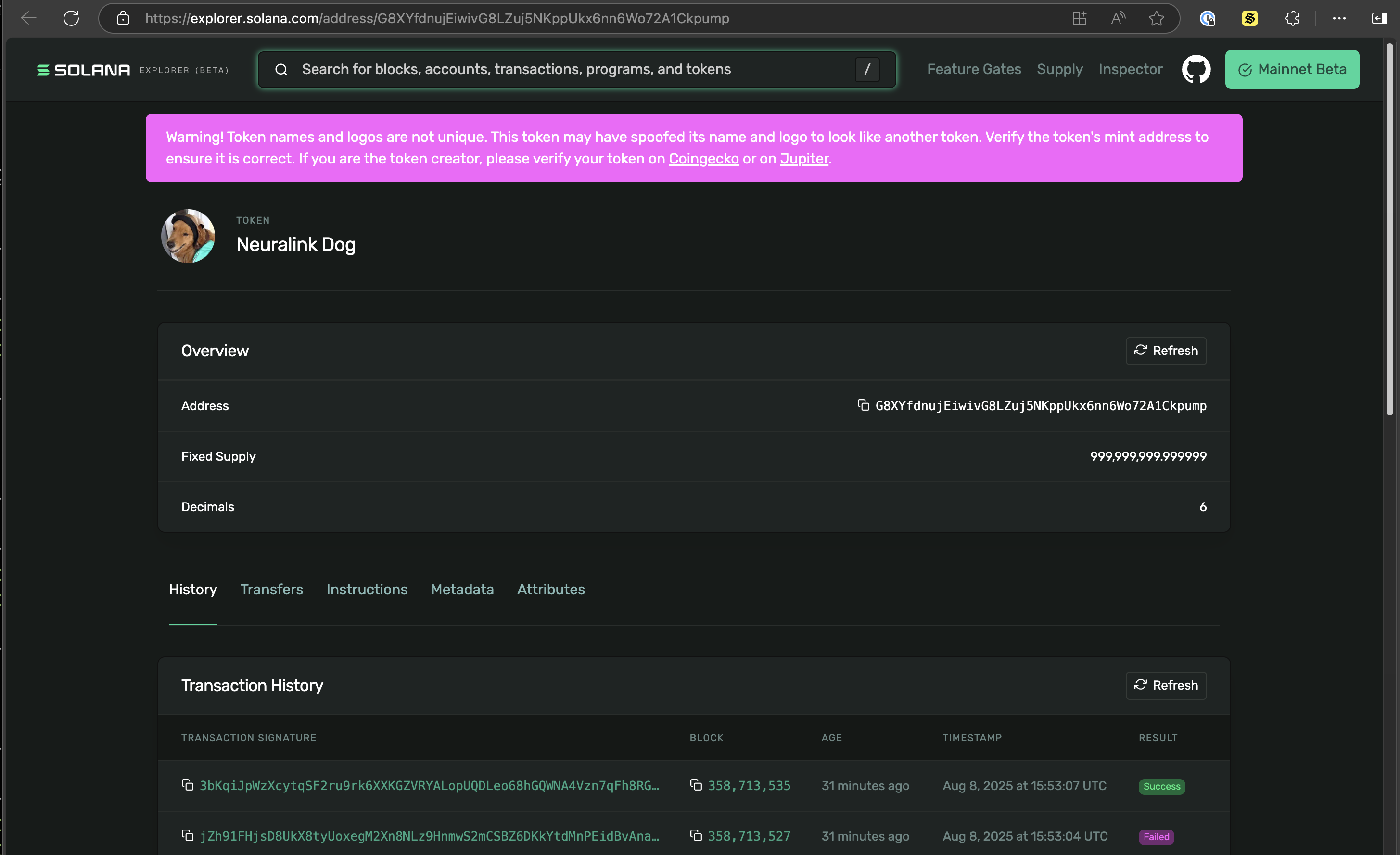
您可以点击铸造地址,在Solana 上查看铸造信息:
遇到问题了吗?完整的代码可在pump.fun monitor 的 GitHub 代码库中找到。
使用 fromSlot 进行历史回放
有时,我们希望从过去的某个特定时间点继续处理——例如,对于可能出现消息丢失或在恢复过程中需要补发消息的客户端。此外,我们还可以从过去3000个时间槽(20分钟)内的任意时间点继续处理。
通常情况下,当有新的插槽数据进来时,我们会保存最新的插槽编号,并设置 fromSlot 在恢复时,将该数字填入订阅请求中。
在本演示中,我们将从特定时间点之前选择一个时间段——打开 yellowstone.ts 并添加以下函数:
// Allow us to get the slot from a given time in the past
export const getSlotFromTimeAgo = async (
  yellowstoneClient: Client,
  timeAgo: number
) => {
  const now = Date.now();
  const fromTime = now - timeAgo;

  const slotsAgo = Math.ceil(timeAgo / SOLANA_SLOT_TIME_MS);
  if (slotsAgo > MAX_SLOTS_TO_REPLAY) {
    throw new Error(
      `From time ${new Date(
        fromTime
      ).toISOString()} is too far in the past. Maximum time to replay is ${MAX_TIME_TO_REPLAY_MINUTES} minutes.`
    );
  }

  const currentSlot = await getCurrentSlot(yellowstoneClient);
  const fromSlot = currentSlot - slotsAgo;

  return fromSlot;
};
然后在 monitor-program.ts, 我们可以设置 fromSlot 5分钟前发布到该栏目:
// Typically, we would record the most recent slot when each event is recieved,
// and then replay from that slot if we need to recover.
// For this demo, let's get the last 5 minutes of transactions
const fromSlot = await getSlotFromTimeAgo(yellowstoneClient, 5 * MINUTES);
重新运行该脚本后,您会先看到一连串的历史数据,随后系统会同步到实时状态。您可以点击任意一次铸币或交易,在Solana 上查看详细信息,包括发生的时间。
总结
在本指南中,我们探讨了如何使用Solana gRPC Solana 。虽然我们主要关注了如何追踪 Pump.fun 程序中新的代币铸造情况,但文中介绍的原则同样适用于监控任何Solana 。
在继续基于Solana 进行开发时,请考虑如何利用Solana gRPC 创建响应更迅速、效率更高的应用程序。无论您是在开发交易机器人、分析仪表盘还是复杂的 DeFi 应用程序,低延迟的实时数据访问都能为您带来显著优势。
资源
- GitHub:Pump.fun 监控
- 文档:Solana gRPC
- Solana gRPC add-on
- Solana :Solana Geyser 插件
- GitHub:Yellowstone gRPC
- GitHub:Geyser Park——Geyser 插件非官方列表
让我们保持联系吧!
我们非常希望了解您是如何使用Solana gRPC 的。欢迎通过Twitter或Discord 向我们分享您的使用体验、提出问题或提供反馈。