Solana エクスプローラー
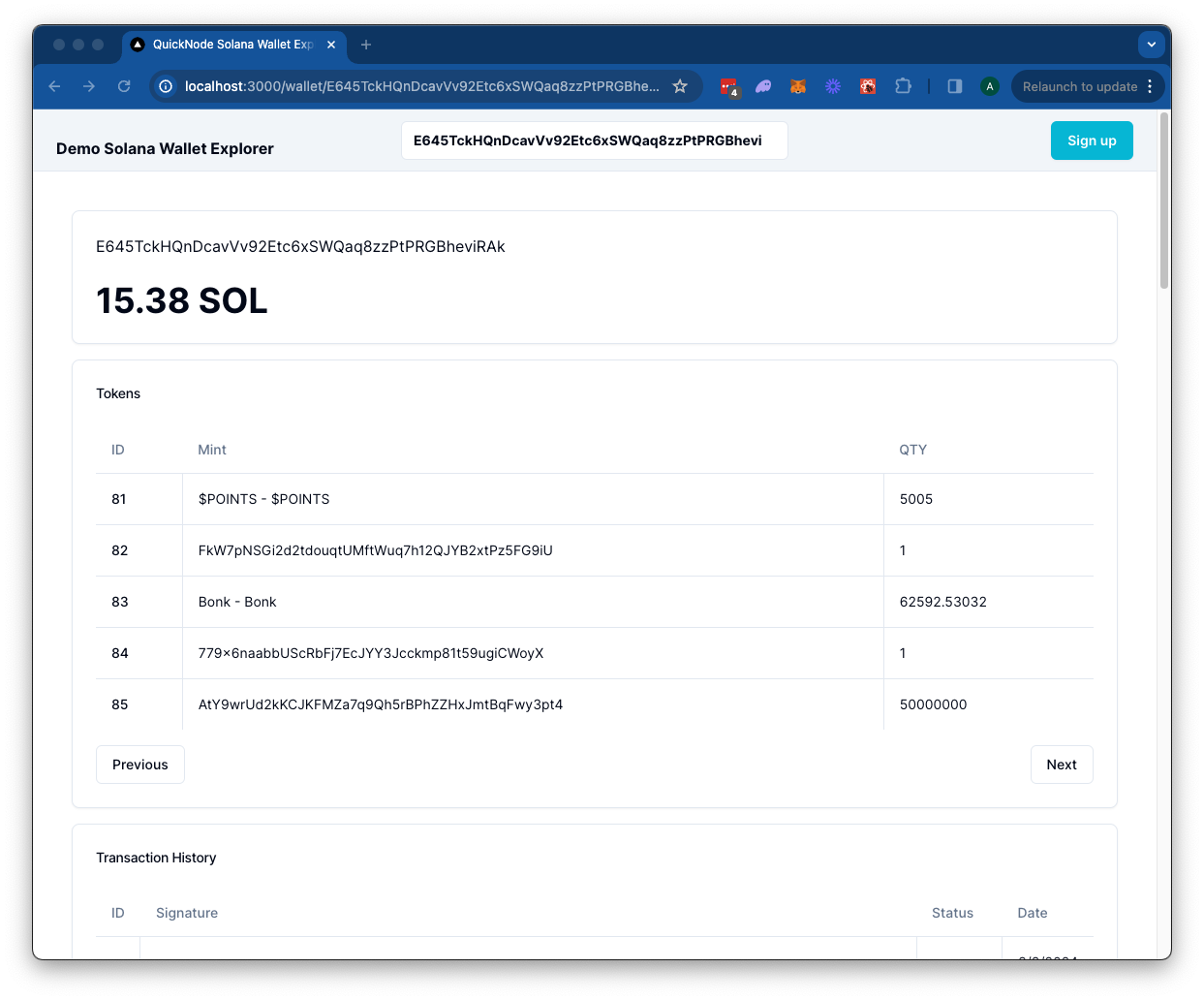
The Solana Wallet Explorer leverages a Quicknode Solana Endpoint to retrieve token balances, transaction history, and NFTs for a specified wallet on the Solana blockchain.

](https://vercel.com/new/clone?repository-url=https%3A%2F%2Fgithub.com%2Fquiknode-labs%2Fqn-guide-examples%2Ftree%2Fmain%2Fsample-dapps%2Fsolana-wallet-explorer&env=SOLANA_RPC_URL,DAS_API_ENABLED,NEXT_PUBLIC_FETCH_JUPLIST&envDescription=SOLANA_RPC_URL%3A%20Use%20Quicknode%20Solana%20Mainnet%20Endpoint%20%7C%20DAS_API_ENABLED%20%3D%20true%20with%20the%20Metaplex%20product%20enabled%20in%20the%20Quicknode%20Dashboard%20%7C%20NEXT_PUBLIC_FETCH_JUPLIST%20%3D%20true%20to%20fetch%20token%20names&envLink=https%3A%2F%2Fdashboard.quicknode.com%2Fendpoints&project-name=starter-solana-explorer&repository-name=starter-solana-explorer&redirect-url=https%3A%2F%2Fdashboard.quicknode.com%2Fendpoints&demo-title=Quicknode%20Starter%20Solana%20Explorer&demo-image=https%3A%2F%2Fgithub.com%2Fquiknode-labs%2Fqn-guide-examples%2Ftree%2Fmain%2Fsample-dapps%2Fsolana-wallet-explorer%2Fpublic%2Fdemo.png)

概要
The Solana Wallet Explorer leverages a Quicknode Solana Endpoint to retrieve token balances, transaction history, and NFTs for a specified wallet on the Solana blockchain. It uses a Next.js 14 以下のツールを使用して立ち上げられたプロジェクト create-next-app.
はじめに
依存関係をインストールする
First, install the dependencies:
npm install
# または
yarn
# または
pnpm install
# または
bun install
環境変数の設定
endpoint 必ず手元に用意しておいてくださいendpoint こちらから無料で取得できます。
名前を変更する .env.example ~へ .env.local and add your Quicknode Solana endpoint. Set DAS_API_ENABLED ~へ true only if you have access to the Metaplex product.
SOLANA_RPC_URL=https://example.solana-mainnet.quiknode.pro/123456/
DAS_API_ENABLED=true
NEXT_PUBLIC_FETCH_JUPLIST=true
まず、開発サーバーを起動します:
npm run dev
# または
yarn dev
# または
pnpm dev
# または
bun dev
ブラウザでhttp://localhost:3000を開くと、結果を確認できます。
Dappの利用方法
Search for a Solana wallet address and press enter.
The Dapp will redirect to /wallet/[address] and query the Solana blockchain for the wallet's token balances, transactions, and NFTs. Results are rendered in respective cards.
建築
src/
├── app/
│   └── api/
│       └── wallet/
├── components/
    ├── explorer/
    └── header/
api- Contains the API routes for the Solana RPC calls. These can be accessed from the client via/api/wallet/[method]?walletAddress=[address]. These GET requests utilize thesolana.jslibrary and Metaplex Digital Asset Standard framework to handle queries.components- Contains the React components for the dapp.- その
explorercomponent contains client-side components that call the API routes and render the results. - その
headercomponent contains the search bar for the dapp.
- その
Vercelへのデプロイ

プレビュー
Next.js ドキュメント
Next.js についてさらに詳しく知りたい場合は、以下のリソースをご覧ください:
- Next.js ドキュメント- Next.js の機能と API について学びましょう。
- Next.js を学ぶ- インタラクティブな Next.js チュートリアル。
Next.jsのGitHubリポジトリをご覧ください。皆様からのフィードバックや貢献を歓迎します!
- リポジトリをフォークする
- フィーチャーブランチを作成する:git checkout -b feature/amazing-feature
- 変更をコミットします:git commit -m "素晴らしい機能を追加"
- ブランチをプッシュしてください:git push origin feature/amazing-feature
- プルリクエストを作成してください。