Phoenix Perps-dashboard
Een realtime dashboard voor SOL-perpetual-futures, gebouwd met React en TypeScript, en aangedreven door de openbare REST- en WebSocket-API van Phoenix. Er is geen API-sleutel nodig.



Overzicht
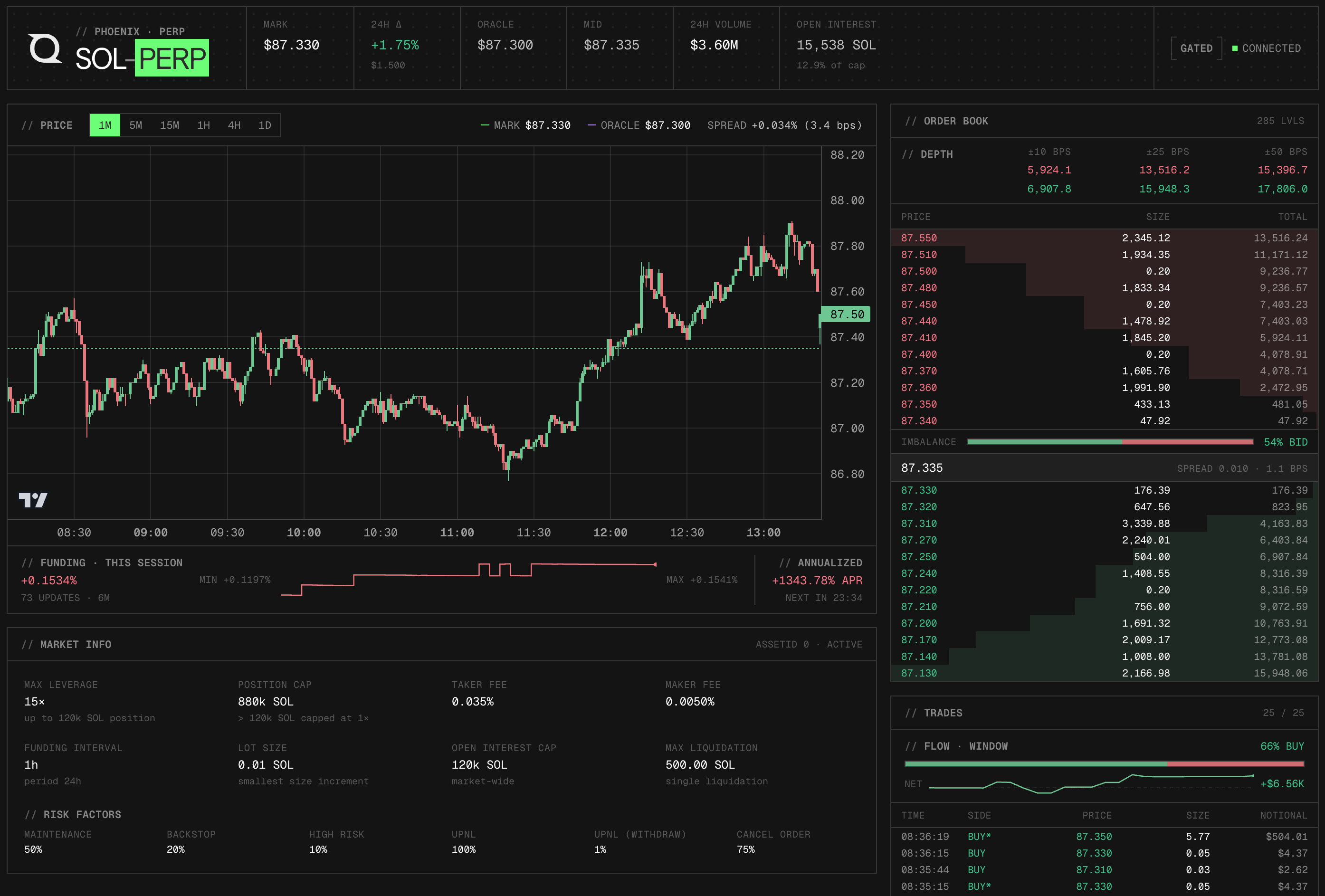
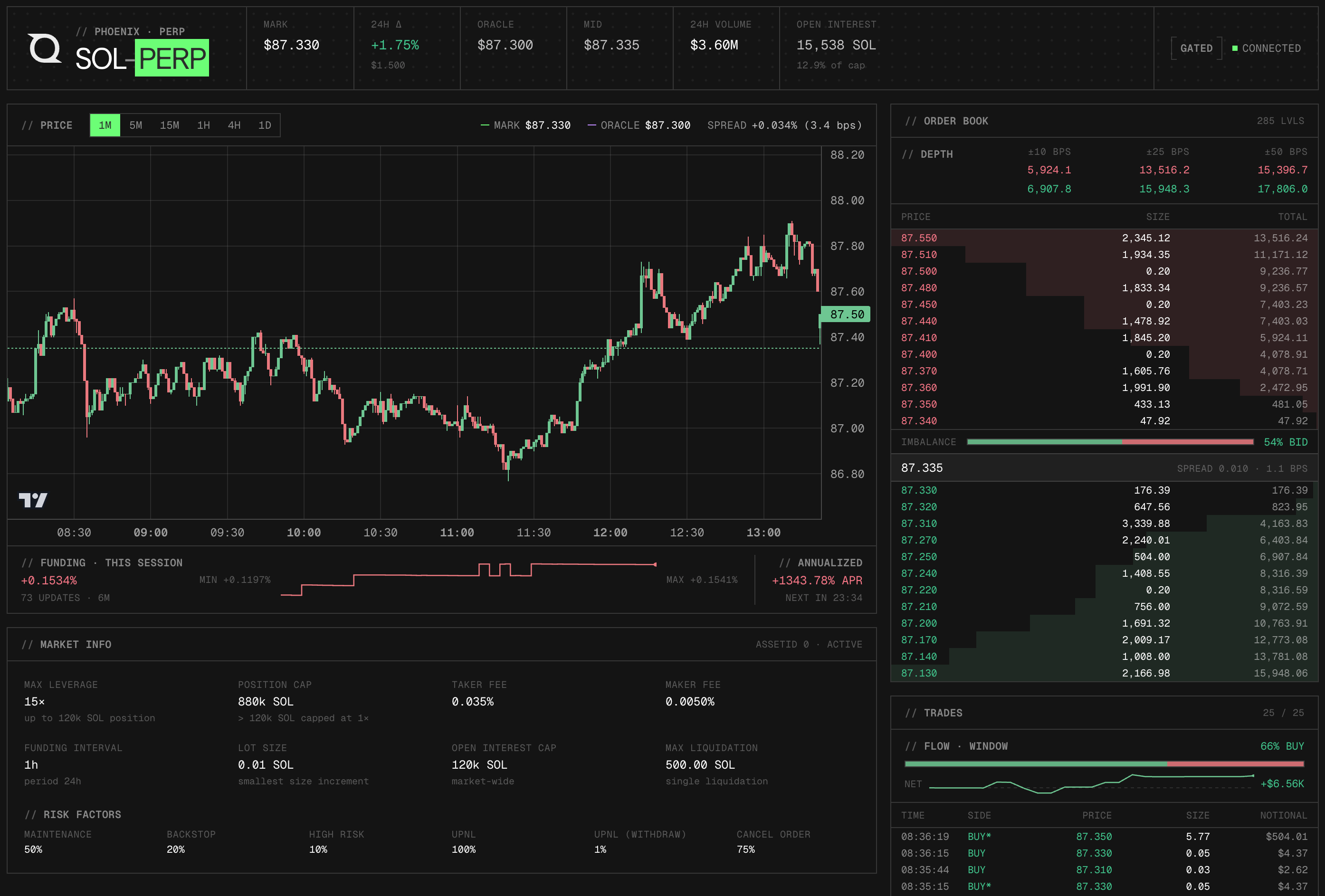
Phoenix is een Solana beurs voor perpetuals. Dit dashboard laat zien hoe je een live SOL-PERP-marktterminal kunt bouwen met behulp van de openbare REST- en WebSocket-API’s van Phoenix, waarbij de volledige datapijplijn wordt doorlopen: het laden van historische candlesticks en statische marktconfiguraties via REST, het abonneren op zes realtime-kanalen via één gedeelde WebSocket-verbinding, en het weergeven van een interactieve candlestick-grafiek naast een live orderboek, transactiestroom en funding-strip.
Er is geen API-sleutel, geen ondertekende headers en geen verbinding met een wallet nodig. Alle gegevens zijn afkomstig uit de openbare bron van Phoenix perp-api.phoenix.trade eindpunten. Om het dashboard uit te breiden met on-chain-gegevens (transactiegeschiedenis, accountstatus), sluit je een Quicknode Solana endpoint.
De volledige handleiding over de architectuur van dit dashboard is te vinden in het artikel „Een realtime SOL Perps-dashboard bouwen met de Phoenix API”.
Architectuur
Phoenix REST API (https://perp-api.phoenix.trade)
  → App.tsx-seeds bij het laden: historische candlesticks + statische marktconfiguratie

Phoenix WebSocket (wss://perp-api.phoenix.trade/v1/ws)
  → PhoenixWebSocket.tsx beheert één gedeelde verbinding
      → marktkanaal      → MarketOverview (statistieken in de header)
      → fundingRate-kanaal → MarketOverview + funding-strip
      → kaarsen-kanaal     → PriceChart (OHLCV + overlays)
      → orderboek-kanaal   → Orderbook (hoogste bied- en laatkoersen)
      → trades-kanaal      → TradeFeed (recente uitvoeringen)
      → beurskanaal    → ConnectionStatus-badge
  Alleen REST → MarketInfo (kosten, hefboomniveaus, tick/lotgrootte)
Kenmerken
- Actuele marktprijs, oracle-prijs, verandering in de afgelopen 24 uur, volume in de afgelopen 24 uur, openstaande posities en funding rate in een vaste kopbalk
- Kandelaargrafiek met de markprijs (groen) en de oracleprijs (paars gestreept) eroverheen; het verschil wordt rood gemarkeerd wanneer het groter is dan 10 basispunten
- Zes tijdsframes (1m, 5m, 15m, 1h, 4h, 1d) — bij het overschakelen worden de kaarsen onmiddellijk opnieuw gegenereerd vanuit REST
- Realtime L2-orderboek met de hoogste bied- en laatkoersen, inclusief het cumulatieve volume en de spread
- Live handelsfeed met de 25 meest recente uitgevoerde orders, met vermelding van de tegenpartij, prijs, omvang en nominale waarde
- Financieringsbalk onder de grafiek met het verloop van de lokale rente per sessie, het jaarlijkse rentepercentage (APR) en de aftelling naar de volgende afrekening
- Paneel met statische marktinformatie, met tarieven, maximale hefboom, niveautabel en margevereisten
- WebSocket-herverbinding met exponentiële backoff (tot 15 seconden)
Vereisten
- Node.js 20+
- npm of pnpm
Projectopbouw
src/
├── api.ts                          # REST-helpers (kaarsen, marktconfiguratie)
├── types.ts                        # Gedeelde TypeScript-typen
├── App.tsx                         # Hoofdcomponent; vult REST-gegevens in bij het laden
├── ws/
│   └── PhoenixWebSocket.tsx        # WebSocket-provider + React-context
├── components/
│   ├── ConnectionStatus.tsx        # Indicator voor WS-verbindingsstatus
│   ├── MarketInfo.tsx              # Configuratiepaneel voor de markt (kosten, hefboomwerking, financiering)
│   ├── MarketOverview.tsx          # Statistiekenbalk in de koptekst
│   ├── Orderbook.tsx               # Live bied- en laatdieptetabel
│   ├── PriceChart.tsx              # Candlestick-grafiek met funding-strip
│   └── TradeFeed.tsx               # Recente transactiegegevens
└── utils/
    ├── format.ts                   # Hulpfuncties voor getalopmaak
    └── useFundingCountdown.ts      # Countdown-hook voor de volgende funding-afrekening
Aan de slag
1. Kloon de repository
git clone https://github.com/quiknode-labs/qn-guide-examples.git
cdsolana
2. Installeer de afhankelijkheden
npm installeren
3. Start de ontwikkelingsserver
npm run dev
Open http://localhost:5173 in je browser. Het dashboard maakt verbinding met Phoenix en begint onmiddellijk met het streamen van livegegevens.
Er zijn geen omgevingsvariabelen nodig. Het dashboard maakt rechtstreeks verbinding met de openbare REST- en WebSocket-eindpunten van Phoenix.
Voorbeeld
- Maak een fork van de repository
- Maak een feature-branch aan:git checkout -b feature/amazing-feature
- Sla je wijzigingen op:git commit -m "Geweldige functie toevoegen"
- Pusht je branch:git push origin feature/amazing-feature
- Dien een pull-verzoek in.