
閱讀時間 5 分鐘
概覽
Dotnet or .NET is very popular for the development of desktop applications, most Windows desktop applications are built using .NET, and it also contributes largely to web application’s tech stack. In this guide, let’s see how we can connect to Ethereum using .NET and Nethereum.
先決條件
- .NET Core SDK 3.1 installed on your system.
- Text editor.
- An Ethereum node.
What is .NET?
.NET is Microsoft’s alternative to Java. .NET is an umbrella framework for developing applications using Visual Basic, C#, and F#. It is open-source and has excellent cross-platform support; it was created by Microsoft mainly for making windows applications, but now with the support for a variety of programming languages, both web-based and form-based applications can be developed using .NET and using ASP.NET, a tool within the .NET framework, one can build backends for web applications.
Following are some features of the .NET framework:
- Common Language Runtime engine (CLR)
- 互通性
- Portability
- Base Class Library
- Simplified deployment
- Language independence
- 安全
For our purpose today, we’ll use C# and Nethereum.
What is C# (C-Sharp)?
C# is a modern Object-Oriented programming language; it is open source under the .NET foundation managed by Microsoft, where community members actively contribute towards it. C# is heavily used in desktop and game development, whereas it can also be used for mobile development, VR, Blockchain development, etc. C# has its roots in C and is closely related to Java and C++. It’s easy to learn and one of the most popular programming languages in the world with tremendous community support.
Here are some notable features of C#:
- C# code, when executed, generates portable executable files like .exe and .dll
- Methods in C# are not virtual by default.
- Classes are grouped into namespaces.
- C# namespaces are not related to directories.
- Primitive data type variables are powerful in C#.
- Has features like Properties and Indexers.
- Supports Structures, Pre-processor directives, and Operator Overloading.
- Being .NET language supports language interoperability.
What is Nethereum?
Nethereum is the .Net integration library for Ethereum; it simplifies the access and smart contract interaction with Ethereum nodes. It is compatible with all the major operating systems and is tested on mobile, desktop, cloud, Xbox, hololens, and Windows IoT. Nethereum is great for Web3 development.
Following are some of the prominent features of Nethereum:
- Support for core Ethereum JSON RPC / IPC methods.
- Simplified smart contract interaction.
- Unity 3d integration.
- Support for HD wallet
- Has libraries for standard contracts Token, ENS, and Uport.
- Simple account lifecycle.
- Has ABI to .NET type encoding and decoding.
We’ll use Nethereum web3 package to get the latest block number from the Ethereum blockchain.
Installing Nethereum
Nethereum requires .NET Core or .NET Framework(4.5.1+) installed. We’ll install .NET Core SDK to make Nethereum work. Download and install the .NET Core SDK ver 3.1 based on your operating system. Then go to your terminal/command line and type the following.
$ dotnet new console -o nethereumapp
This will create a new .NET application in the current directory. You can give your application any name (nethereumapp in this example).
Now cd into your application.
$ cd nethereumapp
Add package reference to Nethereum.Web3
$ dotnet add package Nethereum.Web3
This might take a while. After the package reference is added, download/update the package by typing the following.
$ dotnet restore
If everything goes right, Nethereum will be added to your system with nethereum web3 package.
Set Up Your Quicknode Ethereum Endpoint
We could use pretty much any Ethereum client, such as Geth or OpenEthereum (fka Parity), for our purposes today. Since that is a bit too involved for just querying for block height, we'll create a free Quicknode account here and easily generate an Ethereum endpoint. It can be a testnet (like Sepolia or Goerli) or Mainnet. After you've created your free Ethereum endpoint, copy your HTTP Provider endpoint:
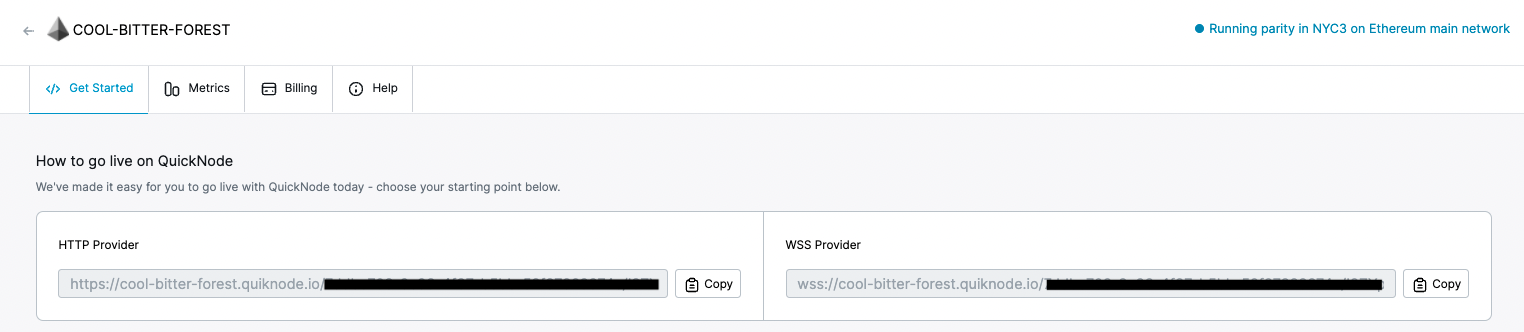
You'll need this later, so copy it and save it.
Connecting with Ethereum
Now go to your .NET app folder and open the Program.cs C# file in a text editor and edit the code according to the following code.
using System;
using System.Threading.Tasks;
using Nethereum.Web3;

namespace nethereumapp
{
    class Program
    {
        static void Main(string[] args)
        {
        	GetBlockNumber().Wait();
        }

        static async Task GetBlockNumber()
        {
        	var web3 = new Web3("ADD_YOUR_ETHEREUM_NODE_URL");
        	var latestBlockNumber = await web3.Eth.Blocks.GetBlockNumber.SendRequestAsync();
        	Console.WriteLine($"Latest Block Number is: {latestBlockNumber}");
        }
    }
}
Make sure to replace `ADD_YOUR_ETHEREUM_NODE_URL` with the http provider from the section above.
Explanation of the code above
Line 1-3: Adding the required namespaces.
Line 5: Declaring our app’s namespace (Which will have a class collection).
Line 7: Declaring a class named Program.
Line 9-12: Declaring the Main class, which is the C# program’s entry point, and states what class does when executed. Declaring that the main class must wait for the execution of GetBlockNumber class.
Line 14: Declaring a Task class GetBlockNumber, task classes in C# are executed asynchronously.
Line 16: Creating an instance of Web3 and setting our node URL.
Line 17: Using the Eth API, we can execute the GetBlockNumber request asynchronously and storing the result in latestBlockNumber variable.
Line 18: Printing the latest block number stored in latestBlockNumber with a string “Latest Block Number is:”
Now to run your app, open your terminal/cmd, go to your .NET app’s folder and type the following.
$ dotnet run
If everything goes well and the code gets executed successfully, you must see an output like this:

結論
Here we saw how we can connect to the Ethereum network by making a .NET app in C# using Nethereum. So go ahead and build your decentralized games and applications. You can refer to Nethereum’s official documentation to learn more about different functions and use cases.
訂閱我們的電子報,獲取更多關於Ethereum的文章與指南。如有任何意見回饋,歡迎透過Twitter 聯絡我們。您隨時都可以在我們的Discord社群伺服器上與我們聊天,那裡匯集了您這輩子見過最酷的開發者們 :)