
2 min read
Sending a Transaction in Ethers.js v5
You can also follow along the written instructions and code below
Once you have set up your local environment with an .env file, add the following line of code:
PRIVATE_KEY = 'ADD_YOUR_PRIVATE_KEY_HERE'
替換 ADD_YOUR_PRIVATE_KEY_HERE with your private key. You can also store your RPC URL in the .env 檔案。
Then create a new index.js file and copy-paste the below ethers.js v5 script:
require("dotenv").config();
const ethers = require('ethers');
(async () => {
    const provider = new ethers.providers.JsonRpcProvider('QUICKNODE_HTTPS_URL');
    const signer = new ethers.Wallet(process.env.PRIVATE_KEY, provider);

      const tx = await signer.sendTransaction({
        to: '0x92d3267215Ec56542b985473E73C8417403B15ac',
        value: ethers.utils.parseUnits('0.001', 'ether'),
      });
      console.log(tx);
})();
In the next section, we will replace QUICKNODE_HTTPS_URL with your Quicknode HTTPS URL.
Getting a Quicknode endpoint
Create a free Quicknode account here if you don't already have one. Then click the Create an Endpoint button, select the EVM chain of your choice.
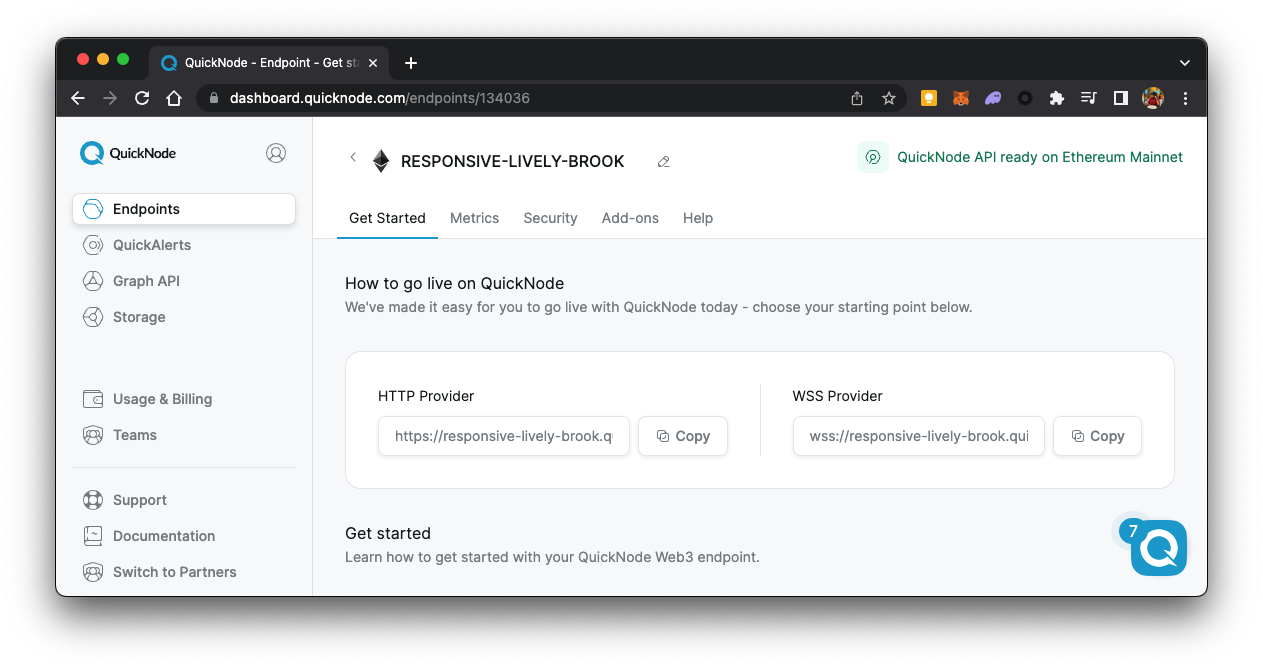
Then, copy your HTTP Provider URL
Sending a Transaction in Ethers.js v6
Once you have set up your local environment with an .env file, add the following line of code:
PRIVATE_KEY = 'ADD_YOUR_PRIVATE_KEY_HERE'
替換 ADD_YOUR_PRIVATE_KEY_HERE with your private key. You can also store your RPC URL in the .env 檔案。
Then create a new index.js file and copy-paste the below ethers.js v6 script:
require("dotenv").config();
const ethers = require('ethers');
(async () => {
    const provider = new ethers.JsonRpcProvider('QUICKNODE_HTTPS_URL');
    const signer = new ethers.Wallet(process.env.PRIVATE_KEY, provider);

      const tx = await signer.sendTransaction({
        to: '0x92d3267215Ec56542b985473E73C8417403B15ac',
        value: ethers.parseUnits('0.001', 'ether'),
      });
      console.log(tx);
})();