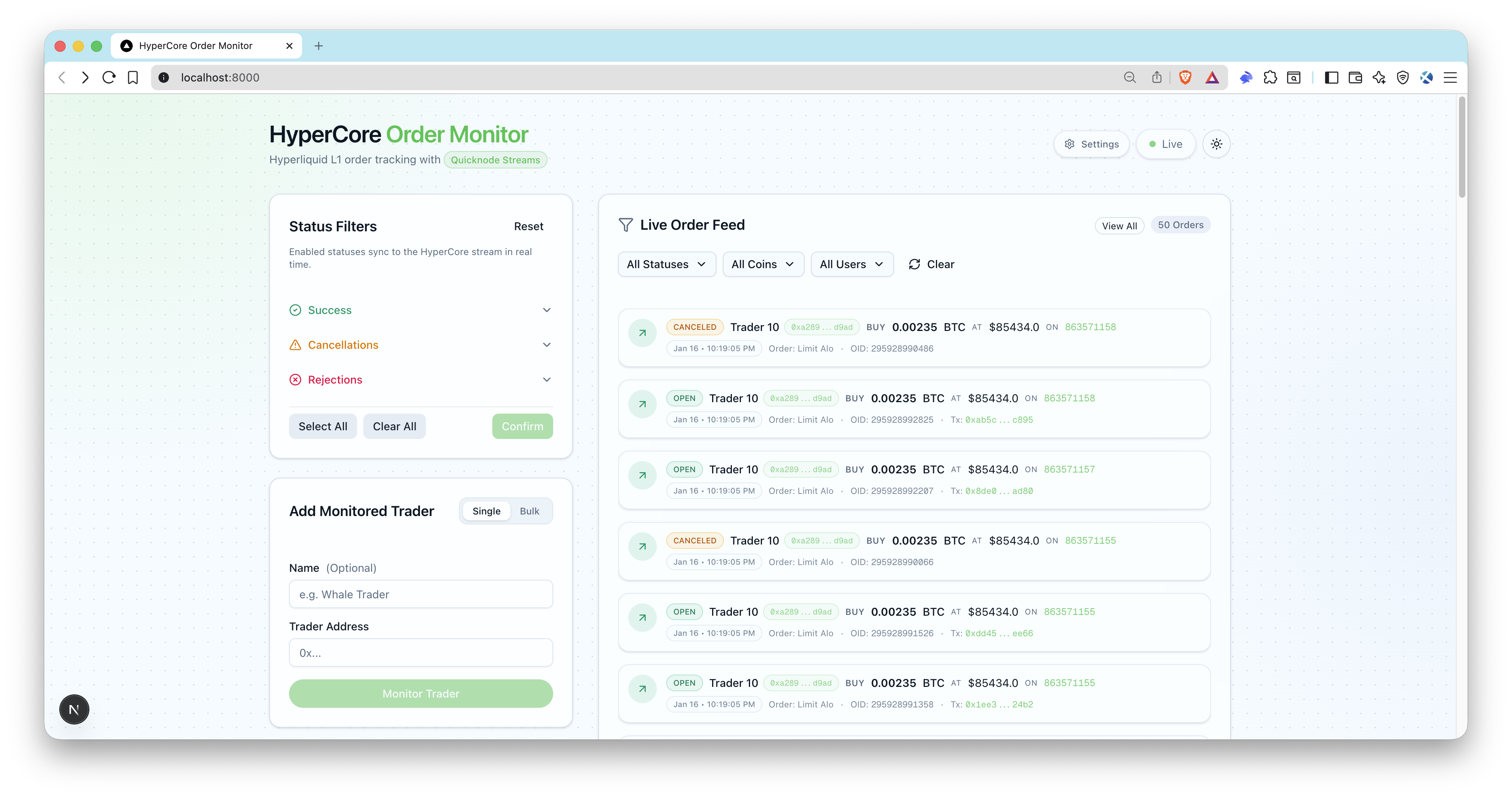
概覽
此範例應用程式可即時追蹤Hyperliquid (L1)上的交易訂單。它利用Quicknode Streams與鍵值儲存庫 (KV Store)進行智慧型動態篩選,無需重新啟動資料流。透過現代化使用者介面,監控大戶交易者、追蹤訂單狀態,並接收即時更新。
建築
Hyperliquid (L1)
  ->Quicknode Streams  KV
    -> POSTstreams 簽名驗證)
      -> 訂單日誌 (OrderLog) 插入或更新 + SSE 發送
        -> 即時 UI 訂單資料流
特色
- 透過 KV 儲存庫清單進行即時位址過濾
- 動態狀態篩選(開放中、已填補、已取消、已拒絕、已觸發)
- 在資料流層級進行原生於區塊鏈的過濾
- 用於即時更新使用者介面的伺服器傳送事件 (SSE)
- Quicknode Streams 腳本(建立 + 啟用)
- 批量新增交易者地址
- Webhook 簽名驗證與時間戳記檢查
- Ethereum ENS 解析(可選)
- Prisma + SQLite 本地儲存
先決條件
- Node.js 20 以上版本,以及一個套件管理工具(pnpm、yarn、npm)。
- Quicknode 透過Streams KV Store 存取功能:建立一個帳戶,並取得您的 Admin API 因為
QN_API_KEY. - 公開 Webhook URL:請使用類似以下的隧道:
ngrok或將應用程式部署至APP_URLQuicknode 可以連接到該位址。 - 可選:endpoint ENS 名稱解析的Ethereum mainnet endpoint (
QN_EVM_ENDPOINT).
專案架構
filters/
  hl-orders-filter.js     #Quicknode Streams (HyperCore)
scripts/
streams.ts        # 建立 KV 清單 + 串流(暫停中)
streams.ts     # 根據 ID 啟動串流
src/
  app/api/                # API 路由(webhooks、使用者、SSE)
  lib/                    #Quicknode、Webhook、SSE 輔助函式
  types/                  # TypeScript 定義
prisma/
  schema.prisma           # SQLite 資料結構
環境變數
複製 .env.example 至 .env 並填寫:
QN_API_KEY=""                  # 具備Streams  KV 權限的Quicknode 金鑰
QN_STREAM_SECURITY_TOKEN=""    # 串流安全憑證(來自設定腳本)
APP_URL="http://localhost:3000" # 公開應用程式網址(本地webhooks 使用 ngrok)
DATABASE_URL="file:./dev.db"   # SQLite 資料庫
QN_EVM_ENDPOINT=""             # 可選:用於 ENS 解析的Ethereum
ADMIN_API_KEY=""               # 本地開發時為選填,生產環境時為必填
註:
QN_STREAM_SECURITY_TOKEN由設定:streams.APP_URL必須能透過Quicknode 存取Quicknode 請使用 ngrok 或已部署的 URL)。- 請確保您的 API 金鑰已啟用「Streams 「KV 儲存庫」的權限。
開始使用
1. 安裝依賴項
pnpm 安裝
# npm install
# yarn install
2. 建立您的 env 檔案
cp .env.example .env
3. 加入必要的變數
請填寫 .env (參見 先決條件).
若要使用本機webhooks,請透過 ngrok 公開您的應用程式,並將 HTTPS URL 複製到 APP_URL:
ngrok http 3000
4. 初始化資料庫
pnpm prisma migrate dev --name hypercore-order-monitor
pnpm db:seed
此種子腳本會建立狀態篩選器(啟用 開啟, 填滿, 觸發 (預設情況下)並新增一個範例交易者地址。
5. 建立Quicknode Streams KV 清單
pnpm 執行 setup:streams
請將列印出的安全代碼複製到 .env (QN_STREAM_SECURITY_TOKEN).
6. 啟動應用程式
pnpm 開發
7. 啟動串流
pnpm 執行 activate:streams
開啟 http://localhost:3000, 新增交易者地址,您便應能透過streams webhooks 即時查看訂單事件。
資料庫
預設使用 SQLite。Prisma 資料結構位於 prisma/schema.prisma.
常用指令:
pnpm prisma migrate dev --name <name>
pnpm db:seed
pnpm prisma studio
Webhook 安全性與有效載荷
- Endpoint:
POSTstreams - 必填標題:
x-qn-nonce,x-qn-timestamp,x-qn-signature - 有效載荷可進行 gzip 壓縮;處理程式會自動偵測
content-encoding: gzip - 簽名驗證的用途
QN_STREAM_SECURITY_TOKEN
API 端點
公開端點:
GET /api/health- 健康檢查GET /api/users- 列出受監控的交易者GET /api/statuses- 清單狀態篩選條件POSTstreams-Quicknode StreamsGET /api/sse- SSE 訂單事件串流
受保護的端點(需 Authorization: Bearer <ADMIN_API_KEY>):
POST /api/users- 新增交易員POST /api/users/bulk- 批量新增交易者(上限 50 個地址)PATCH /api/users?id=...- 更新交易者DELETE /api/users?id=...- 移除交易者GET /api/orders- 根據篩選條件列出訂單PATCH /api/statuses- 更新已啟用狀態POST /api/statuses/reset- 重設為預設值
同步腳本
pnpm run sync:statuses- 將 KV 狀態清單與資料庫進行對帳pnpm run sync:users- 將 KV 使用者清單與資料庫進行比對pnpm run reset:kv- 刪除 HyperCore KV 清單
預覽
貢獻與回饋
我們非常樂意聽取您的意見,並歡迎您為這個範例應用程式提供任何貢獻!
若要回報問題或提供意見回饋,請在 qn-guide-examples 儲存庫。
若要貢獻,請依照以下步驟操作:
- 分叉此儲存庫
- 建立功能分支:git checkout -b feature/amazing-feature
- 將您的變更提交:git commit -m "新增超棒的功能"
- 推送您的分支:git push origin feature/amazing-feature
- 開啟一個 Pull Request。
探索更多範例應用程式