Streams consumes API credits based on the number of blocks processed by your Stream, determined by network and dataset type. Filters help you shape your data pipeline by controlling exactly what data reaches your destination. Use the API Credits Calculator to estimate your usage.
Filters enable you to customize and filter your streams payload using Go or JavaScript (ECMAScript) code. With the help of filters, you can match specific patterns and rules against the data from your stream, and personalize the data sent to your destination. This feature can be configured within the Quicknode developer portal, and through the Streams REST API.
How to Use Filters
Filters can be written in JavaScript or Go, and both operate on the same payload and produce the same delivered output. This server-side filtering capability offers several advantages:
- Stream the Data You Want: Only the filtered data that matches your criteria is sent to your destination, reducing bandwidth, storage, and processing requirements.
- Custom Transformations: Transform and enrich the data before it reaches your system, including filtering specific transaction types or events, extracting and transforming specific fields, computing derived values, and aggregating data points.
- Flexible Filtering: Create complex filtering logic using the full feature set of your chosen language, including pattern matching, mathematical operations, array and object manipulation, and conditional logic.
You can configure filters in two ways:
- Dashboard: Use the Stream Filter Editor when creating or editing a stream in the Quicknode Dashboard
- REST API: Pass a base64-encoded filter function via the
filter_functionparameter when creating 或 updating a stream
See the REST API Overview for API examples.
Example Filters
The examples below implement the same logic in both languages and return exactly the same output.
Solana Stake Program Filter
This filter finds every successful transaction in each block that includes at least one instruction sent to the Solana Stake Program — such as staking, unstaking, or moving stake:
- 去
- JavaScript
type Payload struct {
    Data     []SolanaBlock          `json:"data"`
    Metadata map[string]interface{} `json:"metadata"`
}
type SolanaBlock struct {
    BlockTime    int64      `json:"blockTime"`
    Transactions []SolanaTx `json:"transactions"`
}
type SolanaTx struct {
    Meta *struct {
        Err interface{} `json:"err"`
    } `json:"meta"`
    Transaction struct {
        Signatures []string `json:"signatures"`
        Message    struct {
            Instructions []struct {
                ProgramID string `json:"programId"`
            } `json:"instructions"`
        } `json:"message"`
    } `json:"transaction"`
}

func Filter(qn *qn.QNContext, payload Payload) interface{} {
    const stakeProgram = "Stake11111111111111111111111111111111111111"
    matches := []map[string]interface{}{}

    for _, block := range payload.Data {
        for _, tx := range block.Transactions {
            if tx.Meta == nil || tx.Meta.Err != nil {
                继续
            }

            instructionCount := 0
            for _, ix := range tx.Transaction.Message.Instructions {
                if ix.ProgramID == stakeProgram {
                    instructionCount++
                }
            }

            if instructionCount > 0 {
                signature := ""
                if len(tx.Transaction.Signatures) > 0 {
                    signature = tx.Transaction.Signatures[0]
                }
                matches = append(matches, map[string]interface{}{
                    "signature":        signature,
                    "blockTime":        block.BlockTime,
                    "instructionCount": instructionCount,
                    "programId":        stakeProgram,
                })
            }
        }
    }

    if len(matches) == 0 {
        return nil
    }
    return matches
}
function main(stream) {
	const STAKE_PROGRAM = 'Stake11111111111111111111111111111111111111'
	const matches = []

	for (const block of stream.data) {
		for (const tx of block.transactions) {
			if (!tx.meta || tx.meta.err) continue

			const stakeInstructions = (
				tx.transaction.message.instructions || []
			).filter(ix => ix.programId === STAKE_PROGRAM)

			if (stakeInstructions.length) {
				matches.push({
					signature: tx.transaction.signatures[0],
					blockTime: block.blockTime,
					instructionCount: stakeInstructions.length,
					programId: STAKE_PROGRAM,
				})
			}
		}
	}

	return matches.length ? matches : null
}
Ethereum ERC-20 Transfer Filter
This filter processes ERC-20 transfer events using the block_with_receipts dataset, decoding the logs using the ERC-20 ABI:
- 去
- JavaScript
type Payload struct {
    Data     []Entry                `json:"data"`
    Metadata map[string]interface{} `json:"metadata"`
}
type Entry struct {
    Receipts []interface{} `json:"receipts"`
}

func Filter(qn *qn.QNContext, payload Payload) interface{} {
    const erc20ABI = `[{"anonymous":false,"inputs":[{"indexed":true,"name":"from","type":"address"},{"indexed":true,"name":"to","type":"address"},{"indexed":false,"name":"value","type":"uint256"}],"name":"Transfer","type":"event"}]`

    var receipts []interface{}
    for _, block := range payload.Data {
        receipts = append(receipts, block.Receipts...)
    }

    decoded := qn.DecodeEVMReceipts(receipts, []string{erc20ABI})

    var erc20Transfers []interface{}
    for _, r := range decoded {
        receipt, ok := r.(map[string]interface{})
        if !ok {
            继续
        }
        logs, ok := receipt["decodedLogs"].([]interface{})
        if !ok {
            继续
        }
        for _, l := range logs {
            logMap, ok := l.(map[string]interface{})
            if !ok {
                继续
            }
            if fmt.Sprintf("%v", logMap["name"]) == "Transfer" {
                erc20Transfers = append(erc20Transfers, receipt)
                换行
            }
        }
    }

    if len(erc20Transfers) == 0 {
        return nil
    }
    return map[string]interface{}{"receipts": erc20Transfers}
}
function main(stream) {
	const ERC20_ABI = [
		{
			name: 'Transfer',
			type: 'event',
			anonymous: false,
			inputs: [
				{ name: 'from', type: 'address', indexed: true },
				{ name: 'to', type: 'address', indexed: true },
				{ name: 'value', type: 'uint256', indexed: false },
			],
		},
	]

	const receipts = stream.data.flatMap(block => block.receipts || [])
	const decoded = decodeEVMReceipts(receipts, [ERC20_ABI])

	const erc20Transfers = decoded.filter(r =>
		r.decodedLogs?.some(log => log.name === 'Transfer')
	)

	return erc20Transfers.length ? { receipts: erc20Transfers } : null
}
This filter demonstrates how to:
- Use the
block_with_receiptsdataset - Define and use an ABI for event decoding
- Process decoded logs to extract ERC-20 transfer events
- Return only receipts containing relevant events
Filter Execution Environment
Filters run on Quicknode's infrastructure in a sandboxed environment and can be written in 去 或 JavaScript. Every filter receives a payload with two top-level members: 数据 (the blockchain payload) and 元数据 (information about the stream and batch). In JavaScript these are accessed as stream.data 和 stream.metadata; in Go they are the payload.Data 和 payload.Metadata fields of the Payload struct. The shape of the JSON is identical across both languages.
The parameter name in your filter function (e.g., 流, payload, 数据) is arbitrary — what matters is the shape of the object passed in, which always contains 数据 和 元数据.
Key details for each language:
- 去
- JavaScript
- Entry Point: Your filter function must be named
筛选, with the signaturefunc Filter(qn *qn.QNContext, payload Payload) interface{}(the legacyfunc Filter(qn *qn.QNContext, data interface{}) interface{}also works). - Parameter:
payloadis a struct with数据和Metadatafields. You declare thePayloadstruct (and any nested structs) yourself, listing only the fields you need — undeclared fields are never decoded, which is why Go is faster on large payloads. - Return Values: Return any JSON-serializable value (struct, map, or slice) to deliver data to your destination. Return
nilto skip delivery for that block. API credits are consumed regardless of the return value. - 执行: Go filters are synchronous — there is no
async/await, and no goroutines are needed. - Debugging: Use
fmt.Printlnto output debug information — its output is captured in the 日志 tab of the Stream Filter Editor, and it formats objects (maps, slices, structs) into a string automatically, so you can log the payload directly. - Available Utilities:
qn.DecodeEVMReceipts(receipts, abis)— Decode EVM transaction receipts using contract ABIsqn.ContainsListItem/qn.ContainsListItems/qn.GetValue/qn.GetList/qn.AddListItem/qn.RemoveListItem/qn.DeleteList/qn.AddValue/qn.DeleteValue— Key-Value Store operations (see Using Key-Value Store with Streams filters)
- Sandbox limits: No
package或importstatements (they're injected automatically). Only thefmt,strings,strconv,encoding/json,以及qnpackages are available — noos,net,时间, or others.
- Entry Point: Your filter function must be named
main. - Parameter: The
mainfunction receives a single object with.data(the blockchain data) and.metadata(stream metadata) properties. The parameter name is arbitrary (e.g.,流,payload). - Return Values: Return an object, array, or string to deliver data to your destination. Return
nullto skip delivery for that block. API credits are consumed regardless of the return value. - Async Support: Filters support
async/awaitfor Key-Value Store operations. Declare your function asasync function main(stream)when usingqnLib.*methods. - Debugging: Use
console.log()to output debug information. Logs appear in the 日志 tab of the Stream Filter Editor. - Available Utilities:
decodeEVMReceipts(receipts, abis)— Decode EVM transaction receipts using contract ABIsqnLib.*— Key-Value Store operations, including writes (see Using Key-Value Store with Streams filters)console.log()— Debug logging
- Sandbox limits: No
require,import, network access,fs, oreval.
AI-Assisted Filter Creation
The Stream Filter Editor includes an AI assistant that helps you write and modify filter functions. Describe what you want to filter in plain language, and the AI generates the JavaScript code.
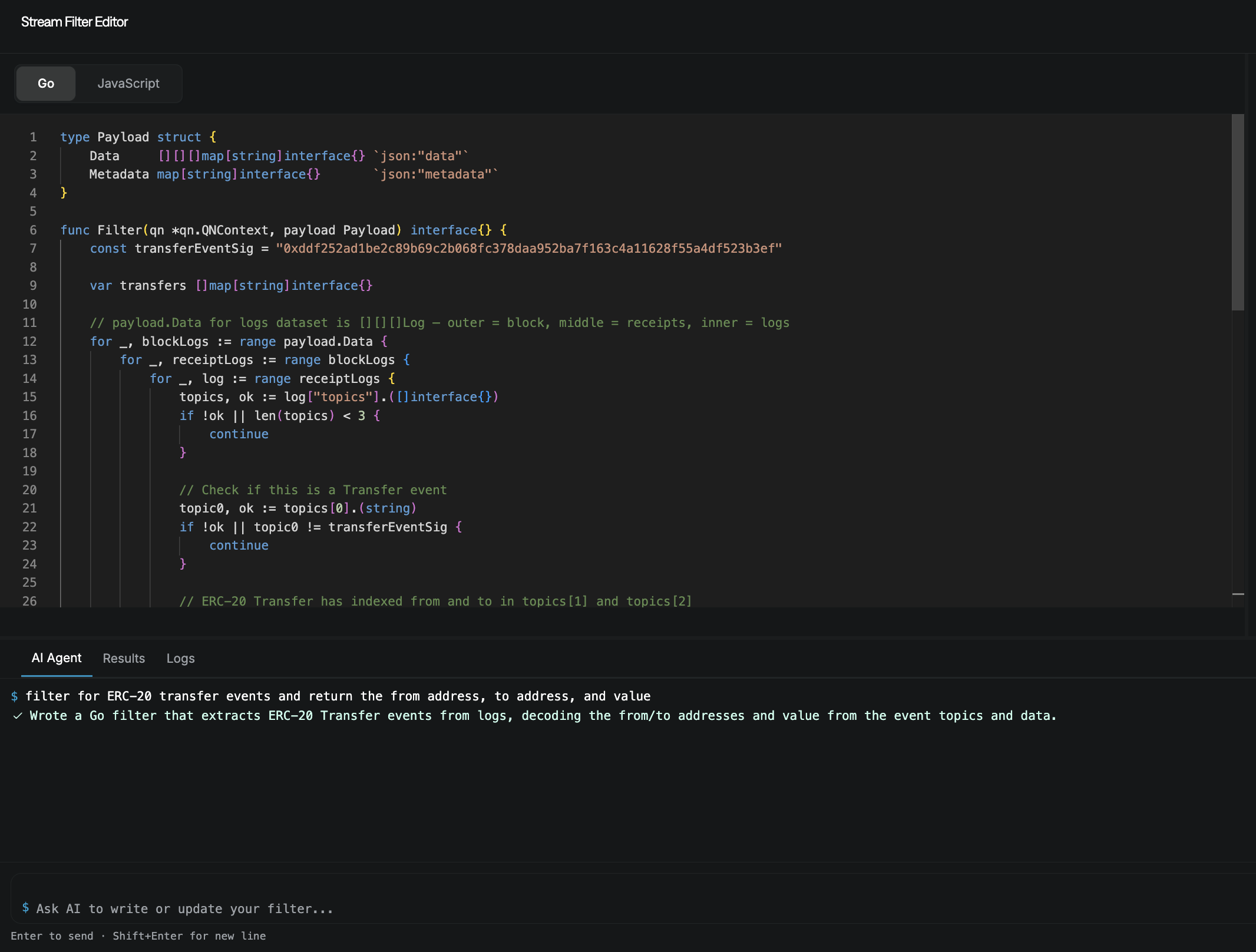
To use the AI assistant:
- Open the Stream Filter Editor when creating or editing a stream
- Click the AI Agent tab below the code editor
- Describe what you want to filter (e.g., "filter for ERC-20 transfer events and return the from address, to address, and value")
- The AI generates a filter function based on your description
- Review the code, test it with the Run test button, and adjust as needed
The AI assistant understands common blockchain patterns like ERC20 transfers, specific address filtering, event decoding, and transaction analysis.
How Filters Work with Billing
Streams consumes API credits based on blocks processed, not data delivered. Filtering does not reduce API credit consumption—you are billed for every block your Stream processes, regardless of what the filter returns.
Filters help you shape your data pipeline by controlling what data reaches your destination, optimizing bandwidth and storage for your downstream systems. Use the API Credits Calculator to estimate your usage. You can monitor your Streams activity in real-time across several views in the dashboard:
- Stream Dashboard: Per-stream statistics
- Filter Metrics: Performance and blocks processed
- Usage Panel: Stream activity and blocks processed
- Billing Page: Credit consumption history
Next Steps
- Browse Example Filters for common patterns
- Learn about Key-Value Store for stateful filtering