引言
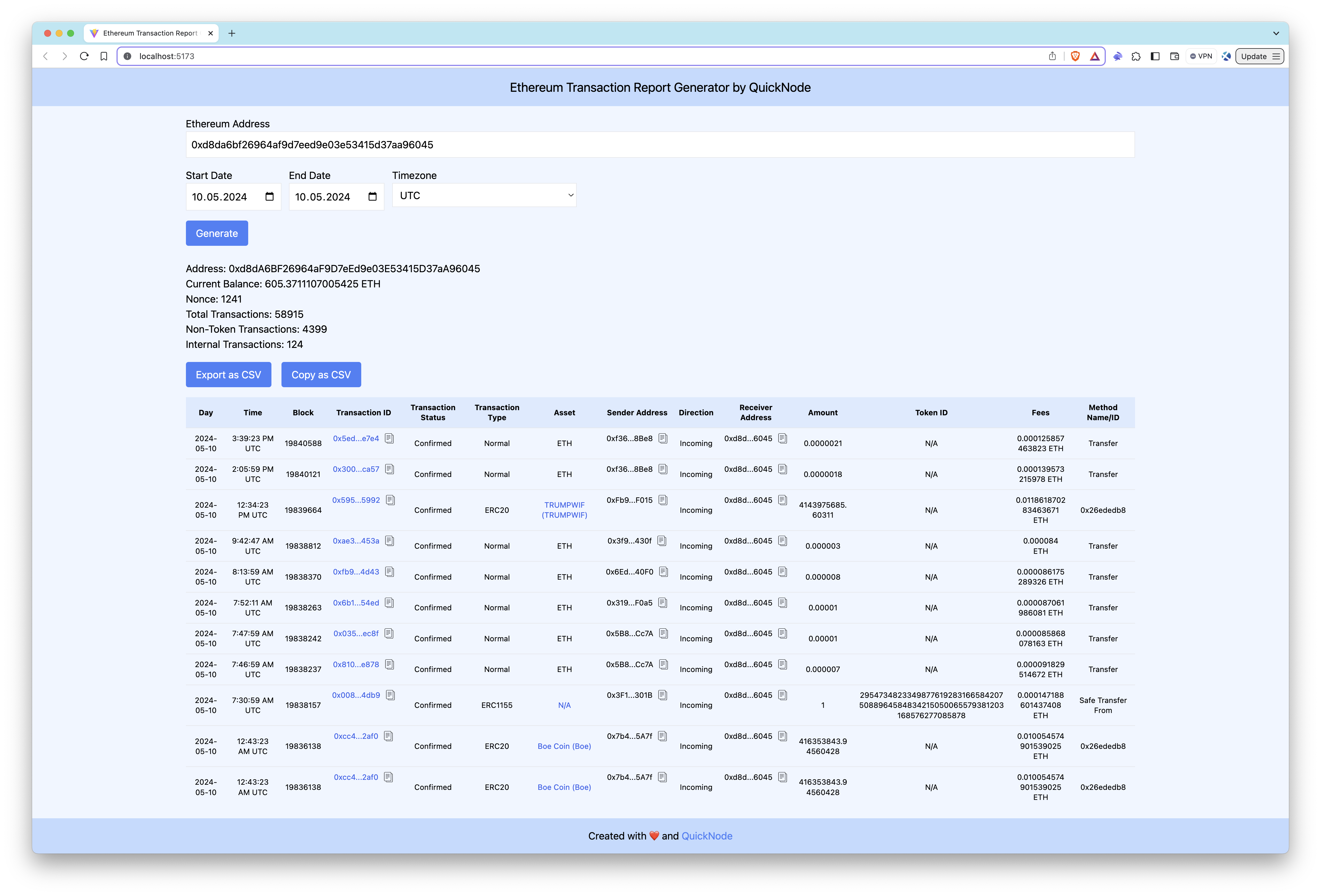
This application fetches and analyzes Ethereum transactions for a given address using Quicknode's Blockbook API, providing detailed reports within a specified date range. It identifies transaction direction (incoming or outgoing), confirmation status, and token transfers across ERC-20, ERC-721, and ERC-1155 assets. Users can filter by transaction type (normal, internal, or token) and date range, with support for time zone selection. Additionally, it offers a wallet summary with balance, nonce, and transaction counts.
For an in-depth guide on how to build this app, refer to our comprehensive guide on Quicknode
技术栈
- Frontend Framework/Library: React
- Language: TypeScript
- Build Tool/Development Server: Vite
功能
- Transaction Direction: Identifies whether transactions are incoming or outgoing.
- Confirmation Status: Determines whether transactions are confirmed.
- Token Transfers: Includes details for ERC-20, ERC-721, and ERC-1155 token transfers.
- Transaction Filtering: Detects normal, internal and token transactions.
- Date Range Filtering: Generates reports for transactions within a specified date range.
- Time Zone Selection: Performs date filtering according to the selected timezone.
- CSV Support: Ability to export or copy results as a CSV file.
- Wallet Summary: Displays a summary of the wallet address, including current balance, nonce, total transactions, non-token transactions, and internal transactions.
入门指南
先决条件
要运行此应用,您需要:
- Node.js installed on your system.
- A Quicknode account with access to the paid Blockbook API.
- 代码编辑器或集成开发环境(例如VS Code)
- TypeScript and ts-node
Run the commands below to install TypeScript and ts-node globally to have TypeScript available across all projects.
npm install -g typescript ts-node
安装依赖项
- 将代码库克隆到本地机器上:
git clone https://github.com/quiknode-labs/qn-guide-examples.git
- 导航至项目目录:
cd sample-dapps/ethereum-transaction-report-generator
- 安装必要的依赖项:
npm 安装
设置环境变量
重命名 .env.example 到 .env and replace the YOUR_QUICKNODE_ETHEREUM_ENDPOINT_URL placeholder with your Quicknode Ethereum endpoint with Blockbook access.
VITE_QUICKNODE_ENDPOINT = "YOUR_QUICKNODE_ETHEREUM_ENDPOINT_URL"
Please note that while we utilize
dotenvfor environment variable management, sensitive information like endpoints can still be visible on the frontend. This configuration is not recommended for production environments as-is.
运行应用程序
运行开发服务器:
npm 运行 dev
Open http://localhost:5173/ with your browser to see the application.
如何使用该应用
- Input an Ethereum wallet address.
- (Optional) Select date range and time zone.
- Press
Generate. - (Optional) Export or copy results as CSV.
The Ethereum Transaction Report Generator application will query the Ethereum blockchain for the wallet's transactions, filter these transactions data and calculate additional variables. Lastly, the app display results.
预览
结论
Quicknode's Blockbook API facilitates the creation of detailed Ethereum transaction reports for developers and businesses alike. While this application covers the fundamentals, there's a vast scope for customization and extended functionalities. Whether for audit purposes, regulatory compliance, or market analysis, Blockbook streamlines the process of extracting blockchain data.
To discover more about how Quicknode assists auditing firms and individuals in extracting this type of data from blockchains, please contact us; we're eager to engage with you!
- 分叉该仓库
- 创建一个功能分支:git checkout -b feature/amazing-feature
- 提交您的更改:git commit -m "添加超棒的功能"
- 推送您的分支:git push origin feature/amazing-feature
- 提交一个拉取请求。