Retour aux exemples d'applications
Générateur Solana
The Solana Token Minter app allows you to create fungible tokens on the Solana blockchain with built-in support for IPFS image uploads.
Auteur



Framework/bibliothèque front-end :
React/Next.js
Langue :
TypeScript
Outil de compilation/serveur de développement :
Next.js
Présentation générale
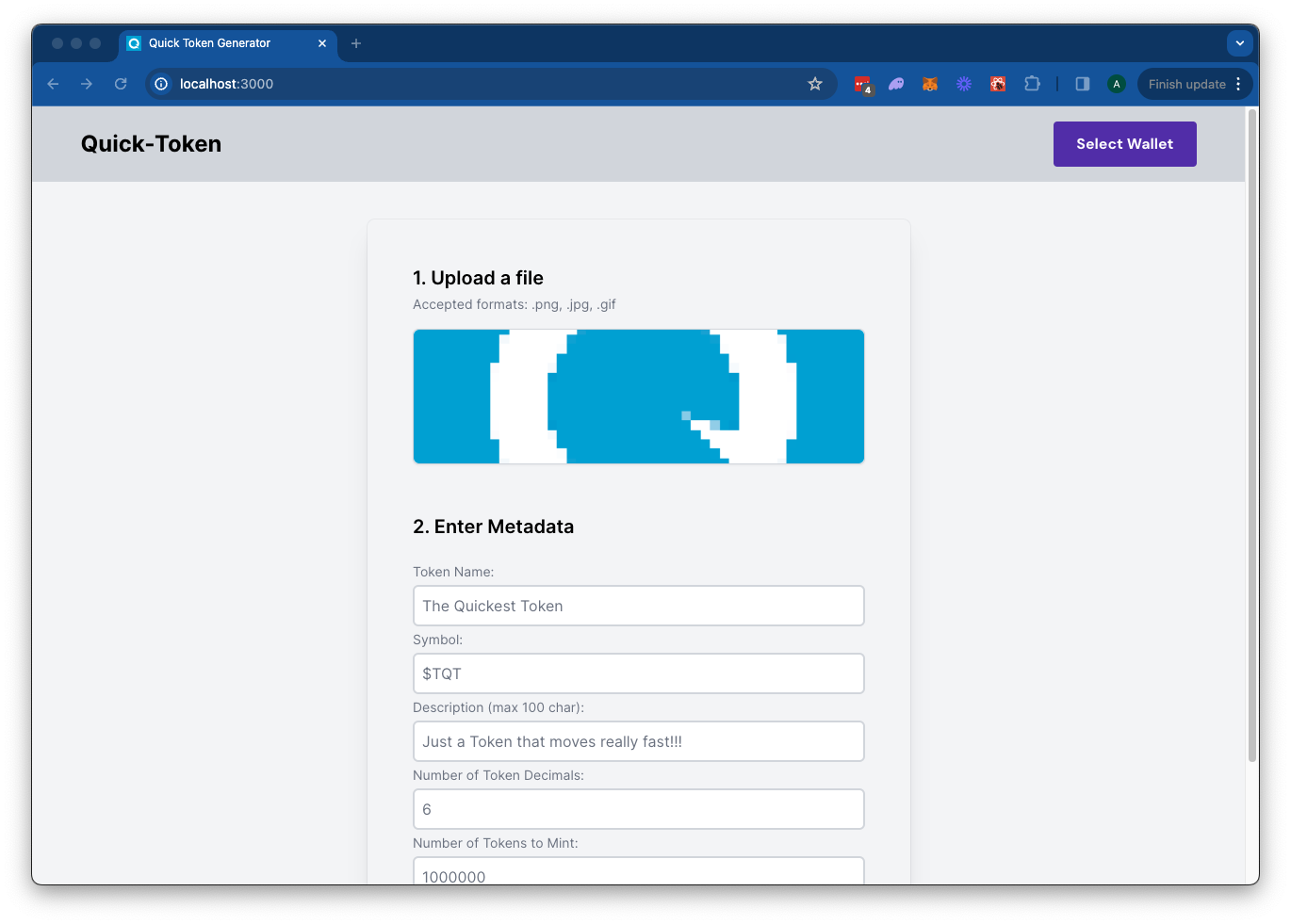
The Solana Token Minter app allows you to create fungible tokens on the Solana blockchain with built-in support for IPFS image uploads using Quicknode's IPFS API. Simply upload an image for your token metadata, fill out the token details, and connect your wallet. Click "Mint" to upload your metadata to IPFS and mint your token seamlessly.This app uses Next.js 14 projet lancé grâce à create-next-app.
Pour commencer
Installer les dépendances
Ouvrez le répertoire du projet :
cd sample-dapps/solana-token-maker
Ensuite, installez les dépendances :
npm installer
# ou
yarn
# ou
pnpm installer
# ou
bun install
Définir les variables d'environnement
Assurez-vous d'avoir unendpoint Quicknode à portée de mainendpoint pouvez en obtenir un gratuitement ici.
- Renommer
.env.exampleà.env.localand update with your Quicknode Solana Node Endpoint and Quicknode IPFS key. - Veillez à mettre à jour le cluster afin de vous assurer que vos URL de transaction pointent vers le bon explorateur (utilisez uniquement les valeurs d'énumération fournies dans le
.env.examplefichier). - You can use Quicknode's public IPFS Gateway URL or replace it with your own.
QN_IPFS_API=QN_abc123456789xyz_REPLACE_THIS
QN_ENDPOINT=https://example.solana-mainnet.quiknode.pro/123456
NEXT_PUBLIC_CLUSTER=mainnet-beta # mainnet-beta | devnet | testnet | local
NEXT_PUBLIC_GATEWAY_URL=https://quicknode.quicknode-ipfs.com/ipfs/
Commencez par lancer le serveur de développement :
npm exécuter dev
# ou
yarn dev
# ou
pnpm dev
# ou
bun dev
Ouvrez http://localhost:3000 dans votre navigateur pour voir le résultat.
Utilisation de la Dapp
- Upload an Image (this will be used for your token metadata)
- Fill out the form with the token details
- Connect your wallet
- Make sure you have ~0.04 SOL in your wallet to cover the new account fees
- If you are using Devnet, you can get free SOL from the Solana Faucet
- Click "Mint" to upload your image and metadata to IPFS and mint your token!
Architecture
src/
├── app/
│   ├── page.tsx
│   └── layout.tsx
│   └── api/
│       └── solana/
│           └── createMintTx/route.ts   # Create New Mint Transaction
│           └── sendAndConfirm/route.ts # Send and Confirm Transaction
│       └── upload/
│           └── image/route.ts  # IPFS Image Upload
│           └── json/route.ts   # IPFS JSON Upload
└── components/
    ├── SolanaProviders.tsx     # Wallet Adapter Context providers
    ├── Minter.tsx              # Main component
    └── [supporting components]
Déployer sur Vercel
Documentation Next.js
Pour en savoir plus sur Next.js, consultez les ressources suivantes :
- Documentation Next.js: découvrez les fonctionnalités et l'API de Next.js.
- Apprenez Next.js – un tutoriel interactif sur Next.js.
Vous pouvez consulter le dépôt GitHub de Next.js: vos commentaires et vos contributions sont les bienvenus !
Contributions et commentaires
Nous serions ravis de connaître votre avis et nous vous invitons à contribuer à cette application d'exemple !
Pour signaler des problèmes ou faire part de vos commentaires, créez un ticket GitHub dans le qn-guide-exemples référentiel.
Pour contribuer, procédez comme suit :
- Créer une branche du dépôt
- Créer une branche de fonctionnalité :git checkout -b feature/amazing-feature
- Validez vos modifications :git commit -m "Ajout d'une fonctionnalité géniale"
- Publiez votre branche :git push origin feature/amazing-feature
- Créez une demande de fusion.
Découvrez d'autres exemples d'applications