नमूना ऐप्स पर वापस जाएँ
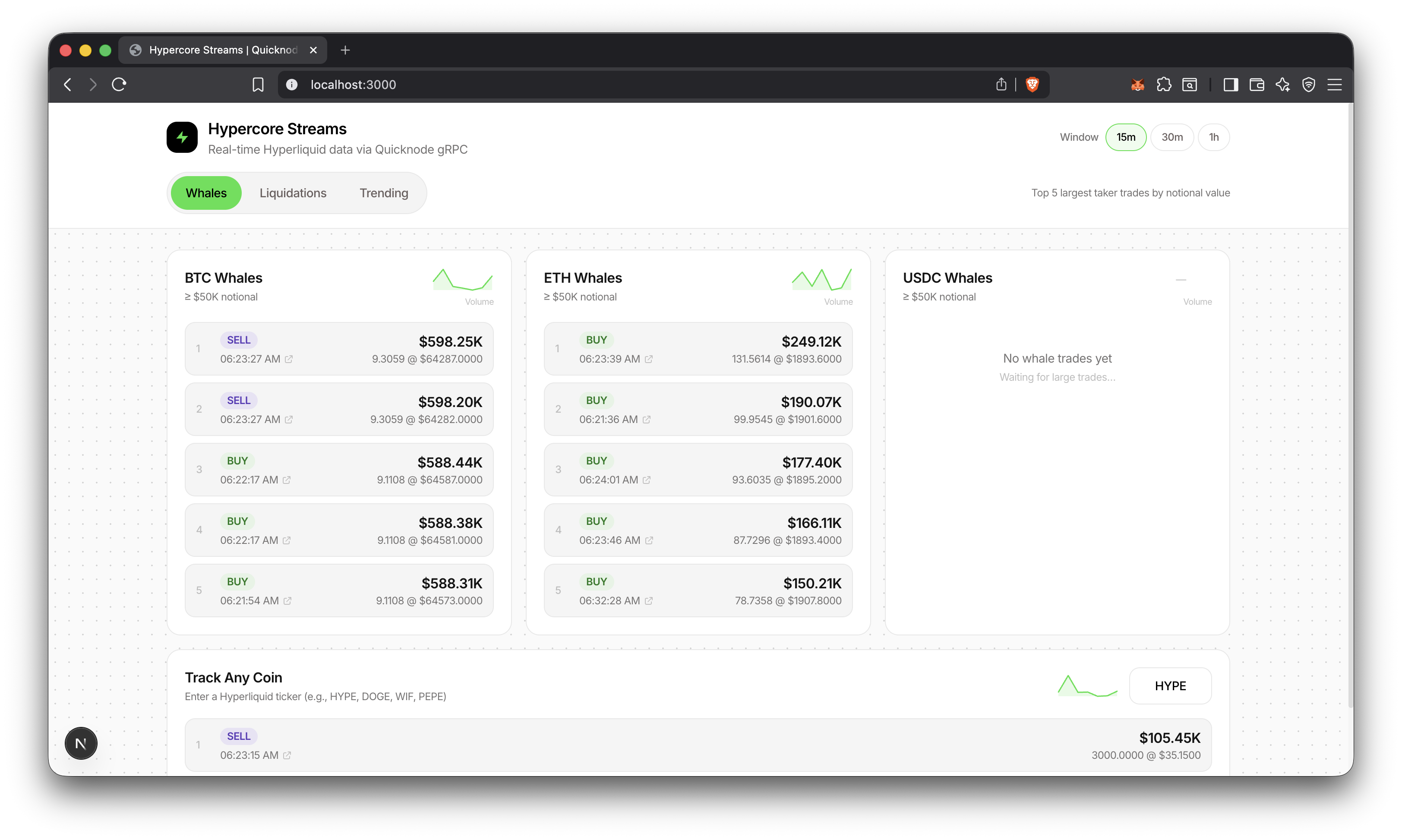
Hyperliquid ट्रेडिंग डैशबोर्ड
A dashboard for real-time whale trades, liquidations, and trending tokens from Hyperliquid using Quicknode's Hypercore gRPC.
Author



फ्रंटएंड फ्रेमवर्क/लाइब्रेरी:
Next.js
भाषा:
टाइपप्रति
बिल्ड टूल/डेवलपमेंट सर्वर:
npm
अवलोकन
This sample app streams every trade from Hyperliquid via Quicknode's Hypercore gRPC and filters for whale trades, liquidations, and trending tokens. gRPC bidirectional streaming delivers data with sub-second latency, with no polling required.
अतिरिक्त संसाधन
For video walkthrough of building the app, check out our video
वास्तुकला
      Quicknode Hypercore gRPC
        (stream every trade)
                  │
                  ▼
        ┌─────────────────┐
        │     Worker      │
        │  Filter + Agg   │
        └────────┬────────┘
                 │
    ┌────────────┼────────────┐
    ▼            ▼            ▼
 Whales    Liquidations   Trending
 (≥$50K)                  (1m buckets)
    │            │            │
    └────────────┼────────────┘
                 ▼
        ┌─────────────────┐
        │    PostgreSQL   │
        └────────┬────────┘
                 │
                 ▼
        ┌─────────────────┐
        │     Next.js     │
        │  [15m/30m/1h]   │
        └────────┬────────┘
                 │
                 ▼
        ┌─────────────────┐
        │    Dashboard    │
        └─────────────────┘
विशेषताएँ
- Whale trade detection (≥$50K notional, configurable)
- Liquidation tracking with full metadata (user, mark price, method)
- Trending tokens ranked by trade count with buy/sell breakdown
- Time window filtering (15m, 30m, 1h)
- Custom coin tracking, any Hyperliquid token
- Volume sparklines with trend indicators
- Explorer deep links for trade verification
- 1-minute aggregation buckets for efficient trending queries
आवश्यक शर्तें
- Node.js 20+ installed
- A PostgreSQL instance, you can use a platform like Aiven to spin up a hosted instance. We'll need this for
DATABASE_URL. - Quicknode खाता with Hypercore gRPC endpoint. We'll need this for
GRPC_ENDPOINTऔरAUTH_TOKEN.
शुरू करना
1. Clone and install
git clone https://github.com/quiknode-labs/qn-guide-examples.git

cd qn-guide-examples/sample-dapps/hyperliquid-trading-dashboard

npm install
2. Start PostgreSQL
If you are using a hosted PostgreSQL instance, skip this step.
npm run db:up
3. Configure environment
export DATABASE_URL="postgresql://postgres:postgres@localhost:5432/hypercore"
export GRPC_ENDPOINT="your-endpoint.hype-mainnet.quiknode.pro:10000"
export AUTH_TOKEN="your_quicknode_token"
Note: Just paste these with values in two terminal windows. You'll need one window for the Next.js app and another for the database worker.
4. Initialize database
npm run db:push
5. Start the worker
npm run worker
This starts the worker process that:
- Connects to Quicknode HyperCore gRPC
- Streams live trading events
- Stores raw trades and aggregated data in PostgreSQL
- Tracks whale activity and liquidations
You should see:
Ping ok: { count: 1 }
Ingester running
WHALE_MIN_USD: 50000
6. Start the dashboard
npm run dev
डेटाबेस
PostgreSQL with Prisma ORM. Two tables:
TradeEvent- Individual whale trades and liquidationsTradeAggMinute- Per-minute aggregations for trending
सामान्य कमांड:
npm run db:up       # Start PostgreSQL container
npm run db:push     # Apply schema
npm run db:studio   # Open Prisma Studio
एपीआई एंडपॉइंट्स
GET /api/whales?coin=BTC&windowMin=15&thresholdUsd=50000- Whale tradesGET /api/liquidations?windowMin=15- LiquidationsGET /api/trending?windowMin=15- Trending coinsGET /api/sparklines?windowMin=15&coins=BTC,ETH,SOL- Volume sparklinesGET /api/health- Health check
पूर्व दर्शन
और अधिक जानें
योगदान और प्रतिक्रिया
हमें आपकी प्रतिक्रिया सुनकर खुशी होगी और इस सैंपल ऐप में किसी भी तरह के योगदान का हम स्वागत करते हैं!
समस्याओं की रिपोर्ट करने या प्रतिक्रिया साझा करने के लिए, GitHub में एक समस्या खोलें। प्रश्न-मार्गदर्शिका-उदाहरण भंडार।
योगदान देने के लिए, इन चरणों का पालन करें:
- रिपॉजिटरी को फोर्क करें
- एक फीचर ब्रांच बनाएं:git checkout -b feature/amazing-feature
- अपने बदलावों को सेव करें:git commit -m "अद्भुत सुविधा जोड़ें"
- अपनी शाखा को आगे बढ़ाएं:git push origin feature/amazing-feature
- एक पुल रिक्वेस्ट खोलें।
और भी सैंपल ऐप्स देखें