हाइपरकोर ऑर्डर मॉनिटर
ट्रेडिंग ऑर्डर को ट्रैक करें Hyperliquid कोर (L1) वास्तविक समय में Quicknode Streams और डायनामिक फ़िल्टरिंग के लिए केवी स्टोर।



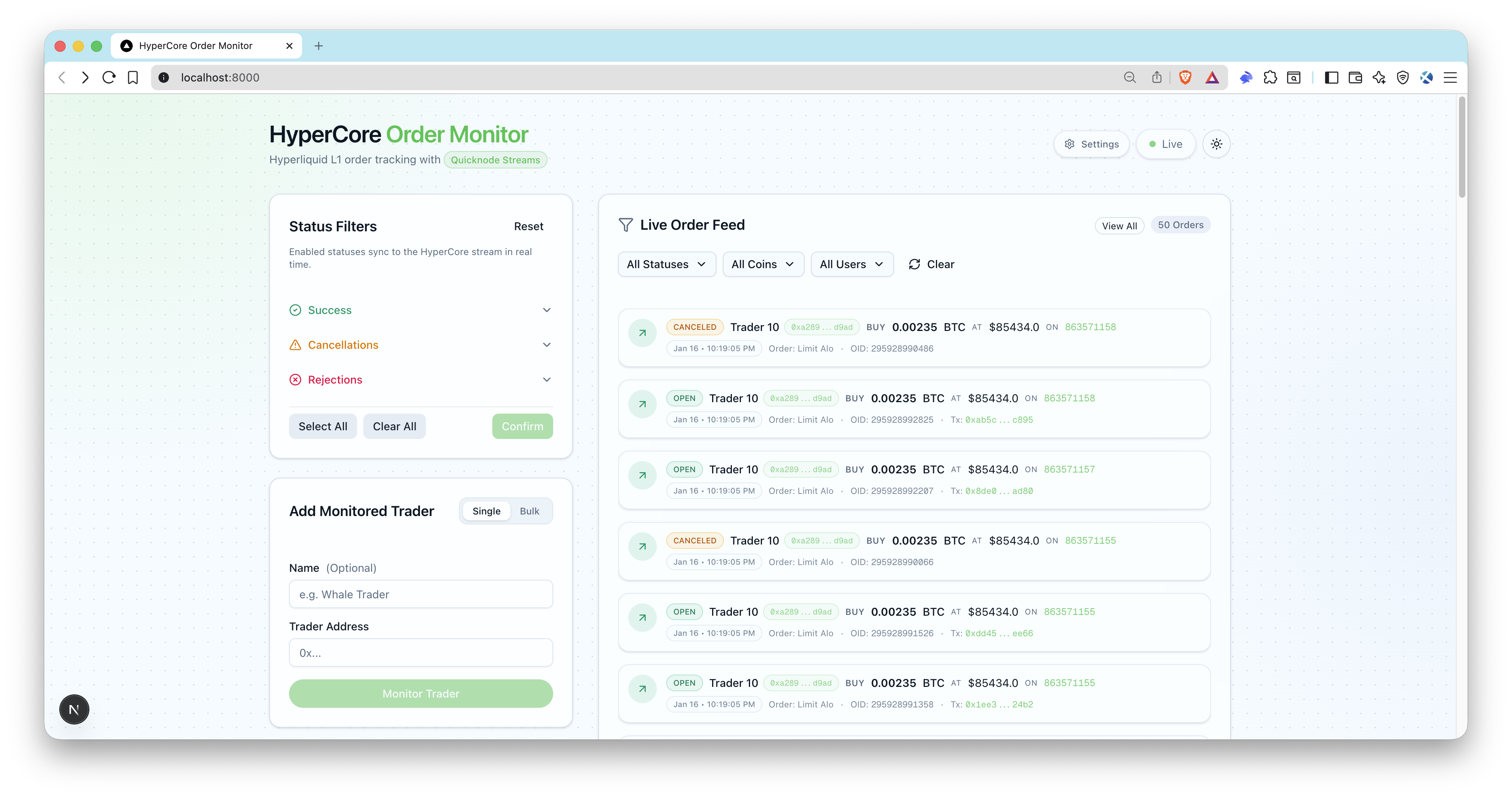
अवलोकन
यह सैंपल ऐप ट्रेडिंग ऑर्डर की रीयल-टाइम ट्रैकिंग को सक्षम बनाता है। Hyperliquid कोर (L1)। यह इसका लाभ उठाता है Quicknode Streams + की-वैल्यू स्टोर (केवी स्टोर) की मदद से स्ट्रीम को रीस्टार्ट किए बिना ही स्मार्ट और डायनामिक फ़िल्टरिंग की जा सकती है। व्हेल ट्रेडर्स पर नज़र रखें, ऑर्डर स्टेटस ट्रैक करें और आधुनिक यूआई के ज़रिए लाइव अपडेट प्राप्त करें।
वास्तुकला
Hyperliquid कोर (L1)
 -> Quicknode Streams + केवी
 -> POST /api/webhook/ streams (हस्ताक्षर सत्यापित)
 -> OrderLog upsert + SSE emit
 -> लाइव यूआई ऑर्डर फ़ीड
विशेषताएँ
- केवी स्टोर सूचियों के माध्यम से वास्तविक समय में पते को फ़िल्टर करना
- गतिशील स्थिति फ़िल्टरिंग (खुला, भरा हुआ, रद्द, अस्वीकृत, ट्रिगर)
- स्ट्रीम स्तर पर ब्लॉकचेन-आधारित फ़िल्टरिंग
- लाइव UI अपडेट के लिए सर्वर-सेंट इवेंट्स (SSE)
- Quicknode Streams सेटअप स्क्रिप्ट (बनाना + सक्रिय करना)
- व्यापारियों के पते थोक में जोड़ें
- वेबहुक हस्ताक्षर सत्यापन और टाइमस्टैम्प जांच
- ईएनएस संकल्प के लिए Ethereum पते (वैकल्पिक)
- प्रिज्मा + SQLite स्थानीय संग्रहण
आवश्यक शर्तें
- Node.js 20+ और एक पैकेज मैनेजर (pnpm, yarn, npm)।
- Quicknode खाता साथ Streams और केवी स्टोर एक्सेस: एक खाता बनाएं, और अपना प्राप्त करें Admin API चाबी के लिए
QN_API_KEY. - सार्वजनिक वेबहुक यूआरएल: टनल का उपयोग करें जैसे
एनग्रोकया ऐप को इस तरह से तैनात करेंAPP_URLपहुँच योग्य है Quicknode . - वैकल्पिक: Ethereum mainnet आरपीसी endpoint ईएनएस नाम समाधान के लिए (
QN_EVM_ENDPOINT).
परियोजना संरचना
फ़िल्टर/
 hl-orders-filter.js # Quicknode Streams फ़िल्टर (हाइपरकोर)
 स्क्रिप्ट/
 setup- streams # KV सूचियाँ और स्ट्रीम (विरामित) बनाता है
 activate- streams # आईडी द्वारा स्ट्रीम को सक्रिय करता है
 स्रोत/
 app/api/ # API रूट ( webhooks , उपयोगकर्ता, एसएसई)
 lib/ # Quicknode , वेबहुक, एसएसई सहायक
 प्रकार/ # टाइपस्क्रिप्ट परिभाषाएँ
 प्रिज्मा/
 schema.prisma # SQLite स्कीमा
पर्यावरण चर
प्रतिलिपि .env.example को .पर्यावरण और भरें:
QN_API_KEY="" # Streams + KV अनुमतियों के साथ Quicknode API कुंजी
 QN_STREAM_SECURITY_TOKEN="" # स्ट्रीम सुरक्षा टोकन (सेटअप स्क्रिप्ट से)
 APP_URL="http://localhost:3000" # सार्वजनिक ऐप URL (स्थानीय webhooks के लिए ngrok)
 DATABASE_URL="file:./dev.db" # SQLite DB
 QN_EVM_ENDPOINT="" # वैकल्पिक: ENS समाधान के लिए Ethereum RPC
 ADMIN_API_KEY="" # स्थानीय विकास के लिए वैकल्पिक, उत्पादन के लिए आवश्यक
टिप्पणियाँ:
QN_स्ट्रीम_सुरक्षा_टोकनद्वारा लौटाया जाता हैस्थापित करना: streams.APP_URLपहुँच योग्य होना चाहिए Quicknode (एनजीरोक या तैनात यूआरएल का उपयोग करें)।- सुनिश्चित करें कि आपकी एपीआई कुंजी में दोनों शामिल हों। Streams और केवी स्टोर की अनुमतियां सक्षम हैं।
शुरू करना
1. आवश्यक शर्तें स्थापित करें
पीएनपीएम स्थापित करना
 # npm इंस्टॉल करें
 # यार्न इंस्टॉल
2. अपनी env फ़ाइल बनाएँ
cp .env.example .env
3. आवश्यक चर जोड़ें
भरें .पर्यावरण (देखना आवश्यक शर्तेंस्थानीय के लिए webhooks अपने ऐप को ngrok के साथ एक्सपोज़ करें और HTTPS URL को कॉपी करें। APP_URL:
ngrok http 3000
4. डेटाबेस को प्रारंभ करें
pnpm prisma migrate dev --name hypercore-order-monitor
 pnpm db:seed
सीड स्क्रिप्ट स्टेटस फ़िल्टर बनाती है (सक्षम करना) खुला, भरा हुआ, उत्प्रेरित (डिफ़ॉल्ट रूप से) और एक नमूना व्यापारी का पता जोड़ता है।
5. बनाएं Quicknode Streams + केवी सूचियाँ
pnpm रन सेटअप: streams
मुद्रित सुरक्षा टोकन की प्रतिलिपि इसमें डालें .पर्यावरण (QN_स्ट्रीम_सुरक्षा_टोकन).
6. ऐप शुरू करें
पीएनपीएम देव
7. स्ट्रीम को सक्रिय करें
pnpm run activate: streams
खुला http://localhost:3000ट्रेडर के पते जोड़ें, और आपको लाइव ऑर्डर इवेंट दिखाई देने चाहिए। streams बाँटना webhooks .
डेटाबेस
डिफ़ॉल्ट रूप से SQLite का उपयोग किया जाता है। Prisma स्कीमा इसमें है। प्रिज्मा/स्कीमा.प्रिज्मा.
सामान्य कमांड:
pnpm prisma migrate dev --name <name>
pnpm db:seed
pnpm prisma studio
वेबहुक सुरक्षा और पेलोड
- Endpoint :
POST /api/webhook/ streams - आवश्यक हेडर:
x-qn-nonce,x-qn-टाइमस्टैम्प,x-qn-हस्ताक्षर - पेलोड को जीज़िप कंप्रेस किया जा सकता है; हैंडलर इसे स्वतः पहचान लेता है।
सामग्री-एन्कोडिंग: जीज़िप - हस्ताक्षर सत्यापन का उपयोग
QN_स्ट्रीम_सुरक्षा_टोकन
एपीआई एंडपॉइंट्स
सार्वजनिक एंडपॉइंट:
GET /api/health- स्वास्थ्य जांचGET /api/users- निगरानी में रखे गए व्यापारियों की सूचीGET /api/statuses- सूची स्थिति फ़िल्टरPOST /api/webhook/ streams- Quicknode Streams WEbhookGET /api/sse- एसएसई ऑर्डर इवेंट्स की स्ट्रीम
संरक्षित एंडपॉइंट (आवश्यकता है Authorization: Bearer <ADMIN_API_KEY>):
POST /api/users- एक व्यापारी जोड़ेंPOST /api/users/bulk- बड़ी संख्या में व्यापारियों को जोड़ें (50 पतों की सीमा)PATCH /api/users?id=...- व्यापारी को अपडेट करेंDELETE /api/users?id=...व्यापारी को हटाएँGET /api/ordersफ़िल्टर के साथ ऑर्डर की सूचीपैच /एपीआई/स्थितियाँ- सक्षम स्थिति अपडेट करेंPOST /api/statuses/reset- डिफ़ॉल्ट पर पुनः सेट करें
सिंक्रोनाइज़ेशन स्क्रिप्ट
pnpm रन सिंक:स्थिति- केवी स्थिति सूची का डेटाबेस के साथ मिलान करता हैpnpm रन सिंक: उपयोगकर्ता- केवी उपयोगकर्ता सूची का डेटाबेस के साथ मिलान करता हैpnpm run reset:kv- हाइपरकोर केवी सूचियों को हटाता है
पूर्व दर्शन
- रिपॉजिटरी को फोर्क करें
- एक फीचर ब्रांच बनाएं:git checkout -b feature/amazing-feature
- अपने बदलावों को सेव करें:git commit -m "अद्भुत सुविधा जोड़ें"
- अपनी शाखा को आगे बढ़ाएं:git push origin feature/amazing-feature
- एक पुल रिक्वेस्ट खोलें।