Flashblocks Base App
A dapp demonstrating Base Flashblocks capabilities with a side-by-side comparison of transaction confirmations: Flashblocks vs Traditional blocks.



개요
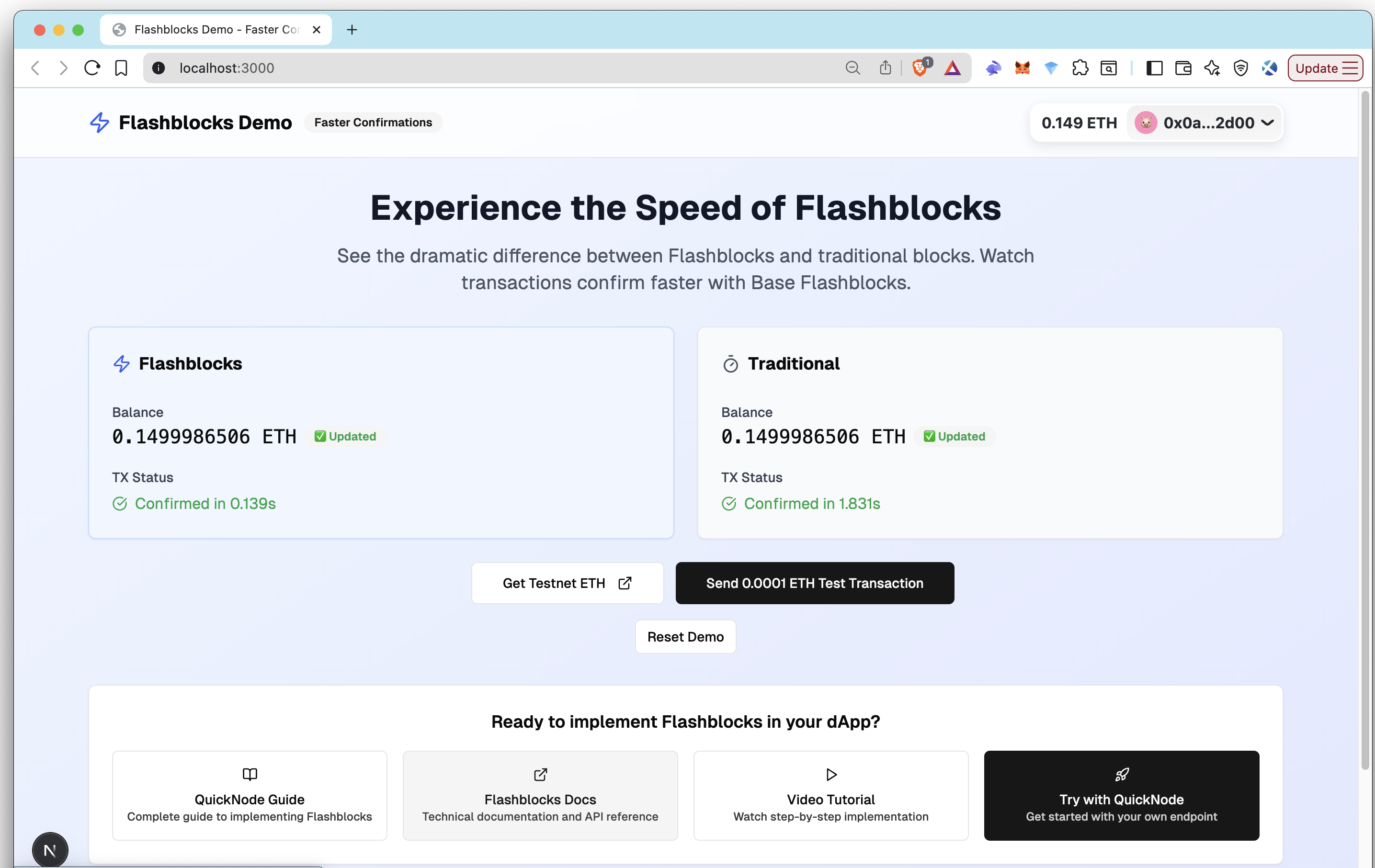
This application provides a hands-on demonstration of Base Flashblocks, a technology designed to provide transaction preconfirmations up to 10x faster than standard blocks. It features a live, side-by-side comparison dashboard that allows you to send a test transaction and visually track the confirmation times of Flashblocks versus traditional blocks on the Base Sepolia testnet.
This example app is provided for educational and demonstration purposes only.
For an in-depth guide on implementing Flashblocks in your own applications, check out our comprehensive guide on Quicknode
To learn more about Flashblocks, check out our What are Flashblocks on Base video.
주요 기능
- ⚡ Side-by-Side Comparison: Live visual comparison of Flashblocks vs Traditional transaction confirmations
- 🔄 Transaction Tracking: Send test transactions and monitor confirmation speeds using
getBlockpolling - 🎯 Dual Client Architecture: Simultaneous monitoring with both
baseSepoliaPreconf그리고baseSepolia사슬
Technology Stack
Frontend Framework
- Next.js: React framework with App Router for optimal performance
- TypeScript: Type-safe development experience
- Tailwind CSS: Utility-first CSS framework for rapid UI development
- shadcn/ui: Modern, accessible React component library
Web3 통합
- Viem: TypeScript-first Ethereum interface with Flashblocks support
- Wagmi: React hooks for Ethereum interactions
- RainbowKit: Beautiful wallet connection experience
- Base Sepolia: Testnet for Flashblocks demonstration
선행 조건
- Node.js 18+ and pnpm (or npm/yarn)
- A Quicknode account with Base Sepolia endpoint
- Project ID from Reown (formerly WalletConnect)
- Browser wallet with Base Sepolia support (MetaMask, Rabby, etc.)
- Small amount of Base Sepolia ETH for testing (available from Quicknode's faucet)
Setting Up Quicknode
-
Create Endpoint: Log in to your Quicknode account and create a new endpoint for Base Sepolia testnet.
-
Get Endpoint URL: After creating the endpoint, go to the endpoint dashboard and copy the HTTPS endpoint URL. Quicknode endpoints support Flashblocks out-of-the-box with no additional configuration needed.
Setting Up Reown (formerly WalletConnect)
-
Create Project: Head to Reown Cloud and create a new project for wallet connectivity.
-
Get Project ID: Copy your Project ID from the project dashboard for use in the application configuration.
빠른 시작
1. Clone the Repository
git clone https://github.com/quiknode-labs/qn-guide-examples.git
cd qn-guide-examples/sample-dapps/flashblocks-base
2. Install Dependencies
pnpm install
# or using npm
npm install
# or using yarn
yarn install
3. Environment Configuration
cp .env.example .env.local
Edit .env.local:
# Quicknode Endpoint (Required)
NEXT_PUBLIC_QUICKNODE_ENDPOINT=your_quicknode_base_sepolia_endpoint_here

# WalletConnect Project ID (Required)
NEXT_PUBLIC_WALLETCONNECT_PROJECT_ID=your_walletconnect_project_id_here
4. Run Development Server
pnpm dev
# or using npm
npm run dev
# or using yarn
yarn dev
Visit http://localhost:3000 to experience Flashblocks in action!
작동 원리
Transaction Confirmation Strategy
The app uses Viem's getBlock method with different client configurations to demonstrate the speed difference:
- Flashblocks Client: Uses
baseSepoliaPreconfchain which automatically applies thependingtag - Traditional Client: Uses standard
baseSepoliachain withlatesttag
// Flashblocks client
export const flashblocksClient = createPublicClient({
  chain: baseSepoliaPreconf, // Auto-uses "pending" for Flashblocks
  transport: http(QUICKNODE_ENDPOINT),
})

// Traditional client
export const traditionalClient = createPublicClient({
  chain: baseSepolia, // Standard blocks with "latest"
  transport: http(QUICKNODE_ENDPOINT),
})
Note: This polling implementation is optimized for demonstration purposes. Production applications should use
waitForTransactionReceiptfor better performance.
The Flashblocks Advantage
- 10x Faster Confirmations: See transactions confirm in 200-600ms vs 2-4 seconds
- Progressive Updates: Watch as 10 flashblocks build into 1 complete block
- Same Security: Cryptographic guarantees maintained with faster feedback
- Better UX: Near-instant feedback matches Web2 user expectations
미리 보기
자세히 알아보기
- Quicknode Flashblocks Documentation
- Video: Flashblocks Technical Deep Dive
- Base Flashblocks Official Docs
- Viem Documentation
- 저장소를 포크하기
- 기능 브랜치 생성:git checkout -b feature/amazing-feature
- 변경 사항을 커밋하세요:git commit -m "멋진 기능 추가"
- 브랜치를 푸시하세요:git push origin feature/amazing-feature
- 풀 리퀘스트를 제출하세요.