HyperCore-bestelmonitor
Volg handelsorders op Hyperliquid (L1) in realtime met Quicknode Streams KV Store voor dynamische filtering.



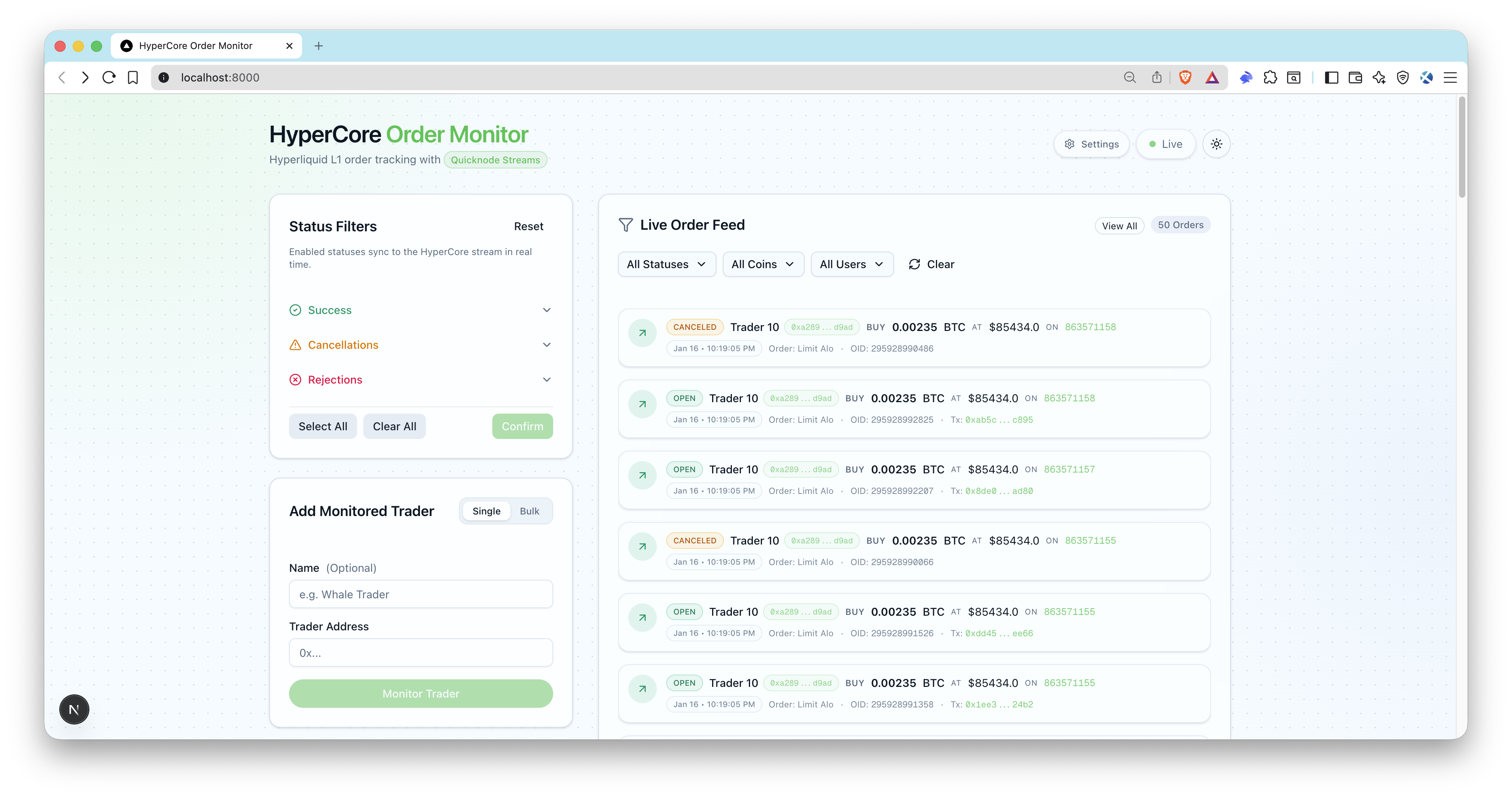
Overzicht
Met deze voorbeeldapp kun je handelsorders op Hyperliquid (L1) in realtime volgen. De app maakt gebruik van Quicknode Streams + Key-Value Store (KV Store) voor intelligente, dynamische filtering zonder dat de stream opnieuw hoeft te worden gestart. Houd grote handelaren in de gaten, volg de status van orders en ontvang live updates via een moderne gebruikersinterface.
Architectuur
Hyperliquid (L1)
  -> Quicknode Streams  KV
    -> POSTstreams handtekening geverifieerd)
      -> OrderLog upsert + SSE-uitzending
        -> Live UI-orderfeed
Kenmerken
- Realtime adresfiltering via KV Store-lijsten
- Dynamische statusfiltering (open, ingevuld, geannuleerd, afgewezen, geactiveerd)
- Blockchain-gebaseerde filtering op streamniveau
- Server-Sent Events (SSE) voor realtime updates van de gebruikersinterface
- Quicknode Streams (aanmaken + activeren)
- Handelaarsadressen in bulk toevoegen
- Verificatie van webhook-handtekeningen en controle van tijdstempels
- ENS-resolutie voor Ethereum (optioneel)
- Prisma + lokale opslag via SQLite
Vereisten
- Node.js 20+ en een pakketbeheerder (pnpm, yarn, npm).
- Quicknode met toegang tot Streams KV Store: Maak een account aan en ontvang je Admin API voor
QN_API_KEY. - Openbare webhook-URL: Gebruik een tunnel zoals
ngrokof de app zo implementeren datAPP_URLis bereikbaar via Quicknode. - Optioneel:mainnet endpoint vanmainnet Ethereum mainnet endpoint ENS-naamomzetting (
QN_EVM_ENDPOINT).
Projectopbouw
filters/
  hl-orders-filter.js     # Quicknode Streams (HyperCore)
scripts/
streams.ts        # Maakt KV-lijsten + stream aan (pauzeert)
streams.ts     # Activeert stream op basis van id
src/
  app/api/                # API-routes (webhooks, gebruikers, SSE)
  lib/                    # Quicknode, webhook, SSE-helpers
  types/                  # TypeScript-definities
prisma/
  schema.prisma           # SQLite-schema
Omgevingsvariabelen
Kopiëren .env.voorbeeld naar .env en vul het volgende in:
QN_API_KEY=""                  # Quicknode sleutel met Streams  KV-machtigingen
QN_STREAM_SECURITY_TOKEN=""    # Stream-beveiligingstoken (uit het installatiescript)
APP_URL="http://localhost:3000" # Openbare app-URL (ngrok voor lokale webhooks)
DATABASE_URL="file:./dev.db"   # SQLite-database
QN_EVM_ENDPOINT=""             # Optioneel: Ethereum voor ENS-resolutie
ADMIN_API_KEY=""               # Optioneel voor lokale ontwikkeling, vereist voor productie
Opmerkingen:
QN_STREAM_SECURITY_TOKENwordt geretourneerd doorconfiguratie:streams.APP_URLmoet bereikbaar zijn via Quicknode gebruik ngrok of een geïmplementeerde URL).- Zorg ervoor dat voor je API-sleutel zowel de machtigingen voor Streams voor KV Store zijn ingeschakeld.
Aan de slag
1. Install dependencies
pnpm installeren
# npm install
# yarn install
2. Create your env file
cp .env.voorbeeld .env
3. Add required variables
Vul in .env (zie Vereisten).
Voor lokale webhooks maak je je app toegankelijk via ngrok en kopieer je de HTTPS-URL naar APP_URL:
ngrok http 3000
4. Initialize the database
pnpm prisma migrate dev --naam hypercore-order-monitor
pnpm db:seed
Het seed-script maakt statusfilters aan (waardoor open, gevuld, geactiveerd (standaard) en voegt een voorbeeldadres van een handelaar toe.
5. Create Quicknode Streams + KV lists
pnpm setup:streams uitvoeren
Kopieer het afgedrukte beveiligingstoken naar .env (QN_STREAM_SECURITY_TOKEN).
6. Start the app
pnpm dev
7. Activate the stream
pnpm run activate:streams
Openen http://localhost:3000, voeg de adressen van handelaren toe, en je zou live ordergebeurtenissen moeten zien zodra streams webhooks streams .
Database
SQLite wordt standaard gebruikt. Het Prisma-schema bevindt zich in prisma/schema.prisma.
Veelgebruikte opdrachten:
pnpm prisma migrate dev --name <name>
pnpm db:seed
pnpm prisma studio
Webhook Security and Payload
- Endpoint:
POSTstreams - Vereiste kopteksten:
x-qn-nonce,x-qn-tijdstempel,x-qn-handtekening - De payload kan met gzip worden gecomprimeerd; de handler detecteert dit automatisch
content-encoding: gzip - Toepassingen van handtekeningverificatie
QN_STREAM_SECURITY_TOKEN
API-eindpunten
Openbare eindpunten:
GET /api/health- gezondheidscontroleGET /api/users- lijst van gecontroleerde handelarenGET /api/statuses- statusfilters weergevenPOSTstreams- Quicknode StreamsGET /api/sse- SSE-stream van ordergebeurtenissen
Beveiligde eindpunten (vereisen Authorization: Bearer <ADMIN_API_KEY>):
POST /api/users- een handelaar toevoegenPOST /api/users/bulk- handelaars in bulk toevoegen (maximaal 50 adressen)PATCH /api/users?id=...- handelaar bijwerkenDELETE /api/users?id=...- handelaar verwijderenGET /api/orders- bestellingen weergeven met filtersPATCH /api/statuses- statussen met 'update' ingeschakeldPOST /api/statuses/reset- terugzetten naar de standaardinstellingen
Synchronization Scripts
pnpm run sync:statuses- Vergelijkt de KV-statuslijst met de databasepnpm run sync:users- Stemt de KV-gebruikerslijst af met de databasepnpm run reset:kv- Verwijdert HyperCore KV-lijsten
Voorbeeld
- Maak een fork van de repository
- Maak een feature-branch aan:git checkout -b feature/amazing-feature
- Sla je wijzigingen op:git commit -m "Geweldige functie toevoegen"
- Pusht je branch:git push origin feature/amazing-feature
- Dien een pull-verzoek in.