跳转至主要内容
返回示例应用

Streams Webhook Signature Validator

A lightweight Express server that verifies Quicknode Streams webhook HMAC-SHA256 signatures and supports gzip-compressed request bodies.

前端框架/库:
Express
语言:
JavaScript
构建工具/开发服务器:
Node.js
示例应用预览

概述

Quicknode Streams can sign each webhook delivery with an HMAC-SHA256 signature so you can confirm that a request originated from Quicknode and was not tampered with in transit. This sample app is a minimal Express server that shows exactly how to verify those signatures, including the edge case where Streams sends a gzip-compressed body.

The signature is computed over the concatenation of nonce + timestamp + payload (UTF-8), keyed with your Stream's security token. When compression is enabled, Streams signs the uncompressed JSON before gzipping it for transport, so the verifier must run HMAC on the decoded bytes rather than the raw gzip octets. This app uses express.raw() with body-parser's built-in gzip decompression to handle that correctly.

For a detailed walkthrough of the signature verification logic, see the companion guide: How to Validate Incoming Streams Webhook Messages.

Tech Stack

  • Runtime: Node.js (>=16)
  • Framework: Express
  • Language: JavaScript
  • Crypto: Node.js built-in crypto module (HMAC-SHA256)

功能


  • HMAC-SHA256 verification: Validates the x-qn-signature header against a locally computed digest using your Stream security token.
  • Gzip body support: Correctly handles Content-Encoding: gzip requests by running HMAC on the decompressed JSON, not the raw bytes.
  • Timing-safe comparison: Uses crypto.timingSafeEqual to prevent timing attacks during signature comparison.
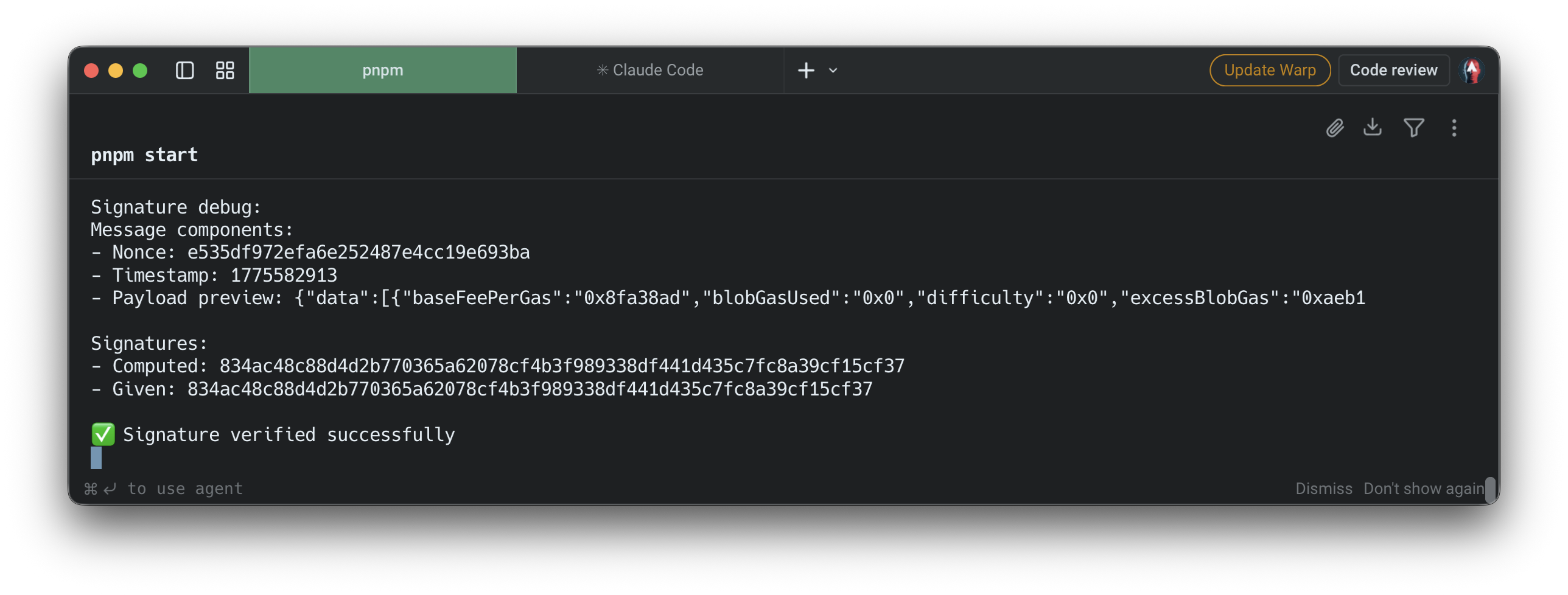
  • Debug logging: Prints nonce, timestamp, payload preview, and both the computed and provided signatures to aid local debugging.
  • Configurable port: Defaults to 9999; override with the PORT 环境变量。

先决条件


  • Node.js v16 or later installed on your machine.
  • A Quicknode account with at least one Stream configured.
  • The security token from your Stream's Settings tab in the Quicknode dashboard.
  • ngrok (or any tunnel tool) to expose your local server to the internet so Streams can reach it.

项目结构

streams-webhook-validate-signature/
├── .env.example # Environment variable template
├── .gitignore
├── package.json
├── package-lock.json
└── server.js # Express webhook receiver and HMAC verifier

环境变量

复制 .env.example.env and set your Stream security token:

QN_STREAM_SECRET=your_more_than_32_bytes_security_token_here

You can find this token in your Stream's Settings tab at dashboard.quicknode.com/streams.


入门指南

1. Clone the repository

git clone https://github.com/quiknode-labs/streams-webhook-validate-signature.git
cd streams-webhook-validate-signature

2. Install dependencies

npm 安装

3. Configure environment variables

cp .env.example .env

Open .env and set QN_STREAM_SECRET to your Stream's security token.

4. Start the server

npm start

The server listens on http://localhost:9999/webhook by default. To use a different port:

PORT=3000 npm start

5. Expose with ngrok

Streams needs a publicly accessible URL to deliver webhooks. In a separate terminal:

ngrok http 9999

Copy the HTTPS forwarding URL (e.g. https://abc123.ngrok.io) and set it as your Stream's webhook URL with the /webhook/webhook path appended:

https://abc123.ngrok.io/webhook

6. Send a test payload

Once the webhook URL is saved, use the Send Payload button in the Streams dashboard to fire a signed test delivery without waiting for real on-chain activity. This works both when creating a new Stream and when editing an existing one. Check your server terminal for the signature debug output to confirm the request was received and verified.

API Endpoints

方法Path描述
POST/webhook/webhookReceives and verifies a Streams webhook delivery

Expected request headers

Header描述
x-qn-nonceRandom nonce included in the signature input
x-qn-timestampUnix timestamp included in the signature input
x-qn-signatureHex-encoded HMAC-SHA256 digest to verify

Responses

状态Meaning
200Signature verified successfully
400Required headers are missing
401Signature verification failed
500Server misconfiguration (missing secret) or processing error

预览

预览

投稿与反馈
我们非常希望听到您的反馈,并欢迎大家为这个示例应用做出任何贡献!
如需报告问题或提供反馈,请在 qn-guide-示例 存储库。
如需贡献,请按照以下步骤操作:
  1. 分叉该仓库
  2. 创建一个功能分支:
    git checkout -b feature/amazing-feature
  3. 提交您的更改:
    git commit -m "添加超棒的功能"
  4. 推送您的分支:
    git push origin feature/amazing-feature
  5. 提交一个拉取请求。