Bitcoin Transaction Report Application
The Bitcoin Transaction Report app uses Quicknode's Blockbook API to query the Bitcoin blockchain, filter transaction data, calculate key metrics, and display the results.



Introduction
This application is designed to fetch and analyze Bitcoin transactions associated with a specific address using Quicknode's Blockbook API. It provides users with detailed reports within a specified date range, offering insights into transaction history, balances after each transaction, and the USD value of Bitcoin movements.
For an in-depth walkthrough on how to fetch data and develop further functionalities, refer to our comprehensive guide or our script files.
Tech Stack
- Frontend Framework/Library: React
- Language: TypeScript
- Build Tool/Development Server: Vite
Features
- Balance Calculation: Calculates the BTC balance before and after each transaction.
- Transaction Direction: Identifies whether transactions are incoming or outgoing.
- Confirmation Status: Determines whether transactions are confirmed.
- USD Conversion: Computes the USD value of each transaction at the time it occurred.
- Transaction Filtering: Excludes internal wallet transactions that are not relevant to the address in question.
- Date Range Filtering: Generates reports for transactions within a specified date range.
- Time Zone Selection: Performs date filtering according to the selected timezone.
- CSV Support: Ability to export or copy result as CSV file.
Getting Started
Prerequisites
To run this app, you'll need:
- Node.js installed on your system.
- A Quicknode account with access to the paid Blockbook API. See the Blockbook product page for pricing details.
- A code editor or an IDE (e.g., VS Code)
- TypeScript and ts-node
Run the commands below to install TypeScript and ts-node globally to have TypeScript available across all projects.
npm install -g typescript
npm install -g ts-node
Installation Dependencies
- Clone the repository to your local machine:
git clone https://github.com/quiknode-labs/qn-guide-examples.git
- Navigate to the project directory:
cd sample-dapps/bitcoin-transaction-report-generator
- Install the necessary dependencies:
npm install
Setting Environment Variables
Rename .env.example to .env and replace the YOUR_QUICKNODE_BITCOIN_ENDPOINT_URL placeholder with your Quicknode Bitcoin endpoint with Blockbook access.
VITE_QUICKNODE_ENDPOINT = "YOUR_QUICKNODE_BITCOIN_ENDPOINT_URL"
Please note that while we utilize
dotenvfor environment variable management, sensitive information like endpoints can still be visible on the frontend. This configuration is not recommended for production environments as-is.
Running the Application
Run the development server:
npm run dev
Open http://localhost:5173/ in your browser to see the application.
Using the App
- Input a Bitcoin wallet address.
- (Optional) Select the date range and time zone.
- Press
Generate. - (Optional) Export or copy results as CSV.
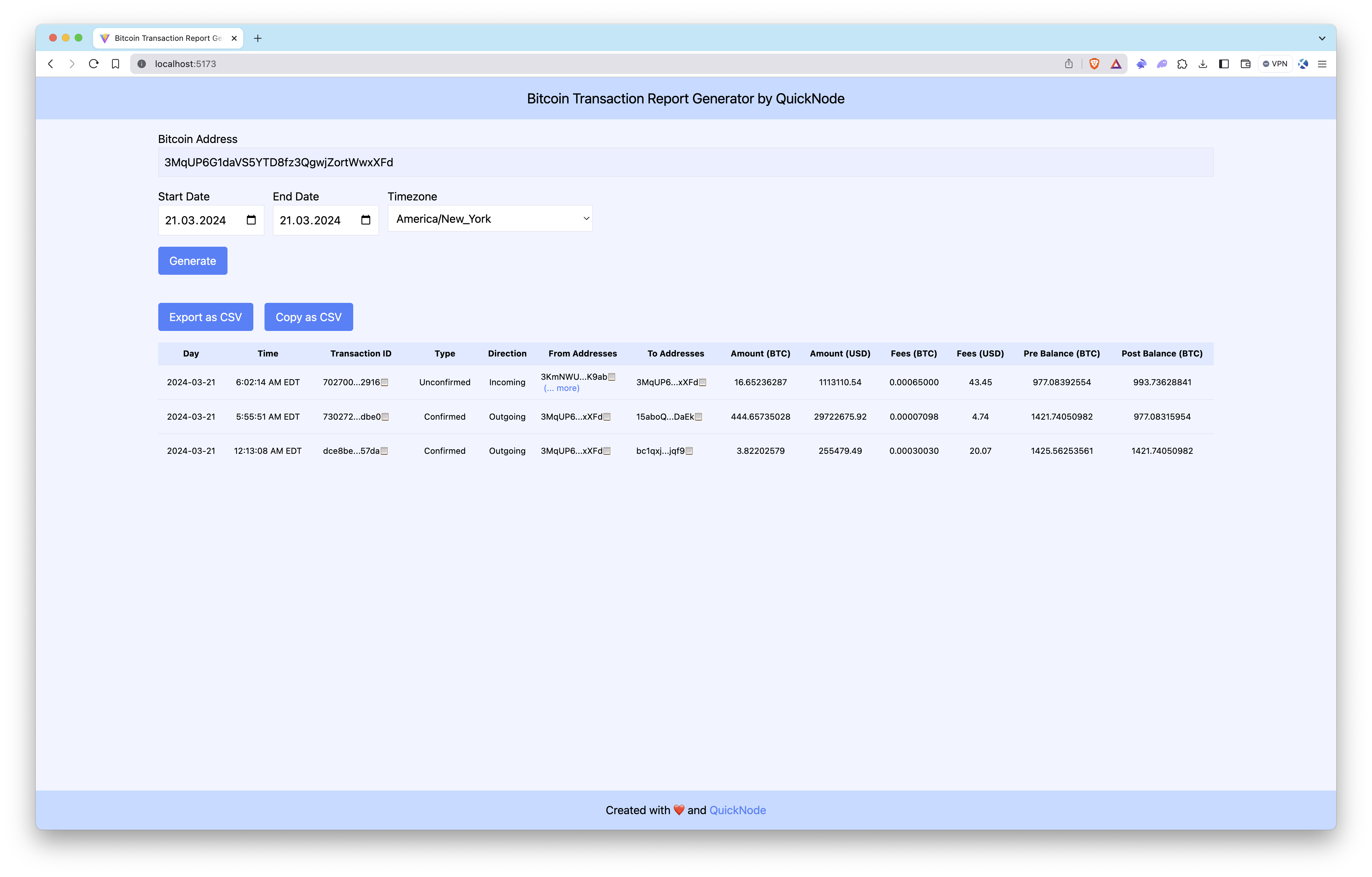
The Bitcoin Transaction Report Generator queries the Bitcoin blockchain for a wallet’s transactions, filters the data, calculates key metrics, and displays the results.
Preview
Conclusion
Quicknode's Blockbook API facilitates the creation of detailed Bitcoin transaction reports for developers and businesses alike. While this application covers the fundamentals, there's a vast scope for customization and extended functionalities. Whether for audit purposes, regulatory compliance, or market analysis, Blockbook streamlines the process of extracting blockchain data.
To discover more about how Quicknode assists auditing firms and individuals in extracting this type of data from blockchains, please contact us; we're eager to engage with you!
- Fork the repository
- Create a feature branch:git checkout -b feature/amazing-feature
- Commit your changes:git commit -m "Add amazing feature"
- Push your branch:git push origin feature/amazing-feature
- Open a Pull Request.