HyperCore Order Monitor
Track trading orders on Hyperliquid Core (L1) in real-time with Quicknode Streams and KV Store for dynamic filtering.



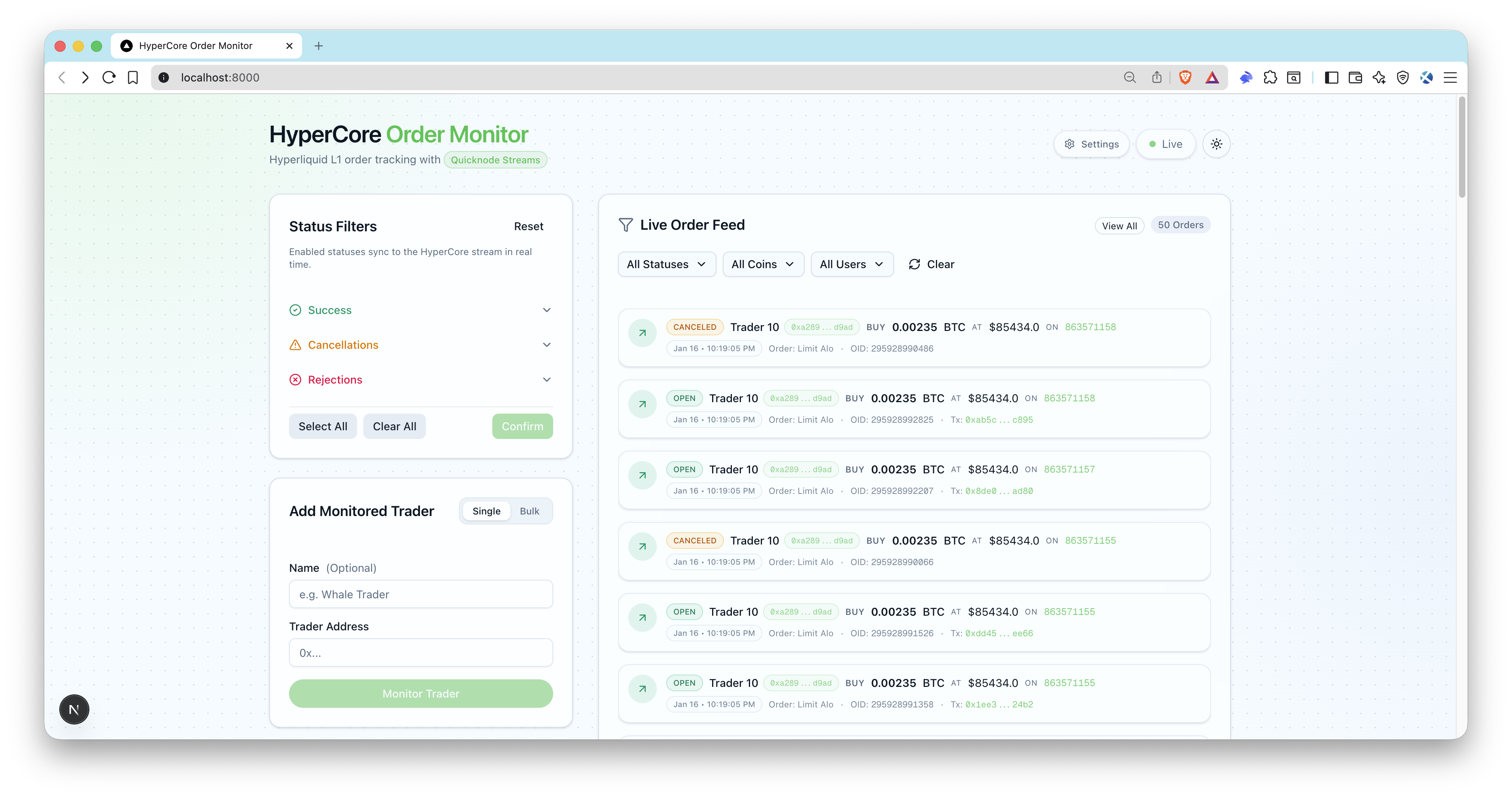
Overview
This sample app enables real-time tracking of trading orders on Hyperliquid Core (L1). It leverages Quicknode Streams + Key-Value Store (KV Store) for intelligent, dynamic filtering without requiring stream restarts. Monitor whale traders, track order statuses, and receive live updates through a modern UI.
Architecture
Hyperliquid Core (L1)
  -> Quicknode Streams + KV
    -> POST /api/webhook/streams (signature verified)
      -> OrderLog upsert + SSE emit
        -> Live UI order feed
Features
- Real-time address filtering via KV Store lists
- Dynamic status filtering (open, filled, cancelled, rejected, triggered)
- Blockchain-native filtering at the stream level
- Server-Sent Events (SSE) for live UI updates
- Quicknode Streams setup scripts (create + activate)
- Bulk add trader addresses
- Webhook signature verification and timestamp checks
- ENS resolution for Ethereum addresses (optional)
- Prisma + SQLite local storage
Prerequisites
- Node.js 20+ and a package manager (pnpm, yarn, npm).
- Quicknode account with Streams and KV Store access: Create an account, and get your Admin API key for
QN_API_KEY. - Public webhook URL: Use a tunnel like
ngrokor deploy the app soAPP_URLis reachable by Quicknode. - Optional: Ethereum mainnet RPC endpoint for ENS name resolution (
QN_EVM_ENDPOINT).
Project Structure
filters/
  hl-orders-filter.js     # Quicknode Streams filter (HyperCore)
scripts/
  setup-streams.ts        # Creates KV lists + stream (paused)
  activate-streams.ts     # Activates stream by id
src/
  app/api/                # API routes (webhooks, users, SSE)
  lib/                    # Quicknode, webhook, SSE helpers
  types/                  # TypeScript definitions
prisma/
  schema.prisma           # SQLite schema
Environment Variables
Copy .env.example to .env and fill in:
QN_API_KEY=""                  # Quicknode API key with Streams + KV permissions
QN_STREAM_SECURITY_TOKEN=""    # Stream security token (from setup script)
APP_URL="http://localhost:3000" # Public app URL (ngrok for local webhooks)
DATABASE_URL="file:./dev.db"   # SQLite DB
QN_EVM_ENDPOINT=""             # Optional: Ethereum RPC for ENS resolution
ADMIN_API_KEY=""               # Optional for local dev, required for production
Notes:
QN_STREAM_SECURITY_TOKENis returned bysetup:streams.APP_URLmust be reachable by Quicknode (use ngrok or a deployed URL).- Ensure your API key has both Streams and KV Store permissions enabled.
Getting Started
1. Install dependencies
pnpm install
# npm install
# yarn install
2. Create your env file
cp .env.example .env
3. Add required variables
Fill in .env (see Prerequisites).
For local webhooks, expose your app with ngrok and copy the HTTPS URL into APP_URL:
ngrok http 3000
4. Initialize the database
pnpm prisma migrate dev --name hypercore-order-monitor
pnpm db:seed
The seed script creates status filters (enabling open, filled, triggered by default) and adds a sample trader address.
5. Create Quicknode Streams + KV lists
pnpm run setup:streams
Copy the printed security token into .env (QN_STREAM_SECURITY_TOKEN).
6. Start the app
pnpm dev
7. Activate the stream
pnpm run activate:streams
Open http://localhost:3000, add trader addresses, and you should see live order events as streams deliver webhooks.
Database
SQLite is used by default. Prisma schema is in prisma/schema.prisma.
Common commands:
pnpm prisma migrate dev --name <name>
pnpm db:seed
pnpm prisma studio
Webhook Security and Payload
- Endpoint:
POST /api/webhook/streams - Headers required:
x-qn-nonce,x-qn-timestamp,x-qn-signature - Payload can be gzip compressed; the handler auto-detects
content-encoding: gzip - Signature verification uses
QN_STREAM_SECURITY_TOKEN
API Endpoints
Public endpoints:
GET /api/health- health checkGET /api/users- list monitored tradersGET /api/statuses- list status filtersPOST /api/webhook/streams- Quicknode Streams webhookGET /api/sse- SSE stream of order events
Protected endpoints (require Authorization: Bearer <ADMIN_API_KEY>):
POST /api/users- add a traderPOST /api/users/bulk- bulk add traders (50 address limit)PATCH /api/users?id=...- update traderDELETE /api/users?id=...- remove traderGET /api/orders- list orders with filtersPATCH /api/statuses- update enabled statusesPOST /api/statuses/reset- reset to defaults
Synchronization Scripts
pnpm run sync:statuses- Reconciles KV status list with databasepnpm run sync:users- Reconciles KV user list with databasepnpm run reset:kv- Deletes HyperCore KV lists
Preview
- Fork the repository
- Create a feature branch:git checkout -b feature/amazing-feature
- Commit your changes:git commit -m "Add amazing feature"
- Push your branch:git push origin feature/amazing-feature
- Open a Pull Request.