9 min read
Overview
It wasn’t long ago that betting on real-world events meant casinos or sportsbooks that required full identity verification, and even then, you were limited to a narrow set of markets. Today, onchain prediction markets like Polymarket let you trade outcomes on everything from election results to how many times someone says a specific word during a livestream, or where an asset’s price will be in the next 15 minutes. No account forms, just smart contracts and the public blockchain ledger.
In this guide, we’ll show you how to build a Polymarket trading bot. Specifically, we’ll build a bot that watches a target wallet, detects its trades in real time, and mirrors buy orders.
Let’s get started!
What You Will Do
- Learn about Polymarket for devs
- Create a Quicknode endpoint
- Set up the bot codebase and environment
- Initialize the Polymarket CLOB client with EOA credentials
- Detect target-wallet trades with the Data API
- Add WebSocket monitoring for faster updates
- Track positions and enforce simple risk limits
- Run a BUY only copy flow for demo purposes
What You Will Need
- A funded EOA wallet on Polygon mainnet with USDC.e and POL
- TypeScript + Node.js
- Polymarket CLOB SDK
- A Quicknode endpoint
- The Polymarket copy trading bot code here
Architecture
TLDR before we code:
- Polymarket CLOB: your bot signs orders, the API handles order flow, and settlement remains non-custodial on-chain.
- Data API (discovery): finds new trades from the wallet you want to copy.
- WebSocket (realtime): gives faster market/user updates once subscribed.
- Executor: sizes the copied order, validates checks, and submits it.
- Risk + positions: track exposure and block trades above your limits.
- Demo guardrail: BUY-only flow for this tutorial (SELL trades are skipped).
Project Prerequisite: Get a Quicknode Endpoint
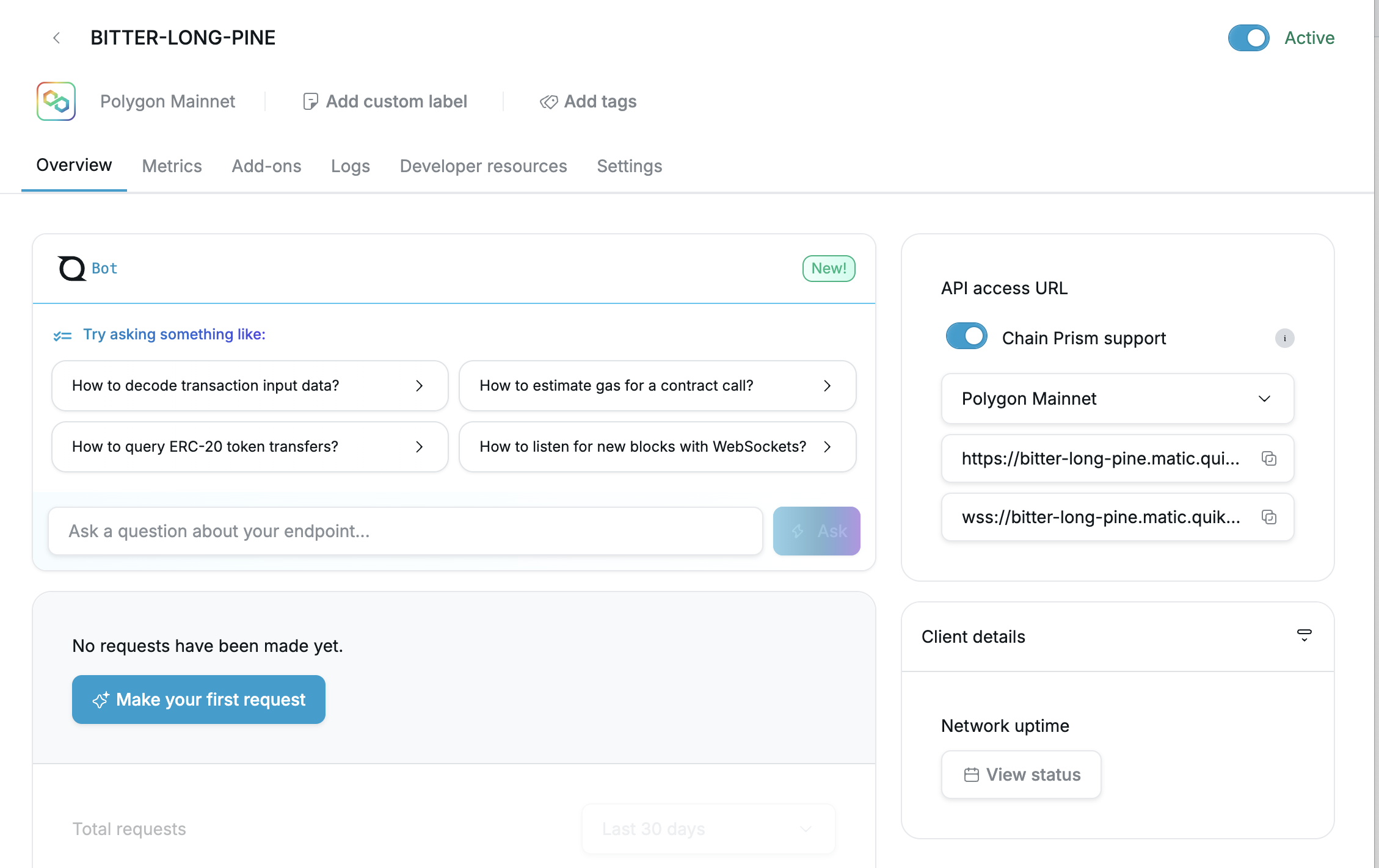
You're welcome to use public nodes or manage your own infrastructure; however, if you'd like faster response times, you can leave the heavy lifting to us. Sign up for a free Quicknode account here and create a Polygon Mainnet endpoint. Keep your HTTP and WSS URLs handy for your .env file.
Clone the Repo
Clone the Quicknode guide examples repository and enter the project directory:
git clone https://github.com/quiknode-labs/qn-guide-examples.git
cd qn-guide-examples/defi/polymarket-copy-bot
Step 1: Install Dependencies
Polymarket's SDK currently expects ethers v5 in this setup.
npm install
Step 2: Configure Environment Variables
Use this minimal .env for EOA mode:
# Required
TARGET_WALLET=0xTARGET_WALLET_TO_COPY
PRIVATE_KEY=0xYOUR_PRIVATE_KEY
RPC_URL=https://polygon-mainnet.quiknode.pro/YOUR_KEY

# Optional geo token (if provided by Polymarket for your account/region)
POLYMARKET_GEO_TOKEN=

# Trading
POSITION_MULTIPLIER=0.1
MAX_TRADE_SIZE=100
MIN_TRADE_SIZE=1
SLIPPAGE_TOLERANCE=0.02
ORDER_TYPE=FOK

# Risk (0 disables the cap)
MAX_SESSION_NOTIONAL=0
MAX_PER_MARKET_NOTIONAL=0

# Monitoring
USE_WEBSOCKET=true
USE_USER_CHANNEL=false
POLL_INTERVAL=2000
WS_ASSET_IDS=
WS_MARKET_IDS=

# Optional gas floor overrides for Polygon approval/order txs
MIN_PRIORITY_FEE_GWEI=30
MIN_MAX_FEE_GWEI=60
Notes:
- The bot always runs EOA (
signatureType=0) in this guide since we are using our private key and not the Polymarket proxy wallet. - The bot derives/generates user API credentials from
PRIVATE_KEYat startup. - First run in EOA mode can trigger approval transactions for USDC.e/CTF spenders.
- Start with small sizing for a demo (
MAX_TRADE_SIZE=5or lower).
Step 3: Initialize the CLOB Client (EOA)
The bot code does this inside TradeExecutor using derive-first, then create fallback.
Code lives in src/trader.ts.
private async deriveAndReinitApiKeys(funderAddress: string): Promise<void> {
  console.log(`   Generating API credentials programmatically...`);
  let creds = await this.clobClient.deriveApiKey().catch(() => null);
  if (!creds || this.isApiError(creds)) {
    creds = await this.clobClient.createApiKey();
  }

  const apiKey = (creds as any)?.apiKey || (creds as any)?.key;
  if (this.isApiError(creds) || !apiKey || !creds?.secret || !creds?.passphrase) {
    const errMsg = this.getApiErrorMessage(creds);
    throw new Error(`Could not create/derive API key: ${errMsg}`);
  }

  this.clobClient = new ClobClient(
    'https://clob.polymarket.com',
    137,
    this.wallet,
    {
      key: apiKey,
      secret: creds.secret,
      passphrase: creds.passphrase,
    },
    0,
    funderAddress,
    config.polymarketGeoToken || undefined
  );
}
Step 4: REST Polling to Discover Trades
Use the Data API to detect new trades from the target wallet. The Data API is your discovery layer in this bot (it finds what to copy).
Code lives in src/monitor.ts.
const response = await axios.get(
  'https://data-api.polymarket.com/activity',
  {
    params: {
      user: config.targetWallet.toLowerCase(),
      type: 'TRADE',
      limit: 100,
      sortBy: 'TIMESTAMP',
      sortDirection: 'DESC',
      start: startSeconds,
    },
    headers: {
      'Accept': 'application/json',
    },
  }
);
Step 5: WebSocket Monitoring (Market + User Channels)
Polymarket exposes market and user WebSocket channels.
marketchannel subscribes withassets_ids.userchannel subscribes withmarketsand requires auth.- The bot connects lazily: websocket starts once at least one subscription exists.
Code lives in src/websocket-monitor.ts.
private buildWsAuth(): { apikey: string; apiKey: string; secret: string; passphrase: string } | undefined {
  if (!this.auth) return undefined;
  return {
    apikey: this.auth.apiKey,
    apiKey: this.auth.apiKey,
    secret: this.auth.secret,
    passphrase: this.auth.passphrase,
  };
}

private sendInitialSubscribe(): void {
  if (!this.ws) return;

  const payload: any = { type: this.channel };
  if (this.channel === 'market') {
    payload.assets_ids = Array.from(this.subscribedAssets);
  } else {
    payload.markets = Array.from(this.subscribedMarkets);
    payload.auth = this.buildWsAuth();
  }

  if ((payload.assets_ids && payload.assets_ids.length) || (payload.markets && payload.markets.length)) {
    this.ws.send(JSON.stringify(payload));
  }
}
Additional Resources:
Step 6: Position Tracking
Positions are loaded at startup (best effort) and updated from successful fills.
Code lives in src/positions.ts.
recordFill(params: {
  trade: Trade;
  notional: number;
  shares: number;
  price: number;
  side: 'BUY' | 'SELL';
}): void {
  const { trade, notional, shares, price, side } = params;
  const key = trade.tokenId;
  const existing = this.positions.get(key);

  const sign = side === 'BUY' ? 1 : -1;
  const deltaShares = shares * sign;
  const deltaNotional = notional * sign;

  const nextShares = (existing?.shares || 0) + deltaShares;
  const nextNotional = (existing?.notional || 0) + deltaNotional;
  const avgPrice = nextShares !== 0 ? Math.abs(nextNotional / nextShares) : 0;

  const updated: PositionState = {
    tokenId: trade.tokenId,
    market: trade.market,
    outcome: trade.outcome,
    shares: Math.max(0, nextShares),
    notional: Math.max(0, nextNotional),
    avgPrice: nextShares !== 0 ? avgPrice : 0,
    lastUpdated: Date.now(),
  };

  this.positions.set(key, updated);
}
Step 7: Risk Controls (Simple Caps)
The bot enforces max session notional and max per-market notional before execution.
Code lives in src/risk-manager.ts.
checkTrade(trade: Trade, copyNotional: number): RiskCheckResult {
  if (copyNotional <= 0) {
    return { allowed: false, reason: 'Copy notional is <= 0' };
  }

  if (config.risk.maxSessionNotional > 0) {
    const nextSession = this.sessionNotional + copyNotional;
    if (nextSession > config.risk.maxSessionNotional) {
      return {
        allowed: false,
        reason: `Session notional cap exceeded (${nextSession.toFixed(2)} > ${config.risk.maxSessionNotional})`,
      };
    }
  }

  if (config.risk.maxPerMarketNotional > 0) {
    const current = this.positions.getNotional(trade.tokenId);
    const next = current + copyNotional;
    if (next > config.risk.maxPerMarketNotional) {
      return {
        allowed: false,
        reason: `Per-market notional cap exceeded (${next.toFixed(2)} > ${config.risk.maxPerMarketNotional})`,
      };
    }
  }

  return { allowed: true };
}
The runtime guard check in the bot:
const copyNotional = this.executor.calculateCopySize(trade.size);
const riskCheck = this.risk.checkTrade(trade, copyNotional);
if (!riskCheck.allowed) {
  console.log(`⚠️  Risk check blocked trade: ${riskCheck.reason}`);
  return;
}
Single-trade lifecycle in one place (handleNewTrade in src/index.ts):
if (trade.side === 'SELL') {
  console.log('⚠️  Skipping SELL trade (BUY-only safeguard enabled)');
  return;
}

if (this.wsMonitor) {
  await this.wsMonitor.subscribeToMarket(trade.tokenId);
}

const copyNotional = this.executor.calculateCopySize(trade.size);
const riskCheck = this.risk.checkTrade(trade, copyNotional);
if (!riskCheck.allowed) {
  console.log(`⚠️  Risk check blocked trade: ${riskCheck.reason}`);
  return;
}

try {
  const result = await this.executor.executeCopyTrade(trade, copyNotional);
  this.risk.recordFill({
    trade,
    notional: result.copyNotional,
    shares: result.copyShares,
    price: result.price,
    side: result.side,
  });
  this.stats.tradesCopied++;
  this.stats.totalVolume += result.copyNotional;
  console.log(`✅ Successfully copied trade!`);
} catch (error: any) {
  this.stats.tradesFailed++;
  console.log(`❌ Failed to copy trade`);
  if (error?.message) {
    console.log(`   Reason: ${error.message}`);
  }
}
Retry policy (from isRetryableError in src/trader.ts):
if (responseStatus === 401 || errorMsg.includes('unauthorized') || responseData.includes('unauthorized')) {
  return false;
}
if (responseStatus === 403 || errorMsg.includes('cloudflare') || responseData.includes('blocked')) {
  return false;
}
if (errorMsg.includes('network') || errorMsg.includes('timeout') || errorMsg.includes('econnreset')) {
  return true;
}
if (errorMsg.includes('rate limit') || responseData.includes('rate limit')) {
  return true;
}
if (errorMsg.includes('502') || errorMsg.includes('503') || errorMsg.includes('504')) {
  return true;
}
if (errorMsg.includes('insufficient') || responseData.includes('allowance')) {
  return false;
}
if (errorMsg.includes('invalid') || responseData.includes('bad request')) {
  return false;
}
if (errorMsg.includes('duplicate') || responseData.includes('duplicate')) {
  return false;
}
Running the Bot
Ensure .env values are set, then start the bot:
npm start
Example startup output:
🤖 Polymarket Copy Trading Bot
================================
Target wallet: 0x...
Order type: FOK
WebSocket: Enabled
Auth mode: EOA (signature type 0)
================================

ℹ️  API credentials will be derived/generated from PRIVATE_KEY at startup
✅ Configuration validated
🔧 Initializing trader...
✅ Trader initialized
ℹ️  WebSocket waiting for first subscription before connecting
🚀 Bot started! Monitoring via: WebSocket + REST API
Trade Detected
When the target wallet places a new trade, the bot detects it, evaluates risk, and attempts to place the copy order.
🎯 New trade detected: BUY 12.5 USDC @ 0.62
   Time: 2026-02-17T14:03:11.000Z

==================================================
🎯 NEW TRADE DETECTED
   Time: 2026-02-17T14:03:11.000Z
   Market: 0xabc123...
   Side: BUY YES
   Size: 12.5 USDC @ 0.620
   Token ID: 1234567890...
==================================================
📈 Executing copy trade (FOK):
   Market: 0xabc123...
   Side: BUY
   Original size: 12.5 USDC
   Token ID: 1234567890...
   Copy notional: 1.25 USDC
   Balance/allowance check passed
   Market price: 0.6300
   Copy shares: 1.9841
✅ FOK order executed: 0xorderid...
✅ Successfully copied trade!
📊 Session Stats: 1/1 copied, 0 failed
When a SELL trade is detected from the target wallet, this demo intentionally skips it:
⚠️ Skipping SELL trade (BUY-only safeguard enabled)
Final Thoughts
You now have a working copy trading bot that can monitor a target wallet, enforce risk constraints, and execute in EOA mode. This is a quick demo implementation, so keep sizes small and treat it as a foundation to continue learning.
Subscribe to our Quicknode Newsletter for more guides on blockchain infrastructure. You can also connect with us on Twitter and in Discord.