[Draft] How To Set Up QuickNode with MetaMask
[Draft] How To Set Up QuickNode with MetaMask
In this article we outline the steps needed to connect your QuickNode to MetaMask.
September 12, 2017 — 1 min read
![[Draft] How To Set Up QuickNode with MetaMask](https://images.ctfassets.net/23fkqdsgbpuj/7tng1NEbjQ6OZ5J0dR0KSH/69257569b77d6c76c5d5f9191cd29208/how-to-set-up-quicknode-with-metamask.png)
In this article we outline the steps needed to connect your QuickNode to MetaMask.
Step 1: Get a QuickNode.
Step 2: Expand the instructions for MetaMask at the bottom of your QuickNode user interface:
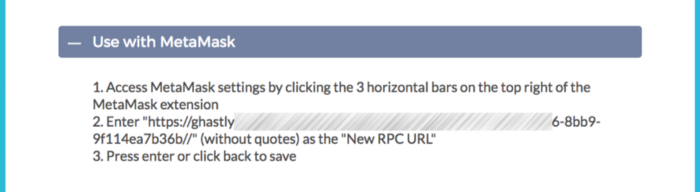
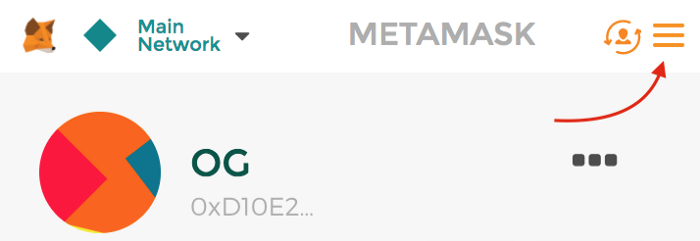
Step 3: Following the instructions, access your MetaMask settings by clicking the 3 bars on the top right:
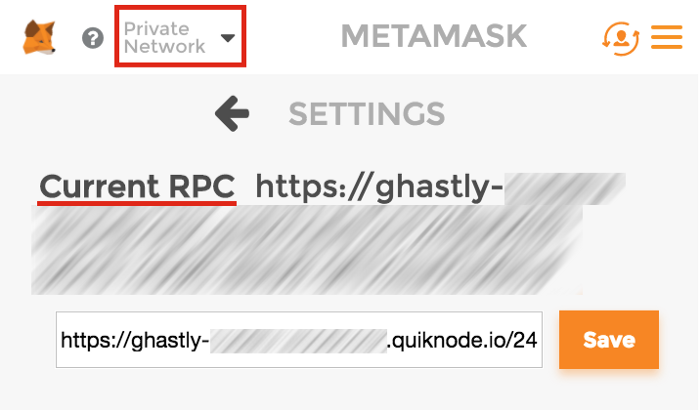
Step 4: Copy/Paste the URL from the instructions and click “Save”:
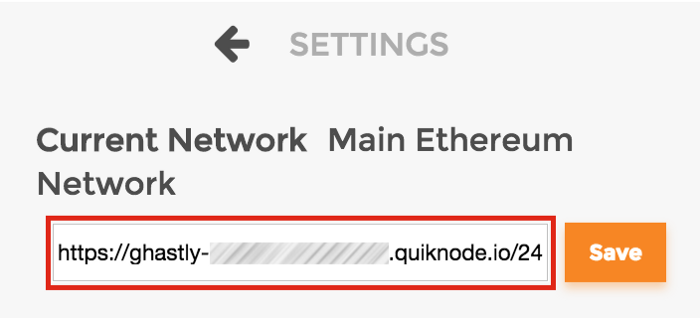
Step 5: Notice your Current Network is now your QuickNode URL, and it says “Private Network” at the top:
That’s it, you’re finished! Proceed to use MetaMask regularly — but now with your own, personal Ethereum node!
Stuck or have questions? Tweet us @QuickNode!
About Quicknode
Founded in 2017, Quicknode deploys institutional-grade blockchain infrastructure for developers and enterprises. With 99.99% uptime and support for 80+ chains, teams build and scale onchain applications without compromise.
Stay updated
The latest engineering insights, product updates, and web3 news delivered straight to your inbox.