Answers>Learn about monitoring & observability>Alerting best practices
Alerting best practices
// Tags
alerting best practiceson-call
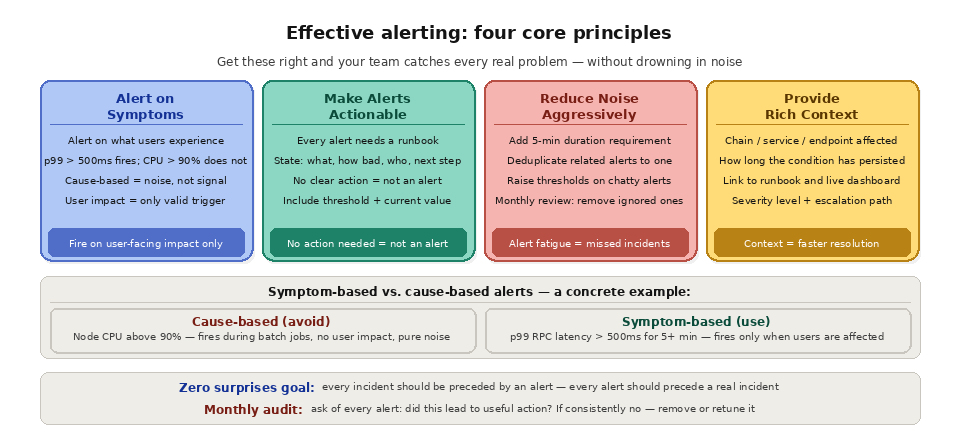
TL;DR: Effective alerting notifies the right people about real problems at the right time, with enough context to take action immediately. The most important principles are: alert on symptoms (user-facing impact) rather than causes (internal metrics), ensure every alert is actionable (if there is nothing to do, it should not be an alert), reduce noise aggressively (alert fatigue causes real incidents to be missed), and provide context (what is wrong, how bad it is, who is affected, and what to do about it). For blockchain applications, alerting must also cover chain-specific conditions like node sync lag, gas price spikes, transaction confirmation delays, and block reorganizations.
The Simple Explanation
Alerting is the bridge between monitoring data and human action. Monitoring systems collect thousands of metrics and millions of log entries. Alerting determines which of those signals deserve to wake someone up at 3 AM. Get it right, and your team catches problems before users notice. Get it wrong, and either real incidents get lost in a flood of noise (too many alerts) or critical problems go undetected until users are screaming (too few alerts).
The goal of a well-tuned alerting system is zero surprises: every production incident should be preceded by an alert, and every alert should precede a real (or imminent) incident. Alerts that fire without a corresponding problem train your team to ignore them. Problems that occur without a preceding alert mean your monitoring has a gap.
What is the difference between monitoring and alerting?
Monitoring and alerting are related but distinct. Monitoring is the continuous collection of metrics, logs, and traces that describe the health of your system. Alerting is the layer on top that decides which of those signals deserve a human response and routes them to the right person. You can monitor without alerting, but you cannot alert well without good monitoring underneath. For the data side of this picture, see
The most important principle in alerting is to alert on symptoms (what users experience) rather than causes (what is happening internally). A symptom-based alert fires when something is broken from the user's perspective. A cause-based alert fires when an internal metric crosses a threshold, regardless of whether users are affected.
A cause-based alert like "Node CPU usage above 90%" might fire during a normal batch processing job that uses a lot of CPU but does not degrade user experience. This alert generates noise and erodes trust in the alerting system. A symptom-based alert like "p99 RPC response time above 500ms for more than 5 minutes" fires only when users are actually experiencing slow responses, regardless of whether the cause is high CPU, a sync issue, or network congestion.
This does not mean you should never monitor internal metrics. Internal metrics are valuable for dashboards, trend analysis, and post-incident investigation. But they should not generate pages unless they are directly correlated with user-facing impact. Reserve alerts for the signals that indicate something is broken or about to break for real users.
What is the difference between symptom-based and cause-based alerts?
Symptom-based alerts fire on what users experience, while cause-based alerts fire on internal metrics that may or may not affect users. The table below contrasts the two so you can decide which signals should page someone and which should stay on a dashboard.
Aspect
Symptom-based alert
Cause-based alert
Triggers on
User-facing impact
Internal metric threshold
Example
p99 RPC latency above 500ms for 5 minutes
Node CPU above 90%
False-positive risk
Low
High
Best used as
Pages that wake someone up
Dashboard and investigation context
Making Alerts Actionable
Every alert should have a clear, documented response. If an alert fires and the on-call engineer's first reaction is "what am I supposed to do about this?", the alert is not actionable.
Each alert should include what is wrong (a clear description of the symptom), quantitative context (the threshold that was crossed and the current value), scope (which endpoint, chain, or service is affected), duration (how long the condition has persisted), and a link to a runbook (step-by-step instructions for diagnosing and resolving the issue).
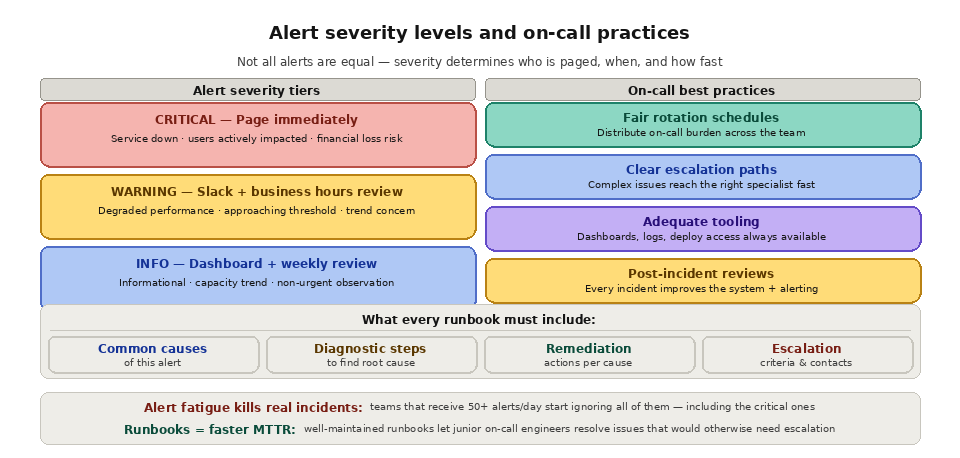
Runbooks are essential documentation for each alert. A runbook should walk the responder through common causes of the alert, diagnostic steps to identify the root cause, remediation actions for each common cause, and escalation criteria (when to wake up someone else). Well-maintained runbooks dramatically reduce incident response time and enable less experienced team members to handle on-call duties effectively.
Reducing Alert Noise
Alert fatigue is the single biggest threat to an effective alerting system. When teams receive dozens of alerts per day, most of which are false positives or low-priority, they start ignoring all alerts, including the critical ones.
Studies in healthcare (where alarm fatigue is a recognized patient safety issue) show that up to 99% of alarms can be false positives, leading clinicians to disable or ignore them.
Strategies for reducing noise include raising thresholds on frequently-firing, non-actionable alerts, adding duration requirements (alert only if the condition persists for 5+ minutes rather than firing on a momentary spike), deduplicating related alerts (if five endpoints on the same provider are all slow, send one alert, not five), implementing severity levels (critical alerts page immediately; warning alerts go to a Slack channel for business-hours review), and regularly reviewing and retiring alerts that are consistently ignored or resolved without action. A useful exercise is to review every alert that fired in the past month and ask: "Did this alert lead to a useful action?" If the answer is consistently no, remove or retune it.
Blockchain-Specific Alerting
Blockchain applications need alerts that cover chain-level conditions in addition to standard application and infrastructure alerts.
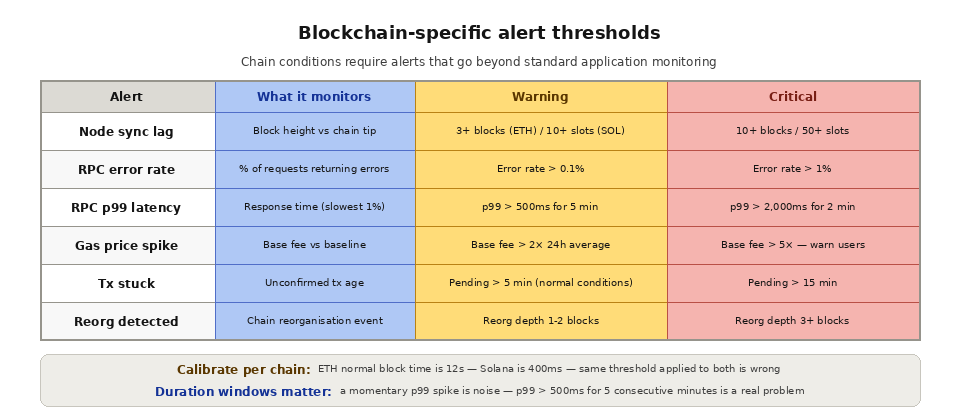
Node sync lag should generate an alert when your node (or your provider's node) falls more than a configurable number of blocks behind the chain tip. For Ethereum, alert at 3+ blocks behind. For Solana, alert at 10+ slots behind. Sync lag means your application is serving stale data.
Gas price spikes affect any application that submits transactions. Alert when the base fee exceeds a threshold that would make transactions uneconomically expensive for your use case. This allows your application to warn users, defer non-urgent transactions, or adjust gas parameters proactively.
Transaction stuck alerts fire when a submitted transaction has not been confirmed within an expected timeframe. A transaction pending for 10+ minutes on Ethereum during normal conditions likely has an insufficient gas price and needs to be resubmitted with a higher fee.
Reorg detection alerts notify you when a block reorganization occurs on a chain your application depends on. If your data pipeline processes blocks at the chain tip without waiting for finality, a reorg means recently processed data may be incorrect and needs correction.
Provider health alerts track the overall health of your RPC provider. If error rates from your provider spike above your threshold, your application should be prepared to switch to a backup provider or enter a degraded-service mode.
Which blockchain conditions should trigger alerts?
Beyond standard infrastructure alerts, blockchain applications need alerts tuned to chain state. The table below lists common conditions and example thresholds. Conditions like reorgs deserve special handling, which we cover in what a blockchain reorg is, and sync lag ties directly to node reliability.
Condition
Example threshold
Why it matters
Node sync lag
3+ blocks (Ethereum) or 10+ slots (Solana)
You are serving stale data
Gas price spike
Base fee above your economic limit
Transactions become too expensive
Stuck transaction
Pending for 10+ minutes
Likely underpriced and needs resubmission
Chain reorg
Deeper than your confirmation count
Recently processed data may be wrong
Provider error rate
Above your baseline
Time to fail over to a backup
On-Call Best Practices
Alerting is only effective if someone responds to the alerts promptly and competently. Establishing a healthy on-call practice involves fair rotation schedules that distribute the burden across the team, clear escalation paths so that complex issues reach the right specialist quickly, adequate tooling so the on-call engineer has immediate access to dashboards, logs, and deployment tools, post-incident reviews that generate improvements to both the system and the alerting configuration, and compensation or time-off policies that acknowledge the real cost of being on-call.
How do alerting and high availability work together?
Alerting tells you when something breaks, but high availability keeps the service running while you respond. The two reinforce each other: provider health alerts are most useful when you have a backup ready to take over. Pair your alerting with high availability design, automated failover, and the infrastructure redundancy that makes a fast response possible.
How Quicknode Enables Effective Alerting
Quicknode's built-in analytics provide the metrics foundation for blockchain infrastructure alerting. Request volume, response latency, error rates, and method-level breakdowns are available on the dashboard and can be used to set alerting thresholds. For teams with custom alerting infrastructure, Quicknode's Dedicated Clusters export Prometheus-compatible metrics that integrate directly with Alertmanager, Grafana Alerts, PagerDuty, or any alerting system in your stack.
Quicknode Streams provides delivery health metrics that enable alerting on data pipeline issues: missed deliveries, processing lag, and destination errors. Combined with RPC-layer alerting, this gives teams comprehensive coverage across both their real-time API access and their streaming data infrastructure.
An alert is actionable when the responder knows exactly what to do. It should state the symptom, the threshold crossed and current value, the affected scope, how long the condition has lasted, and a link to a runbook with diagnostic and remediation steps.
What is alert fatigue?
Alert fatigue is what happens when a team receives so many alerts, especially false positives, that it starts ignoring all of them, including the critical ones. Raising thresholds, adding duration requirements, deduplicating, and using severity levels all reduce it.
Should you alert on CPU usage?
Usually not as a page. CPU is a cause-based metric that often spikes during normal work without affecting users. Keep it on a dashboard and instead page on user-facing symptoms like elevated error rates or latency.
How do you alert on blockchain reorgs?
Configure reorg detection on the chains you depend on and alert when a reorg is deeper than the number of confirmations you wait for. If your pipeline processes blocks at the tip, a reorg means recent data needs correction. See common blockchain failure modes for related risks.
What severity levels should alerts use?
A simple, effective model is two levels: critical alerts page on-call immediately, and warning alerts go to a channel for business-hours review. This keeps pages reserved for problems that truly require an urgent human response.